ATracker PRO Time Tracker

ATracker PRO Time Tracker


Descargar en App StoreDescargar en Google Play
Logo de ATracker PRO Time Tracker
ATracker PRO Time Tracker: Domina tu tiempo con precisión de un toque

El compañero de productividad definitivo para usuarios avanzados y buscadores de objetivos. Rastrea sin esfuerzo el trabajo, los hábitos y los hitos de la vida con hermosas visualizaciones de datos y sincronización perfecta entre dispositivos.

Editor

WonderApps AB

Categoría

Productivity

Descargas

292K+

Valoración

4.6/5

Total valoraciones

2K+

Idiomas

19

Tu día, visualizado

Descubre la interfaz utilizada por 292K+ usuarios.
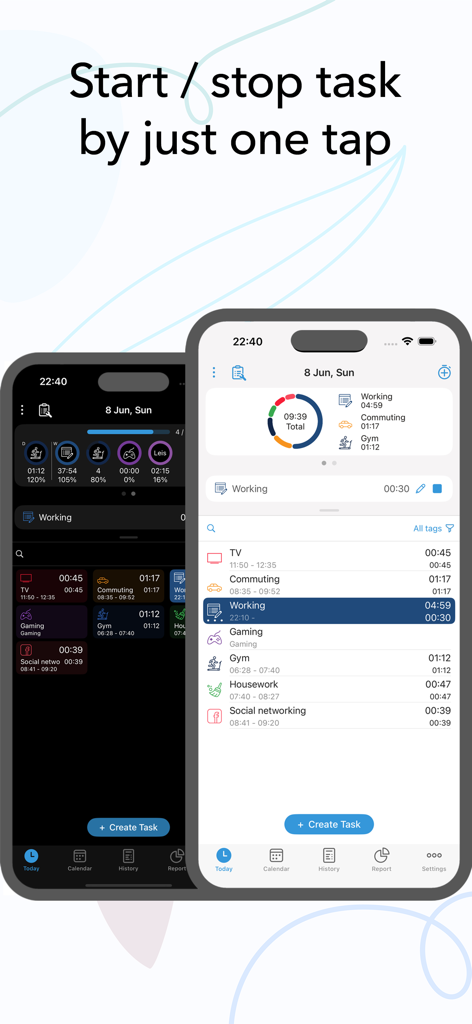
Interfaz de la aplicación ATracker PRO en iPhone mostrando seguimiento de tareas de un toque con opciones de modo oscuro y claro

Interfaz de la aplicación ATracker PRO en iPhone mostrando seguimiento de tareas de un toque con opciones de modo oscuro y claro

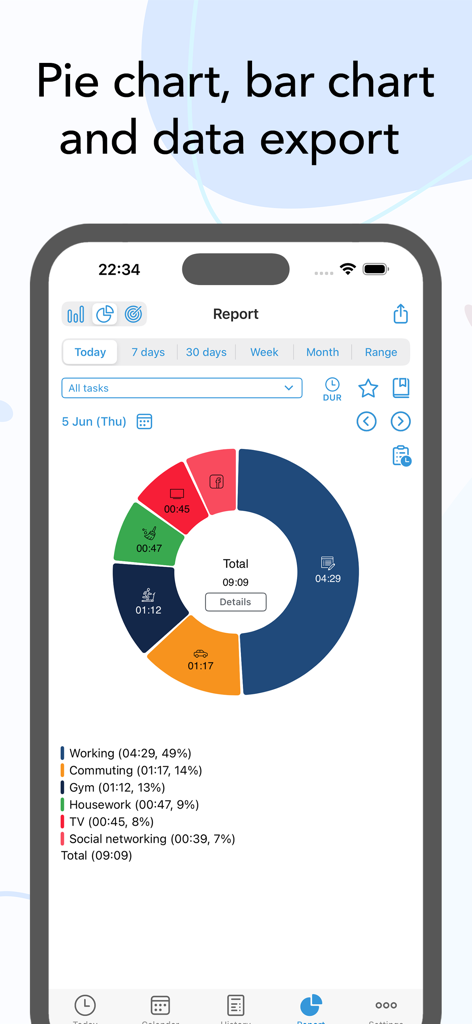
Un gráfico circular colorido en la aplicación ATracker PRO que muestra el tiempo dedicado a diversas tareas diarias

Un gráfico circular colorido en la aplicación ATracker PRO que muestra el tiempo dedicado a diversas tareas diarias

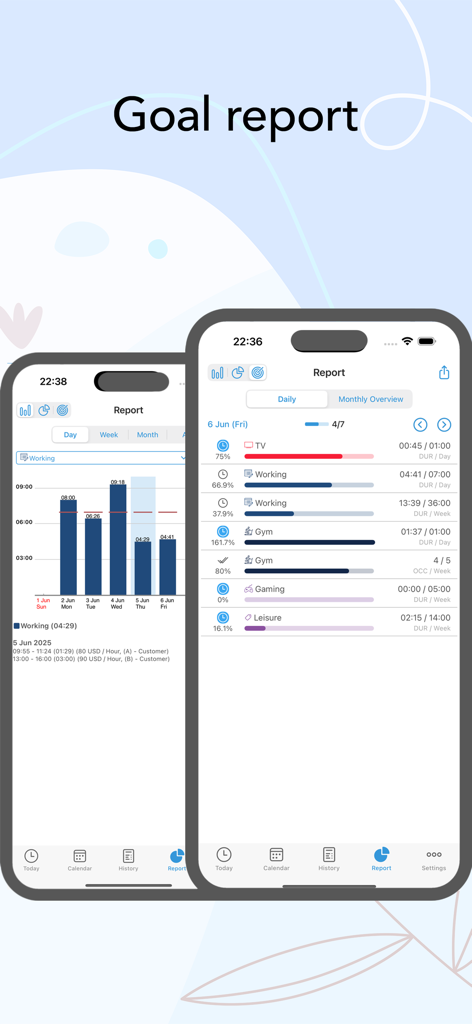
Capturas de pantalla de la aplicación ATracker PRO que muestran informes de objetivos con gráficos de barras de actividad y barras de progreso para la gestión de tareas diarias

Capturas de pantalla de la aplicación ATracker PRO que muestran informes de objetivos con gráficos de barras de actividad y barras de progreso para la gestión de tareas diarias

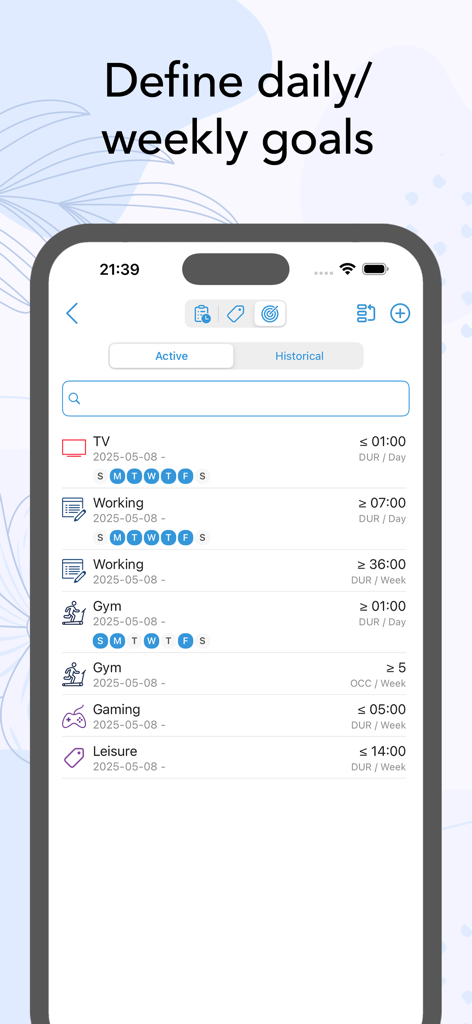
Interfaz de la aplicación ATracker PRO que muestra objetivos de seguimiento de tiempo diarios y semanales para actividades como trabajo en el gimnasio y juegos

Interfaz de la aplicación ATracker PRO que muestra objetivos de seguimiento de tiempo diarios y semanales para actividades como trabajo en el gimnasio y juegos

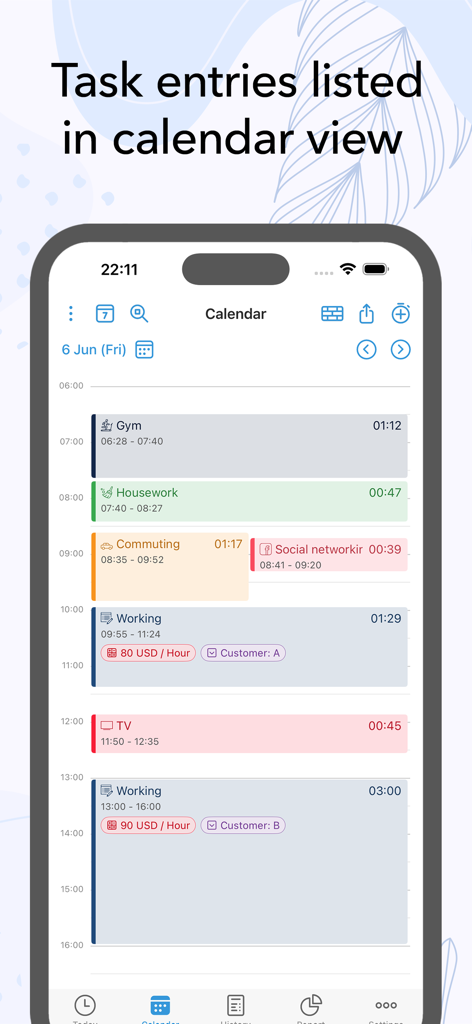
Vista de calendario de ATracker PRO que muestra entradas de tareas y duraciones codificadas por colores

Vista de calendario de ATracker PRO que muestra entradas de tareas y duraciones codificadas por colores

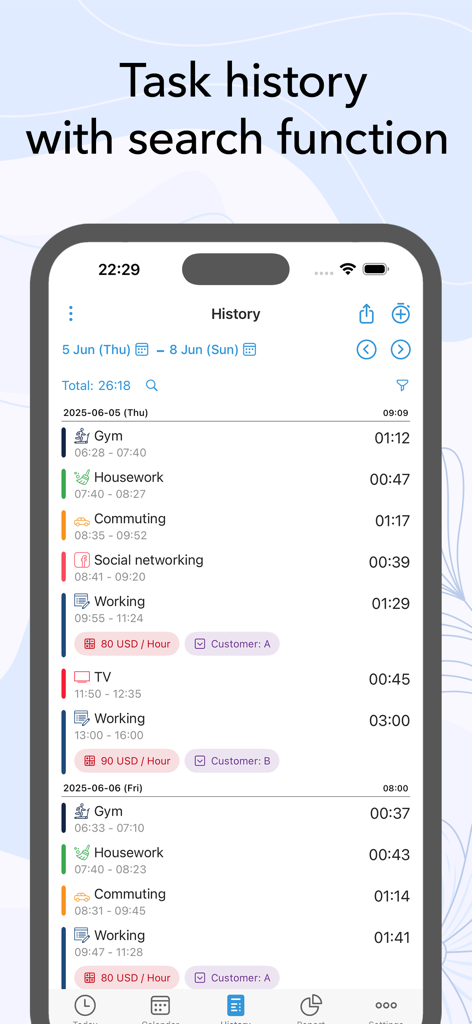
Interfaz de registro de historial de tareas de ATracker PRO que muestra registros de actividad y duraciones de seguimiento de tiempo

Interfaz de registro de historial de tareas de ATracker PRO que muestra registros de actividad y duraciones de seguimiento de tiempo

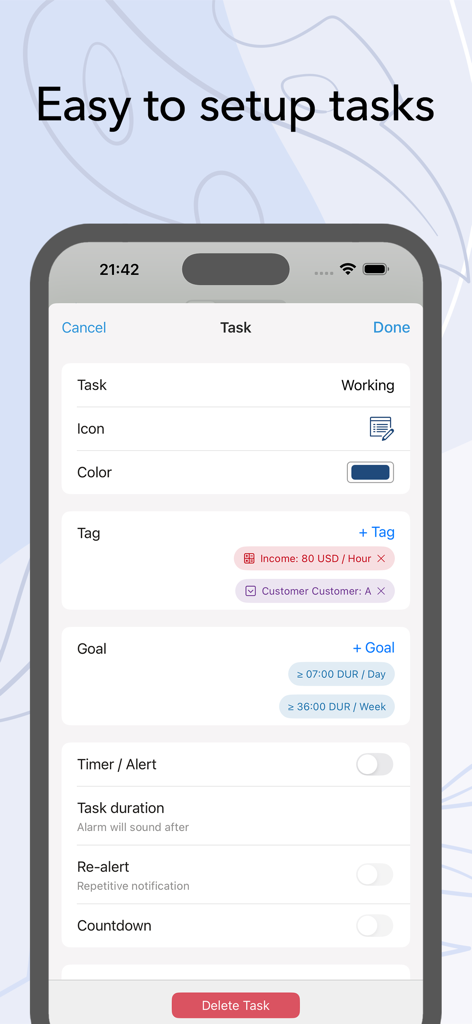
Interfaz de la aplicación ATracker PRO para configurar una nueva tarea con opciones de etiquetas y objetivos

Interfaz de la aplicación ATracker PRO para configurar una nueva tarea con opciones de etiquetas y objetivos

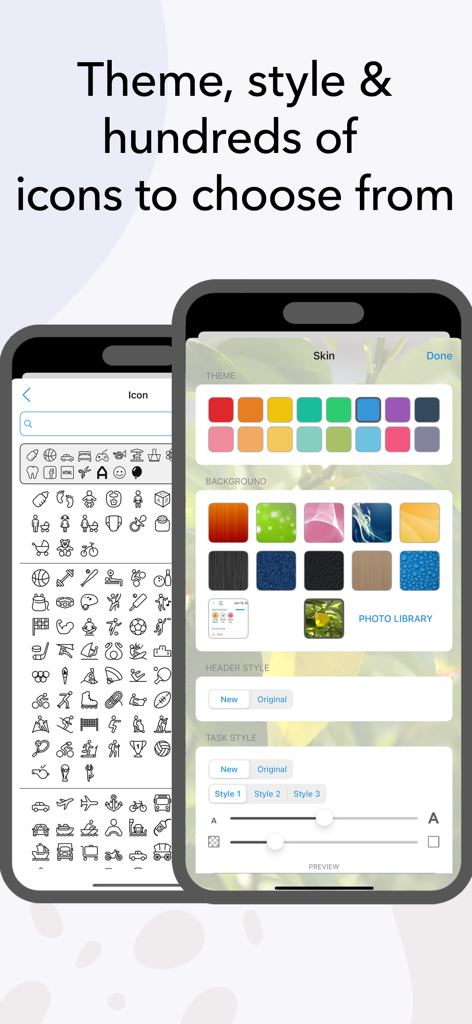
Interfaz de ATracker PRO destacando opciones de personalización que incluyen iconos y temas de color.

Interfaz de ATracker PRO destacando opciones de personalización que incluyen iconos y temas de color.

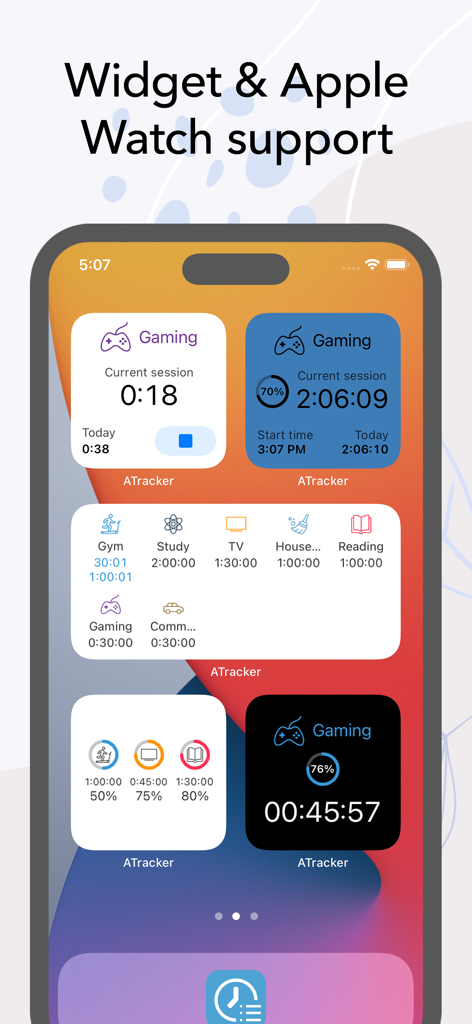
Varios widgets de seguimiento de tiempo de ATracker PRO en la pantalla de inicio de un iPhone.

Varios widgets de seguimiento de tiempo de ATracker PRO en la pantalla de inicio de un iPhone.

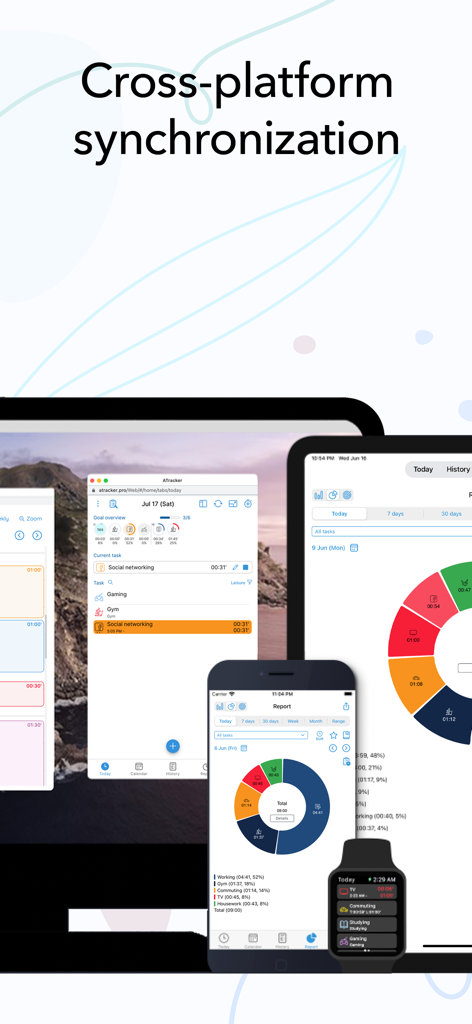
Interfaz de la aplicación de seguimiento de tiempo ATracker PRO sincronizada en portátil, tableta, smartphone y smartwatch

Interfaz de la aplicación de seguimiento de tiempo ATracker PRO sincronizada en portátil, tableta, smartphone y smartwatch

Controla cada segundo

Las herramientas que hacen destacar esta app, elegida por 292K+ usuarios.

Seguimiento de tiempo de un toque

Inicia o detén tareas con un solo toque: sin menús complejos ni entradas manuales, solo productividad pura que se adapta a tu flujo natural.

📈

Informes visuales de progreso

Convierte tus registros de actividad en información útil con hermosos gráficos circulares y de barras que muestran exactamente a dónde va tu tiempo.

Integración perfecta en la vida

Rastrea tu trabajo, proyectos paralelos y hábitos en tu iPhone, iPad y Apple Watch con sincronización instantánea y potentes widgets en la pantalla de inicio.

Sobre la app

Todo lo que necesitas saber sobre ATracker PRO Time Tracker.

Descripción

Life is precious and so is your time. And keeping that in mind, ATracker is here to help you achieve more of your goals, build a sustainable habit, and boost your productivity to a new height. ATracker is a simple yet very powerful time tracking app and productivity tool that allows you to use it with minimal setup. Having a track of your precious time has never been easier with our one-tap to start/stop time tracking. As the leading time tracking app, ATracker also offers bar or pie charts showcasing where your time went. Lots of features for self-development The fully customizable user interface allows you to turn this habit tracker into your own. The tracking app also comes with the option of categorizing tasks with tags; data export; sync data between multiple devices for the shortest path towards self-improvement and the perfect boost of productivity. It's a fresh way to organize your day and make the most out of it … with just a few taps. SCOPE ATracker is a clean and minimalistic approach to, • Track time of different tasks and projects at work • Track time of School studies and projects • Track time of Exercises • Track time of Socializing • Track time of Homemaking tasks • Track time of Baby or child daily activities • Hobby projects • Or any activity people want to track and control We believe that time tracking should be effortless. Here are some of the key features ATracker offers • Start and stop tracking a task with just one tap. • Overview of today's time spending on the Today tab. • Interactive goal system for self-improvement. • Complete activity log. Show activities on any given date. Add missed or modify existing activity. • Customization of activities with hundreds of unique icons to choose from. You can also color code the activities for a personalized time tracking experience. • Ability to keep notes for each task entry. • Statistics showed in bar charts and pie charts. • Group tasks by tags and allow users to filter tasks by tag on the Today tab, as well as aggregate the data by tag in reporting. • The activity timer does not stop even when the application is not running, or your mobile is in sleep mode. • Set alarm for activities. The alarm will sound even when the app is not running. • Widget to see your data on-screen at all times. • Gesture support • Full customization of UI with more skins and allow the user to use their own image as background. PRO FEATURES With an only one-time investment, you will get to enjoy, - No Ads. - Unlimited tasks - Data export with PDF and CSV file. - Able to keep notes for each task entry. - Full customization of UI with more skins and allow user to use own image as background. WEB SUBSCRIPTION With web subscription, ATracker supports sync across multiple devices. It also provides web access to ATracker services besides the app. This add-on is optional. • ATracker subscriptions purchased in-app renew monthly or yearly depending on your plan. Plan pricing may vary by country. • Payment will be charged to iTunes Account at confirmation of purchase • Subscription automatically renews unless auto-renew is turned off at least 24-hours before the end of the current period • Account will be charged for renewal within 24-hours prior to the end of the current period, and identify the cost of the renewal • Subscriptions may be managed by the user and auto-renewal may be turned off by going to the user's Account Settings after purchase • Any unused portion of a free trial period, if offered, will be forfeited when the user purchases a subscription to that publication, where applicable SUPPORT Visit https://support.wonderapps.se or contact us at support@wonderapps.se Terms of Service: https://atracker.pro/atracker_TOS.html Privacy Policy: https://atracker.pro/atracker_policy.html Life is precious and so is your Time. So, stop wasting your time and organize your life the right way NOW.

Última versión

17.20

Tamaño

131.7 MB

Fecha de lanzamiento

21 abr 2012

Toma el control de tu tiempo con un solo toque

Únete a miles de personas exitosas que usan ATracker para cerrar la brecha entre sus objetivos y su realidad diaria. Descarga ahora y empieza a hacer que cada segundo cuente.

Descargar en App StoreDescargar en Google Play

App information, icons, screenshots, and descriptions displayed on this page are sourced from the Apple App Store and are the property of their respective developers. Download estimates and rankings are based on MWM's proprietary models and may not reflect actual figures. This page is provided for informational and analytical purposes only.

Believe this page infringes your intellectual property? File a dispute