AudioScrub (REMIX Edition): Domina Cada Nota y Toca de Oído
La herramienta profesional para músicos serios. Ralentiza solos complejos, haz bucles en secciones difíciles y transpone a cualquier tonalidad sin perder calidad. Sin anuncios, sin distracciones: solo tú y tu música.
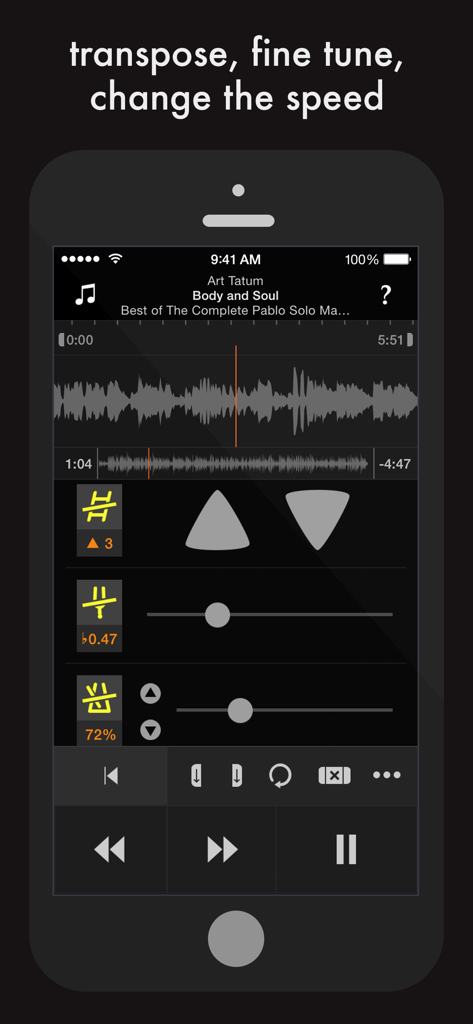
Interfaz de la aplicación AudioScrub en iPhone mostrando la visualización de la forma de onda y los controles para transponer, afinar y cambiar la velocidad de la música
Domina Cada Detalle de la Música
Las herramientas que hacen destacar esta app, elegida por 61K+ usuarios.
🐢
Adapta Velocidad y Tonalidad
Reduce la velocidad al 25% para captar cada nota o cambia el tono para que coincida con tu afinación sin alterar el tempo.
🔁
Bucles Quirúrgicos
Establece bucles precisos ilimitados con una forma de onda desplazable para dominar puentes y solos difíciles mediante la repetición.
⏪
Rebobinado y Navegación Inteligentes
Mantén tus manos en el instrumento con un rebobinado de 2 segundos estilo 'cinta de casete' y una interfaz táctil diseñada para una concentración profunda.
Sobre la app
Todo lo que necesitas saber sobre AudioScrub (REMIX Edition).
Descripción
"Play music by ear"
AudioScrub (REMIX Edition) is a musical assistant that helps you learn to play your favourite songs.
It can change the speed (without changing the pitch), put the music in a comfortable range, loop parts of a song, display a waveform, and rewind or fast forward like a tape player.
Use your ears to learn jazz solos, fiddle tunes, math rock, indigenous music, classical pieces, Lady Gaga… Whatever grooves you, this app will help you develop your listening ability.
* * * FEATURES * * *
1. Your speed, your key.
Whether it's too fast, slow, high, or low, the speed and pitch modules can adapt the music to your preference. You can even change the tempo without altering the pitch.
2. See and scroll.
A fluid, scrollable waveform allows you to quickly and visually access different areas of the song. No need to pinch and zoom to go back and forth between large and small scales because both are visible simultaneously.
3. Tapedeck-style playback.
Say goodbye to accidentally pressing the 'rewind' button and losing your place in the song. You probably want to go back 'just a bit', so that's what the rewind button does: tap to jump back two seconds; hold to seek backwards.
4. Play that again, and again, and again, and…
Create a loop and set in and out points by tapping the buttons or dragging the sliders. With unlimited loops, you can have one for intro, verse, chorus, solo, head, coda…
5. To the left, to the right.
To save time, you can set a loop to the correct number of bars and then just shift to the left or right. This lets you practice in musical sections without re-creating the same loop several times.
6. Play it in twelve keys.
Use the trainer module to learn a section of music by cycling through different keys, automatically or manually. Five transposition schemes give you a variety of approaches depending on the music.
7. Über comfort.
The playback buttons are large and positioned in a way that natural for your hands. You can play, pause, and rewind without looking at the screen.
8. ALL THE TAGS.
You can finally see all of the musical metadata without truncation, including the title, artist, album, composer, and release date.
* * * TECHNICAL SPECIFICATIONS * * *
• Slow down to 25% of original speed and speed up to 200% without changing the pitch
• Adjust key by up to 12 semitones up and down
• Adjust fine tuning for out of tune recordings or instruments
• Adjust panning for recordings with instruments in one channel
• Train in multiple keys / transpositions automatically
• Loop sections or the entire song
• Save unlimited loops
• Loop in the background while using other apps
• Loop in the background while device is locked / asleep
• See and scroll waveform of song
• Rewind and fast forward like a tape player
• View metadata (Title, Artist, Album, etc…) without truncation
• Play songs from the Music app (excluding Apple Music)
• Play songs from Dropbox, Mail, Airdrop, and other apps
• Play songs from iTunes File Sharing / Drag and Drop
• Play MP3, Unprotected AAC / M4A, AIFF, and WAV files
• Stream songs via AirPlay
• No file management required: works with any song in the Music app (excluding Apple Music)
• VoiceOver support
• Clean interface
• No complicated instructions
• No annoying ads or review popups
• No behavioural analytics or 3rd party trackers
• Universal app for iPhone, iPad, and iPod touch
* * * BUG REPORTS, SUPPORT, FEEDBACK * * *
From within the app, tap the Info button, then select 'Send Feedback'.
* * * QUOTES * * *
"this app keeps me on my A game. I have all of the songs we play on my iPod […] I load it up on this bad boy and work it out until I land it. I love this app and it will always be on page one"
"allows me to spend the least amount of time touching my iPad and the most time actually picking up notes and wrtiting them down on my sheet. I'm already transcribing my third song and it's really quite fun"
Última versión
2.6.10
Tamaño
3.8 MB
Fecha de lanzamiento
12 ago 2014
¿Listo para Dominar tu Próximo Solo?
Descarga la herramienta de nivel profesional diseñada para músicos que aprenden de oído. Ralentiza, haz bucles y transpone con total precisión y cero distracciones.
FAQ
Preguntas Frecuentes
Todo lo que necesitas saber sobre AudioScrub (REMIX Edition)
¿Qué es AudioScrub (REMIX Edition)?
AudioScrub (REMIX Edition) es un asistente musical que ayuda a los usuarios a aprender a tocar sus canciones favoritas de oído. Cuenta con herramientas para ajustar la velocidad, cambiar el tono, hacer bucles y mostrar formas de onda.
¿Puede AudioScrub (REMIX Edition) cambiar la velocidad de una canción sin alterar su tono?
Sí, AudioScrub (REMIX Edition) puede cambiar la velocidad de una canción sin alterar su tono. Reduce la música hasta un 25% y la acelera hasta un 200% del tempo original.
¿Permite AudioScrub (REMIX Edition) a los usuarios hacer bucles de secciones de una canción?
Sí, AudioScrub (REMIX Edition) permite a los usuarios crear bucles ilimitados con puntos de entrada y salida ajustables. Los bucles se pueden configurar, mover y reproducir en segundo plano incluso cuando el dispositivo está bloqueado.
¿Qué formatos de archivo de audio soporta AudioScrub (REMIX Edition)?
AudioScrub (REMIX Edition) soporta archivos MP3, AAC / M4A sin protección, AIFF y WAV. Reproduce canciones de la aplicación Música (excluyendo Apple Music), Dropbox, Mail, Airdrop y Compartir Archivos de iTunes.
Sí, AudioScrub (REMIX Edition) incluye un módulo de entrenamiento para transponer música. Los usuarios recorren diferentes tonalidades automáticamente o manualmente, ajustando hasta 12 semitonos hacia arriba y hacia abajo.
¿Muestra AudioScrub (REMIX Edition) los metadatos de las canciones?
Sí, AudioScrub (REMIX Edition) muestra todos los metadatos musicales sin truncamiento. Esto incluye el título, artista, álbum, compositor y fecha de lanzamiento de las canciones.
¿Está AudioScrub (REMIX Edition) libre de anuncios y rastreadores?
Sí, AudioScrub (REMIX Edition) no tiene anuncios molestos ni ventanas emergentes de revisión. Tampoco contiene análisis de comportamiento ni rastreadores de terceros.
¿Cómo puedo enviar comentarios o reportar errores para AudioScrub (REMIX Edition)?
Para enviar comentarios o reportar errores para AudioScrub (REMIX Edition), los usuarios tocan el botón Info dentro de la aplicación y luego seleccionan 'Send Feedback'.
¿Soporta AudioScrub (REMIX Edition) VoiceOver?
Sí, AudioScrub (REMIX Edition) incluye soporte para VoiceOver, mejorando la accesibilidad para los usuarios.
¿Puede AudioScrub (REMIX Edition) ajustar la afinación fina de las grabaciones?
Sí, AudioScrub (REMIX Edition) permite a los usuarios ajustar la afinación fina. Esta función corrige grabaciones o instrumentos desafinados.
App information, icons, screenshots, and descriptions displayed on this page are sourced from the Apple App Store and are the property of their respective developers. Download estimates and rankings are based on MWM's proprietary models and may not reflect actual figures. This page is provided for informational and analytical purposes only.
Believe this page infringes your intellectual property? File a dispute