BedrockConnect

BedrockConnect

Descargar en App Store
Logo de BedrockConnect

BedrockConnect: Únete a Cualquier Servidor de Minecraft en Tu Consola

El puente definitivo para que los jugadores de Xbox, PlayStation y Switch se unan a servidores de terceros y usen paquetes de texturas personalizados sin límites.

Editor

GKM Interactive UG haftungsbeschraenkt

Categoría

Utilities

Descargas

76K+

Valoración

4.4/5

Total valoraciones

4K+

Idiomas

9

Tu Consola, Desbloqueada

Descubre la interfaz utilizada por 76K+ usuarios.

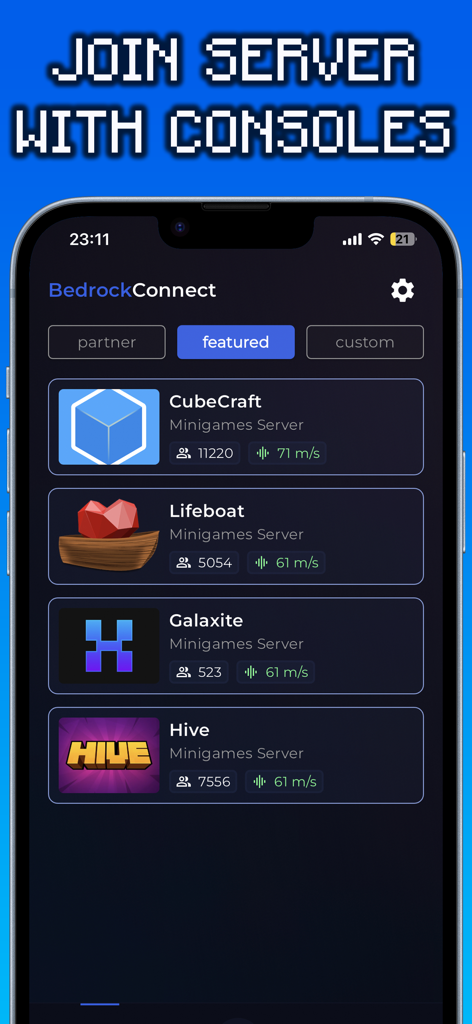
Interfaz de la aplicación BedrockConnect que muestra una lista de servidores de Minecraft destacados, incluyendo CubeCraft y Hive
Interfaz de la aplicación BedrockConnect que muestra una lista de servidores de Minecraft destacados, incluyendo CubeCraft y Hive

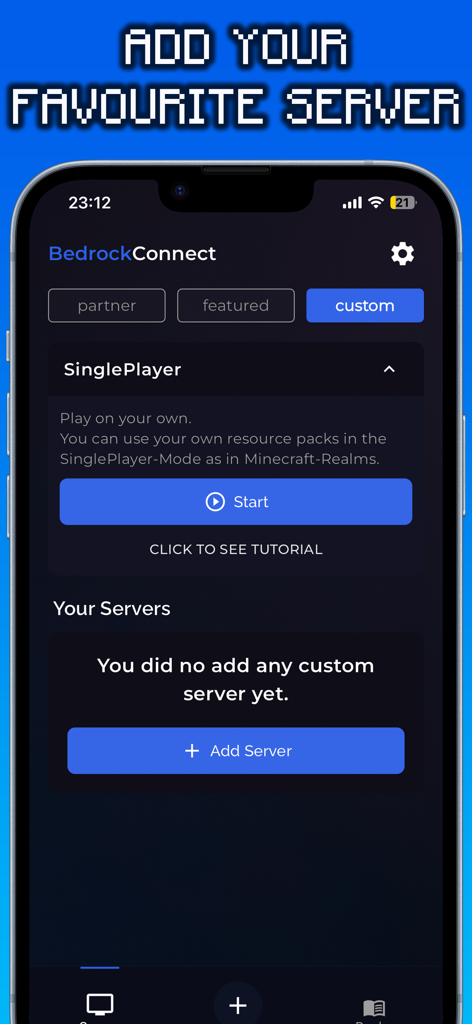
Interfaz de la aplicación BedrockConnect que muestra la pantalla para añadir servidores personalizados de Minecraft
Interfaz de la aplicación BedrockConnect que muestra la pantalla para añadir servidores personalizados de Minecraft

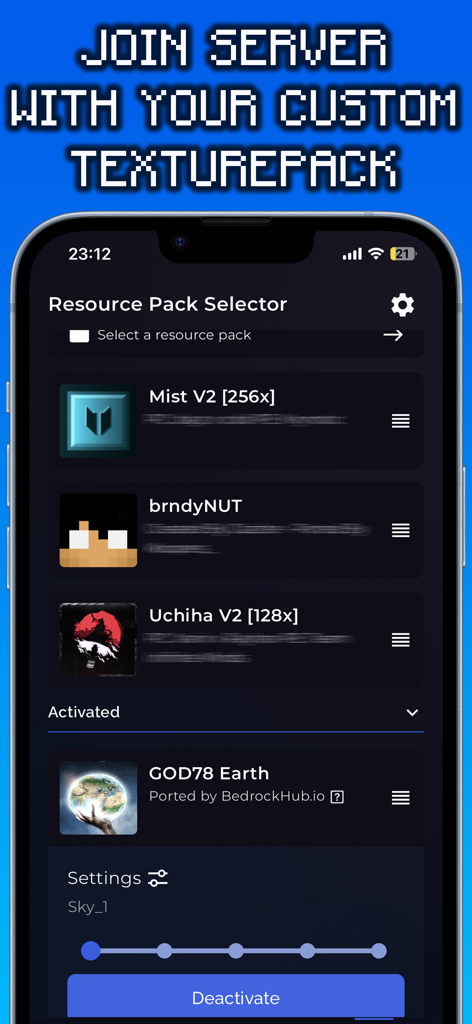
Interfaz de la aplicación BedrockConnect que muestra el selector de paquetes de recursos para paquetes de texturas personalizados de Minecraft.

Interfaz de la aplicación BedrockConnect que muestra el selector de paquetes de recursos para paquetes de texturas personalizados de Minecraft.

Mejora Tu Experiencia en Consola

Las herramientas que hacen destacar esta app, elegida por 76K+ usuarios.

🌐

Únete a Cualquier Servidor de Terceros

Libérate de la lista predeterminada. Conéctate a cualquier servidor de Minecraft Bedrock introduciendo simplemente una dirección IP en tu teléfono.

🎨

Paquetes de Texturas Personalizadas Gratuitas

Olvídate de los costos del Marketplace. Usa tus paquetes de recursos favoritos creados por la comunidad para personalizar tu mundo de juego de forma gratuita.

🎮

Soporte Fluido para Consolas

Diseñado específicamente para jugadores de Xbox, PlayStation y Switch que desean la experiencia completa de Minecraft sin complicaciones técnicas.

Sobre la app

Todo lo que necesitas saber sobre BedrockConnect.

Descripción

The BedrockConnect app is a revolutionary multiplayer connection solution for the popular video game Minecraft Bedrock Edition. With this app, players can seamlessly play together on third-party servers across different platforms like PlayStation, Xbox, and Switch. Especially for console players, the BedrockConnect app provides a great opportunity to use free custom texture packs/resource packs on supported servers using the serverpacks method. This allows them to personalize the game and customize their gaming environment. Using the BedrockConnect app is easy. Make sure that all the devices involved, including the console and mobile phone, are connected to the same Wi-Fi network. Avoid using VPN services or ad blockers, as these can affect the functionality of the app. Also, note that Wi-Fi boosters or repeaters can have an impact on the app. BedrockConnect has proven to be an essential tool for Minecraft players who want to play with friends on different third-party servers. Here are the basic steps to use the app for PlayStation and Xbox: 1. Open the app and confirm all the important information. 2. Swipe right and click on the "+" symbol. 3. Enter the IP address and port of the desired Bedrock server. The server must be online and compatible with the Bedrock Edition. 4. Click on "Start & show ads". 5. The server should now appear in the Minecraft friends list. Click on it to join. 6. Join the server on the console! Done! You will be redirected to the desired server. To use a Texture Pack / Resource Packs on a server, follow these steps: 1. Go to the app settings and enable "Serverpacks". 2. Select a valid Minecraft Bedrock-compatible Texture Pack. 3. Start a supported server (a list can be found at https://serverlist.bedrockhub.io). 4. Open Minecraft, go to settings, and navigate to "Storage" -> "Cached Data". 5. Delete any existing "Serverpacks". 6. Start the supported server in the BedrockConnect app. 7. Join the server on the console! Done! The pack will be downloaded, and you will be redirected to the desired server. Visit our Discord server at https://discord.bedrockhub.io for further support and information. There you can also find a list of servers we support with serverpacks: https://serverlist.bedrockhub.io. Key Features Summary: - Server list for a compact overview of all servers with player count, ping, MOTD, and version. - "Featured Server" category for special recommendations. - Serverpacks feature for using custom Texture Packs on supported servers. - Automatic updates for supported serverpacks. - Support for the Switch console (available for Apple users only). - Modern and user-friendly design. Avoiding Common Issues: - Ensure that all devices, including console and mobile phone, are connected to the same Wi-Fi network. - Avoid using VPN services or ad blockers, as they can affect the app's functionality. - Avoid using Wi-Fi boosters or repeaters, as they can impact the app. - Check firewall settings and router configurations as they can cause issues. - For iOS devices, make sure the "Local Network" setting is enabled for the app. - Make sure ads are shown, as the app relies on ad display for free users. - Note that shaders, modpacks, addons, clients, or skin packs will not work. The app only supports resource packs / texture packs, using only the "Front", "Textures", "Sounds", and "Particles" folders from the texture pack while ignoring the rest. Disclaimer: BedrockConnect is a third-party application and is not affiliated with Mojang AB or Minecraft. BedrockConnect is not an extension of Minecraft or Mojang AB and is not affiliated with them. It is a third-party solution created by the community to enable cross-platform connections in the Bedrock Edition. Terms of Use (EULA): https://www.apple.com/legal/internet-services/itunes/dev/stdeula/

Última versión

2.0.91

Tamaño

97.0 MB

Fecha de lanzamiento

2 nov 2022

¿Listo para Romper los Límites de Tu Consola?

Únete a más de 76,000 jugadores que se conectan a servidores personalizados y usan paquetes de texturas gratuitos en Xbox, PlayStation y Switch. Obtén BedrockConnect hoy mismo y empieza a jugar Minecraft sin fronteras.

Descargar en App Store
Recomendaciones

Apps Similares

Apps con características y experiencia similares
App information, icons, screenshots, and descriptions displayed on this page are sourced from the Apple App Store and are the property of their respective developers. Download estimates and rankings are based on MWM's proprietary models and may not reflect actual figures. This page is provided for informational and analytical purposes only.

Believe this page infringes your intellectual property? File a dispute