Dote Timer - Time Management

Dote Timer - Time Management

Descargar en App Store
Logo de Dote Timer - Time Management

Dote Timer: Voltea para Concentrarte, Planifica con Precisión y Dona

Supera las distracciones con nuestro exclusivo temporizador de volteo, visualiza tu progreso con un planificador de puntos de 10 minutos y convierte tus sesiones de trabajo profundo en donaciones reales para estudiantes necesitados.

Editor

Smartdong School

Categoría

Productivity

Descargas

56K+

Valoración

4.6/5

Total valoraciones

1K+

Idiomas

18

Domina tu Flujo

Descubre la interfaz utilizada por 56K+ usuarios.
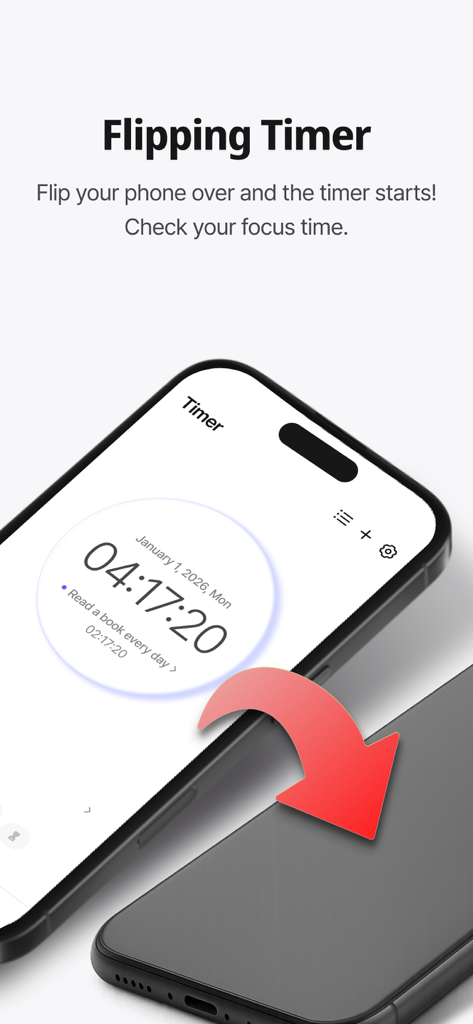
Un smartphone volteado boca abajo para activar la función del temporizador de concentración en la aplicación Dote Timer.

Un smartphone volteado boca abajo para activar la función del temporizador de concentración en la aplicación Dote Timer.

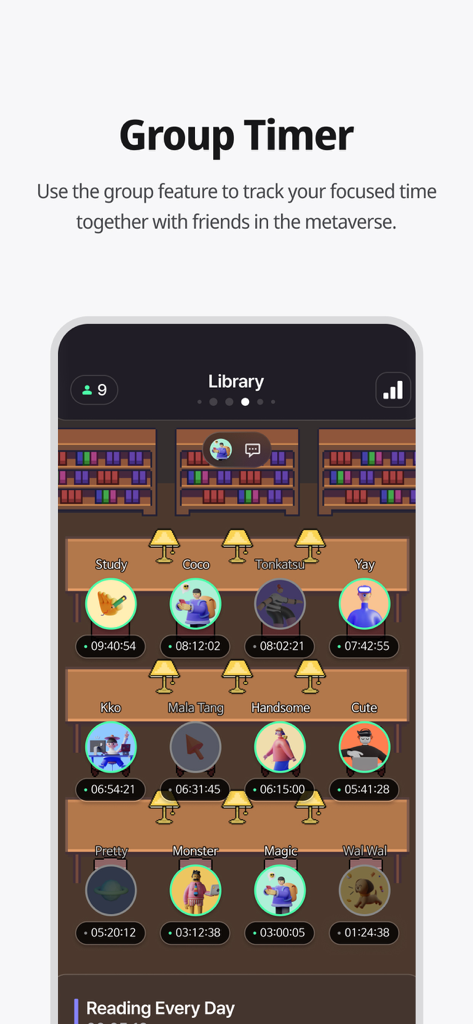
Una captura de pantalla de la aplicación Dote Timer que muestra la función de temporizador grupal con un entorno de biblioteca virtual donde los usuarios estudian juntos.

Una captura de pantalla de la aplicación Dote Timer que muestra la función de temporizador grupal con un entorno de biblioteca virtual donde los usuarios estudian juntos.

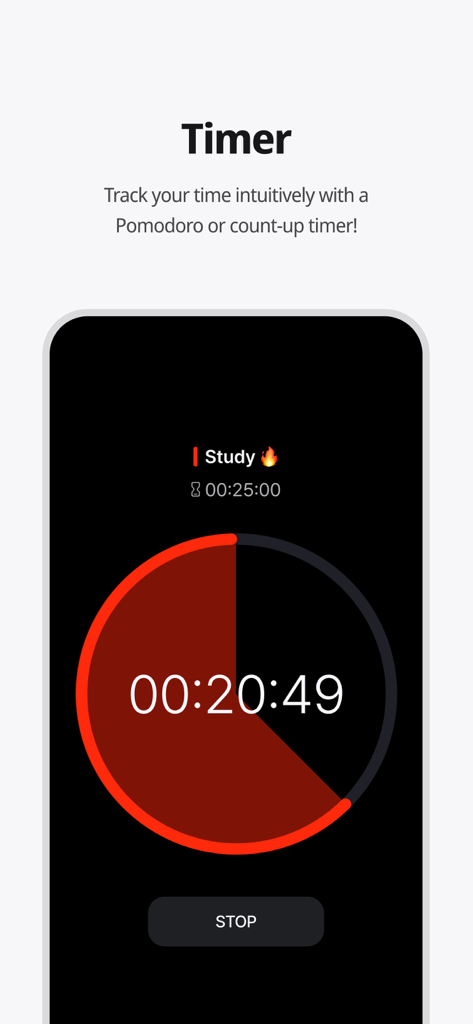
Interfaz de la aplicación Dote Timer que muestra una cuenta regresiva de temporizador de estudio Pomodoro circular.

Interfaz de la aplicación Dote Timer que muestra una cuenta regresiva de temporizador de estudio Pomodoro circular.

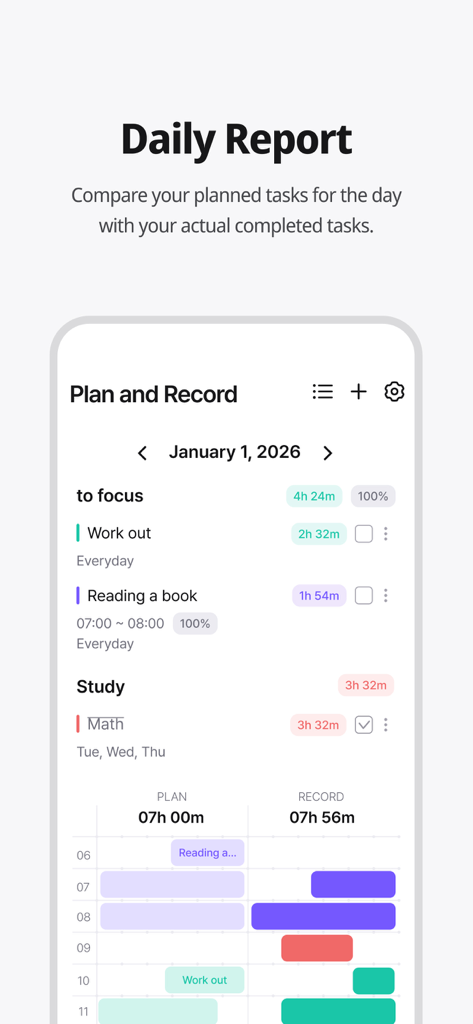
Pantalla de informe diario de Dote Timer comparando las tareas planificadas y el tiempo registrado real.

Pantalla de informe diario de Dote Timer comparando las tareas planificadas y el tiempo registrado real.

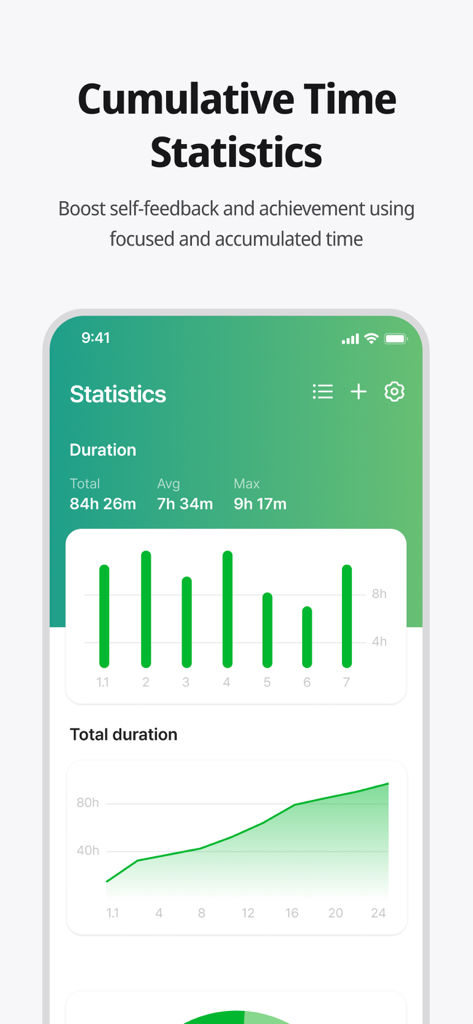
Pantalla de estadísticas de tiempo de concentración acumulado de Dote Timer y gráficos.

Pantalla de estadísticas de tiempo de concentración acumulado de Dote Timer y gráficos.

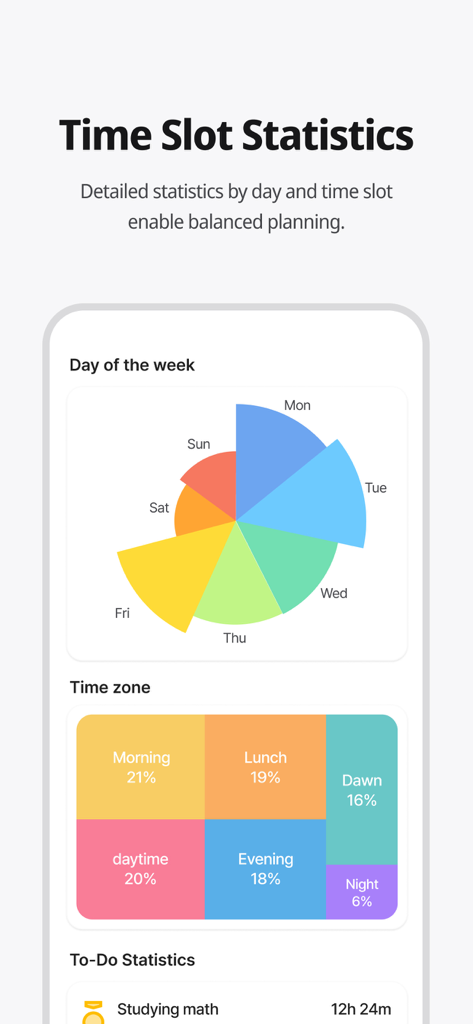
Un panel de análisis colorido que muestra estadísticas de gestión del tiempo por día de la semana y hora del día.

Un panel de análisis colorido que muestra estadísticas de gestión del tiempo por día de la semana y hora del día.

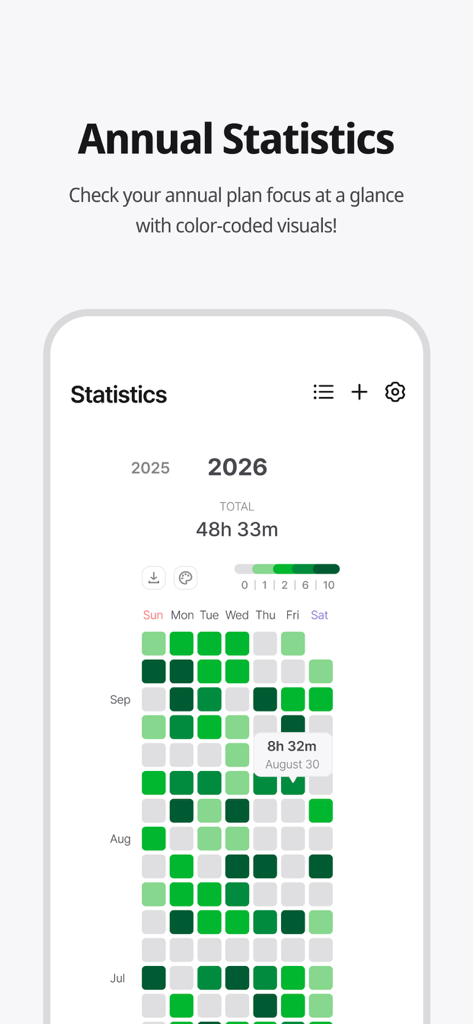
Mapa de calor de estadísticas de concentración anual codificado por colores en la aplicación Dote Timer.

Mapa de calor de estadísticas de concentración anual codificado por colores en la aplicación Dote Timer.

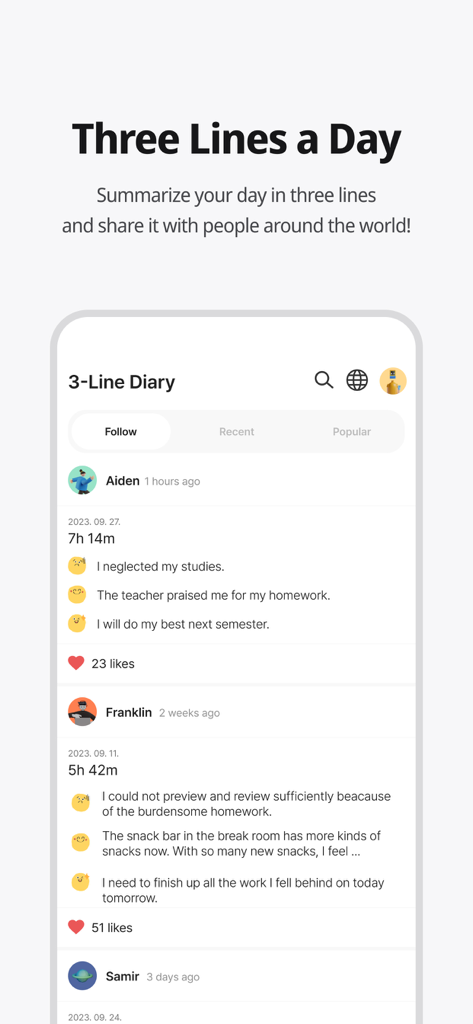
Función de diario comunitario 'Tres Líneas al Día' en la aplicación Dote Timer que muestra resúmenes de usuarios y tiempos de concentración.

Función de diario comunitario 'Tres Líneas al Día' en la aplicación Dote Timer que muestra resúmenes de usuarios y tiempos de concentración.

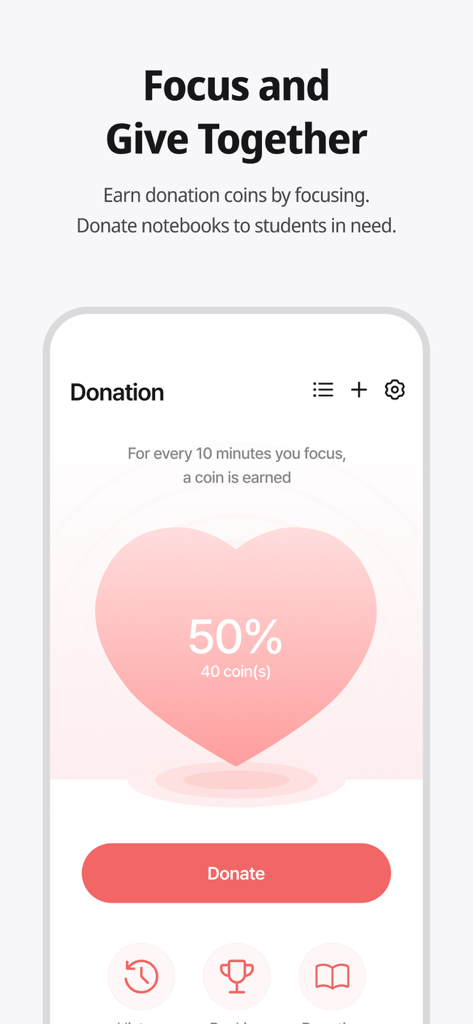
Pantalla de la aplicación Dote Timer que muestra la función de donación donde los usuarios pueden ganar monedas al concentrarse y donarlas a estudiantes necesitados.

Pantalla de la aplicación Dote Timer que muestra la función de donación donde los usuarios pueden ganar monedas al concentrarse y donarlas a estudiantes necesitados.

Eleva tu Productividad con Propósito

Las herramientas que hacen destacar esta app, elegida por 56K+ usuarios.

📱

Voltea para Concentración Profunda

Elimina la adicción al smartphone con un temporizador que solo funciona cuando tu teléfono está boca abajo. Recupera tu atención y entra en un estado de flujo al instante.

📈

Análisis de Plan vs. Realidad

Compara tus objetivos con tu tiempo de concentración real con precisión de 10 minutos. Utiliza mapas de calor visuales para identificar tus horas más productivas.

🌍

Productividad con Impacto

Convierte tu concentración en una fuerza para el bien. Gana monedas mientras trabajas para financiar materiales educativos para estudiantes desfavorecidos de todo el mundo.

Sobre la app

Todo lo que necesitas saber sobre Dote Timer - Time Management.

Descripción

#Time Management Secret of Successful People# Try Dot Timer now, the king of time management! Are you having trouble managing your time? Need to concentrate, but your smartphone is distracting you? Organizing your work or even recording your study time, everything can be done with Dot Timer! ##Flip Timer UP your concentration with a timer that runs when your flip your smartphone! Let's get away from smartphone addiction! Get donation coins every 10 minutes of concentration ##Time Table Unique time table that allows you to compare your plans with the actual records at a glance! Maximize time utilization with a 10-minute dot-separated planner ##Various statistical charts It's not end with record! Analyze your concentration time in detail with various graphs and charts! Identify your improvement with daily statistics, annual statistics, cumulative statistics, weekly statistics, hourly statistics and plan leaderboards at a glance ##Donation Program You can donate the collected coins to gift notes for underprivileged students! Donation rangking are changing in real time basis ##Three Lines a Day How are you today? Share your diary in three lines. Motivate each other with friends around the world ‍##Study Group 'Study With' Try taking notes with your friends in real time! There are various themes such as classrooms, libraries, offices, fitness places and others. Group member statistics. ##Premium Features Try premium features that are constantly being updated. More efficient time management developed by time management experts How to Use Dote Timer Apple Watch 1. Add a to-do in the Dote timer app. 2. Open the Dote Timer Apple Watch app and select a task by pressing the ‘Select Task’ button. 3. Press the START button to start recording. 4. When the recording is finished, press the STOP button to save the recording and end it. Caution : 1. The Apple Watch must be connected to the iPhone. 2. The Dote timer must be installed on the iPhone. * Notice * First, You need to click To Do List and create category to use this app. reporting translation errors -> skyktc75@gmail.com Your review can help a lot for your developer. Thank you. When we try to concentrate on something, there are so many distractions. One of the biggest distractions is the smartphone. You need to focus on the book. But I find myself looking at the phone. The plan was to study for 5 hours But you actually spent only 1 hour on the book? Dote Timer is the answer! Let’s start with the special proprietary features of Dote Timer. First, Dote Timer starts only when you flip the device (screen facing down). It will automatically stop when you use or move the phone after activating the timer. Thus, you can concentrate on study or work. Second, you can compare the plan with your actual concentration record. Set up the D-Day of your task. And categorize it into A, B, or C depending on the importance to set up a precise plan. The actual length of concentration is recorded and can be compared with your original plan. Third, the thickness of color denotes how much you concentrated. Thus, you can easily find out the days when you concentrated on your tasks. Especially the app shows in different colors the days of concentration and the days you failed to concentrate throughout the year. So you can compare how you fared yesterday and today to make your day more productive. In addition, collect coins by using the timer and donate them for underserved people. My accumulated time of concentration is converted into coins. When they reach a certain threshold, Dote Planner and Dote Book will be donated to underserved students. There are also the standings of donation, Which motivates the users to compete in the donation of coins. Dote Timer can be set up as desired. Just focus on what you have to do to contribute to society. The most efficient time management app for the perfect time allocation. Download Dote Timer now!

Última versión

2.6.6

Tamaño

103.5 MB

Fecha de lanzamiento

6 jul 2021

Transforma tu Tiempo de Pantalla en Impacto Social

¿Listo para vencer la procrastinación? Únnete a miles de estudiantes y profesionales que voltean sus teléfonos para encontrar concentración. Descarga Dote Timer hoy mismo y comienza a convertir tu trabajo profundo en donaciones del mundo real.

Descargar en App Store

App information, icons, screenshots, and descriptions displayed on this page are sourced from the Apple App Store and are the property of their respective developers. Download estimates and rankings are based on MWM's proprietary models and may not reflect actual figures. This page is provided for informational and analytical purposes only.

Believe this page infringes your intellectual property? File a dispute