GNSS View

GNSS View

Descargar en App Store
Logo de GNSS View

GNSS View: Domina tu Visibilidad Satelital y Precisión de Posicionamiento

Visualiza constelaciones QZSS, GPS y globales en tiempo real. Aprovecha pantallas de RA de nivel profesional y gráficos de cielo para monitorear HDOP/VDOP y asegurar una precisión de señal óptima para vuelos de drones, topografía y exploración.

Editor

NEC Corporation

Categoría

Navigation

Descargas

259K+

Valoración

4.2/5

Total valoraciones

100

Idiomas

1

Precisión Visualizada

Descubre la interfaz utilizada por 259K+ usuarios.
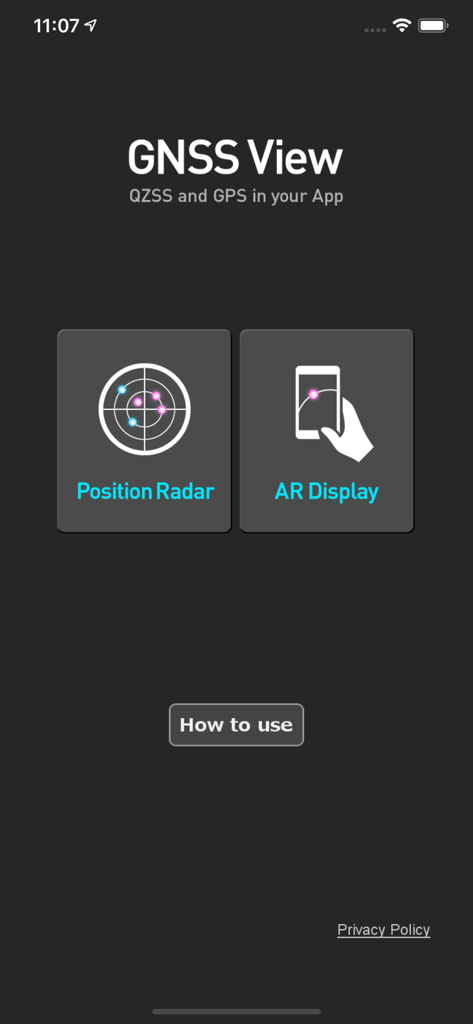
Pantalla de inicio de la aplicación móvil GNSS View con botones para Radar de Posición y Pantalla RA

Pantalla de inicio de la aplicación móvil GNSS View con botones para Radar de Posición y Pantalla RA

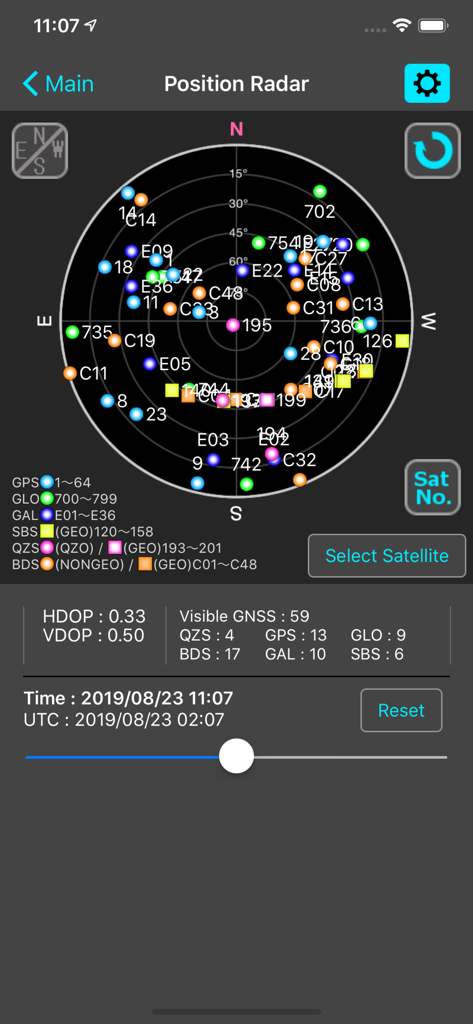
Pantalla Radar de Posición de la aplicación GNSS View mostrando un gráfico de cielo satelital con métricas HDOP y VDOP

Pantalla Radar de Posición de la aplicación GNSS View mostrando un gráfico de cielo satelital con métricas HDOP y VDOP

Visibilidad Satelital en Tiempo Real y Análisis de Precisión

Las herramientas que hacen destacar esta app, elegida por 259K+ usuarios.

🛰️

Seguimiento Global Multi-Constelación

Monitorea QZSS, GPS, GLONASS, Galileo y BeiDou simultáneamente para asegurar la máxima confiabilidad de la señal en tareas de alta precisión.

👁️

Visualización de Cielo en RA

Identifica instantáneamente obstrucciones de línea de visión superponiendo posiciones satelitales en tu entorno del mundo real usando la vista de cámara RA.

📊

Métricas Profesionales de Precisión

Accede a datos críticos de HDOP, VDOP y máscara de elevación para verificar la geometría de la señal y mitigar errores de posicionamiento antes de comenzar tu operación.

Sobre la app

Todo lo que necesitas saber sobre GNSS View.

Descripción

This application enables you to see where the Quasi-Zenith Satellite System in the sky! ●What is QZSS? Quasi-Zenith Satellite System (QZSS) is a Japanese satellite positioning system composed mainly of satellites in quasi-zenith orbits (QZO). Satellite positioning systems use satellite signals to calculate position information. One famous example is the American Global Positioning System (GPS) and the QZSS is sometimes called the Japanese GPS. For details, please refer to the following Website "Quasi-Zenith Satellite System". URL : https://qzss.go.jp/en ●What is GNSS View? GNSS View provides that iOS version application that is based on the website application "GNSS View". This application enables you to know position of positioning satellites such as QZSS and GPS in the specified time and location. The positioning satellites displayed in the GNSS View are not based on the satellite information directly received by the smartphone but are displayed based on the satellite arrangement calculated based on the publicly released orbit information. ●GNSS View 3 functions 【Main】 ・You can move to the Position Radar screen or AR Display screen from the application startup screen. ・You can see the operating manual and privacy policy of this application via the website. 【Position Radar】 ・It is provided radar view of positioning satellites such as QZSS and GPS as a sky plot at the specified time and location. ・Positioning satellites can be specified from QZSS, GPS, GLONASS, BeiDou, Galileo, SBAS. ・You can also select specified signal satellites to see on the radar. ・You can see selected satellites by setting elevation mask angle. ・You can switch east and west of satellite arrangement, turn on / off rotation, and switch on / off display of satellite number. ・It displays HDOP, VDOP, the total number of satellites and the number of each positioning satellites in the satellite arrangement displayed on the radar. 【AR Display】 ・Position of positioning satellites such as QZSS and GPS on the sky from your current location is able to see through your camera at the specified time. ・In order to display satellites, it is necessary to turn on the position information of the smartphone and complete the positioning. Therefore, it may take time to display. ・Positioning satellites can be specified from QZSS, GPS, GLONASS, BeiDou, Galileo, SBAS. ・You can also select specified signal satellites to see on the radar. ・You can see selected satellites by setting elevation mask angle. ●Supported versions ・iOS 18 ・iOS 17 ・iOS 16 ・iOS 15 ・iOS 14 ・iOS 13

Última versión

6.0.1

Tamaño

4.3 MB

Fecha de lanzamiento

31 oct 2014

Visualiza la Precisión. Domina tus Datos de Ubicación.

Únete a más de 259,000 profesionales y entusiastas de la tecnología que utilizan la herramienta de confianza de NEC para el seguimiento satelital en tiempo real, la visualización en RA y el análisis de señales de misión crítica.

Descargar en App Store

App information, icons, screenshots, and descriptions displayed on this page are sourced from the Apple App Store and are the property of their respective developers. Download estimates and rankings are based on MWM's proprietary models and may not reflect actual figures. This page is provided for informational and analytical purposes only.

Believe this page infringes your intellectual property? File a dispute