
Esta página no es una página oficial de la aplicación ni de su desarrollador, sino una publicación editorial independiente creada con fines informativos y de comentario. Salvo que se indique expresamente lo contrario, ni la aplicación ni su desarrollador están afiliados, respaldados, patrocinados, autorizados ni conectados oficialmente con MWM, Apple, Google Play, el editor de la aplicación ni su desarrollador, y nada en esta página implica que la aplicación haya sido desarrollada utilizando los servicios de MWM. Todas las marcas comerciales, logotipos, capturas de pantalla y demás contenidos son propiedad de sus respectivos propietarios.

Microsoft OneNote
La memoria humana es un laberinto. OneNote desmantela esa debilidad, otorgando a los usuarios una extensión digital donde cada idea, lista o detalle se solidifica en un registro permanente y recuperable, accesible sin fricción desde cualquier dispositivo.
Descargas
50M+Valoración
Total valoraciones
4.5MEditor
Categoría
ProductivityIdiomas
33Última versión
16.107.3Tamaño
350.1 MBFecha de lanzamiento
18 ene 2011Evaluación de Microsoft OneNote
Análisis de funcionalidades clave para una productividad versátil.
Sincronización Multi-Dispositivo y Acceso en la Nube
Esta herramienta permite a los usuarios acceder a sus notas desde cualquier dispositivo y en cualquier momento, asegurando que la información importante esté siempre disponible y actualizada.
Cuaderno Digital Flexible
La aplicación ofrece un espacio ilimitado para capturar ideas, organizar información en secciones y páginas, y estructurar el contenido de manera personalizada para cualquier necesidad.
Integración de Contenido Multimedia y Escaneo
Permite a los usuarios insertar imágenes, archivos, y escanear documentos o pizarras directamente en las notas utilizando Office Lens, enriqueciendo el contenido de manera significativa.
Colaboración en Tiempo Real
La aplicación facilita el trabajo en equipo, permitiendo que múltiples usuarios editen y contribuyan a un mismo cuaderno compartido simultáneamente, ideal para proyectos grupales.
Escritura a Mano y Dibujo Digital
Esta herramienta cuenta con opciones avanzadas de inking, permitiendo a los usuarios escribir, dibujar y anotar con un lápiz óptico o el dedo, incluyendo la conversión de formas.
Notas Adhesivas Sincronizadas
Permite guardar rápidamente pensamientos e ideas fugaces como notas adhesivas digitales, que se sincronizan a través de dispositivos para un acceso instantáneo.
Preguntas Frecuentes
Todo lo que necesitas saber sobre Microsoft OneNote
Is Microsoft OneNote available for free?
Yes, Microsoft OneNote is free on iPhone and many other devices. Users can get started by downloading the app and signing in with a Microsoft or work/school account.
How does Microsoft OneNote allow me to access notes across devices?
Microsoft OneNote syncs your notes via OneDrive, allowing access to them anytime, anywhere, and across all your devices. This ensures your notes are always available whether at home or on the go.
Can I secure my notes in Microsoft OneNote with a password?
Yes, Microsoft OneNote allows users to secure their notes with a password. Additionally, it supports using Touch ID for quick and secure access to protected notes.
What organizational features does Microsoft OneNote offer for my notes?
Microsoft OneNote provides powerful organizational tools, allowing users to quickly arrange notes in a personalized way. It also helps find recent notes fast and pin frequently used pages.
Does Microsoft OneNote support drawing and handwriting?
Yes, Microsoft OneNote supports drawing and handwriting, particularly on iPad. It offers various pen colors and settings, and a 'Convert to Shapes' mode for automatically perfecting hand-drawn shapes.
Can I use sticky notes with Microsoft OneNote?
Yes, Microsoft OneNote allows users to quickly save thoughts and ideas using colorful sticky notes. These sticky notes sync across devices, providing access from anywhere, anytime.
How can I collaborate with others using Microsoft OneNote?
Microsoft OneNote facilitates collaboration by allowing users to work together in a shared notepad. Notes are saved to the cloud (OneDrive, SharePoint) and can be accessed and shared on any device.
Does Microsoft OneNote allow capturing images from documents or whiteboards?
Yes, Microsoft OneNote integrates with Office Lens. This feature enables users to save pictures of whiteboards, photos, or printed documents directly into their notes, with automatic cropping.
Are there subscriptions available within the Microsoft OneNote app?
Yes, monthly Microsoft 365 subscriptions are available for purchase within the Microsoft OneNote app. These are charged to your App Store account and renew automatically.
What is the data privacy policy for Microsoft OneNote?
Microsoft OneNote is subject to a separate privacy statement and terms. Data used with the app may be accessible to Microsoft or third-party publishers, and processed in the United States or other countries.
Las siguientes capturas de pantalla y la descripción provienen directamente del listado oficial de la tienda de la aplicación y son propiedad del desarrollador.
App Store
Capturas
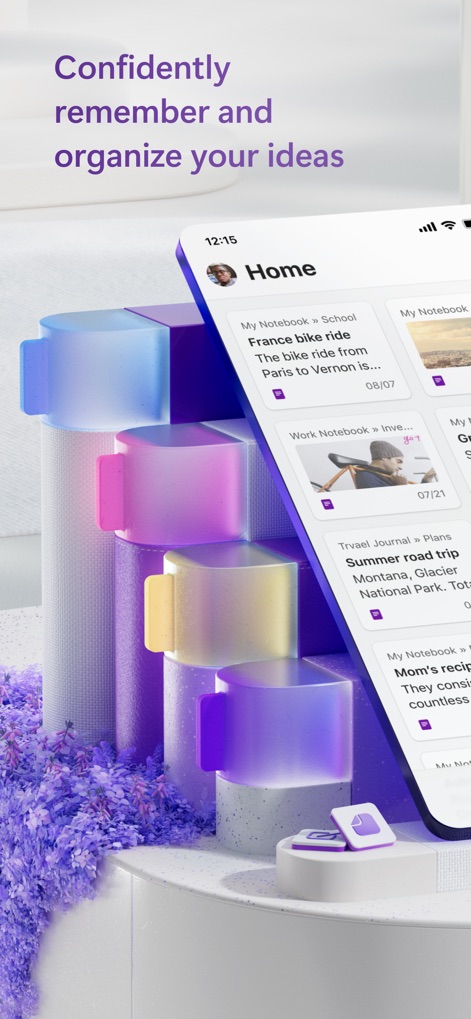
Ideas Organizadas
La pantalla de inicio presenta una interfaz intuitiva con tarjetas individuales para notas recientes y una barra de navegación inferior con accesos rápidos a 'Home' y 'Search'.

Gestión Eficiente
Esta vista muestra la fluidez del diseño móvil, donde los usuarios pueden navegar entre diferentes notas y el botón flotante '+' facilita la creación de nuevo contenido.

Notas Siempre Contigo
La interfaz principal destaca la organización por tarjetas que muestran títulos como 'France bike ride' y fechas clave, complementada con accesos intuitivos a 'Search' y 'Notebooks'.

Multiplataforma Total
La captura ilustra la versatilidad de la aplicación, mostrando una nota detallada en la versión de escritorio y su adaptación concisa en la interfaz móvil.

Estructura por Secciones
La herramienta permite una organización profunda a través de un menú lateral que presenta secciones diferenciadas por pestañas de colores, como 'Administration' y 'Product Ideas'.

Notas Visuales Enriquecidas
La aplicación soporta la inserción de imágenes de alta calidad como la de 'Montana - Glacier National Park' y la inclusión de texto descriptivo detallado para cada entrada.

Metas y Checklists
Los usuarios pueden crear listas de verificación interactivas para seguimiento de metas anuales, mostrando casillas de verificación y texto informativo para cada tarea.

Planificación Interactiva
Esta captura destaca la capacidad de integrar un mapa con anotaciones a mano alzada, como 'Winery', y una lista de verificación detallada para organizar un viaje.
Descripción
Download
Apps Similares
Apps con características y experiencia similares

Notion: Notes, Tasks, AI
Notion Labs, Incorporated

Freenotes®: AI Notes Taking
Hangzhou Free Notes Technology Co., Ltd

Structured - Daily Planner
unorderly GmbH

Google Tasks: Get Things Done
Google LLC

TickTick:To-Do List & Calendar
Appest Limited

Noteful: Notes & PDF Markup
Noteful Technologies Ltd

Todoist: To Do List & Calendar
Doist Inc.

To do list MinimaList & Widget
Inner Grow Limited

monday.com - Work Platform
monday.com Ltd.
Esta página no es una página oficial de la aplicación ni de su desarrollador, sino una publicación editorial independiente creada con fines informativos y de comentario. Salvo que se indique expresamente lo contrario, ni la aplicación ni su desarrollador están afiliados, respaldados, patrocinados, autorizados ni conectados oficialmente con MWM, Apple, Google Play, el editor de la aplicación ni su desarrollador, y nada en esta página implica que la aplicación haya sido desarrollada utilizando los servicios de MWM. Todas las marcas comerciales, logotipos, capturas de pantalla y demás contenidos son propiedad de sus respectivos propietarios.