NBS Mobile Banking

NBS Mobile Banking

Descargar en App StoreDescargar en Google Play
Logo de NBS Mobile Banking

NBS Banca Móvil: Tu Vínculo Seguro con Nueva Zelanda desde Cualquier Lugar

Mantente conectado a tus raíces y gestiona tus activos de Nueva Zelanda con facilidad. Desde la región de Nelson hasta EE. UU., experimenta la fiabilidad de la sociedad constructora más antigua de Nueva Zelanda en tu bolsillo.

Editor

Nelson Building Society

Categoría

Finance

Descargas

11K+

Valoración

3.5/5

Total valoraciones

0

Idiomas

1

Tu Sucursal Local, en Cualquier Lugar

Descubre la interfaz utilizada por 11K+ usuarios.
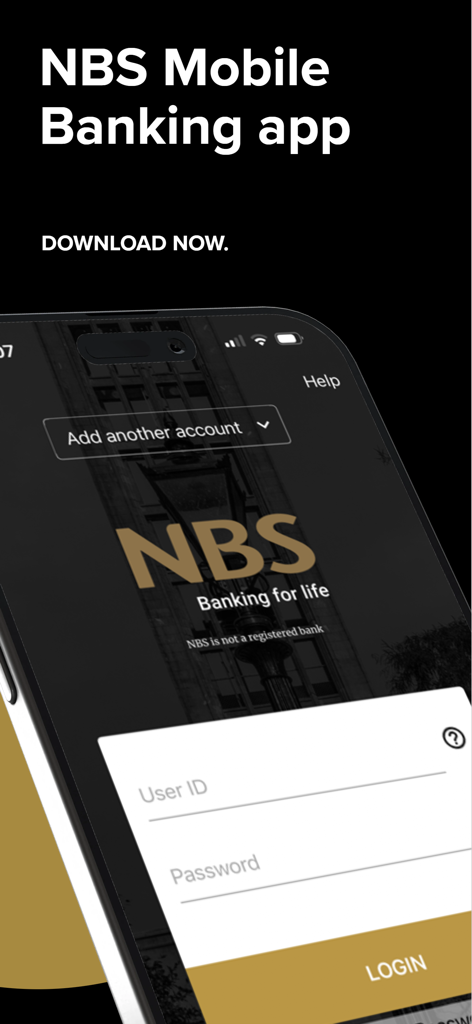
Pantalla de inicio de sesión de la aplicación NBS Banca Móvil en un smartphone

Pantalla de inicio de sesión de la aplicación NBS Banca Móvil en un smartphone

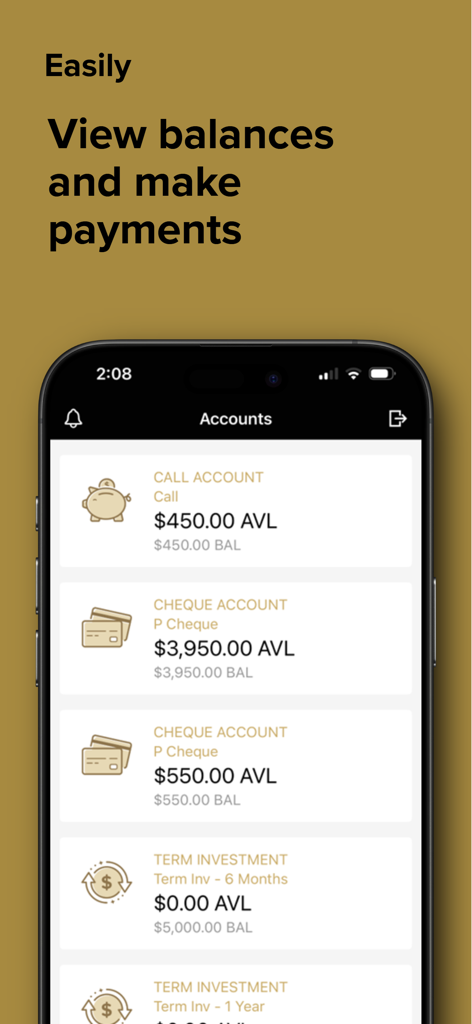
Una captura de pantalla de la aplicación NBS Banca Móvil que muestra saldos y tipos de cuentas como cuenta a la vista y cuenta corriente

Una captura de pantalla de la aplicación NBS Banca Móvil que muestra saldos y tipos de cuentas como cuenta a la vista y cuenta corriente

Gestiona tus Finanzas de NZ con Confianza

Las herramientas que hacen destacar esta app, elegida por 11K+ usuarios.

💸

Pagos de Facturas sin Esfuerzo

Gestiona fácilmente los impuestos de tu propiedad y los servicios públicos de NZ. Crea nuevos pagadores o configura pagos automáticos para obligaciones recurrentes en casa sin necesidad de un escritorio.

🔒

Acceso Seguro e Instantáneo

Inicia sesión rápidamente con un PIN personalizado de cuatro dígitos. Tus cuentas están protegidas por los mismos rigurosos estándares de seguridad que nuestra banca por internet, respaldadas por el soporte de sucursales locales.

📱

Supervisión en Tiempo Real

Realiza un seguimiento de los ingresos por alquiler y monitoriza los saldos de todas tus cuentas NBS. Consulta el historial de transacciones al instante para mantenerte al tanto de tu salud financiera a través de las zonas horarias.

Sobre la app

Todo lo que necesitas saber sobre NBS Mobile Banking.

Descripción

NBS Mobile app - easy and convenient access for you to bank while you’re on the go. Log-in to our secure Mobile App to: * Sign in quickly with a four digit PIN * Check account balances * View transactions * Transfer between your NBS accounts * Pay existing Bill Payees * Make one-off payments to a New Zealand bank account * Create a New Payee * Create an Automatic Payment using an existing Bill Payee IMPORTANT: By downloading and completing the setup of NBS Mobile app you agree to NBS Electronic Banking Terms & Conditions forming part of NBS General Terms & Conditions available at www.nbs.co.nz. How it works: If you are an existing NBS Internet Banking customer then; 1. Download the NBS Mobile app; 2. Call into your nearest NBS Branch or phone 0800 101 700 to ensure all ID held on file, is current. 3. You are good to go! If you are not a NBS Internet Banking customer or you know your ID is not current, call into your local Branch or phone us on 0800 101 700. Acceptable forms of ID are detailed below: Photographic (Current and original) * New Zealand Driver Licence * New Zealand or Overseas Passport * New Zealand Firearms Licence Non Photographic (Current and original) * New Zealand Birth Certificate or Certificate of New Zealand Citizenship * An embossed Debit Card or Credit Card issued by a registered New Zealand bank * A government agency issued card i.e. SuperGold Card Address Verification (Less than three months old) * A recent statement from any New Zealand bank. Must be on Bank Letterhead * A utility bill such as power, gas, water, telephone or internet service provider * Any official insurance policy that includes a name and address Security The NBS Mobile App is every bit as secure as NBS Internet Banking. You can choose your own four digit PIN to access the NBS Mobile App and if you lose your mobile device, access can be disabled by your local Branch. Things you should know NBS Mobile App is only available for NBS customers registered with NBS Internet Banking and using an appropriate Mobile device. NBS recommends you always adhere to manufacturers software and support to ensure your mobile devices are covered by the latest software and security updates. If you are connecting via Wi-Fi a trusted network is recommended. Downloading the NBS Mobile App is FREE, however internet data charges may be incurred through your mobile service provider. All information submitted by you during the setup and use of NBS Mobile App will be retained by NBS and used in accordance with our Privacy obligations set out in NBS General Terms & Conditions. NBS reserves the right to modify or withdraw this service at any time. Access is subject to availability and maintenance. About NBS A local, independent and mutually owned Building Society. You’ll find us in eight locations throughout Nelson, Tasman, Buller, West Coast, Golden Bay and Mid Canterbury. NBS - New Zealand’s Oldest Building Society, building lifestyles, dreams and a sense of local pride since 1862. Need help? Phone us on 0800 101 700 between 9.00am to 4.30pm business days, call into your local Branch or visit www.nbs.co.nz.

Última versión

5.6.3

Tamaño

27.3 MB

Fecha de lanzamiento

1 abr 2014

Banca con orgullo local, estés donde estés en el mundo.

Únete a miles de kiwis que gestionan sus finanzas de Nueva Zelanda de forma segura desde el extranjero. Descarga la aplicación NBS hoy mismo y lleva contigo la fiabilidad de la sociedad constructora más antigua de Nueva Zelanda.

Descargar en App StoreDescargar en Google Play

App information, icons, screenshots, and descriptions displayed on this page are sourced from the Apple App Store and are the property of their respective developers. Download estimates and rankings are based on MWM's proprietary models and may not reflect actual figures. This page is provided for informational and analytical purposes only.

Believe this page infringes your intellectual property? File a dispute