NDICam

NDICam

Descargar en App Store
Logo de NDICam

NDICam: Cámara NDI de nivel profesional para iOS

Convierte tu iPhone o iPad en una fuente de video IP de alto rendimiento. Transmite flujos Full NDI o NDI HX3 de baja latencia directamente a vMix, OBS y TriCaster con controles profesionales diseñados para la producción en vivo.

Descargar en App Store

Editor

Mark Gilbert

Categoría

Photo & Video

Descargas

158K+

Valoración

3.0/5

Total valoraciones

100

Idiomas

1

Control profesional de un vistazo

Descubre la interfaz utilizada por 158K+ usuarios.
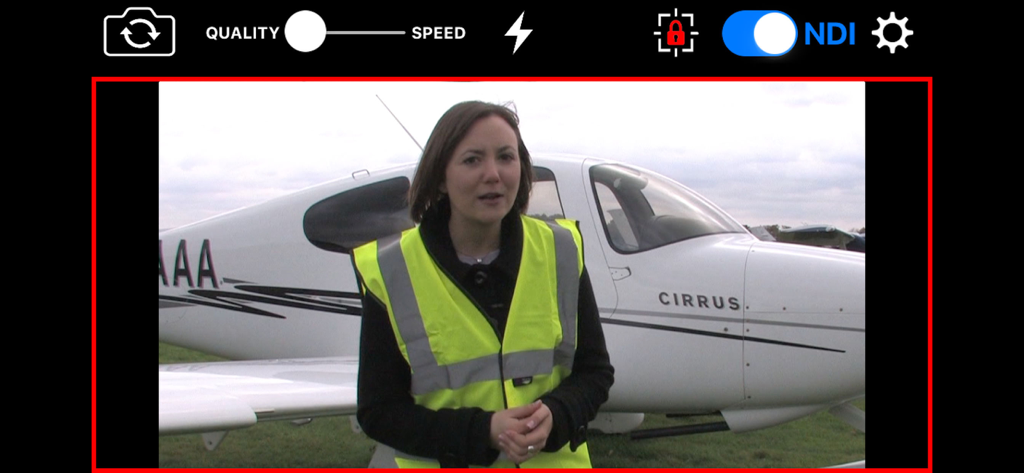
Pantalla de la aplicación NDICam que muestra una interfaz de transmisión de video profesional con interruptor NDI y luz tally en vivo

Pantalla de la aplicación NDICam que muestra una interfaz de transmisión de video profesional con interruptor NDI y luz tally en vivo

Logotipos de NDI y NDI HX3 con la marca del desarrollador Sienna

Logotipos de NDI y NDI HX3 con la marca del desarrollador Sienna

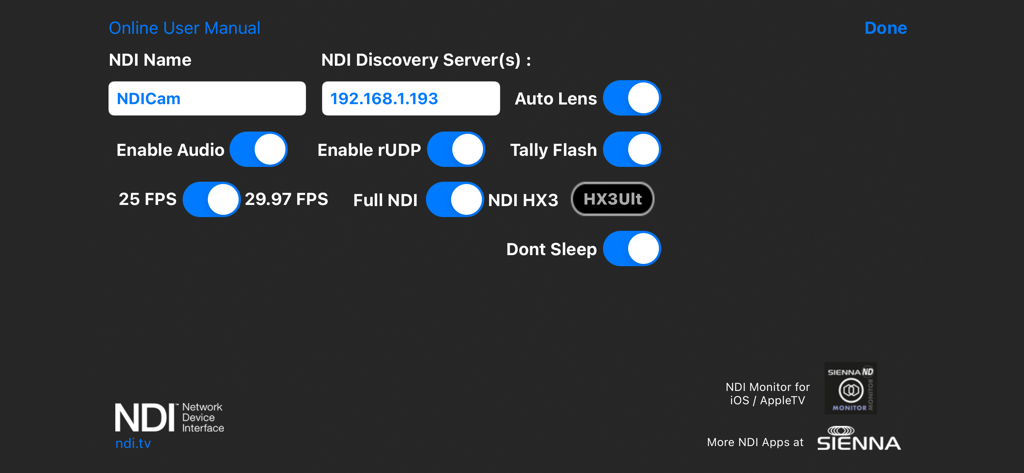
Menú de ajustes de NDICam que muestra el servidor de descubrimiento NDI y las opciones de transmisión de video

Menú de ajustes de NDICam que muestra el servidor de descubrimiento NDI y las opciones de transmisión de video

Video de calidad de transmisión a tu alcance

Las herramientas que hacen destacar esta app, elegida por 158K+ usuarios.

NDI HX3 de ultra baja latencia

Cambia entre los modos Full NDI y NDI HX3 para ofrecer video 1080p nítido optimizado para el ancho de banda de tu red y el rendimiento del hardware.

🔴

Tally en vivo y lógica profesional

Mantente sincronizado con indicadores de tally en pantalla (en vivo/previsualización) y un tally opcional con flash de cámara para avisar a los presentadores cuando están al aire.

⚙️

Control total de la producción

Toma el mando total de tu toma con bloqueo AF/AE, nomenclatura manual de fuentes, control de silencio de audio y cambio fluido de cámara frontal a trasera durante las transmisiones.

Sobre la app

Todo lo que necesitas saber sobre NDICam.

Descripción

* Special Offer Price * NDICam is the original NDI iOS camera built by the world's leading NDI broadcast infrastructure developers - Sienna. Mature and feature rich, uniquely with both Full NDI and NDI HX3 modes. The NDI (Network Device Interface) protocol connects to professional vision mixers and other devices, and delivers a high quality, low latency connection. NDICam is compatible with All TriCasters, VMix, Wirecast and hundreds of other professional IP video systems, software and hardware, which support NDI. - Simple to use - nothing to configure on your iOS device - Switch between front and rear cameras during broadcast - Auto Focus, AF Lock and Tap to Focus - Auto Exposure, AE Lock and Tap to Expose - Illumination light on/off - Audio Mute Control - Manual Naming of NDI Stream source - 4 quality / performance levels to suit your device and network, plus NDI HX Option - Pinch to zoom (where zoom is supported) - Auto-lens mode for multi-lens cameras - On screen live / preview tally plus optional use of camera flash as talent tally (with red gel cover). - Option to prevent iOS device sleep - Select 25FPS or 29.97FPS standard rate. - Choice of Full NDI or NDI HX3 compression modes (HX2 at 2 to 20 mBit, plus HX3 Ultra) - Rotation support for Portrait or Landscape Video Modes. Front and Rear cameras can be selected at the touch of a button and NDICam features a 4 position quality vs frame rate slider to deliver optimum video suited to the quality of your wifi connection and your iPhone's processing performance. Depending on your iOS device, compression mode selected and Wifi network performance NDICam supports up to 1080 full HD resolution. Control of flashlight, touch to focus, focus lock, pinch to zoom and audio enable are also included. You can even use the phone's torch as a Tally Light, by covering it with a red gel. Note: Depending on the performance of your iOS device and your WIFI network, you may not see full frame rates when operating at maximum 1080 resolution with a full HD camera. Using HX3 mode will help if the bottleneck is your WIFI network. Note: NDI is a high bandwidth protocol designed for local area Gigabit networks. In order to see good results you will need a fast, uncontested wifi connection. If you see slow frame rates, try improving the wifi environment, with a better router, less interference, directional antenna or maybe switch to 5GHz if you are on 2.4GHz. . NB HX3 Ultra will use around 50mBits of bandwidth, so it's lower than full NDI, but still quite high. Use one of the lower bandwidth HX3 modes if your network connection is struggling. NDICam is also compatible with wired ethernet connections to iOS devices which can help deliver smooth video compared to a poor quality Wifi network. Good results have been seen with lightning to ethernet adaptors. You can specify an NDI discovery server in the application settings. Note that you will need to restart the app for any changes to take effect. Specifying a discovery server will disable the standard mDNS (Bonjour) advertisement for the NDI Cam source, so your iOS device must be able to reach the discovery server one the network. If you experience problems - delete the Discovery Server entry and restart the app. NB: NDI HX3 Ultra mode requires a recent NDI compatible receiver.

Última versión

7.31

Tamaño

3.0 MB

Fecha de lanzamiento

31 mar 2016

La producción profesional de NDI® comienza aquí

Convierte tu iPhone o iPad en una cámara lista para la transmisión con soporte Full NDI y HX3. Integra perfectamente tus dispositivos móviles en los flujos de trabajo de vMix, OBS y TriCaster hoy mismo.

Descargar en App Store

App information, icons, screenshots, and descriptions displayed on this page are sourced from the Apple App Store and are the property of their respective developers. Download estimates and rankings are based on MWM's proprietary models and may not reflect actual figures. This page is provided for informational and analytical purposes only.

Believe this page infringes your intellectual property? File a dispute