Paperless Music: La Biblioteca Digital Definitiva para Músicos Profesionales
Abandona las carpetas pesadas y experimenta la forma más fiable de organizar, anotar y interpretar tus partituras. Sin suscripciones, sin anuncios y sin límites: solo tú y tu música.
Editor
Agilstream, LLC
Categoría
Music
Descargas
24K+
Valoración
4.8/5
Total valoraciones
1K+
Idiomas
1
Domina tu Interpretación
Descubre la interfaz utilizada por 24K+ usuarios.
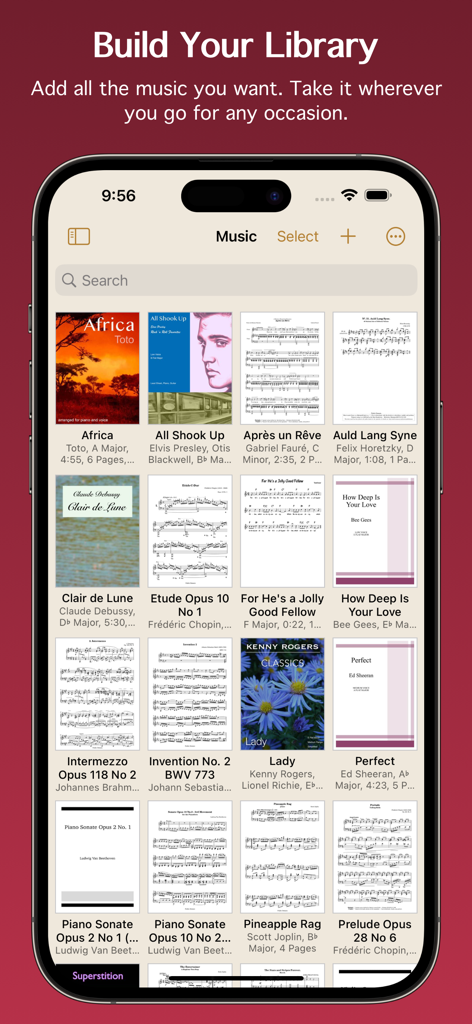
Vista de cuadrícula de biblioteca de música digital en la aplicación Paperless Music que muestra portadas y partituras de varias músicas
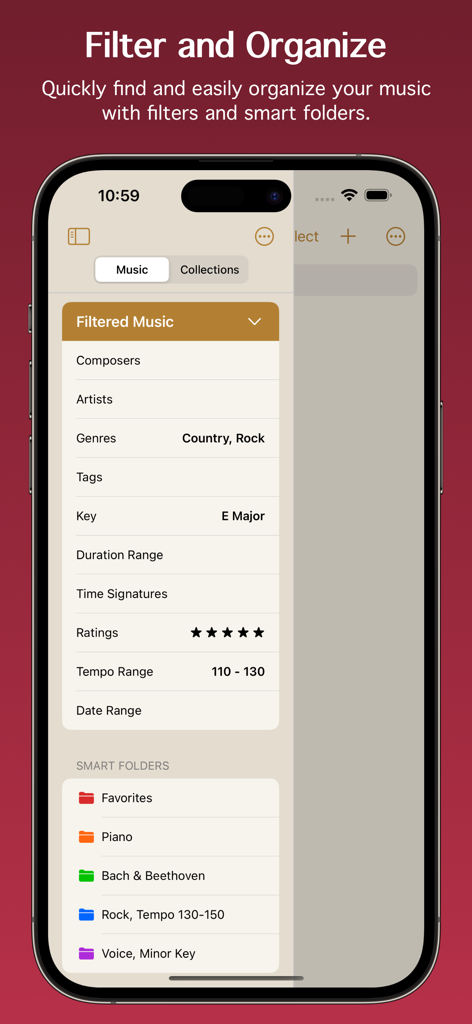
Interfaz de la aplicación Paperless Music que muestra filtros de música y carpetas inteligentes para organizar partituras digitales
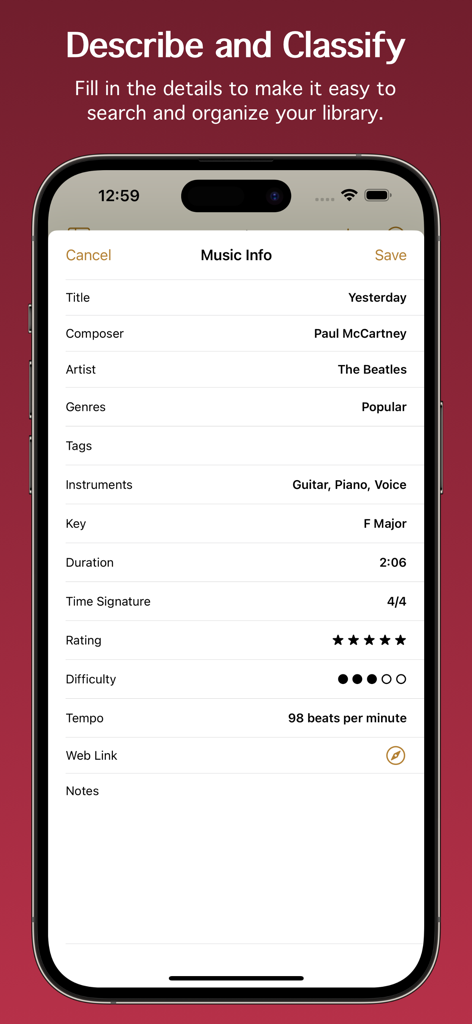
Captura de pantalla de la pantalla de información musical en la aplicación Paperless Music que muestra campos de metadatos como título, compositor, tonalidad y tempo de la canción Yesterday.
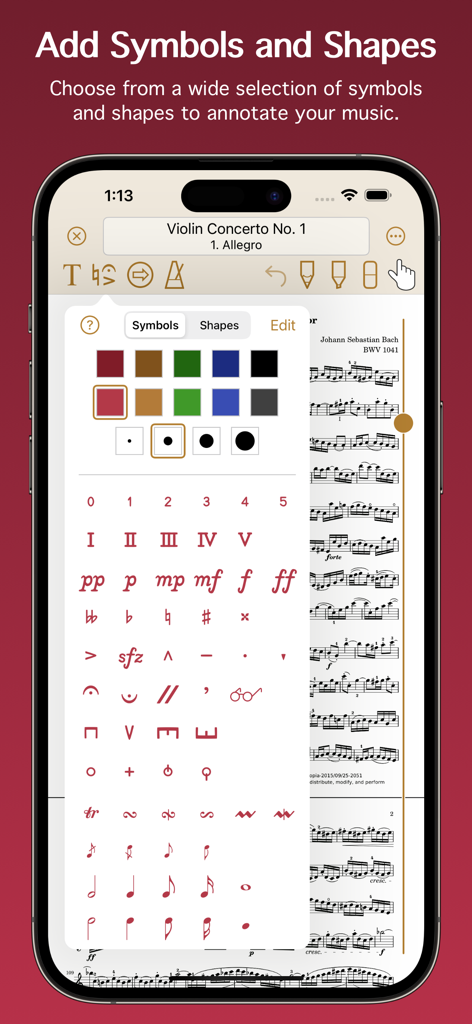
Una interfaz móvil para Paperless Music que muestra una amplia selección de símbolos musicales, dinámicas y formas para anotar partituras digitales.
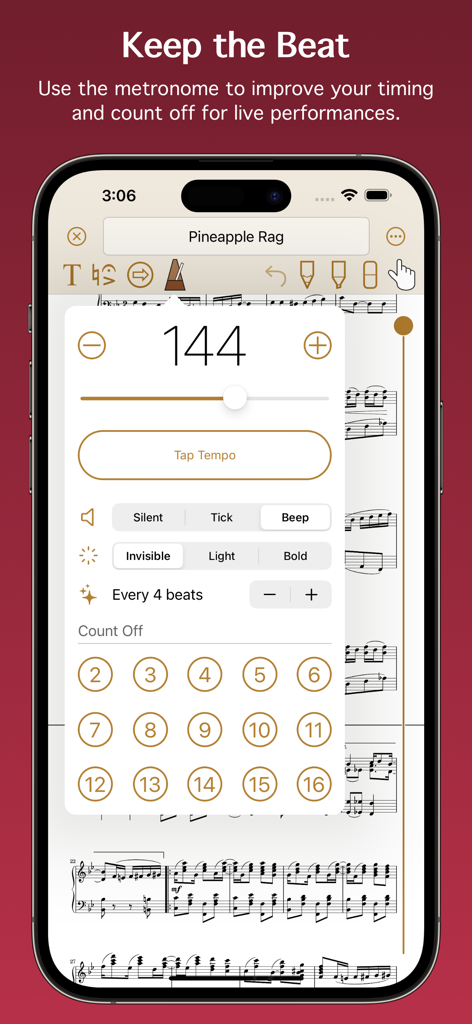
Interfaz de metrónomo en la aplicación Paperless Music para configurar el tempo y la cuenta atrás.
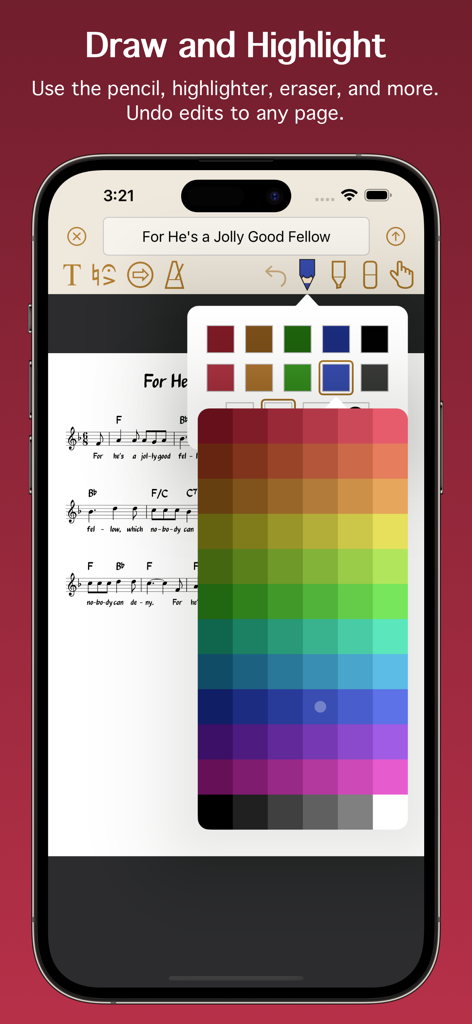
Interfaz que muestra partituras digitales con herramientas de anotación y una paleta de selección de colores.
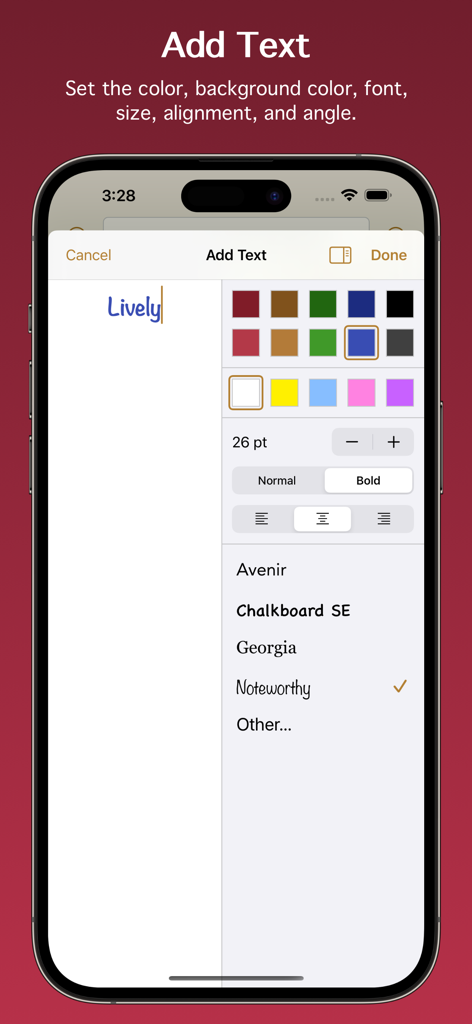
Interfaz para añadir y formatear anotaciones de texto en la aplicación Paperless Music
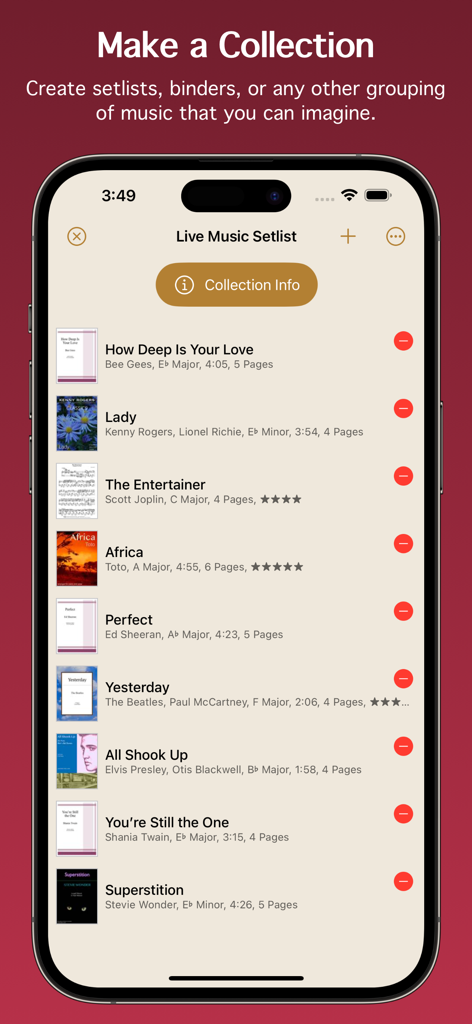
Captura de pantalla de la aplicación Paperless Music que muestra una lista de canciones en vivo organizada con títulos y detalles de las canciones
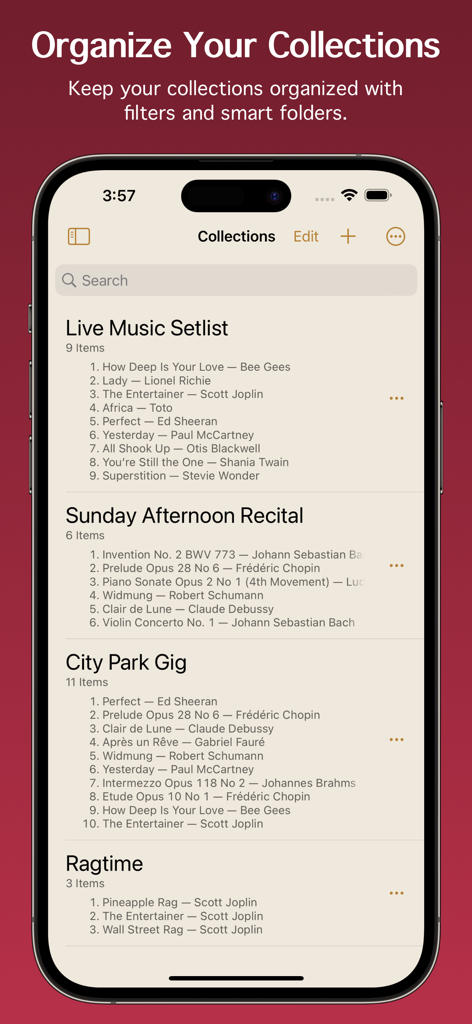
Listas de canciones y colecciones organizadas que se muestran en la interfaz de la aplicación Paperless Music
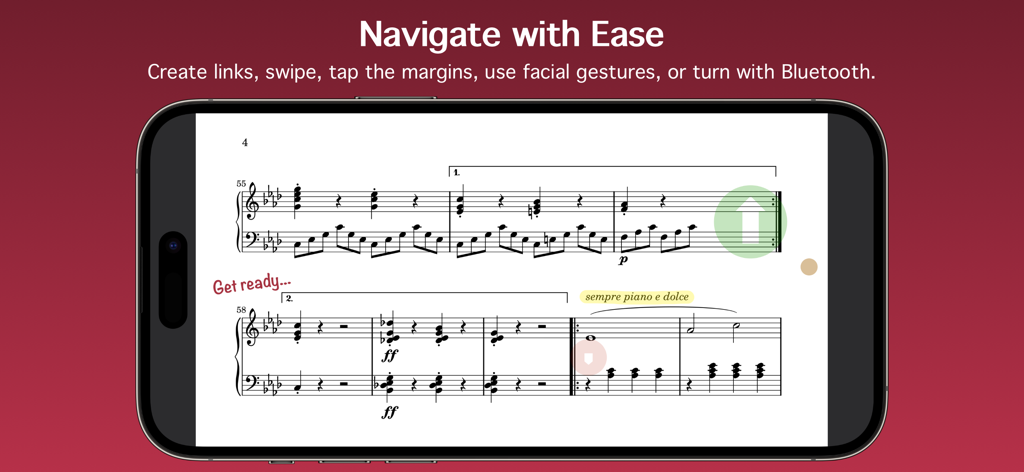
La aplicación Paperless Music que muestra partituras digitales con enlaces de navegación y anotaciones en un smartphone
Todo lo que Necesitas para Dar lo Mejor de Ti
Las herramientas que hacen destacar esta app, elegida por 24K+ usuarios.
📂
Biblioteca Inteligente Avanzada
Organiza miles de partituras con metadatos como tonalidad, tempo y duración. Utiliza carpetas inteligentes y filtros potentes para encontrar la pieza exacta que necesitas en segundos.
✨
Interpretación sin Manos
Concéntrate por completo en tu música con el cambio de página sin interrupciones a través de gestos faciales o pedales Bluetooth. Diseñado para la fiabilidad, para que puedas actuar en el escenario sin preocupaciones.
✏️
Marcado Digital de Precisión
Anota partituras de forma natural con soporte para Apple Pencil. Añade símbolos musicales, resaltados o texto, y utiliza el metrónomo y el afinador integrados para perfeccionar cada sesión.
Sobre la app
Todo lo que necesitas saber sobre Paperless Music.
Descripción
Free 90-day trial!
Add your sheet music, guitar tabs, fake books, and scores, and leave your paper behind. Organize, annotate, practice, and perform with the most powerful yet easy-to-use music viewer and manager.
Whether you’re a student or teacher, whether you play in a band, sing in a choir, or gig on the weekends, and no matter what your style of music is, you can count on the app’s reliability for live performances and go paperless with confidence.
Build Your Library
• Import PDF files from the Files app, a web browser, or from many other apps and sources.
• Scan your music with the camera-based document scanner.
• Import images from the Photos app.
Organize Your Music
• Describe and classify your music in great detail with information like title, composer, artist, genres, tags, instruments, key, duration, time signature, rating, difficulty, tempo, web link, and notes.
• Add scores with multiple movements or books with multiple songs, then organize them into sections.
• Create collections to make groups of music, such as setlists, virtual binders, or books.
• Easily find the music and collections you’re looking for with filters. With a few taps, for example, you can see all music that’s in a major key with a 4/4 or 6/8 time signature, having a tempo between 120 - 135 beats per minute.
• Create smart folders to automatically keep your music and collections organized.
Add Audio Tracks
• Add tracks from the Music app.
• Record your own audio.
• Import audio files.
• Adjust pitch and playback speed.
• Turn pages automatically while audio plays.
Stay In Tune
• Tune your instrument using the device microphone.
• Generate a tone using a variety of instruments and sounds.
• Adjust the A4 frequency.
• Select from 10 temperaments to customize the tuning.
Practice and Perform
• View music in portrait or landscape mode.
• Scroll music horizontally or vertically.
• Turn pages by swiping, moving the slider, using a Bluetooth page turner, tapping the edge of the screen, following a link, making a facial gesture, or playing audio that has automatic page turning enabled. (Facial gestures require a device with a TrueDepth camera.)
• Create links to jump or scroll to another page. Links are great for music with repeats or codas. They also allow music to be automatically scrolled with precise timing.
• Use the pencil and highlighter tools to write on music with your finger or with the Apple Pencil. All Apple Pencil settings are supported.
• Add text with options for size, rotation, color, font, and justification.
• Choose from a wide selection of symbols and shapes to add fingerings, dynamics, accidentals, and more.
• Use the low-latency metronome with options for sound, visuals, accent, and count off.
See More with Second Screen
• Connect two devices and see more of your music.
• When viewing music on the main device, it will extend onto the other device’s screen.
Share and Back Up
• Share your music and collections with other Paperless Music users, with or without your annotations or audio tracks.
• Share music in native format to preserve all information, or share in PDF format for general sharing and printing.
• Create a backup of your library to keep your data extra safe and to easily transfer everything to other devices.
And Much More
• Set the page color of your music.
• Undo changes made to any page while the viewer is open.
• Choose from six library view modes for music and three modes for collections.
• Batch edit genres, tags, and instruments.
• Adjust the text size in the Settings app to boost or shrink the size of text throughout Paperless Music.
• Search using Spotlight. Find and launch right into your music even when the app isn’t running.
Learn more by reading the integrated, searchable user guide, accessible from the app’s home screen and from the website.
Paperless Music has no ads and no subscriptions. There is no sign-in and there are no accounts.
www.paperlessmusic.com
Última versión
7.0.1
Tamaño
7.1 MB
Fecha de lanzamiento
3 ene 2015
Tu Biblioteca Completa, Lista para el Escenario Principal
Únete a miles de músicos que actúan con confianza. Comienza tu prueba gratuita de 90 días hoy mismo y experimenta un espacio de trabajo de nivel profesional sin suscripciones ni anuncios.
App information, icons, screenshots, and descriptions displayed on this page are sourced from the Apple App Store and are the property of their respective developers. Download estimates and rankings are based on MWM's proprietary models and may not reflect actual figures. This page is provided for informational and analytical purposes only.
Believe this page infringes your intellectual property? File a dispute