PenToPRINT Handwriting to Text
Descargar en App Store

Esta página no es una página oficial de la aplicación ni de su desarrollador, sino una publicación editorial independiente creada con fines informativos y de comentario. Salvo que se indique expresamente lo contrario, ni la aplicación ni su desarrollador están afiliados, respaldados, patrocinados, autorizados ni conectados oficialmente con MWM, Apple, Google Play, el editor de la aplicación ni su desarrollador, y nada en esta página implica que la aplicación haya sido desarrollada utilizando los servicios de MWM. Todas las marcas comerciales, logotipos, capturas de pantalla y demás contenidos son propiedad de sus respectivos propietarios.

Logo de PenToPRINT Handwriting to Text
Descargar en App Store

PenToPRINT Handwriting to Text

La herramienta OCR de escritura a mano definitiva para estudiantes y profesionales. Convierta cursiva, guiones o letra impresa en documentos de Word editables y cierre la brecha entre el papel y lo digital.

Cifras Clave

Descargas

765K+

Valoración

4.4/5

Total valoraciones

4K+

Editor

Serandi systems LTD

Categoría

Productivity

Idiomas

1

Última versión

2.13

Tamaño

31.2 MB

Fecha de lanzamiento

7 nov 2017
Funciones

Cierre la Brecha Entre Papel y Pantalla

Pen to Print le permite mantener los beneficios táctiles de la escritura a mano mientras obtiene la capacidad de búsqueda y de compartir del texto digital.

Decodifique Cursiva con Facilidad

Nuestro motor OCR especializado lee guiones desordenados y cursiva, ahorrándole horas de reescritura manual de su cuaderno favorito.

Flujo de Trabajo Digital Optimizado

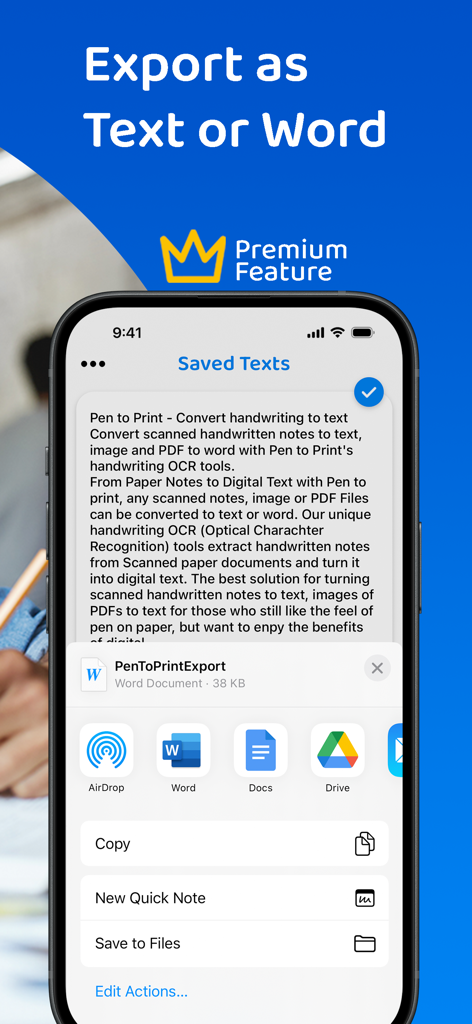
Exporte su texto convertido directamente a Word o Correo Electrónico, integrando sus ideas escritas a mano en sus proyectos profesionales o académicos.

Las siguientes capturas de pantalla y la descripción provienen directamente del listado oficial de la tienda de la aplicación y son propiedad del desarrollador.

App Store

Capturas

PenToPRINT Handwriting to Text - Pantalla azul con texto blanco que dice Convertir escritura a mano en texto
Pantalla azul con texto blanco que dice Convertir escritura a mano en texto

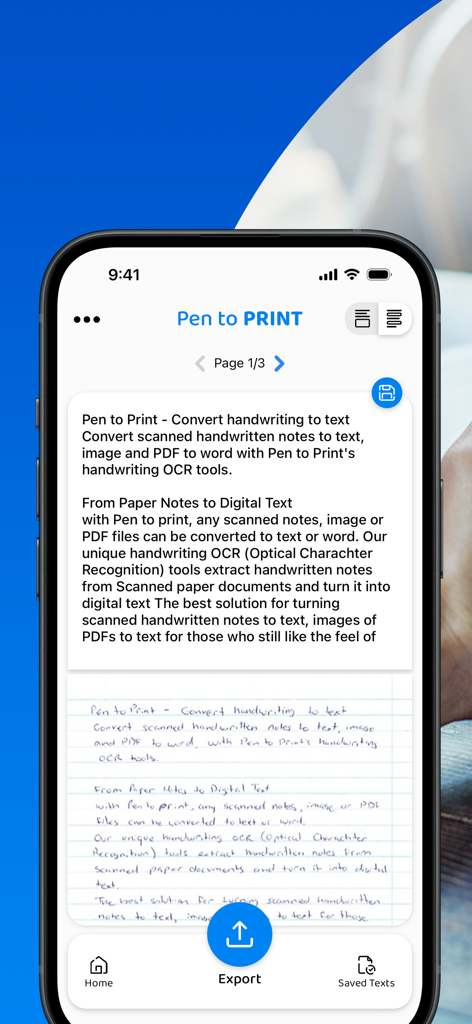
PenToPRINT Handwriting to Text - Una pantalla de smartphone que muestra la aplicación PenToPRINT convirtiendo una nota escrita a mano en texto digital editable con una opción de exportación.
Una pantalla de smartphone que muestra la aplicación PenToPRINT convirtiendo una nota escrita a mano en texto digital editable con una opción de exportación.

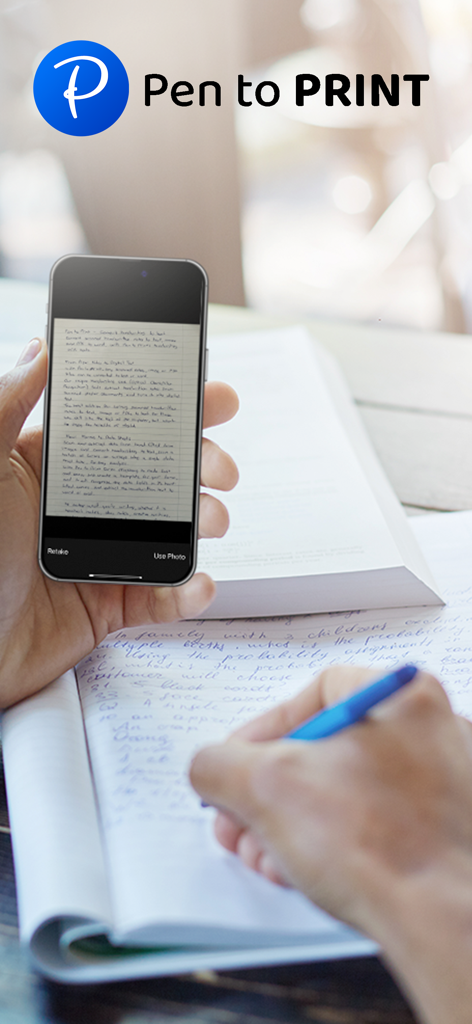
PenToPRINT Handwriting to Text - Persona escaneando notas manuscritas con la aplicación Pen to Print en un smartphone
Persona escaneando notas manuscritas con la aplicación Pen to Print en un smartphone

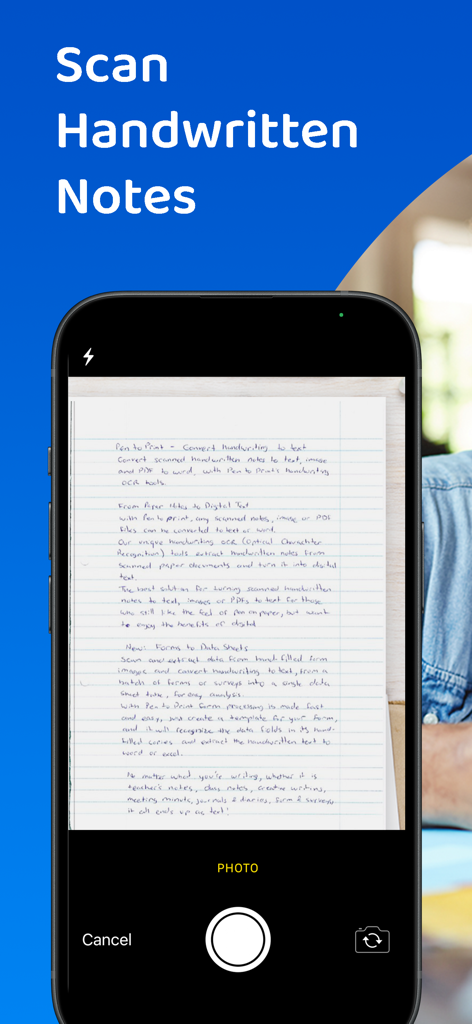
PenToPRINT Handwriting to Text - Una interfaz de smartphone escaneando un documento escrito a mano usando la función OCR de PenToPRINT

Una interfaz de smartphone escaneando un documento escrito a mano usando la función OCR de PenToPRINT

PenToPRINT Handwriting to Text - Un estudiante usando un smartphone para digitalizar notas escritas a mano mientras estudia
Un estudiante usando un smartphone para digitalizar notas escritas a mano mientras estudia

PenToPRINT Handwriting to Text - Pantalla de la aplicación PenToPRINT mostrando opciones de exportación a Word y Google Docs
Pantalla de la aplicación PenToPRINT mostrando opciones de exportación a Word y Google Docs

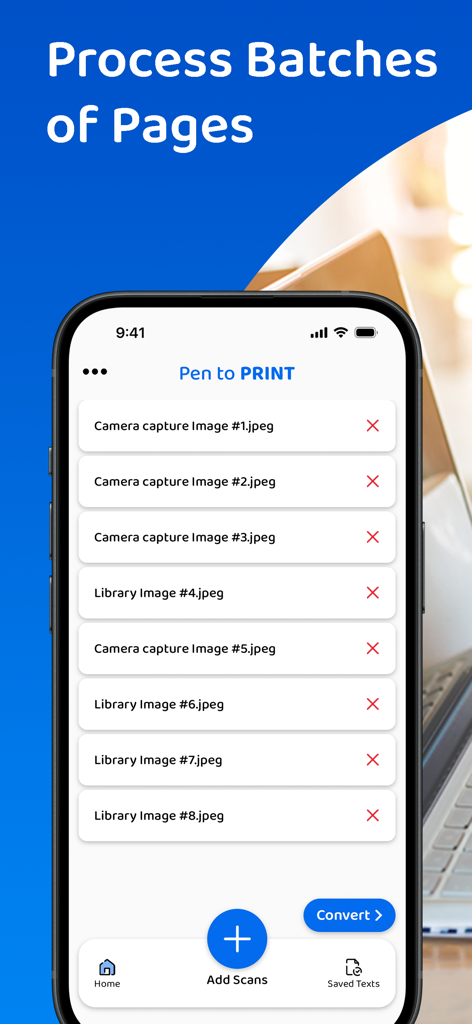
PenToPRINT Handwriting to Text - Una interfaz móvil para la aplicación PenToPRINT que muestra una lista por lotes de páginas escritas a mano escaneadas listas para su conversión a texto digital

Una interfaz móvil para la aplicación PenToPRINT que muestra una lista por lotes de páginas escritas a mano escaneadas listas para su conversión a texto digital

PenToPRINT Handwriting to Text - Una persona usando un smartphone para escanear notas escritas a mano de un cuaderno en espiral
Una persona usando un smartphone para escanear notas escritas a mano de un cuaderno en espiral

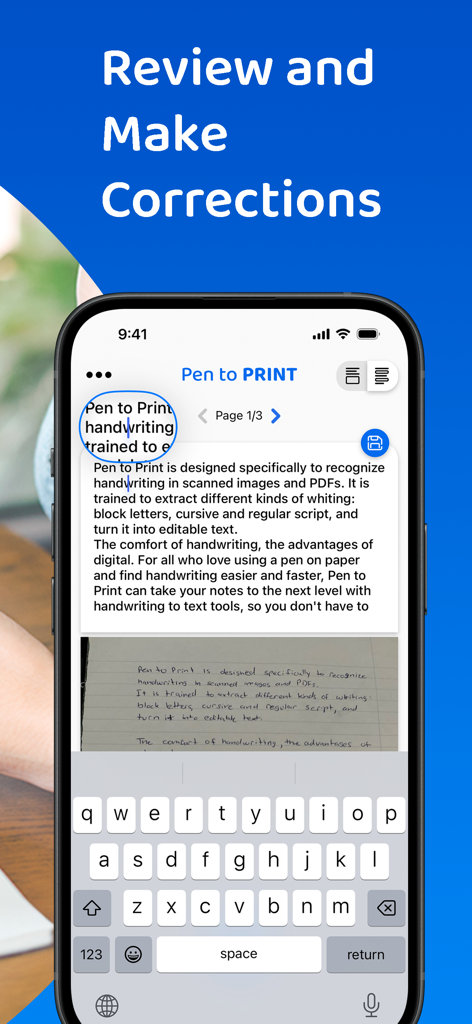
PenToPRINT Handwriting to Text - Interfaz de la aplicación PenToPRINT que muestra la función para revisar y corregir escritura a mano convertida en texto digital
Interfaz de la aplicación PenToPRINT que muestra la función para revisar y corregir escritura a mano convertida en texto digital

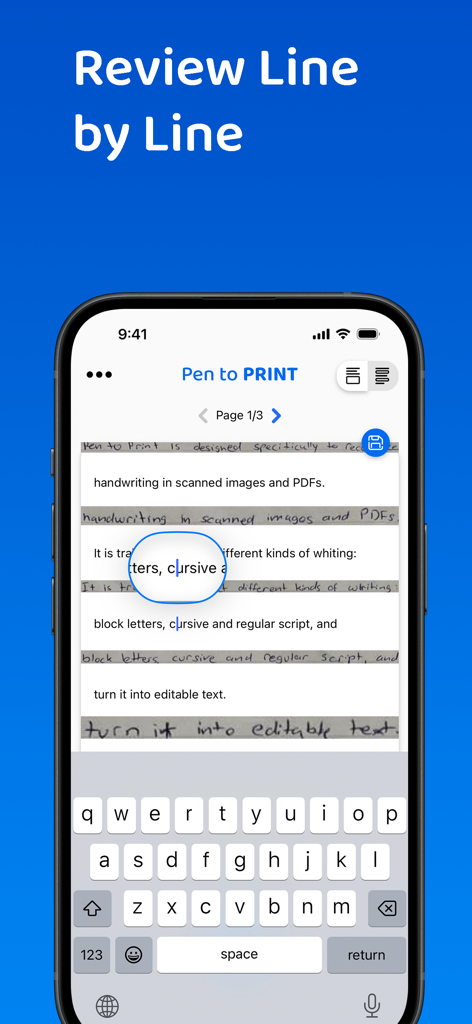
PenToPRINT Handwriting to Text - Smartphone mostrando la interfaz de la aplicación PenToPRINT para revisar y editar notas escritas a mano convertidas en texto digital línea por línea.

Smartphone mostrando la interfaz de la aplicación PenToPRINT para revisar y editar notas escritas a mano convertidas en texto digital línea por línea.

Descripción

Pen to Print, the leading handwriting to text OCR platform, is converting scanned handwritten notes into editable, searchable, and shareable digital text. Leveraging advanced Handwriting OCR (Optical Character Recognition) technology, Pen to Print is your go-to solution for digitizing handwritten notes, enhancing your productivity by bridging the gap between traditional handwriting and the digital world. Our unique handwriting to text OCR (Optical character recognition) engine extracts handwritten texts from scanned paper notes and turns them into digital editable text. Unlike other OCR scanner apps, it is designed specifically to recognize handwriting and works great as a cursive reader and deciphering illegible handwriting. Elevate your experience by opting for our premium plan, which allows you to export your text or share it effortlessly with others. With a premium subscription, you gain the flexibility to export your text in either txt or Word formats to any compatible applications on your device. Additionally, premium subscribers have the convenience of sharing their texts with others through email, messaging platforms, or social media networks. We suggest starting with assessing our handwriting recognition capability and the app's effectiveness in transforming handwriting to text before deciding to upgrade to the premium plan. Although Digital text is easier to edit, search and store, handwriting on paper notes is still commonly used, since it's fast, easy, and accessible. Pen to Print's handwriting recognition (OCR) is an excellent solution for those who still like the feel of pen on paper, but want to enjoy the benefits of digital. It is easy to use, fast and affordable. Converting handwriting to text with Pen to Print is a perfect solution for cursive reading and illegible writing, for students, for sharing meeting minutes, protocols, and other handwritten documents with multiple participants. Please note: The success of handwriting recognition relates directly to the quality of your scan. For best results scan your document in a well-lighted area, and make sure the paper is straightened and not folded or skewed. If unsuccessful, just try scanning again, it might make all the difference. The app currently supports Latin script only. Our handwriting recognition system can convert different kinds of handwriting to text: block letters, cursive, and regular script. Significant time and effort are invested in this app in order to provide an efficient quality handwriting to text OCR tool. We hope you find this app useful and enjoy using it to convert your handwritten notes to text. We welcome all feedback and are always happy to hear from our users. If you like our app, an app review will be well appreciated :-) If you encounter a problem, please contact us at: contact@serendi.me, so we can provide you assistance and support. For more information, visit our website: https://www.pen-to-print.com Download Pen to Print now, and start converting your handwriting to text! The Yearly Plan and Monthly Plan are auto-renewing subscriptions, providing an unlimited amount of text exports for a year/a month respectively, therefore: Payment will be charged to iTunes Account at confirmation of purchase. Subscription automatically renews unless auto-renew is turned off at least 24 hours before the end of the current period. Account will be charged for renewal within 24 hours prior to the end of the current period, and identify the cost of the renewal. Subscriptions may be managed by the user and auto-renewal may be turned off by going to the user's Account Settings after purchase. Any unused portion of a free trial period, if offered, will be forfeited when the user purchases a subscription to that publication, where applicable. Check out our terms & conditions at: https://www.serendi.me/p2p-terms-and-conditions

Download

Descargar en App Store

Esta página no es una página oficial de la aplicación ni de su desarrollador, sino una publicación editorial independiente creada con fines informativos y de comentario. Salvo que se indique expresamente lo contrario, ni la aplicación ni su desarrollador están afiliados, respaldados, patrocinados, autorizados ni conectados oficialmente con MWM, Apple, Google Play, el editor de la aplicación ni su desarrollador, y nada en esta página implica que la aplicación haya sido desarrollada utilizando los servicios de MWM. Todas las marcas comerciales, logotipos, capturas de pantalla y demás contenidos son propiedad de sus respectivos propietarios.








