Pixelmator: Edición de imágenes profesional para tu iPhone y iPad
Libera tu creatividad con un potente editor basado en capas diseñado para móviles. Desde retoques con IA hasta impresionantes diseños gráficos, crea obras de arte profesionales en cualquier lugar.
Descubre la interfaz utilizada por 817K+ usuarios.
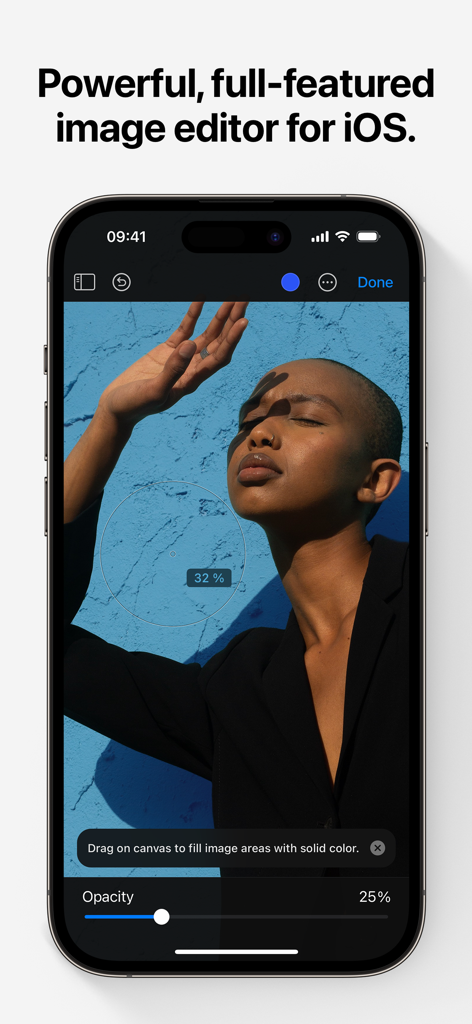
La interfaz de la aplicación Pixelmator en un iPhone mostrando herramientas de edición de fotos y una imagen de retrato.
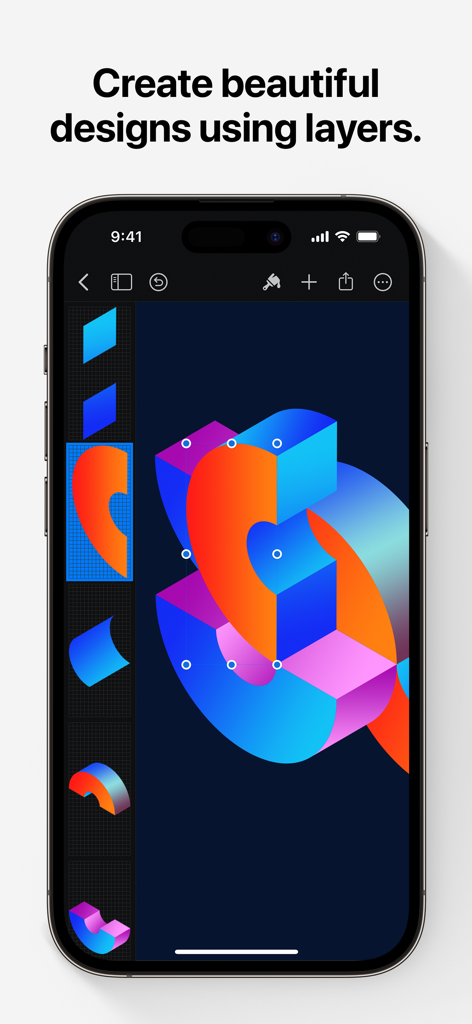
Interfaz de Pixelmator en iPhone mostrando un vibrante diseño gráfico con múltiples capas.
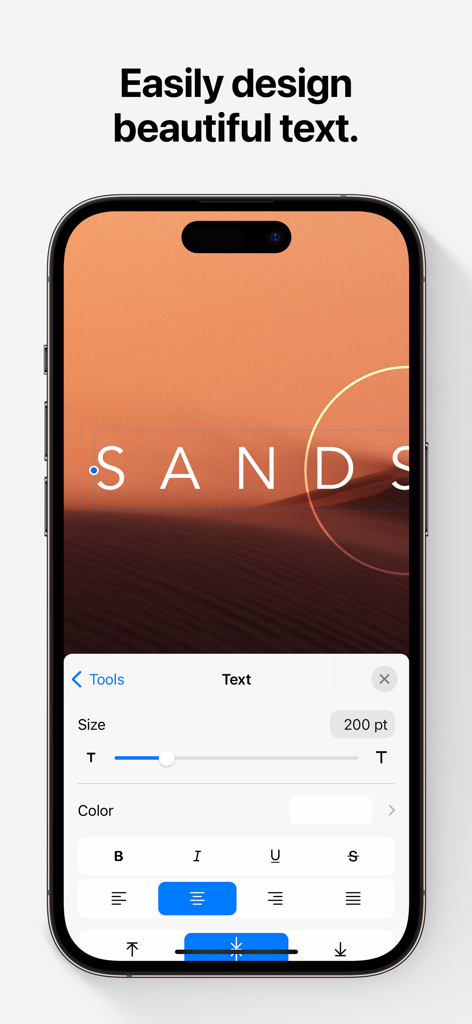
Pantalla de iPhone mostrando la interfaz de edición de texto de la aplicación Pixelmator.
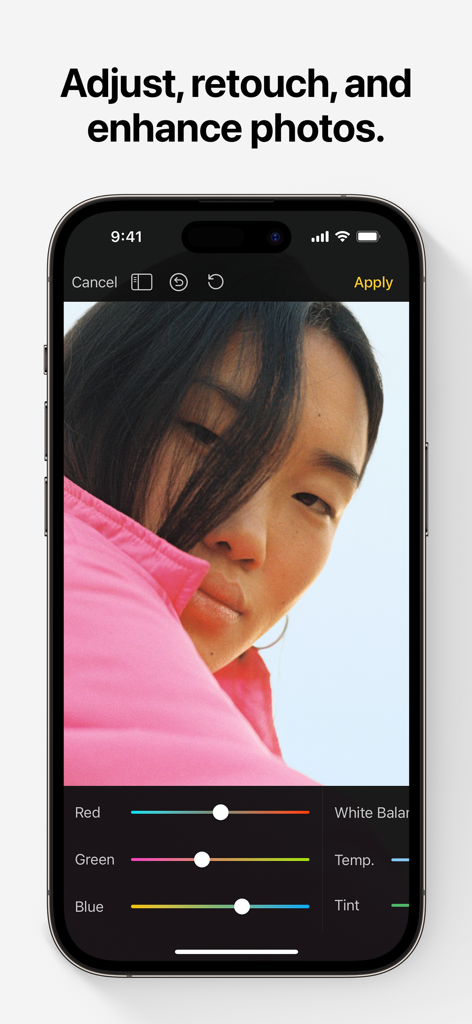
Interfaz de edición de fotos de Pixelmator en iPhone con herramientas de ajuste de color.
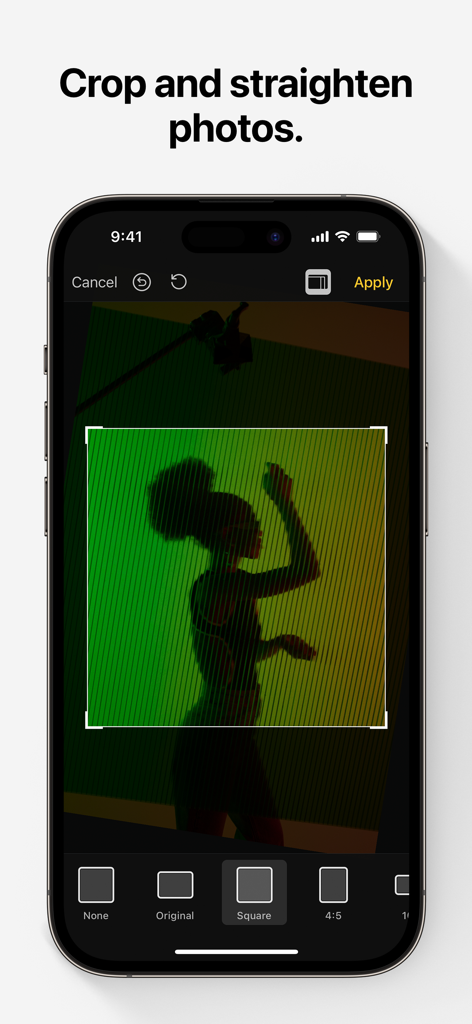
Interfaz de la aplicación de edición de fotos Pixelmator mostrando la función de recorte y enderezamiento en un iPhone
Herramientas de diseño profesional, perfeccionadas para móviles
Las herramientas que hacen destacar esta app, elegida por 817K+ usuarios.
✨
Magia impulsada por IA
Ahorra tiempo con herramientas de aprendizaje automático que seleccionan sujetos, eliminan fondos y borran imperfecciones con un solo toque.
🎨
Capas avanzadas
Crea folletos profesionales, logotipos y arte utilizando estilos de capa no destructivos, modos de fusión y formas vectoriales precisas para un control creativo total.
✏️
Pintura digital natural
Convierte tu iPad en un lienzo con pinceles diseñados por artistas y compatibilidad total con Apple Pencil, con sensibilidad a la presión, inclinación y rechazo de palma para una sensación realista.
Sobre la app
Todo lo que necesitas saber sobre Pixelmator.
Descripción
Pixelmator is a powerful, full-featured, layer-based image editor that lets you add shapes, images, and text to create beautiful image compositions, touch up and enhance images, sketch, and paint on iPad and iPhone alike.
Designed exclusively for iOS and iPadOS, Pixelmator takes full advantage of the latest iOS and iPadOS 17 features and technologies, giving you innovative, fast, and powerful tools.
Create Eye-Catching Designs
- Combine words, shapes, and images to create breathtaking artwork right on your iPhone and iPad
- Apply non-destructive layer styles like shadows, outlines, gradient fills, and more
- Insert, group, and blend layers of an image
- Easily add, combine, and customize shapes
- Blend layers, shapes, and text using any of the blending modes
- Use precise selection tools to edit areas of an image
- Automatically select subjects in images with the machine learning-powered Select Subject
- Crop, arrange, and rotate objects and layers with pixel-perfect precision
- Easily remove the background of images or cut and paste objects from one image to another
Add Shapes and Text
- Create flyers, logos, and other compositions using vector shapes and their styling options
- Customize Smart Shapes with easy-to-use controls
- Add text and make it look gorgeous with 24 pre-designed text styles
- Change the font, size, alignment, line spacing, use custom fonts, and more
Paint and Sketch
- Paint stunning images right on your iPhone and iPad
- Choose from over artist-designed brushes and numerous painting techniques
- Paint with near-natural wetness effect of watercolor and crayon brushes
- Create stunning pixel art images with the custom-designed Pixel brush
- Paint with incredible detail thanks to the double texture brush technology
- Vary the speed of your stroke to change the thickness of some of the brushes
- Easily select and fine-tune colors with a full-featured color picker
- Instantly choose colors right from your image with the Eyedropper
- Paint more naturally than ever with the Apple Pencil, featuring palm rejection, pressure, tilt, and acceleration sensitivity
Edit and Enhance Photos
- Get started with dozens of beautifully designed templates
- Instantly improve your photos with single-tap color presets
- Take full control over the tonal range of your image with levels and curves
- Easily remove color casts and set the right white balance
- Wipe away image imperfections, skin blemishes, and unwanted objects with the Repair tool
- Duplicate areas of your image with the easy-to-use Clone tool
- Pinch, bump, twirl, or warp areas of an image with powerful, Metal-based Distort tools
- Blur, sharpen, lighten, or darken areas of an image
- Choose from dozens of breathtaking effects to subtly improve or completely change the look of an image
- Open and edit images of up to 256 megapixels
Export and Share Images
- Optimize images for the web using quality, color depth, and size settings
- Export images to Files, iCloud, or open in other apps using a file format of your choice
- Using the integrated share extension, easily share your artwork with friends and family using Mail, AirDrop, or post it to social platforms like Instagram, Twitter, or Facebook
Compatibility
- Open and save images using HEIF, JPEG, PNG, and TIFF formats
- Work with multilayered Pixelmator Pro and Adobe Photoshop documents
- Save your edited images directly to Photos
- Create, edit, and keep all your images up to date on all your devices thanks to iCloud support
- External keyboard support with over 70 keyboard shortcuts
Built for iPhone and iPad
- Pixelmator is meticulously thought through and created from the ground up for iPhone and iPad devices
- Designed to take full advantage of powerful iOS and iPadOS features and technologies — iCloud Drive, Photos extension, Split View, and more
- Thanks to Apple silicon, Metal, Core Image, and Core Animation, Pixelmator delivers state-of-the-art performance and real-time responsiveness
Última versión
3.1.16
Tamaño
409.8 MB
Fecha de lanzamiento
24 oct 2014
¿Listo para diseñar sin límites?
Unete a más de 800.000 creadores y experimenta edición de imágenes, pintura y diseño de nivel profesional directamente en tu iPhone y iPad.
FAQ
Preguntas Frecuentes
Todo lo que necesitas saber sobre Pixelmator
¿Qué es Pixelmator Classic iOS?
Pixelmator Classic iOS es un editor de imágenes potente, completo y basado en capas para iPad y iPhone. Permite a los usuarios crear composiciones, retocar fotos, dibujar y pintar directamente en sus dispositivos.
¿Está Pixelmator Classic iOS disponible en dispositivos Android?
No, Pixelmator Classic iOS está diseñado exclusivamente para iOS y iPadOS. Aprovecha las últimas funciones y tecnologías de estos sistemas operativos de Apple, garantizando un rendimiento optimizado.
¿Puede Pixelmator Classic iOS eliminar fondos de imágenes?
Sí, Pixelmator Classic iOS elimina fácilmente los fondos de las imágenes. También cuenta con una herramienta "Seleccionar sujeto" impulsada por aprendizaje automático para la selección automática del sujeto y permite cortar y pegar objetos.
¿Es compatible Pixelmator Classic iOS con la edición basada en capas?
Sí, Pixelmator Classic iOS es un editor de imágenes basado en capas. Admite la inserción, agrupación, mezcla de capas y la aplicación de estilos de capa no destructivos como sombras y rellenos degradados para diseños complejos.
¿Cómo puedo agregar texto a las imágenes en Pixelmator Classic iOS?
Pixelmator Classic iOS permite agregar texto a las imágenes. Proporciona 24 estilos de texto prediseñados y controles completos para cambiar la fuente, el tamaño, la alineación, el espaciado entre líneas y usar fuentes personalizadas.
¿Es compatible Pixelmator Classic iOS con el Apple Pencil para pintar?
Sí, Pixelmator Classic iOS es compatible con el Apple Pencil. Ofrece rechazo de palma, sensibilidad a la presión, inclinación y aceleración, proporcionando una experiencia de pintura y dibujo natural y detallada en dispositivos compatibles.
¿Qué herramientas de ajuste de fotos están disponibles en Pixelmator Classic iOS?
Pixelmator Classic iOS incluye una herramienta de Reparación, una herramienta de Clonar y herramientas de Distorsión basadas en Metal. También ofrece niveles, curvas, balance de blancos y varios efectos para ajustar, retocar y mejorar fotos.
¿Cuál es el tamaño máximo de imagen que puede abrir Pixelmator Classic iOS?
Pixelmator Classic iOS puede abrir y editar imágenes de hasta 256 megapíxeles. Esta capacidad garantiza la compatibilidad con fotografía de alta resolución y proyectos de diseño gráfico detallados en iOS y iPadOS.
¿Qué formatos de archivo admite Pixelmator Classic iOS?
Pixelmator Classic iOS admite la apertura y el guardado de imágenes en formatos HEIF, JPEG, PNG y TIFF. También funciona con documentos de Pixelmator Pro y Adobe Photoshop multicapa para una amplia compatibilidad.
Sí, Pixelmator Classic iOS permite a los usuarios recortar y enderezar fotos. La captura de pantalla #5 muestra la interfaz de recorte, que ofrece varias opciones de relación de aspecto como Cuadrado y 4:5 para ajustes precisos.
App information, icons, screenshots, and descriptions displayed on this page are sourced from the Apple App Store and are the property of their respective developers. Download estimates and rankings are based on MWM's proprietary models and may not reflect actual figures. This page is provided for informational and analytical purposes only.
Believe this page infringes your intellectual property? File a dispute