PlayOn Cloud - Streaming DVR

PlayOn Cloud - Streaming DVR

Descargar en App Store
Logo de PlayOn Cloud - Streaming DVR

PlayOn Cloud: Tu DVR universal de streaming y eliminador de anuncios

Graba películas y series de Netflix, Disney+ y Hulu en la nube. Salta los comerciales, evita los límites de descarga y conserva tus favoritos para siempre para verlos sin conexión, en cualquier momento y lugar.

Editor

MediaMall Technologies, Inc.

Categoría

Entertainment

Descargas

1M+

Valoración

4.3/5

Total valoraciones

4K+

Idiomas

-

Tu DVR de streaming en acción

Descubre la interfaz utilizada por 1M+ usuarios.

Logotipo y eslogan de PlayOn Cloud para el primer DVR de streaming del mundo con personas usando dispositivos móviles
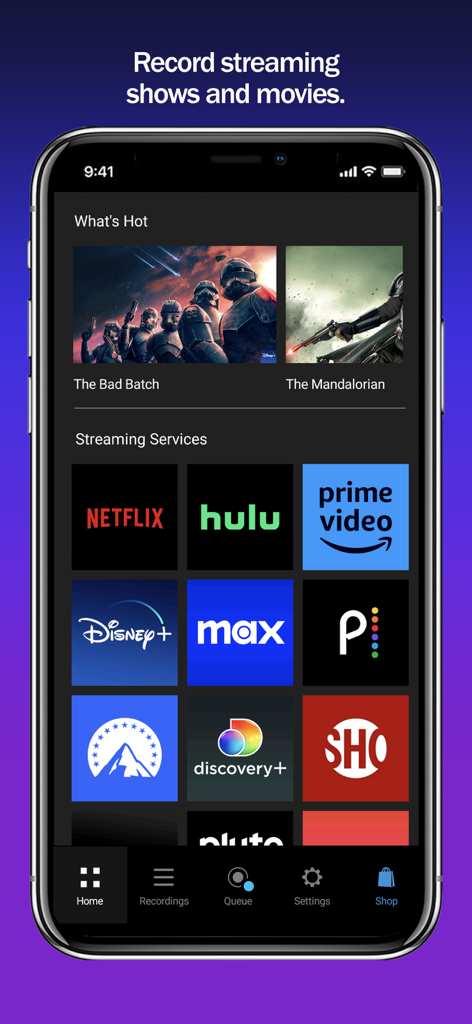
Logotipo y eslogan de PlayOn Cloud para el primer DVR de streaming del mundo con personas usando dispositivos móviles

Pantalla de inicio de la aplicación PlayOn Cloud que muestra iconos de servicios de streaming como Netflix, Hulu y Prime Video
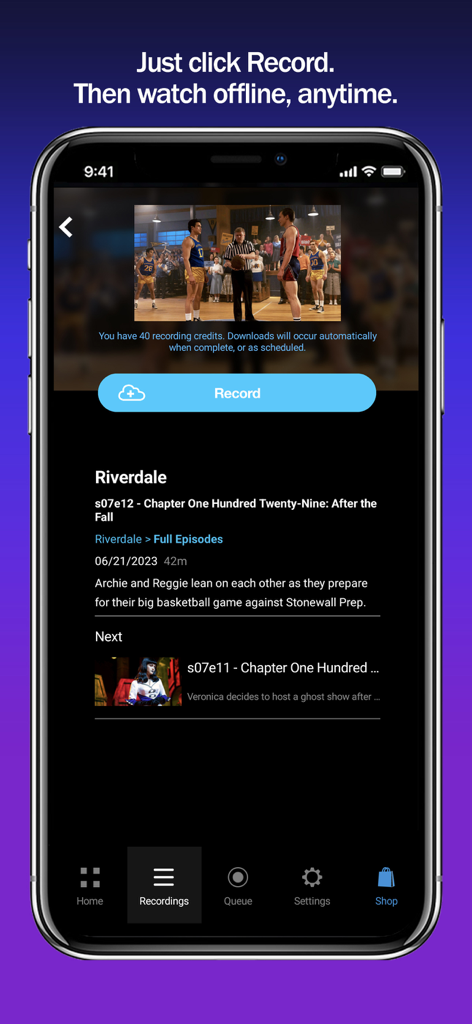
Pantalla de inicio de la aplicación PlayOn Cloud que muestra iconos de servicios de streaming como Netflix, Hulu y Prime Video

Interfaz de la aplicación PlayOn Cloud que muestra el botón de grabación para descargar un episodio de televisión para ver sin conexión
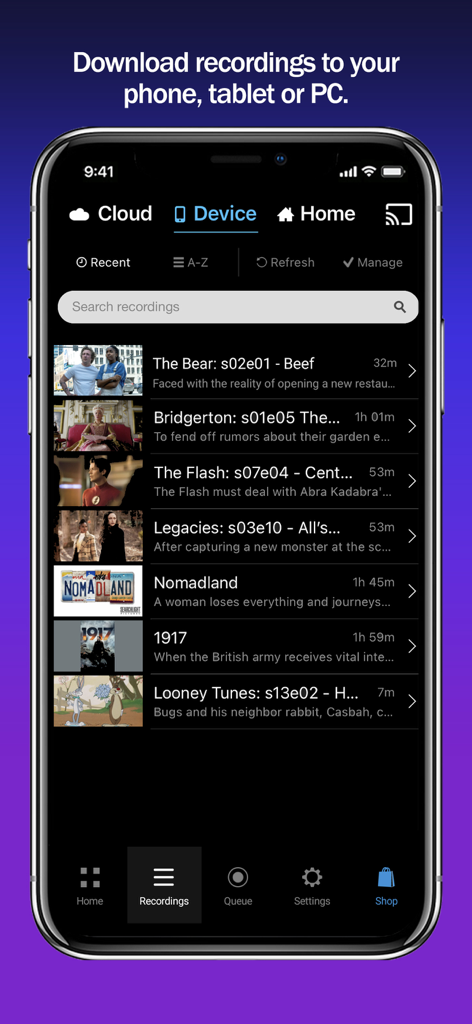
Interfaz de la aplicación PlayOn Cloud que muestra el botón de grabación para descargar un episodio de televisión para ver sin conexión

Interfaz de la aplicación PlayOn Cloud que muestra una lista de programas de televisión y películas descargados para ver sin conexión, incluyendo títulos como The Bear y Bridgerton.

Interfaz de la aplicación PlayOn Cloud que muestra una lista de programas de televisión y películas descargados para ver sin conexión, incluyendo títulos como The Bear y Bridgerton.

Tu streaming, sin limitaciones

Las herramientas que hacen destacar esta app, elegida por 1M+ usuarios.

⏭️

Omisión automática de anuncios

Deja de perder el tiempo. Graba desde los planes económicos con anuncios de Netflix, Hulu o Disney+ y salta los comerciales automáticamente durante la reproducción.

✈️

Verdadera portabilidad sin conexión

El compañero de viaje perfecto. Descarga tus grabaciones en tu teléfono, tableta o PC para verlas en tu trayecto diario o en vuelos largos sin usar datos.

📦

Archivo de video permanente

No vuelvas a perder una serie. A diferencia de las descargas estándar en la aplicación, las grabaciones de PlayOn nunca caducan y siguen siendo tuyas aunque el título sea eliminado del servicio de streaming.

Sobre la app

Todo lo que necesitas saber sobre PlayOn Cloud - Streaming DVR.

Descripción

Record and download any streaming video from Netflix, Disney+, Hulu, Amazon Prime, HBO Max, Peacock, Paramount+, The CW, Discovery+, Showtime, STARZ, Vudu, Pluto, Tubi, CBS, NBC, ABC, FOX, PBS, The Roku Channel, and BBC iPlayer, Acorn, Xfinity, and Spectrum. PlayOn Cloud downloads never expire. Download Big Bang Theory, The Bear, House of Dragon, Superman & Lois, Star Trek: Strange New Worlds, Yellowstone, Gotham Knights, Chicago Fire, Grey's Anatomy, or any of your favorite movies and shows; watch anytime, anywhere, even offline. Save hundreds of dollars a year by subscribing to the Ad-supported tiers of Netflix, Hulu, Disney+, HBO Max, Peacock, and Paramount+ and then skip over the ads when you watch with PlayOn (just like you do with your cable DVR). Record and download videos from Netflix before they go offline then watch them anywhere, anytime, even after they have been removed from Netflix. No need to select only the videos that Netflix lets you download, with PlayOn Cloud you can download ANY Netflix or Hulu video. Record and download Disney+ videos to watch offline. The simple PlayOn Cloud app gives you easy access to download all streaming videos from Netflix, Disney+, Hulu, Amazon Prime, HBO Max, Peacock, Paramount+, The CW, Discovery+, Showtime, STARZ, Vudu, Pluto, Tubi, CBS, NBC, ABC, FOX, PBS, The Roku Channel, and BBC iPlayer, Acorn, Xfinity, and Spectrum.– over 20 of the most popular streaming services. Love House of Dragon, Game of Thrones, Jack Ryan or want to watch Moon Knight when you’re offline? Simply select the show you want and hit record. Once recorded, a streaming show or movie will be available for you to download to your mobile device or PC. You can even set it to automatically download to your phone, tablet, or TV as soon as the recording is finished. You can skip right over the recordings automatically when you watch. You can even watch your recordings on your Roku, Chromecast, Fire TV, or Apple TV (and skip the recordings). The recording happens in the PlayOn Cloud so no data is used to make the recording. Once your PlayOn Cloud recording is downloaded, you can watch it anytime and anywhere. You can watch it on your big screen TV with your Roku, Chromecast, Fire TV, or Apple TV. No more worrying about a Netflix video leaving. You can even download it to your Mac, PC or other device. No more WiFi requirement to watch on your mobile device – you can download Netflix and watch when you're not on WiFi without using data. Want to watch your downloaded PlayOn Cloud recordings on your TV? You can cast to your TV with Roku, Chromecast or Fire TV or AirPlay it to your Apple TV. Have a long flight tomorrow? Queue up Game of Thrones, Jack Ryan or The Mandalorian tonight and they’ll be downloaded and waiting when you take off. Long subway ride to work? With PlayOn Cloud, you’ll be watching downloaded Netflix, The CW, or Disney+ videos the entire time. Need a selection of safe shows for your kids to watch? PlayOn Cloud makes it easy to fill up your kid's device with safe streaming shows - and watch them without using any cellular data, or watching any commercials. When you watch recordings that have commercials, you have an option to automatically skip the ads. How great is that? Want to make PlayOn Cloud even more powerful? Get an optional PlayOn Cloud Storage and Credit plan. You'll get a week to make 7 free recordings. After that you'll be billed $4.99 per month for 30 recordings and 100GB cloud storage. You’ll be charged as a recurring transaction through your iTunes account. Your subscription will automatically renew unless canceled at least 24 hours before the end of the current billing period. Your account will be charged for renewal within 24 hours prior to the end of the current period. You can manage your subscription and turn off auto-renewal by going to your iTunes Account Settings after purchase. Terms of Use: https://www.playon.tv/eula Privacy Policy: http://www.playon.tv/privacy

Última versión

1.2.127.37153

Tamaño

155.0 MB

Fecha de lanzamiento

3 oct 2016

Toma el control de tu streaming hoy mismo

Salta los anuncios, ahorra datos y conserva tus series favoritas para siempre. Únete a más de 1 millón de usuarios y obtén tus primeras 7 grabaciones gratis.

Descargar en App Store

App information, icons, screenshots, and descriptions displayed on this page are sourced from the Apple App Store and are the property of their respective developers. Download estimates and rankings are based on MWM's proprietary models and may not reflect actual figures. This page is provided for informational and analytical purposes only.

Believe this page infringes your intellectual property? File a dispute