
Esta página no es una página oficial de la aplicación ni de su desarrollador, sino una publicación editorial independiente creada con fines informativos y de comentario. Salvo que se indique expresamente lo contrario, ni la aplicación ni su desarrollador están afiliados, respaldados, patrocinados, autorizados ni conectados oficialmente con MWM, Apple, Google Play, el editor de la aplicación ni su desarrollador, y nada en esta página implica que la aplicación haya sido desarrollada utilizando los servicios de MWM. Todas las marcas comerciales, logotipos, capturas de pantalla y demás contenidos son propiedad de sus respectivos propietarios.


PrinterShare
La atadura del cable ha muerto. Esta aplicación libera tus documentos, enviándolos a cualquier impresora, en cualquier lugar.
Descargas
1M+Valoración
Total valoraciones
8.5KEditor
Categoría
ProductivityIdiomas
26Última versión
4.5.1Tamaño
50.3 MBFecha de lanzamiento
4 jun 2010Evaluación de sus características principales para usuarios móviles y pequeñas empresas.
Análisis de Funcionalidades Clave de PrinterShare
Detección y Compatibilidad Amplia con Impresoras Wi-Fi
La aplicación ofrece la capacidad de detectar automáticamente miles de impresoras Wi-Fi y sugiere drivers para modelos no directamente soportados, garantizando una amplia cobertura.
Impresión de Contenido Variado desde Dispositivos Móviles
Permite a los usuarios imprimir fotos, documentos PDF, contactos, páginas web y contenido compartido desde otras aplicaciones o el portapapeles, abarcando una gran variedad de necesidades de impresión.
Impresión Universal a Través de Aplicación de Escritorio
Esta herramienta facilita la impresión a cualquier impresora conectada a un ordenador Windows o Mac mediante su aplicación de escritorio complementaria, ampliando significativamente la compatibilidad.
Capacidad de Impresión Remota a Través de Internet
La aplicación permite a los usuarios imprimir a impresoras ubicadas en cualquier parte del mundo, utilizando la aplicación de escritorio y una cuenta de consola registrada, ideal para entornos empresariales o remotos.
Opciones Flexibles de Conexión Wi-Fi
Ofrece la posibilidad de imprimir tanto en impresoras con Wi-Fi Directo como en aquellas conectadas a través de una red Wi-Fi existente mediante un router, proporcionando flexibilidad de conexión.
Función Integrada para Guardar como PDF
Esta herramienta cuenta con una opción para guardar cualquier contenido imprimible directamente como un archivo PDF, ideal para archivado digital o distribución sin necesidad de impresión física.
Las siguientes capturas de pantalla y la descripción provienen directamente del listado oficial de la tienda de la aplicación y son propiedad del desarrollador.
App Store
Capturas
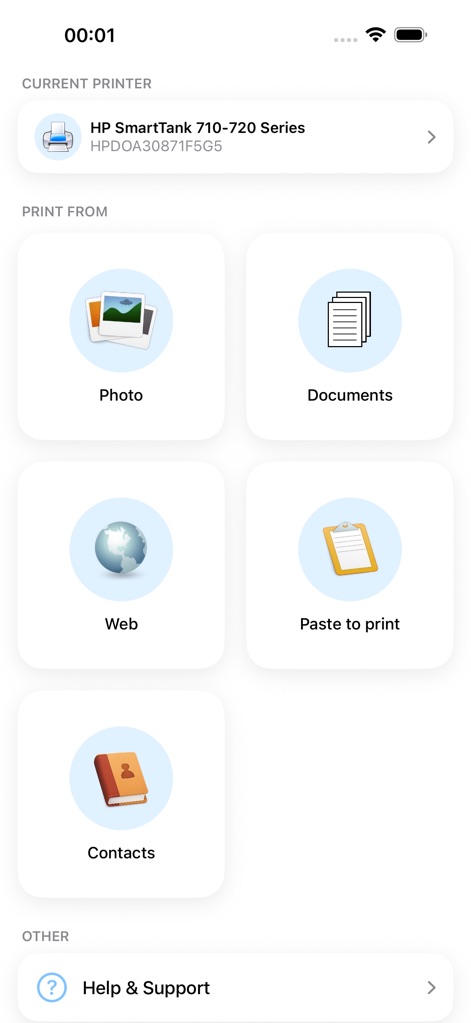
La interfaz principal de la aplicación muestra la impresora conectada y una selección de fuentes de impresión como 'Photo' y 'Documents', facilitando a los usuarios el inicio rápido de sus tareas de impresión.
Impresión Sencilla y Versátil
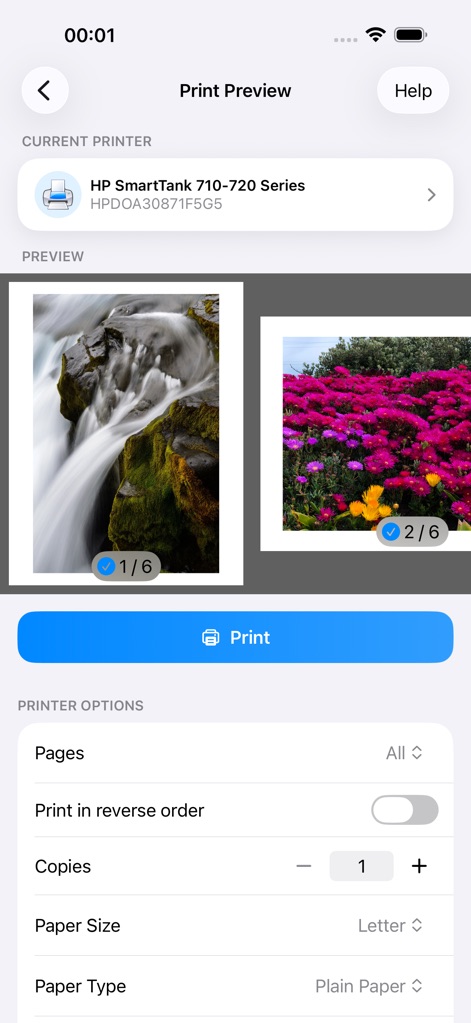
Esta pantalla de 'Print Preview' permite a los usuarios visualizar los elementos seleccionados, como las miniaturas de imágenes, y ajustar opciones de impresión detalladas como el 'Paper Size' y el número de 'Copies' antes de imprimir.
Personaliza Tu Impresión
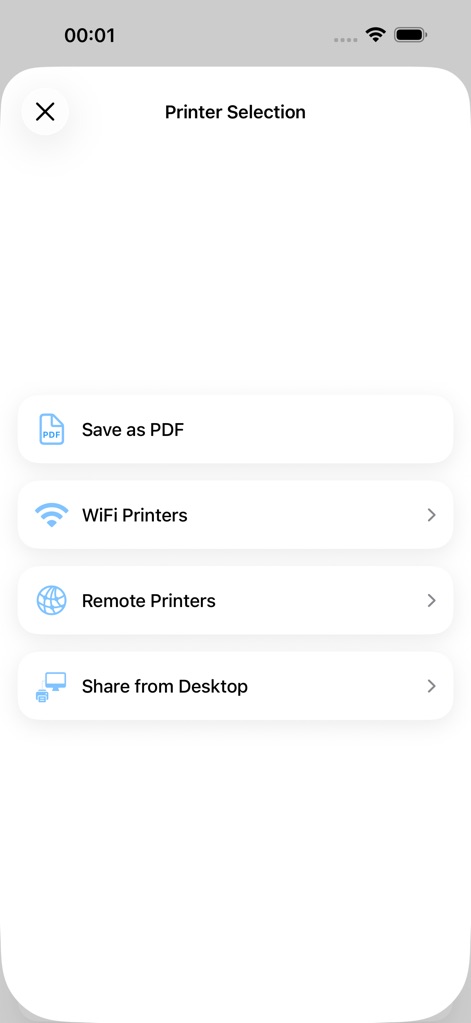
Desde esta vista de 'Printer Selection', los usuarios pueden elegir entre diferentes métodos de impresión, incluyendo 'WiFi Printers' y la capacidad de 'Save as PDF', ofreciendo flexibilidad para diversas necesidades de salida.
Múltiples Opciones de Salida
Descripción
Download
Apps Similares
Apps mejor clasificadas en la misma categoría

ChatGPT
OpenAI OpCo, LLC

Google Gemini
Google LLC

Grok
X.AI Corporation

Gmail - Email by Google
Google LLC

千问 - 阿里最强大模型官方AI助手
Shanghai Zhixin Puhui Technology Co., Ltd.

Google Drive
Google LLC

Microsoft Authenticator
Microsoft Corporation

Google Sheets
Google LLC

Google Docs
Google LLC
Esta página no es una página oficial de la aplicación ni de su desarrollador, sino una publicación editorial independiente creada con fines informativos y de comentario. Salvo que se indique expresamente lo contrario, ni la aplicación ni su desarrollador están afiliados, respaldados, patrocinados, autorizados ni conectados oficialmente con MWM, Apple, Google Play, el editor de la aplicación ni su desarrollador, y nada en esta página implica que la aplicación haya sido desarrollada utilizando los servicios de MWM. Todas las marcas comerciales, logotipos, capturas de pantalla y demás contenidos son propiedad de sus respectivos propietarios.