PrompterPal
PrompterPal
Descargar en App Store

Esta página no es una página oficial de la aplicación ni de su desarrollador, sino una publicación editorial independiente creada con fines informativos y de comentario. Salvo que se indique expresamente lo contrario, ni la aplicación ni su desarrollador están afiliados, respaldados, patrocinados, autorizados ni conectados oficialmente con MWM, Apple, Google Play, el editor de la aplicación ni su desarrollador, y nada en esta página implica que la aplicación haya sido desarrollada utilizando los servicios de MWM. Todas las marcas comerciales, logotipos, capturas de pantalla y demás contenidos son propiedad de sus respectivos propietarios.


Logo de PrompterPal
Descargar en App Store

PrompterPal

Transforma tu iPad y iPhone en un prompter de calidad de estudio. Domina cada presentación con desplazamiento inteligente, reconocimiento de voz y control remoto multidispositivo diseñado para profesionales.

Cifras Clave

Descargas

68K+

Valoración

3.5/5

Total valoraciones

0

Editor

Sunshine Valley Systems

Categoría

Productivity

Idiomas

1

Última versión

7.5.11

Tamaño

101.3 MB

Fecha de lanzamiento

1 abr 2010
Funciones

Domina tu Presentación con Control Profesional

Desde salas de juntas de alto nivel hasta estudios de YouTube en solitario, PrompterPal te proporciona las herramientas de precisión y la integración de hardware que necesitas para hablar con total confianza.

Control Remoto Total

Mantén un contacto visual perfecto con tu audiencia. Utiliza tu Apple Watch, un teclado Bluetooth o incluso un mando de juegos para gestionar la velocidad de tu guion a distancia.

Hardware Profesional y Duplicación

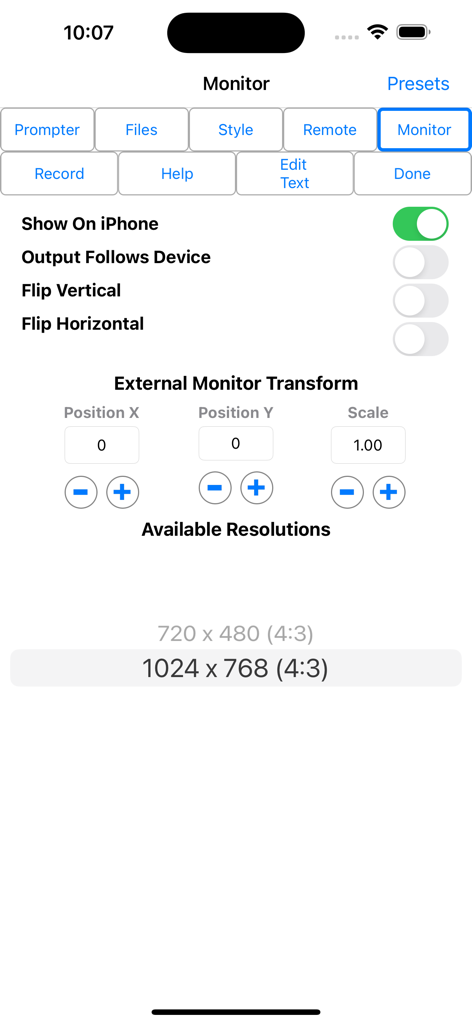
Transforma cualquier espacio en un estudio profesional con soporte para monitor externo y duplicación horizontal, perfectamente compatible con cristal divisor de alta gama.

Las siguientes capturas de pantalla y la descripción provienen directamente del listado oficial de la tienda de la aplicación y son propiedad del desarrollador.

App Store

Capturas
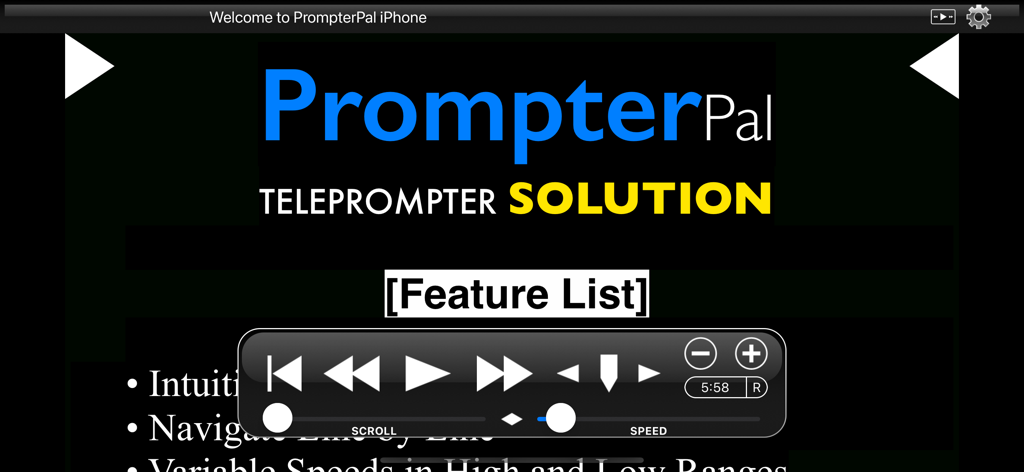
PrompterPal - Interfaz de la aplicación teleprompter PrompterPal mostrando controles de reproducción y velocidad

Interfaz de la aplicación teleprompter PrompterPal mostrando controles de reproducción y velocidad
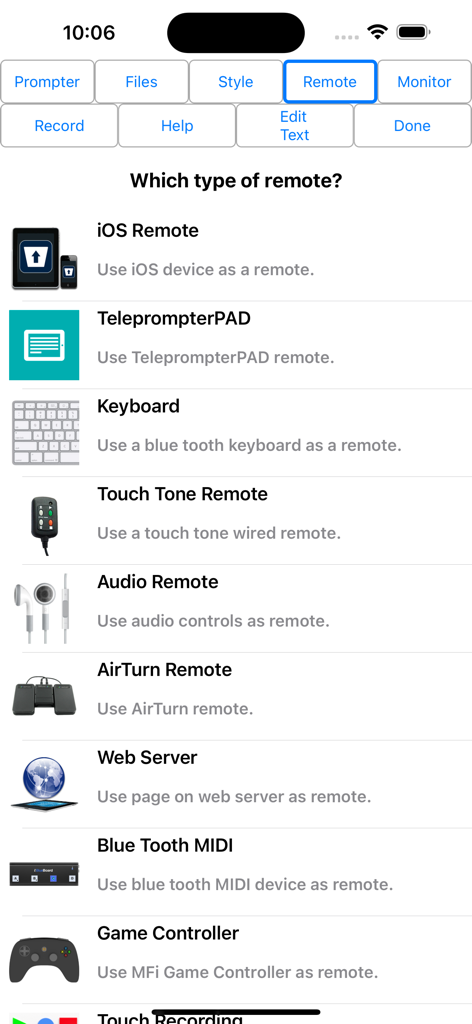
PrompterPal - Interfaz de PrompterPal mostrando varias opciones de control remoto, incluyendo teclado y mando de juegos.
Interfaz de PrompterPal mostrando varias opciones de control remoto, incluyendo teclado y mando de juegos.

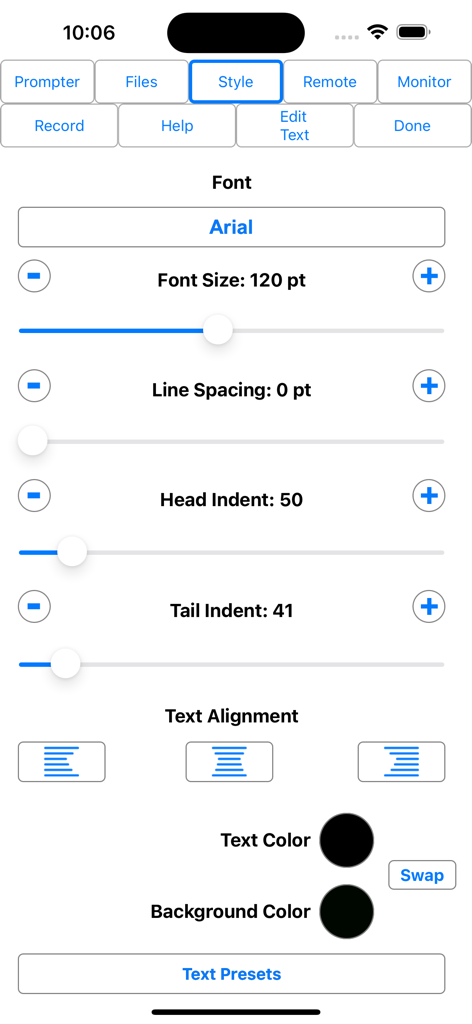
PrompterPal - Interfaz de la aplicación PrompterPal mostrando opciones de personalización de fuentes y estilo de texto
Interfaz de la aplicación PrompterPal mostrando opciones de personalización de fuentes y estilo de texto

PrompterPal - Interfaz de la aplicación PrompterPal mostrando la configuración del monitor externo y las opciones de duplicación de texto.

Interfaz de la aplicación PrompterPal mostrando la configuración del monitor externo y las opciones de duplicación de texto.

Descripción

PrompterPal turns your iPad and iPhone into a teleprompter or speech assistant! PrompterPal automatically scrolls your speech for you to allow you to engage your audience and not worry about losing your place. Various forms of remote controls are possible as well as an external monitor. Share files between PrompterPal and a computer in several different ways. Check out PromptRemote, the free remote for PrompterPal. Easily configure the appearance of the text content to suit your presentation requirements including... • Font • Font Size • Text Color • Background Color • Head and Tail Indent • Line Spacing • Text Style Prompter features include: • Import File Types: PrompterPal (.prompterPal), Text (.txt), Rich Text (.rtf), Word (.docx) and HTML • Export File Types: PrompterPal (.prompterPal), Text (.txt), Rich Text (.rtf) and HTML • Five Marker Styles: Bar, Marker, Two Line, Inverted, Two Markers • Scroll Speed: Variable with two speed ranges. • Display mirroring for using a reflective teleprompter • Countdown: Two styles • Bidirectional Timer • External Monitor Support • Built-in user manual • Customizable title bar to give access to the features that are important to your workflow. • More... • File Sharing PrompterPal offers a variety of file sharing methods to assist in moving files between devices as well as a computer. - iTunes File Sharing: Copy files to and from PrompterPal using iTunes. - Email Files: Email files from PrompterPal and open files from other apps such as Mail. - iOS File Sharing: Send files directly from one PrompterPal to another. - Web Server: Host a web page that can be used from any computer to upload and download files. - Web Server Browser: Use built-in browser to load web page from another web server to download files or the entire database from another PrompterPal. - AirDrop: Use Apple's AirDrop to send files. - iCloud: Upload and download files from iCloud Drive. - Dropbox: Upload and download files from your Dropbox account. - Google Drive: Upload and download files from your Google Drive account. - iOS Remote Sharing: Send files and databases between host and peers. • Remote Control PrompterPal has a variety different remote options. - iOS Remote: Use another iOS device running PrompterPal or PromptRemote to control PrompterPal. Synchronize multiple devices. - Blue Tooth Keyboard: Assign keys of a blue tooth keyboard to control prompter features. - Touch Tone Remote: Use touch tone signals playing into the microphone line-in to control prompter features. - Audio Remote: Use the headphone in-line remote or other audio remote to control prompter features. - AirTurn Remote: Use wireless remotes from www.airturn.com to control prompter features. - Web Server Remote: Use a web page hosted on the network to control the prompter features. - Apple Watch: Use the Apple Watch to remotely control prompter functions. - Bluetooth MIDI: Use IK Multimedia's iRig Blueboard to control prompter functions. - Game Controller: Use MFi game controllers to control prompter functions. - Touch Recording: Record and playback your interactions with the prompter. - Speech Recognition: Use your speech to control the script using key words or the text content of the script. - Key Commands: Configure key combinations to control prompter features. This feature is enabled at all times. • Recording - Use either camera. - Movable video preview overlaying the script. - Share your video in a variety of ways. • Monitor Out Use an external monitor connected to the dock connector or AppleTV to display the prompter content. - Choose output resolution from supported resolutions. - Configure output to match device, or device to match output. - Adjust transform and mirroring for external display independently of device. - Works great with AppleTV and AirPlay. PrompterPal is perfect for public speakers, public broadcasting and electronic news gathering, school and business presentations and more!

Download

Descargar en App Store

Esta página no es una página oficial de la aplicación ni de su desarrollador, sino una publicación editorial independiente creada con fines informativos y de comentario. Salvo que se indique expresamente lo contrario, ni la aplicación ni su desarrollador están afiliados, respaldados, patrocinados, autorizados ni conectados oficialmente con MWM, Apple, Google Play, el editor de la aplicación ni su desarrollador, y nada en esta página implica que la aplicación haya sido desarrollada utilizando los servicios de MWM. Todas las marcas comerciales, logotipos, capturas de pantalla y demás contenidos son propiedad de sus respectivos propietarios.








