TwistedWave Recorder

TwistedWave Recorder


Descargar en App Store
Logo de TwistedWave Recorder

Grabadora TwistedWave: Potencia de Estudio Profesional en tu Bolsillo

El motor de audio rápido, fluido y de alta fidelidad diseñado para prosumidores. Graba en 24 bits, edita con precisión y gestiona archivos masivos sin ralentizar nunca tu flujo de trabajo creativo.

Editor

TwistedWave Software Ltd.

Categoría

Music

Descargas

144K+

Valoración

4.7/5

Total valoraciones

800

Idiomas

2

Precisión al Alcance de tu Mano

Descubre la interfaz utilizada por 144K+ usuarios.
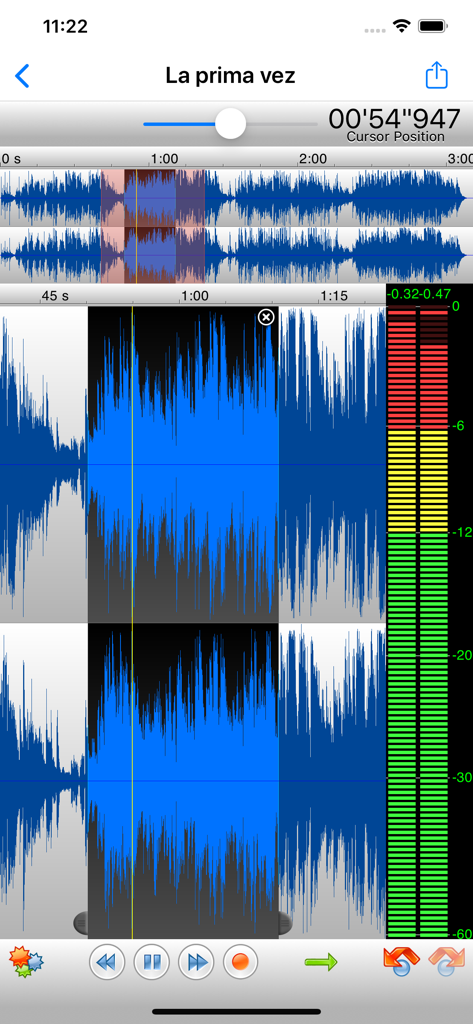
Aplicación móvil Grabadora TwistedWave mostrando formas de onda de audio estéreo y niveles de grabación

Aplicación móvil Grabadora TwistedWave mostrando formas de onda de audio estéreo y niveles de grabación

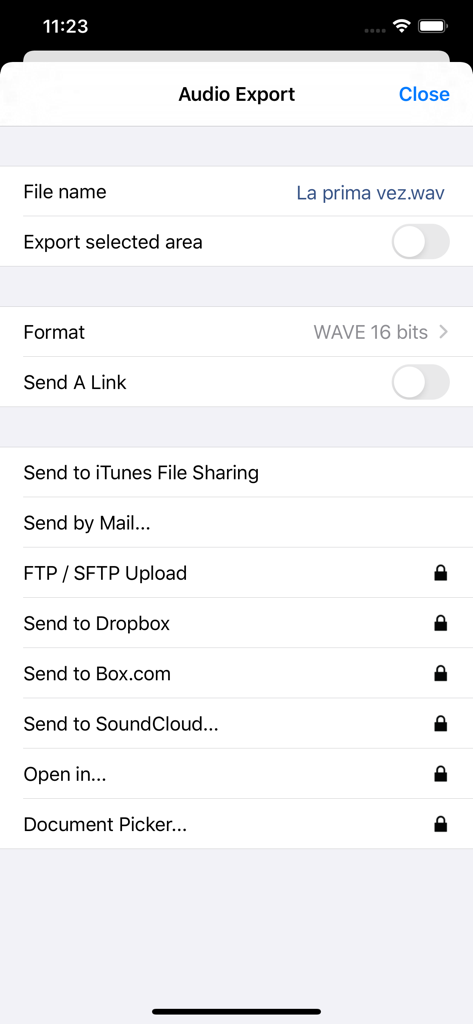
Menú de exportación de audio de Grabadora TwistedWave con opciones de almacenamiento en la nube y formato de archivo.

Menú de exportación de audio de Grabadora TwistedWave con opciones de almacenamiento en la nube y formato de archivo.

Potencia de Clase de Escritorio en tu Estudio Móvil

Las herramientas que hacen destacar esta app, elegida por 144K+ usuarios.

Rendimiento sin Retardos y Alta Resolución

Graba en 24 bits/96 kHz con latencia cero. Nuestro motor está diseñado para manejar archivos masivos de manera fluida, por lo que nunca tendrás que preocuparte por los límites de memoria o fallos durante sesiones críticas.

🎚️

Procesamiento de Grado Profesional

Transforma tu audio con la tecnología estándar de la industria ZTX de estiramiento temporal y soporte completo para extensiones AUv3. Accede a deshacer/rehacer ilimitado y a un conjunto de filtros y efectos profesionales al instante.

🌐

Flujo de Trabajo Profesional sin Fricciones

Transfiere archivos sin esfuerzo con acceso al navegador WiFi o exportaciones directas a SoundCloud, Dropbox y FTP. Integra tus micrófonos externos y aplicaciones Audiobus para una configuración móvil completa.

Sobre la app

Todo lo que necesitas saber sobre TwistedWave Recorder.

Descripción

TwistedWave is a very fast and easy to use audio editor and recorder. Even when working with huge files, it will remain very fast and fluid, and will never run out of memory. TwistedWave Recorder is the free version of TwistedWave Audio Editor. You can use it to record and send audio by email. Once the full editing functionality and the extra export options have been purchased, "TwistedWave Recorder" and "TwistedWave Audio Editor" offer the same feature set. UNIQUE TO TWISTEDWAVE • Very fluid, even with very large files • Unlimited undo / redo history, happens instantly RECORD AUDIO • No duration limit other than the available storage • Up to 24 bit / 96 kHz audio if your audio interface supports it • Record stereo audio with the built-in microphone (iPhone XS or more recent) • Record studio quality audio with an external microphone • Record audio from other music applications with Audiobus APPLY EFFECTS (with in-app purchase) • Precision Time Stretching & Pitch Shifting technology licensed from ZTX • All the AudioUnit extensions (AUv3) available on the App Store can be used with TwistedWave • Cut, copy / paste audio around • Fade in / out • Reverb • Delay / echo • Distortion • Equalizer (parametric, or iPod EQ) • Dynamics processor, can be used as a compressor or a noise gate • Peak limiter to amplify audio without causing distortion • Amplify or normalize the audio to a given level • Filters (low-pass, high-pass, band-pass, low-shelf, high-shelf) • Convert the sampling rate (with SoX' very high quality resampler) • Reverse. Play the file backwards, mostly for fun! MANY FILE FORMATS SUPPORTED • WAV • M4A (AAC or Apple Lossless) • MP3 (Encoded with the LAME MP3 encoder for the best quality) • FLAC • AIFF • CAF MANY IMPORT OPTIONS • Import songs from the music library • Import files from the Files app • Import files from an SD card or USB drive, with the right adapter • Open files sent from other apps • Browser access, send a file to TwistedWave from a device on the same WiFi network MANY EXPORT OPTIONS (with in-app purchase) • Send your files by - Email (available free, without the in-app purchase) - iMessage - SoundCloud - Dropbox - AudioCopy - An FTP or SFTP account - Any app that accepts audio files • Export multiple files in a single ZIP file • Browser access to allow downloading and uploading files from/to TwistedWave • File too large? Just send a link. (30 days for free on TwistedWave's servers) BROWSER ACCESS (with in-app purchase) Connect to the TwistedWave app from a web browser on another device or computer on the same WiFi network, and: • Play and download the files directly from a browser • Send files to TwistedWave by drag and dropping them in the browser

Última versión

1.91

Tamaño

32.7 MB

Fecha de lanzamiento

20 dic 2013

¿Listo para Transformar tu iPhone en un Estudio Profesional?

Únete a más de 144.000 creadores que utilizan la grabadora de audio más fluida y de alto rendimiento en iOS. Comienza gratis y experimenta grabación sin retardo y calidad de 24 bits de grado de estudio hoy mismo.

Descargar en App Store

App information, icons, screenshots, and descriptions displayed on this page are sourced from the Apple App Store and are the property of their respective developers. Download estimates and rankings are based on MWM's proprietary models and may not reflect actual figures. This page is provided for informational and analytical purposes only.

Believe this page infringes your intellectual property? File a dispute