
Esta página no es una página oficial de la aplicación ni de su desarrollador, sino una publicación editorial independiente creada con fines informativos y de comentario. Salvo que se indique expresamente lo contrario, ni la aplicación ni su desarrollador están afiliados, respaldados, patrocinados, autorizados ni conectados oficialmente con MWM, Apple, Google Play, el editor de la aplicación ni su desarrollador, y nada en esta página implica que la aplicación haya sido desarrollada utilizando los servicios de MWM. Todas las marcas comerciales, logotipos, capturas de pantalla y demás contenidos son propiedad de sus respectivos propietarios.


WeatherHub
Proteja su propiedad con alertas instantáneas de fugas, cambios de temperatura y variaciones climáticas. Disfrute de una fácil configuración plug-and-play sin necesidad de registro y sin cuotas mensuales.
Descargas
144K+Valoración
Total valoraciones
200Editor
Categoría
WeatherIdiomas
3Última versión
1.54Tamaño
11.2 MBFecha de lanzamiento
30 ago 2014Proteja lo que Más le Importa
WeatherHub conecta su hogar a su smartphone con sensores profesionales, proporcionando monitorización en tiempo real y tranquilidad sin necesidad de suscripciones o registro personal.
Alertas de Emergencia Instantáneas
Evite reparaciones costosas con notificaciones push inmediatas si se detecta una fuga o si las temperaturas caen por debajo de sus límites personalizados.
Privado y Sin Suscripción
Disfrute de la funcionalidad completa sin registro de cuenta ni cuotas mensuales. Sus datos son suyos con nuestro sistema seguro y anónimo plug-and-play.
Preguntas Frecuentes
Todo lo que necesitas saber sobre WeatherHub
¿Qué es la aplicación WeatherHub?
La aplicación WeatherHub es un sistema de vigilancia doméstica para monitorear diversas condiciones utilizando sensores inalámbricos. Proporciona datos en tiempo real y alertas a su smartphone.
¿Cómo notifica el sistema WeatherHub a los usuarios sobre problemas?
El sistema WeatherHub notifica a los usuarios sobre problemas a través de notificaciones push a su smartphone. Alerta inmediatamente cuando ocurren problemas, permitiendo una acción proactiva.
¿Se requiere registro personal para usar la aplicación WeatherHub?
No, no se requiere registro personal para usar la aplicación WeatherHub. Los usuarios pueden operar la aplicación después de la instalación sin crear una cuenta.
¿Qué hardware se necesita para operar el sistema WeatherHub?
Para operar el sistema WeatherHub, los usuarios necesitan hardware esencial que consiste en una pasarela (gateway) y al menos un sensor de su elección.
¿Pueden los usuarios personalizar los límites de alarma dentro de la aplicación WeatherHub?
Sí, los usuarios pueden personalizar los límites de alarma dentro de la aplicación WeatherHub. La interfaz gráfica de usuario permite establecer umbrales de alarma específicos para cada sensor inalámbrico.
¿Muestra la aplicación WeatherHub lecturas actuales de temperatura y humedad?
Sí, la aplicación WeatherHub muestra lecturas actuales de temperatura y humedad de los sensores conectados. Por ejemplo, "Sample Sensor Humidity Guard" muestra 23.4 °C y 33.0 %.
¿Cuánto tiempo almacena la aplicación WeatherHub datos de sensores estándar?
La aplicación WeatherHub almacena datos de sensores estándar durante 90 días. Algunos sensores especializados ofrecen un historial extendido de hasta 18 meses en la SensorCloud.
¿Pueden los sensores WeatherHub detectar fugas de agua?
Sí, WeatherHub ofrece un sensor detector de agua (n.º de artículo 30.3305.02) que informa si, por ejemplo, una lavadora tiene una fuga.
¿Qué información está disponible a través de la pestaña "Info" en la aplicación WeatherHub?
La pestaña "Info" en la aplicación WeatherHub proporciona información adicional y un video para la instalación. Dirige a los usuarios a www.mobile-alerts.eu o www.tfa-dostmann.de/weatherhub.
¿La aplicación WeatherHub se puede descargar gratis?
Sí, la aplicación WeatherHub se puede descargar gratis desde la AppStore. Sin embargo, requiere hardware separado como una pasarela y sensores para funcionar.
Las siguientes capturas de pantalla y la descripción provienen directamente del listado oficial de la tienda de la aplicación y son propiedad del desarrollador.
App Store
Capturas
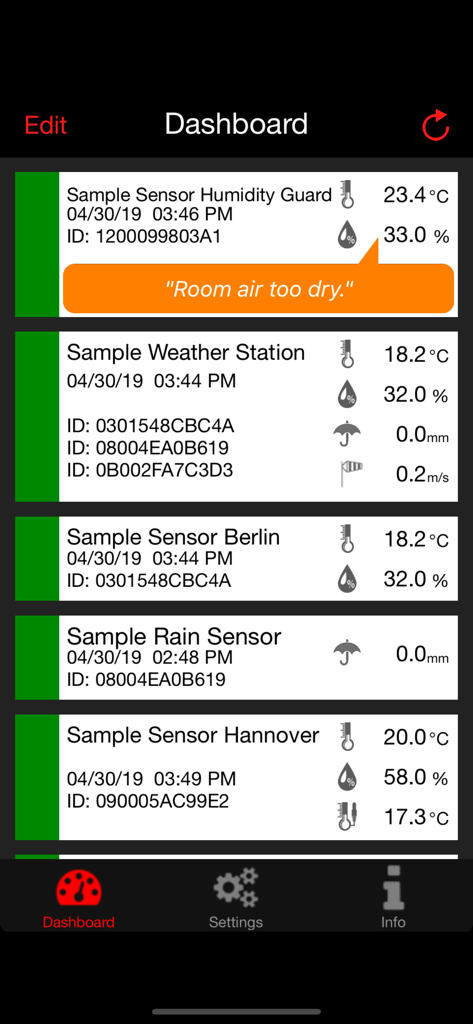
Panel de la aplicación WeatherHub que muestra datos en tiempo real de temperatura, humedad y lluvia de múltiples sensores domésticos inalámbricos.
Descripción
Download
Apps Similares
Apps mejor clasificadas en la misma categoría

墨迹天气-MojiWeather
Beijing MojiFengyun Technology Co.,Ltd.

The Weather Channel - Radar
The Weather Channel

Windy.com
Windyty, SE

天气预报-精准15日天气预报
Chongqing Caochen Technology Co., Ltd.

My Aurora Forecast & Alerts
JRustonApps B.V.

AccuWeather: Weather Forecast
AccuWeather International, Inc.

Weather & Radar - Storm radar
WetterOnline - Meteorologische Dienstleistungen GmbH

天气通
Weibo Internet Technology (China) Co.Ltd.

The Thermometer -Digital-
Vida Apps Incorporated
Esta página no es una página oficial de la aplicación ni de su desarrollador, sino una publicación editorial independiente creada con fines informativos y de comentario. Salvo que se indique expresamente lo contrario, ni la aplicación ni su desarrollador están afiliados, respaldados, patrocinados, autorizados ni conectados oficialmente con MWM, Apple, Google Play, el editor de la aplicación ni su desarrollador, y nada en esta página implica que la aplicación haya sido desarrollada utilizando los servicios de MWM. Todas las marcas comerciales, logotipos, capturas de pantalla y demás contenidos son propiedad de sus respectivos propietarios.