AirTrack Classic
AirTrack Classic
Télécharger sur App Store

Cette page n'est pas une page officielle de l'application ou de son développeur, mais une publication éditoriale indépendante créée à des fins d'information et de commentaire. Sauf indication expresse contraire, ni l'application ni son développeur ne sont affiliés, approuvés, sponsorisés, autorisés ou autrement officiellement liés à MWM, Apple, Google Play, à l'éditeur de l'application ou au développeur de l'application, et rien sur cette page n'implique que l'application a été développée en utilisant les services de MWM. Toutes les marques, logos, captures d'écran et autres contenus restent la propriété de leurs propriétaires respectifs.

Logo de AirTrack Classic
Télécharger sur App Store

AirTrack Classic

Donnez vie à votre simulateur grâce à un écran multifonctions (MFD), un écran de vol principal (PFD) et un centre de contrôle de vol (FMC) de qualité professionnelle sur votre appareil mobile. Surveillez les vols long-courriers à distance, contrôlez votre pilote automatique et profitez d'une intégration parfaite avec MSFS, X-Plane et Navigraph.

Chiffres Clés

Téléchargements

262K+

Note

4.2/5

Nombre d'avis

400

Éditeur

Haversine Ltd

Catégorie

Navigation

Langues

1

Dernière version

3.21

Taille

188.6 MB

Date de sortie

3 août 2010
Fonctionnalités

Intégration professionnelle au poste de pilotage

Transformez votre appareil mobile en une suite avionique haute fidélité. Contrôlez, surveillez et pilotez vos vols virtuels avec la précision d'un véritable cockpit.

Surveillance des vols sans fil

Éloignez-vous de votre bureau sans perdre le contrôle. Surveillez votre altitude, votre vitesse et votre heure d'arrivée estimée depuis n'importe quelle pièce de votre maison grâce à la synchronisation Wi-Fi en temps réel.

Pilote automatique à distance et FMC

Réglez votre MCP, syntonisez vos radios et gérez votre plan de vol via une interface FMC dédiée, transformant ainsi votre iPad en un tableau de bord tactile fonctionnel.

Les captures d'écran et la description suivantes proviennent directement de la fiche officielle de l'application sur le store et sont la propriété du développeur.

App Store

Captures
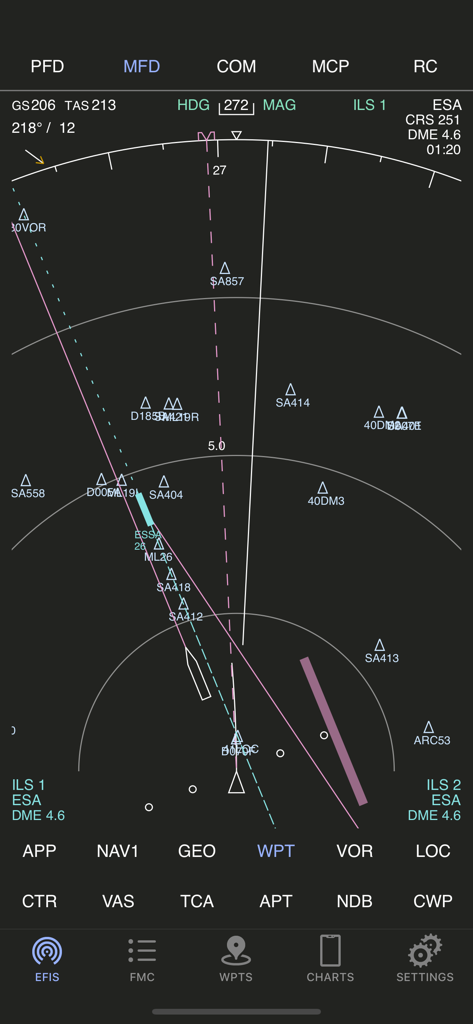
AirTrack Classic - L'application AirTrack Classic affiche un écran multifonction indiquant la navigation de vol et les points de passage.
L'application AirTrack Classic affiche un écran multifonction indiquant la navigation de vol et les points de passage.

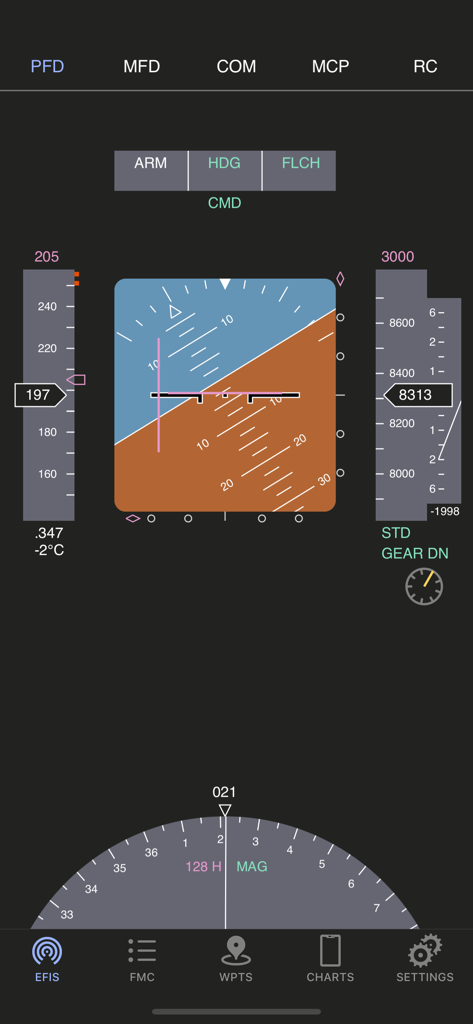
AirTrack Classic - Interface de l'écran de vol principal AirTrack Classic affichant les instruments de vol
Interface de l'écran de vol principal AirTrack Classic affichant les instruments de vol

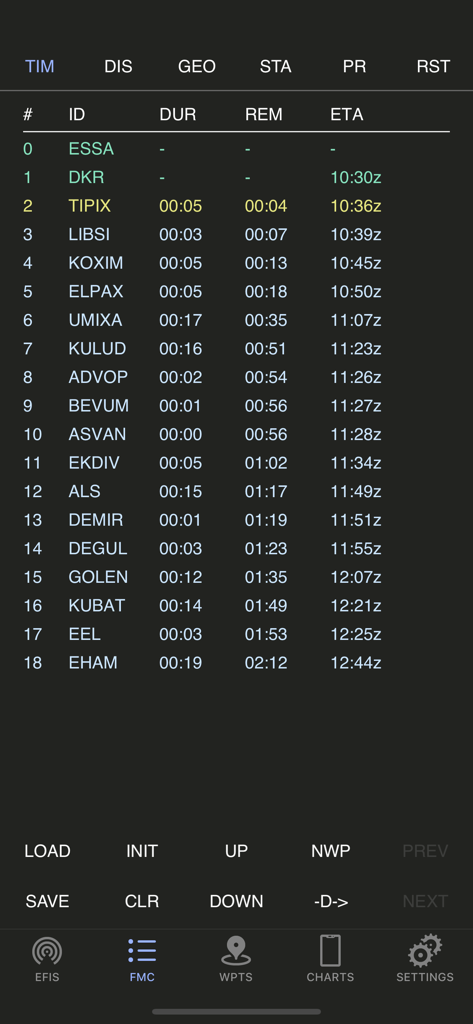
AirTrack Classic - Application AirTrack Classic affichant l'écran du planificateur d'itinéraire de l'ordinateur de gestion de vol
Application AirTrack Classic affichant l'écran du planificateur d'itinéraire de l'ordinateur de gestion de vol

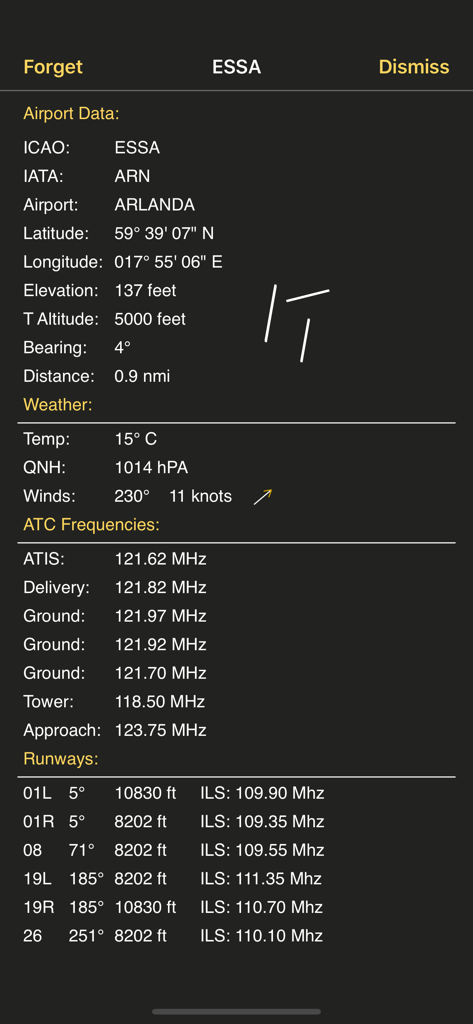
AirTrack Classic - Capture d'écran d'AirTrack Classic montrant des données aéroportuaires détaillées pour ESSA Arlanda, y compris les fréquences météorologiques, le contrôle aérien et les informations sur les pistes.
Capture d'écran d'AirTrack Classic montrant des données aéroportuaires détaillées pour ESSA Arlanda, y compris les fréquences météorologiques, le contrôle aérien et les informations sur les pistes.

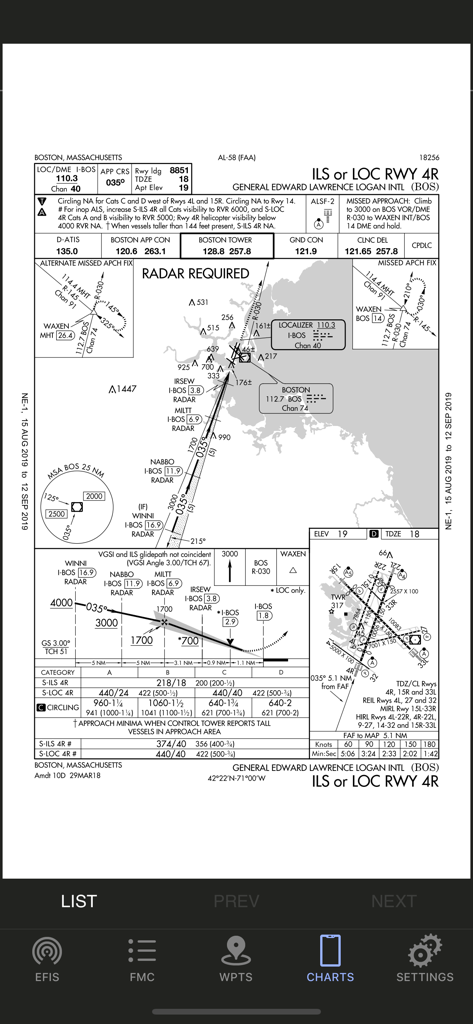
AirTrack Classic - Carte d'approche aux instruments de l'aéroport international Logan de Boston affichée dans l'application AirTrack Classic.

Carte d'approche aux instruments de l'aéroport international Logan de Boston affichée dans l'application AirTrack Classic.

Description

AirTrack integrates with multiple data sources in order to report flight and navigation data wirelessly and in real time. Designed to be used with a Flight Simulator, with the aid of a plugin this application allows you to track your virtual flights in real-time in the palm of your hand, as well as to remotely control your simulated flights. You no longer need to stay glued to the computer in order to know if you're still flying at 39,000 feet, if you're still heading to the right waypoint, how long you've got left or what the weather is going to be like at your destination airport; you can now relax and do it in the garden or anywhere within WiFi reach really and control your flight with your thumb. But if this isn't enough, AirTrack can also use your device's built-in GPS, Accelerometer and Gyro to determine your current movements and attitude and the Internet to download real weather to simulate an aircraft's sensors. Turn your car trip into a flight experience by getting information about your instant position, heading and surrounding waypoints. See yourself in an EFIS style navigation display / primary flight display or plan your multi-leg trip with the built in route planner FMC which gives you real-time information about your waypoints, how far they are and how long it will take you to reach them. With its built-in database of FIX, VOR, NDB and Airports, AirTrack can also be used as a flight simulator companion allowing you to plan and monitor your trip, target a VOR or even perform a full IFR approach without ever needing to look at the screen. The AirTrack features include: - A full Primary Flight Display with speed, altitude, vertical speed, barometric pressure - Also in the PFD, compass, AI with roll/pitch, auto-pilot status and settings. - Instant GS, IAS, MACH, TAS and VS when available. - An MFD with APP, VOR, MAP and PLN mode with centered and expanded views. - The whole world as a map of geo contours in the MFD. - NAV / ADF and ILS / Approach guidance in the PFD and MFD. - An MCP panel to control the Aircraft's Auto-Pilot. - Wind speed and direction indicators. - Next waypoint reporting on the MFD. - Electronic Flight Bag style interface for iPad, - An advanced multimode navigation display. - A multi-leg FMC style route planner. - Enroute Airways decoder. - SID, STAR and Approach procedures decoder. - Bi-directional radio stack. - AutoTransponder Mode. - Customizable waypoints. - Saved waypoints and Nearby waypoints. - Real-Time weather information for airports. - Detailed airport information including runways. - A database of localities worldwide. - Built-in database of intersections, VORs and NDBs. - Support for NAVIGRAPH FMS AIRAC cycles. - Tracking of VATSIM / IVAO/ PilotEdge surrounding air traffic on the MFD. - Tracking of which controllers are online in VATSIM/IVAO. - Auto-tuning of ATC frequencies to COM1/COM2. - Automatic position report generation for oceanic. - Enhanced graphics with high-res Retina Display. - Remote Yoke/Joystick/Rudder for flight simulator. - Support for X-Plane - Support for Flight Simulator 2020 - Support for FS9 and FSX(*) - Cloud Services flight plan and waypoint sync. - Cloud based auto-sync advanced flight planner - Cloud based Approach plate / charts viewer with user charts. - And much more ... (*) Support for the old FS9 and FSX simulators is limited and provided by a third party plugin which is no longer actively maintained.

Download

Télécharger sur App Store

Cette page n'est pas une page officielle de l'application ou de son développeur, mais une publication éditoriale indépendante créée à des fins d'information et de commentaire. Sauf indication expresse contraire, ni l'application ni son développeur ne sont affiliés, approuvés, sponsorisés, autorisés ou autrement officiellement liés à MWM, Apple, Google Play, à l'éditeur de l'application ou au développeur de l'application, et rien sur cette page n'implique que l'application a été développée en utilisant les services de MWM. Toutes les marques, logos, captures d'écran et autres contenus restent la propriété de leurs propriétaires respectifs.