Application Authentificatrice ® : Le standard premium pour votre sécurité numérique
Protégez vos comptes sensibles avec une authentification à deux facteurs de niveau professionnel. Bénéficiez d'une synchronisation multi-appareils transparente, d'une confidentialité avancée contre les regards indiscrets et d'une migration facile depuis Google Authenticator pour une tranquillité d'esprit totale.
Éditeur
Rocket Technology Inc
Catégorie
Productivity
Téléchargements
10K+
Note
4.4/5
Nombre d'avis
700
Langues
33
Découvrez la sécurité professionnelle
Découvrez l'interface utilisée par 10K+ utilisateurs.
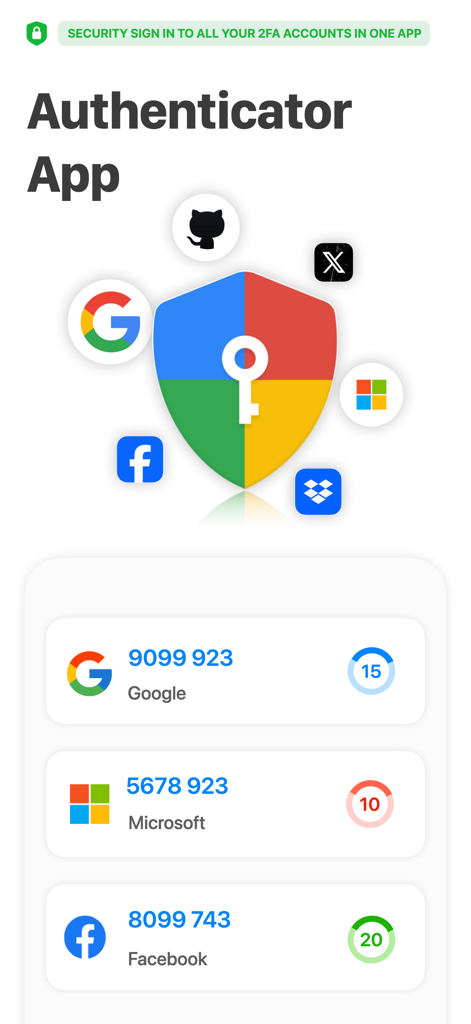
Interface de l'Application Authentificatrice affichant les codes de vérification 2FA pour les comptes Google, Microsoft et Facebook
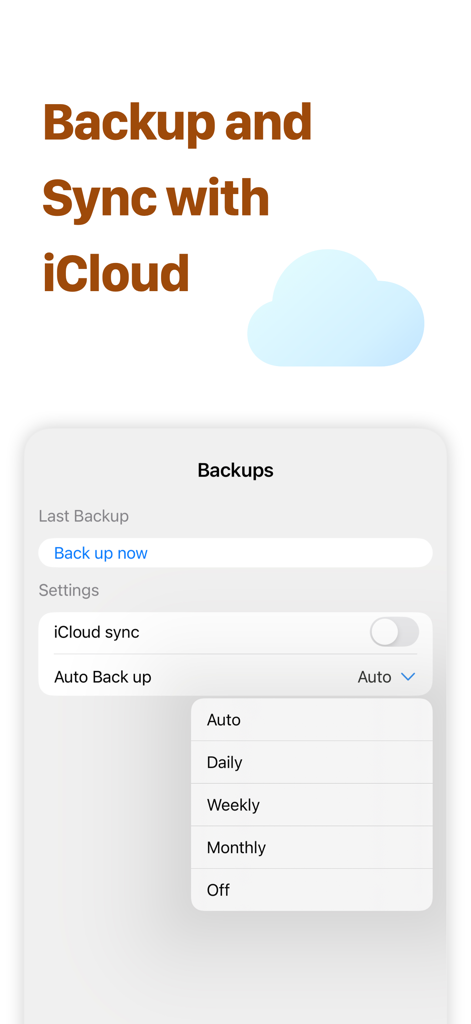
Capture d'écran de l'Application Authentificatrice montrant la synchronisation iCloud et les paramètres de sauvegarde automatique.
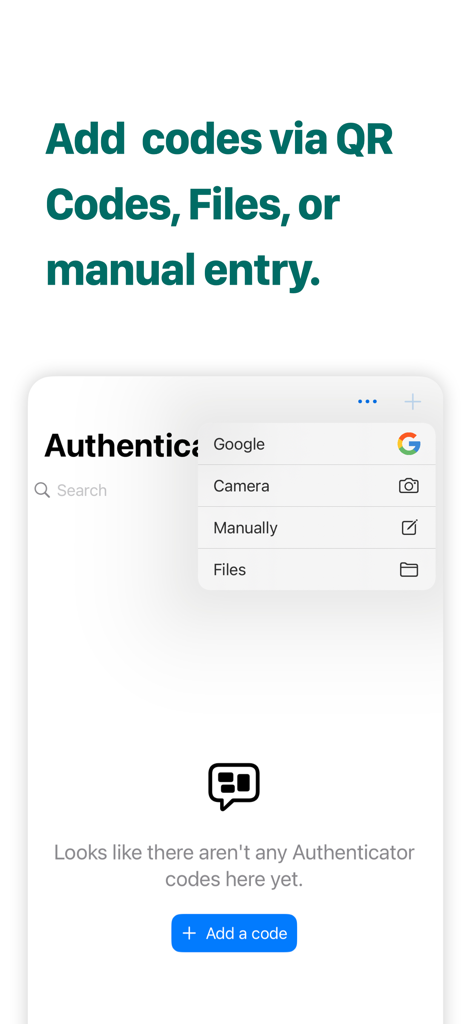
Interface montrant plusieurs méthodes pour ajouter des codes 2FA, y compris la caméra, la saisie manuelle et les fichiers
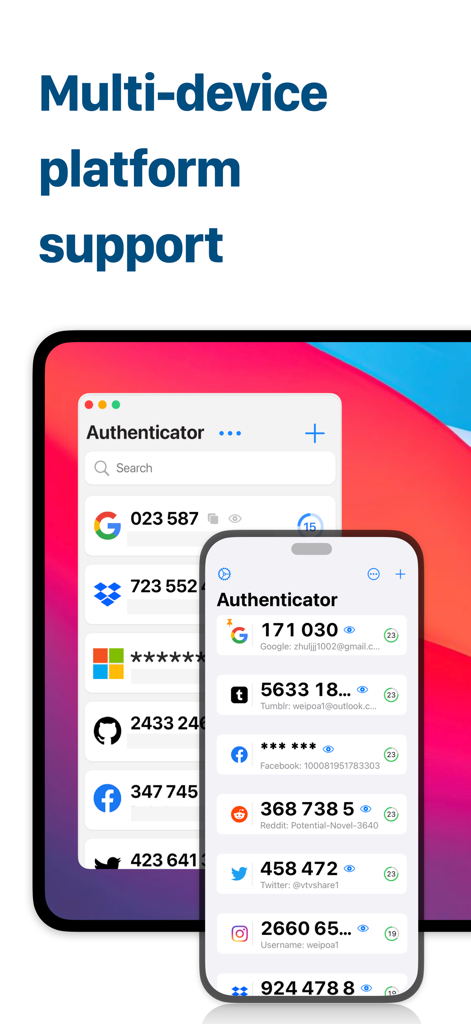
Interface de l'Application Authentificatrice affichée sur un Mac et un iPhone, montrant les codes de sécurité 2FA synchronisés.
Sécurité sans compromis pour vos actifs numériques
Les outils qui font la différence, choisis par 10K+ utilisateurs.
🔄
Migration et configuration transparentes
Passez de Google Authenticator en quelques secondes. Notre puissante fonction d'importation garantit une transition sans risque pour tous vos jetons sensibles, sans crainte d'être bloqué.
🛡️
Protection avancée contre les regards indiscrets
Protégez votre vie privée dans les espaces publics. Notre fonction exclusive d'économiseur d'écran obfusque vos codes, empêchant les regards indiscrets de voler vos informations de connexion.
⚡
Organisation de niveau professionnel
Conçu pour les utilisateurs expérimentés ayant des dizaines de comptes. Épinglez vos codes les plus utilisés en haut et profitez d'une synchronisation instantanée sur votre iPhone, Mac et Apple Watch.
À propos de l'app
Tout ce que vous devez savoir sur Authenticator App ®.
Description
Authenticator App is your go-to application for securing your online accounts. With Authenticator App, you can enjoy unparalleled security and convenience, ensuring the strongest possible protection for your personal information and data.
Google account verification and data import
Authenticator App is a powerful application that supports Google account verification and the ability to import data from Google Authenticator. This means you can easily connect your Google account with the Authenticator app, ensuring the highest level of security for your online accounts. With the Import Data feature, you can quickly migrate your account information, making the process easier and more efficient.
Mainstream Account Authentication
Authenticator App not only supports Google account verification, but also verifies mainstream accounts such as Facebook, Twitter, Microsoft, Reddit, Dropbox, and more. This makes Authenticator ideal for unified management of multiple online accounts. Regardless of the platform you're using, Authenticator provides you with secure and convenient login verification to ensure your account information is optimally protected.
Anti-Snooping Feature
Authenticator App takes security to the next level with the featured "screen saver". By hiding and obfuscating the CAPTCHA, Authenticator effectively prevents others from snooping on your login information, providing an extra layer of security for your account. You can use Authenticator with confidence knowing that your information is safe and secure.
Quickly Add Accounts
By scanning a QR code, you don't need to save the QR code, you can add an account by scanning it directly from the desktop application, which is very easy and fast to do.Authenticator also supports a variety of adding methods, including scanning, uploading, and manually typing, so you can choose the way that best suits your needs to add an account. This flexibility and convenience makes account management much easier.
Multiple Adding Methods and Account Topping
Authenticator App offers multiple ways to add accounts, including scanning, uploading, manual entry, camera scanning, and importing data from Google Authenticator. Additionally, you can top frequently used accounts for easier management and use, and Authenticator provides you with comprehensive account management features to keep you in control of your online information anytime, anywhere.
SUBSCRIPTION OPTIONS
• Annual plan: billed annually at $39.99/year after the 3-day trial ends
LIFETIME LICENSE
• Pro License: one-time purchase for $69.99
After the free trial, the total amount for the subscription will be deducted from your iTunes account. Unless you cancel the subscription at least 24 hours before the current period ends, it will automatically renew. Your account will be charged with the renewal fee within 24 hours prior to the end of the current period. Any unused portion of a free trial, if offered, will be forfeited upon purchase. Subscriptions and auto-renewal can be managed or canceled through your iTunes account settings: Settings > iTunes & App Store > Apple ID > Manage Subscriptions.
Terms of Use: https://irocketapp.com/sevices.html
Privacy Policy: https://irocketapp.com/privacy.html
Contact Us: https://irocketapp.com
DISCLAIMER:
Auth for Google Authenticator is an independent application designed specifically to facilitate Two Factor Authentication. This app is not associated with, endorsed by, or connected to any brands such as Apple, Google, Microsoft, Zoom, Facebook, Snapchat, Safari, Mozilla Firefox, Opera, Twitter, Brave, Microsoft Edge, or others.
All trademarks, logos, and brand names are the property of their respective owners, and their use does not imply any endorsement. This app offers a convenient tool for managing Two Factor Authentication for your accounts and is not an official Google Authenticator app.
Dernière version
2.2
Taille
18.0 MB
Date de sortie
27 mars 2024
Sécurisez votre monde numérique avec une protection de niveau professionnel
Rejoignez plus de 10 000 professionnels soucieux de leur sécurité qui protègent leurs actifs dans tout l'écosystème Apple. Commencez votre voyage vers une tranquillité d'esprit numérique ultime dès aujourd'hui.
Recommandations
Apps Similaires
Apps avec des fonctionnalités et une expérience similaires
App information, icons, screenshots, and descriptions displayed on this page are sourced from the Apple App Store and are the property of their respective developers. Download estimates and rankings are based on MWM's proprietary models and may not reflect actual figures. This page is provided for informational and analytical purposes only.
Believe this page infringes your intellectual property? File a dispute