Book Writer
Book Writer
Télécharger sur App Store

Cette page n'est pas une page officielle de l'application ou de son développeur, mais une publication éditoriale indépendante créée à des fins d'information et de commentaire. Sauf indication expresse contraire, ni l'application ni son développeur ne sont affiliés, approuvés, sponsorisés, autorisés ou autrement officiellement liés à MWM, Apple, Google Play, à l'éditeur de l'application ou au développeur de l'application, et rien sur cette page n'implique que l'application a été développée en utilisant les services de MWM. Toutes les marques, logos, captures d'écran et autres contenus restent la propriété de leurs propriétaires respectifs.


Logo de Book Writer
Télécharger sur App Store

Book Writer

Des projets de classe aux souvenirs professionnels, permettez aux élèves et aux créateurs de créer des livres interactifs, de publier en ePub et de donner vie à des histoires en toute simplicité.

Chiffres Clés

Téléchargements

132K+

Note

3.3/5

Nombre d'avis

300

Éditeur

Good Effect

Catégorie

Education

Langues

5

Dernière version

4.924

Taille

72.4 MB

Date de sortie

3 déc. 2011
Fonctionnalités

Stimulez la créativité dans chaque classe et chaque foyer

La manière la plus intuitive de transformer vos pensées en livres numériques interactifs. Conçue pour les éducateurs, les élèves et ceux qui créent des souvenirs afin qu'ils partagent leurs histoires avec le monde entier.

Narration multimédia riche

Donnez vie à vos projets en faisant glisser et déposer des photos, des vidéos, des enregistrements vocaux et de la musique directement sur vos pages pour une expérience véritablement interactive.

Conçu pour les jeunes créateurs

Notre interface conviviale élimine la courbe d'apprentissage technique, permettant aux élèves de se concentrer sur l'organisation de leurs pensées et l'expression de leur imagination.

Les captures d'écran et la description suivantes proviennent directement de la fiche officielle de l'application sur le store et sont la propriété du développeur.

App Store

Captures
Book Writer - Écran d'accueil de l'application Book Writer montrant son icône orange et le texte d'introduction pour la création de livres.
Écran d'accueil de l'application Book Writer montrant son icône orange et le texte d'introduction pour la création de livres.

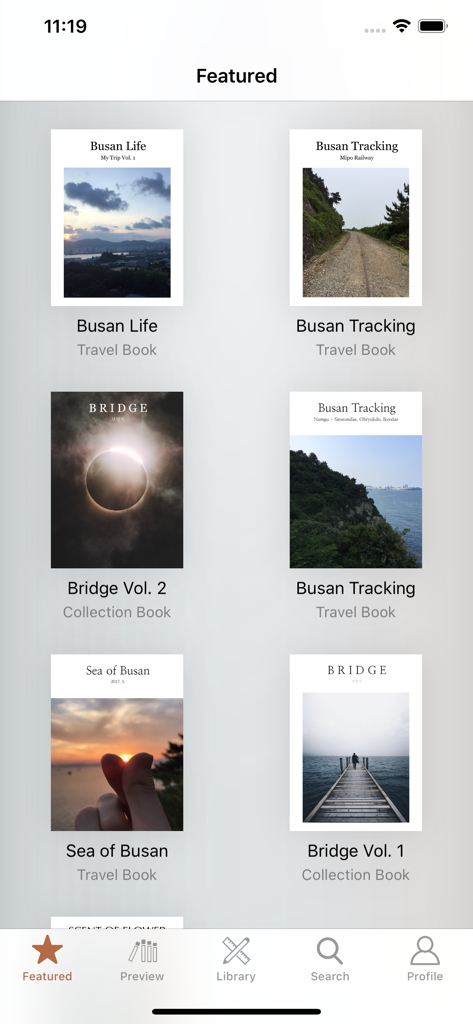
Book Writer - Une galerie montrant des livres de voyage et de collection en vedette dans l'application Book Writer.
Une galerie montrant des livres de voyage et de collection en vedette dans l'application Book Writer.

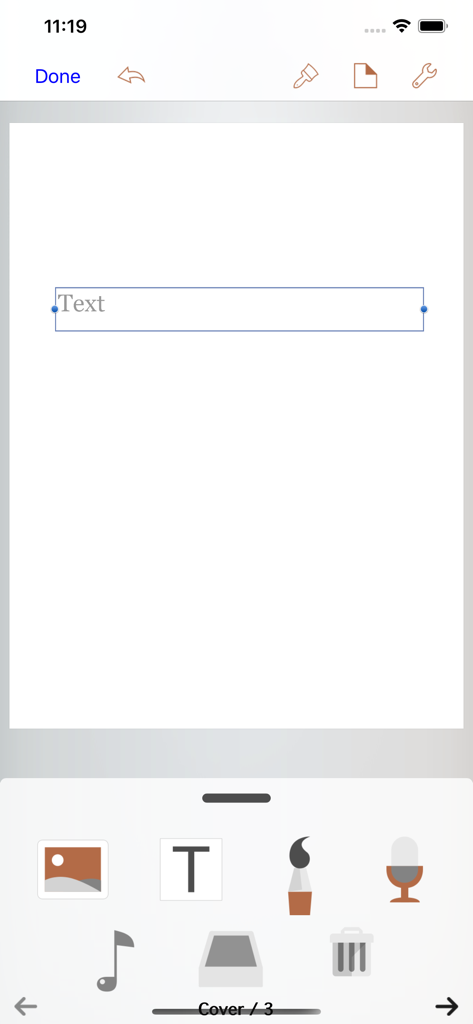
Book Writer - L'interface de l'éditeur de l'application Book Writer montrant les outils de création multimédia et une zone de texte sur une page blanche.

L'interface de l'éditeur de l'application Book Writer montrant les outils de création multimédia et une zone de texte sur une page blanche.

Description

Take Note, Organize Thoughts, Make a Book. Share with the World. Make your own book with Book Writer. Anyone can easily make a book. Make an interactive book and enjoy making and reading the books you made! You can use it in school, work, and at home to make all types of books such as photo book, recipe book, diary, PR booklet, PDF documents, and etc. Making a multimedia book You can add pictures, text, voice recordings, songs, and videos on the page. You can use the camera to take pictures or videos and add them right on to the book. You can draw image and edit image using Pen Tool. Provides interactive functions such as item connection and auto play to make your book more fun. Easy and intuitive interface Children of all ages can easily use the interface. Use the Item Bar to add items to the page by drag&drop. All text are shown on the page in real time with the In-Page text editor that is provided. Use the Undo function to return to the previous work. Share your books You can share your book with others using Book World. Join the Book World and upload your book to Book World, and follow your favorite author. Books in Book World can be read on diverse smartphone, PC and Mac. You can share your book with Book Writer on Dropbox, iTunes or via E-mail. Read through iBooks The books made with Book Writer can be read through iBooks. You can read your book in Book Writer directly, or Book World web reader. Paperbook publish service You can publish your book to paperbook using Paperbook publish service. Published books can also be seen in Book World via smartphone, PC, Mac. In Class Book Writer is being used in many countries by thousands of people for educational use. Book Writer helps students to make a book by organizing their thoughts. With an intuitive interface, anyone can easily express and organize their thoughts. 50% discount for educational institutions. Use App Store Volume Purchase Program to purchase Book Writer. For more details - http://www.apple.com/itunes/education/ Main Functions Templates are provided to make books of different styles and formats. Choosing a layout style automatically relocates your items. Use drag & drop to easily add items. You can use the photos from Photo Library to add to the book, or can add pictures taken directly from camera. Pictures can be moved, the size can be adjusted, and you can rotate or crop the pictures by touching. Text box item can be added to the page to input text. Supports fonts and styles of various types. You can draw image and edit image using Pen Tool. You can add videos from your album or you can directly record videos with your camera to add them. Use recorder to record your voice and add to the book, or add music from Music Library to your book. Bring any music from Music Library to add as your background music. Use the auto play function to automatically play the media at the time you want. Item connection function is provided to connect your pictures or text to sound items. The Undo function allows you to return to your previous work. Use the Page Editor to add or delete pages or change the order of the page by using drag & drop. You can combine two books together. The completed book can be read in ‘Reading Mode’. Books that have been created can be shared via Book World, iTunes, E-mail, Dropbox, etc. Share your book with others using Book World. And can be read on many smartphone, PC, Mac. You can publish your book to paperbook using Paperbook publish service. Save your book as a PDF document or you can use AirPrint or use Export to print the books The standard E-book format, epub, is supported to read the made books with iBooks and you can register your books on iBookstore. Book Writer supports the fixed-layout format of iBooks. The fixed-layout format is not ideal for books with long text like novels. Online support is included. Please visit our homepage - http://goodeffect.com

Download

Télécharger sur App Store

Cette page n'est pas une page officielle de l'application ou de son développeur, mais une publication éditoriale indépendante créée à des fins d'information et de commentaire. Sauf indication expresse contraire, ni l'application ni son développeur ne sont affiliés, approuvés, sponsorisés, autorisés ou autrement officiellement liés à MWM, Apple, Google Play, à l'éditeur de l'application ou au développeur de l'application, et rien sur cette page n'implique que l'application a été développée en utilisant les services de MWM. Toutes les marques, logos, captures d'écran et autres contenus restent la propriété de leurs propriétaires respectifs.








