CalCs - Calendar Complications

CalCs - Calendar Complications


Télécharger sur App Store
Logo de CalCs - Calendar Complications

CalCs - Les complications ultimes de calendrier et de rappels pour l'Apple Watch

Arrêtez de sortir votre téléphone. Accédez instantanément aux grilles mensuelles, aux listes d'événements et aux rappels directement sur le cadran de votre montre avec des complications conçues pour les professionnels organisés.

Télécharger sur App Store

Éditeur

Akihiro Usui

Catégorie

Utilities

Téléchargements

26K+

Note

3.6/5

Nombre d'avis

300

Langues

1

Précision à votre poignet

Découvrez l'interface utilisée par 26K+ utilisateurs.
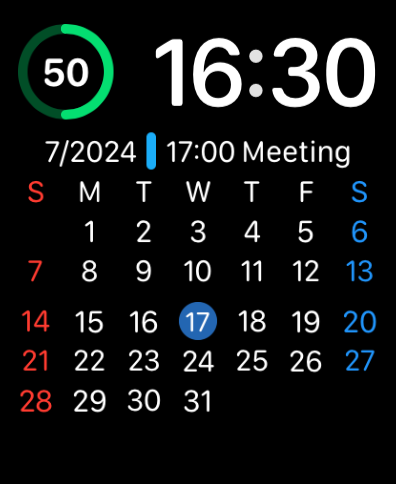
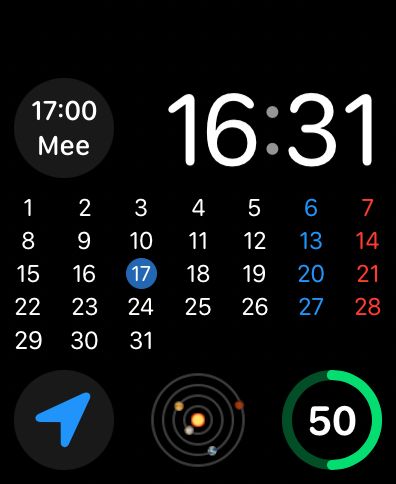
Cadran d'Apple Watch affichant une grille de calendrier mensuelle complète et les informations de la prochaine réunion

Cadran d'Apple Watch affichant une grille de calendrier mensuelle complète et les informations de la prochaine réunion

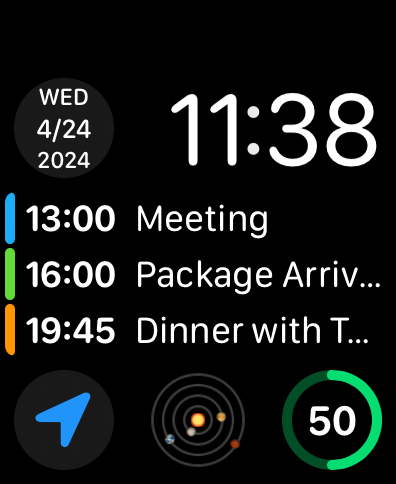
Cadran d'Apple Watch affichant une liste d'événements à venir et une complication de date

Cadran d'Apple Watch affichant une liste d'événements à venir et une complication de date

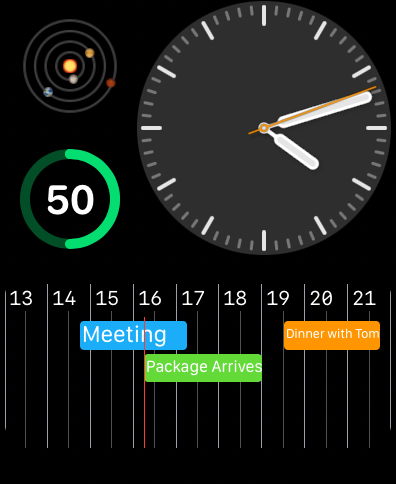
Cadran d'Apple Watch montrant une chronologie de calendrier horizontale avec des événements et des rappels planifiés

Cadran d'Apple Watch montrant une chronologie de calendrier horizontale avec des événements et des rappels planifiés

Cadran d'Apple Watch affichant une grille de calendrier mensuelle complète et les détails du rendez-vous à l'aide des complications CalCs

Cadran d'Apple Watch affichant une grille de calendrier mensuelle complète et les détails du rendez-vous à l'aide des complications CalCs

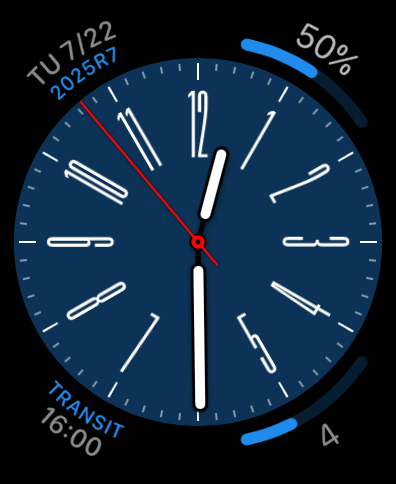
Un cadran d'Apple Watch analogique présentant des complications personnalisées de calendrier et de rappel sur un cadran bleu.

Un cadran d'Apple Watch analogique présentant des complications personnalisées de calendrier et de rappel sur un cadran bleu.

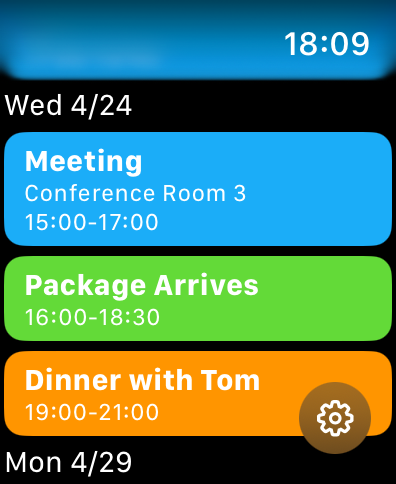
Une liste d'événements de calendrier et de rappels codés par couleur sur l'écran d'une Apple Watch

Une liste d'événements de calendrier et de rappels codés par couleur sur l'écran d'une Apple Watch

Optimisez votre productivité en un coup d'œil

Les outils qui font la différence, choisis par 26K+ utilisateurs.

📅

Vue complète de la grille mensuelle

Comblez le fossé dans watchOS avec une vue d'ensemble mensuelle complète directement sur le cadran de votre montre, vous permettant de vérifier les dates et de planifier à l'avance en quelques secondes.

Complications haute densité

Maximisez l'espace de votre écran avec des formats circulaires, d'angle et rectangulaires qui affichent votre prochain événement ou rappel en attente sans avoir à sortir votre téléphone.

🛠️

Personnalisation professionnelle

Adaptez votre expérience en filtrant des listes de calendrier spécifiques et en définissant votre début de semaine préféré pour qu'il corresponde à votre flux de travail personnel et professionnel.

À propos de l'app

Tout ce que vous devez savoir sur CalCs - Calendar Complications.

Description

CalCs (short for "Calendar Complications") is a watchOS-only app that provides various complications related to the calendar. ---Important Notes--- The features built into the main body of this app are limited to listing events/reminders & displaying a monthly calendar. All other features are provided through complications & the Smart Stack. ●If you download CalCs from the iPhone App Store, due to synchronization issues between the iPhone & Apple Watch, CalCs may not appear on the Apple Watch. According to Apple's specifications, watchOS-only apps cannot be re-downloaded from the App Store app on the iPhone. Therefore, please use the App Store app "on your Apple Watch" and follow the steps below to re-download it. ・Scroll to the bottom → "Account" → "Purchased" → "CalCs" → re-download ------------------- Key Features ●Supports a variety of complications such as date display, events/reminders display, & monthly calendar display ・Date Display Displays the current date in various formats. ・Event/Reminder Display Displays events/reminders synced with your iPhone. You can choose whether or not to include all-day events. ・Monthly Calendar Display Displays the monthly calendar in various formats. You can choose to start the week on Monday. It also supports holidays in some areas. ●In the main app, events/reminders, & the monthly calendar are displayed Tapping the complication opens the app, where you can view the list of events/reminders synced with your iPhone, as well as the monthly calendar. *Only incomplete reminders are displayed. *The app currently does not have functionality to add, edit, or delete events/reminders, nor to mark reminders as complete. Please understand. ●Minimal Setting Options To avoid complicating settings on the small Apple Watch screen, the settings only allow you to select which calendar/reminder lists to display. *Notes ・The corner complications, circular complications, & large rectangular complications are supported only on Apple Watch Series 4 & later, so CalCs is not guaranteed to work on Series 3 or earlier models. ・Due to the limitations of watchOS complication display updates, complications may not immediately reflect changes when the date changes or after events or reminders are added or edited on the iPhone. ・After placing a complication for the 1st time, it may take some time for it to actually appear. ・If the complication is not updating, try tapping the complication to open CalCs, as this may refresh the data. ・If the complication is not updated even after launching CalCs, the issue may be resolved by one of the following methods. Please try them. 1. Restart both your iPhone and Apple Watch. 2. Force restart CalCs ① With CalCs open, press and hold the side button. ② When the screen for emergency call and power off appears, press and hold the Digital Crown. 3. Reinstall CalCs ① Press the Digital Crown to display the app list. ② Press and hold CalCs, then tap the × button to delete it when it appears. ③ Launch the App Store app on your Apple Watch. ④ Scroll to the bottom → "Account" → "Purchased" → "CalCs" → Re-download. ・If the complication does not update after force quitting and restarting CalCs, try restarting both your iPhone and Apple Watch, as it may resolve the issue. ・If event information is not displayed on the app's main event/reminder list screen or in complications, it may be because full access to the calendar has not been granted. The issue may be resolved by following the steps below to re-enable full access permission to the calendar. Please give it a try. ①Open the "Privacy & Security" section in the iPhone Settings app & tap "Calendars". ②Change CalCs' calendar access to "None", then select "Add Events Only". ③When you open CalCs, you will be prompted to grant full access, so tap "Allow Full Access".

Dernière version

1.84

Taille

4.8 MB

Date de sortie

24 avr. 2024

Améliorez la productivité de votre Apple Watch

Arrêtez de sortir votre téléphone. Rejoignez des milliers de professionnels organisés qui utilisent CalCs pour garder leur calendrier mensuel complet et leurs rappels exactement là où ils devraient être : à leur poignet.

Télécharger sur App Store

App information, icons, screenshots, and descriptions displayed on this page are sourced from the Apple App Store and are the property of their respective developers. Download estimates and rankings are based on MWM's proprietary models and may not reflect actual figures. This page is provided for informational and analytical purposes only.

Believe this page infringes your intellectual property? File a dispute