CuadraTurnos PMM PRO - Policía

CuadraTurnos PMM PRO - Policía

Télécharger sur App Store
Logo de CuadraTurnos PMM PRO - Policía

CuadraTurnos PMM PRO - Policía : Le gestionnaire de roulement professionnel conçu pour les forces de l'ordre

Prenez le contrôle de votre emploi du temps rotatif, suivez vos partenaires et vos statistiques de patrouille, et équilibrez votre service avec votre vie privée — le tout dans une application sécurisée, sans publicité, conçue pour la "Thin Blue Line".

Télécharger sur App Store

Éditeur

SY Technologies & Computer Solutions Spain, S.L.

Catégorie

Productivity

Téléchargements

16K+

Note

3.5/5

Nombre d'avis

0

Langues

2

La précision à chaque service

Découvrez l'interface utilisée par 16K+ utilisateurs.
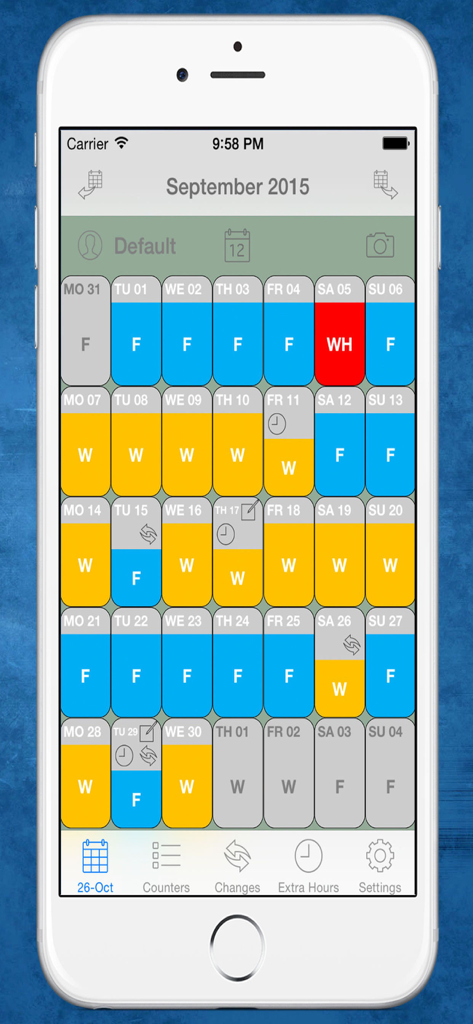
Vue mensuelle du calendrier montrant les roulements de travail et les jours de repos avec code couleur pour les policiers

Vue mensuelle du calendrier montrant les roulements de travail et les jours de repos avec code couleur pour les policiers

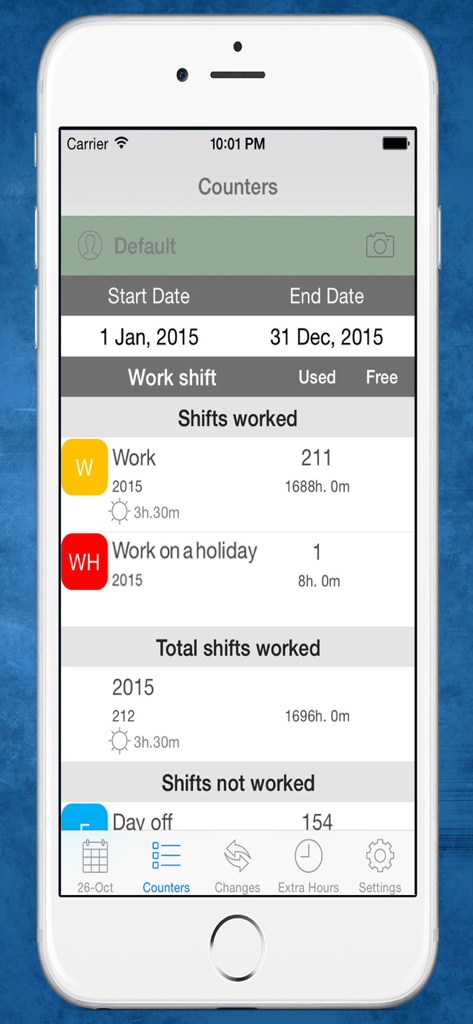
Écran de statistiques de l'application CuadraTurnos PMM PRO montrant les roulements de la police et le total des heures travaillées pour l'année.

Écran de statistiques de l'application CuadraTurnos PMM PRO montrant les roulements de la police et le total des heures travaillées pour l'année.

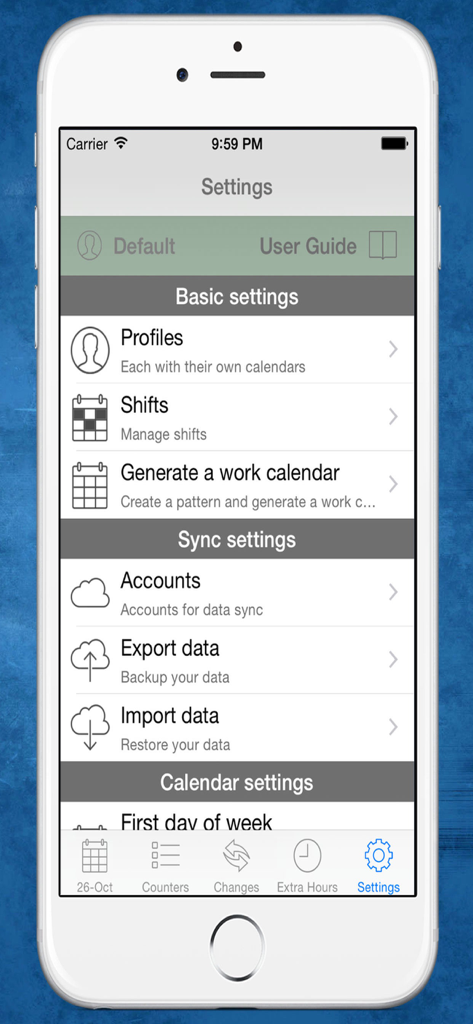
Écran des paramètres de l'application de police CuadraTurnos PMM PRO montrant les options de profil et de gestion des roulements

Écran des paramètres de l'application de police CuadraTurnos PMM PRO montrant les options de profil et de gestion des roulements

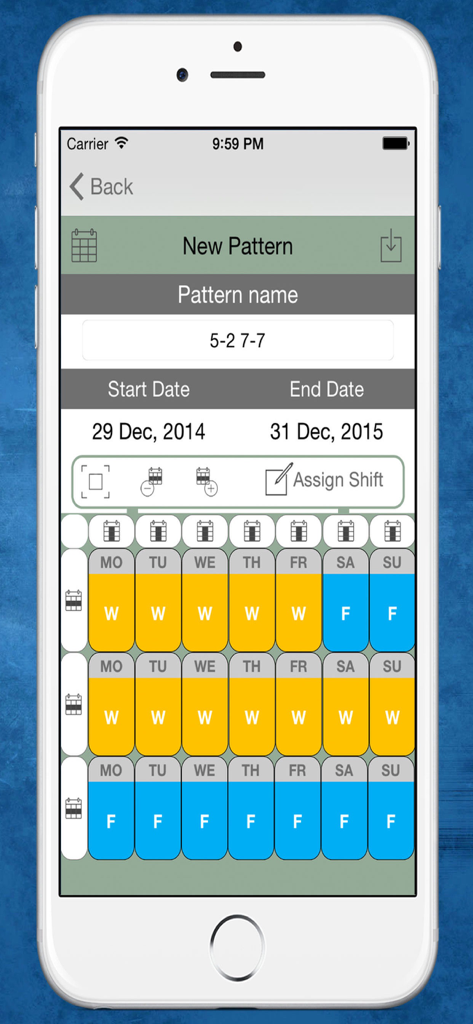
Interface pour créer un nouveau modèle de roulement de travail dans l'application CuadraTurnos PMM PRO montrant un planning sur plusieurs semaines avec jours de travail et jours de repos

Interface pour créer un nouveau modèle de roulement de travail dans l'application CuadraTurnos PMM PRO montrant un planning sur plusieurs semaines avec jours de travail et jours de repos

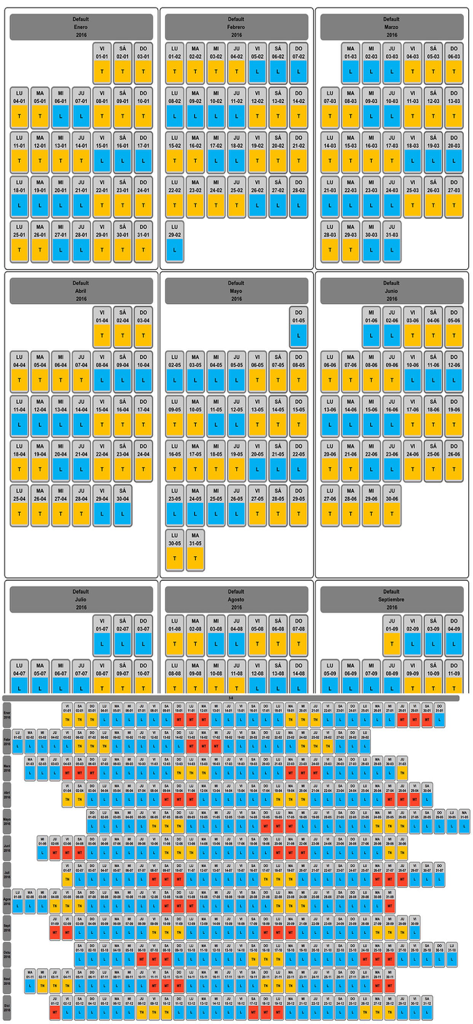
Calendrier de rotation mensuel et annuel pour les policiers avec jours de travail et de repos par code couleur

Calendrier de rotation mensuel et annuel pour les policiers avec jours de travail et de repos par code couleur

Prenez le contrôle de votre planning de service

Les outils qui font la différence, choisis par 16K+ utilisateurs.

📅

Modèles de patrouille automatisés

Générez le planning de toute votre année en quelques secondes en configurant des rotations personnalisées comme le 4-2 ou les roulements Panama, afin de planifier vos moments en famille des mois à l'avance.

👮

Registres de service professionnels

Documentez les détails essentiels de chaque vacation, y compris le nom de votre partenaire, l'ID du véhicule et le type de patrouille, afin d'être toujours prêt pour vos futurs témoignages au tribunal.

📊

Suivi des heures sup. et de la productivité

Ne perdez plus un centime en suivant vos heures supplémentaires et activités annexes grâce à des compteurs intégrés qui résument automatiquement vos jours de travail, vos heures sup. et vos statistiques de patrouille.

À propos de l'app

Tout ce que vous devez savoir sur CuadraTurnos PMM PRO - Policía.

Description

Languages: English and Spanish. This version is an adapted version for police, in which, besides having your shift calendar always with you, you can have important policial information associated with each service as the partner with whom to perform the service, type of service provided (patrol by car , by motorbike, on foot, ...), vehicle used, ... You will also have access, apart from statistics of workdays and days off, to other statistics, called productivity, where it shows the number of days they have patrolled by car, by motorbike, on foot, .... Shift Cal - Cuadra Turnos is an essential app designed for people with shift work. This app will help you manage and organize your work schedule in a simple and intuitive way and will let you take it in your iPhone or iPad. - PRO VERSION - No ads. - Create your own work calendar from the 'Settings' tab by clicking 'Generate work calendar' option and setting up a pattern. - Set your work shift in a particular day: just make a long press or a double tap on that day in the calendar and choose among the different types of day available. - PRO VERSION - You can set up to 3 shifts per day. - Create and modify all types of day you need: From the 'Shifts' option in the Settings tab. - App comes with the following 'shifts' already created (T-work, TF-Work on a holiday, L-Day off, LF-Day off on a holiday, V-holidays). - PRO VERSION - Create as many work calendars as you need (peers, family, ...) from the 'Settings' tab by clicking 'Profiles' option. - PRO VERSION - Manages shifts, patterns and notes independently in each profile. - PRO VERSION - Compare work calendars of the existing profiles from the 'Settings' tab by clicking 'Compare Work Calendars' option. - PRO VERSION - Quick access buttons to annual view, compare profiles and screenshot at the top of the main screen. (Filter by months / years) - Manage daily data fields: You can set the visibility and order of data fields in workdays and in days off. - PRO VERSION - It's allow to create new daily data fields and also editing existing data daily fields. - You will find statistics of workdays, hours worked and overtime in COUNTERS tab. - Control your shift changes and the partner with whom you do it from the CHANGES tab, the calendar displays a small icon in the day on which you have made ​​a shift change. - Control overtime you make. The calendar displays a small icon in the day on which you have made overtime, you will find summarized information in day detail and more information in EXTRA HOURS tab. - Write down as many notes as you need for each day of the week and you can even set a start and end time for each note as if it were an organizer. The calendar displays a small icon in the day on which you have notes. - PRO VERSION - Set notifications in the notes to be notified on the date and time specified. - You will have an overview of your year calendar: To access, simply click the 'Year View' button. - You can export and import your data: you can make backups of your data and restore them whenever you want, even in different devices. Backup files are compatible with all Shift Cal - Cuadra Turnos apps. - Export and import your data via Dropbox. - PRO VERSION - To recover data from the Free version just export the data from the Free version and restore it in the PRO version. - Screenshot: generates a png image or pdf file of the tab in which you are or year view which you can share via bluetooth, email, whatsapp ... - Associate images/photos to a day is possible. (Only 1 image/photo by day in free version). - Productivity information available.

Dernière version

2.31

Taille

36.7 MB

Date de sortie

2 déc. 2015

Maîtrisez votre service et votre vie

Rejoignez des milliers de professionnels des forces de l'ordre qui font confiance à CuadraTurnos PMM PRO pour suivre leurs heures supplémentaires, gérer des rotations complexes et rester synchronisés avec leurs partenaires et leurs familles. Pas de publicité — juste les outils dont vous avez besoin pour le travail.

Télécharger sur App Store

App information, icons, screenshots, and descriptions displayed on this page are sourced from the Apple App Store and are the property of their respective developers. Download estimates and rankings are based on MWM's proprietary models and may not reflect actual figures. This page is provided for informational and analytical purposes only.

Believe this page infringes your intellectual property? File a dispute