Gammel

Gammel

Télécharger sur App Store
Logo de Gammel

Gammel : Arrêtez les calculs mentaux et célébrez chaque étape

De magnifiques widgets conçus pour votre écran d'accueil et votre Apple Watch qui affichent l'âge exact de vos enfants, animaux de compagnie et anniversaires en semaines, mois ou années.

Télécharger sur App Store

Éditeur

Luke Johnson

Catégorie

Utilities

Téléchargements

100

Note

1.0/5

Nombre d'avis

0

Langues

1

Les âges en un coup d'œil

Découvrez l'interface utilisée par 100 utilisateurs.
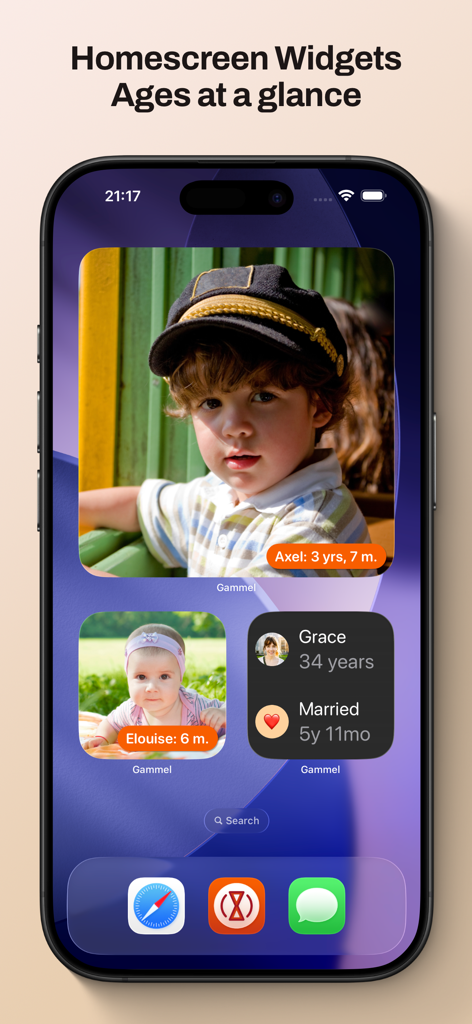
Un écran d'accueil iPhone présentant des widgets Gammel montrant des photos et les âges suivis d'enfants et d'un anniversaire de mariage.

Un écran d'accueil iPhone présentant des widgets Gammel montrant des photos et les âges suivis d'enfants et d'un anniversaire de mariage.

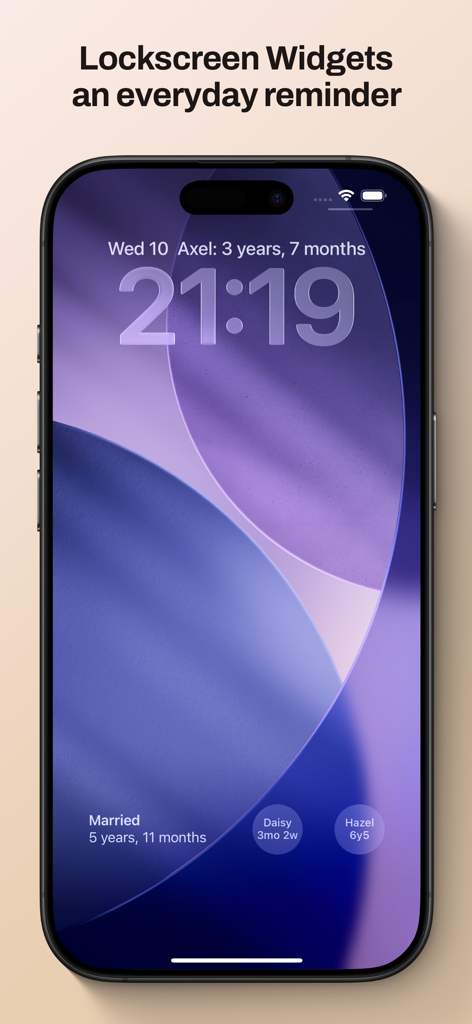
Écran de verrouillage iPhone montrant des widgets Gammel pour suivre les âges et les étapes familiales

Écran de verrouillage iPhone montrant des widgets Gammel pour suivre les âges et les étapes familiales

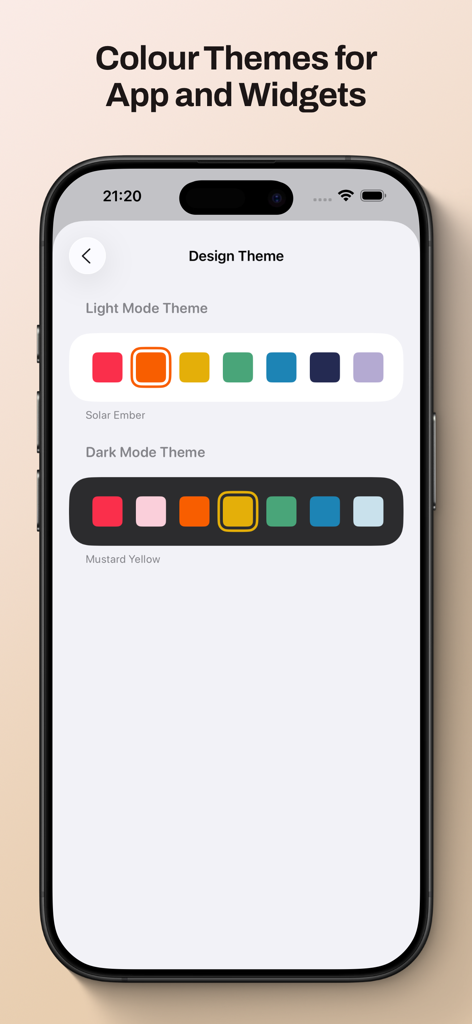
Écran de l'application Gammel montrant des options de thèmes de couleurs en mode clair et sombre pour les widgets et la personnalisation de l'interface.

Écran de l'application Gammel montrant des options de thèmes de couleurs en mode clair et sombre pour les widgets et la personnalisation de l'interface.

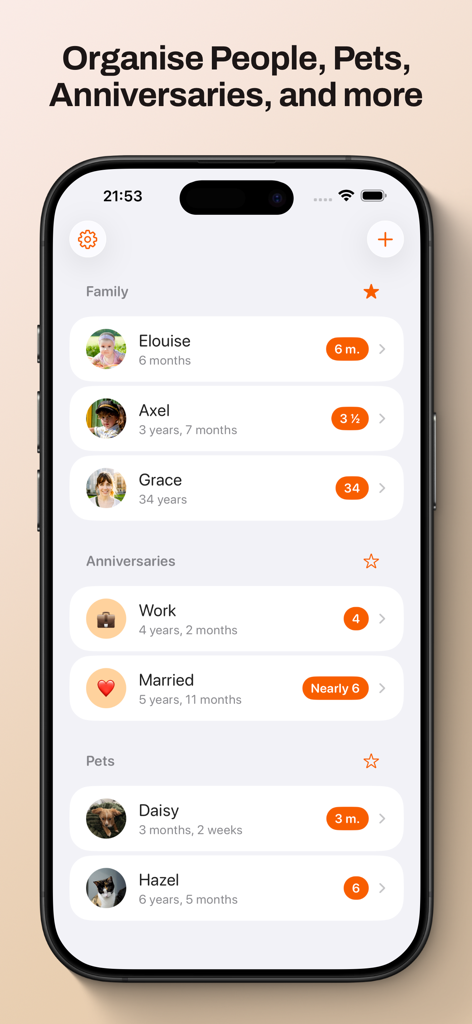
Tableau de bord de l'application Gammel affichant un suivi d'âge organisé pour les membres de la famille, les anniversaires et les animaux.

Tableau de bord de l'application Gammel affichant un suivi d'âge organisé pour les membres de la famille, les anniversaires et les animaux.

Ne faites plus jamais de calculs mentaux

Les outils qui font la différence, choisis par 100 utilisateurs.

🍼

Logique d'âge intelligente

Suivez sans effort les nouveau-nés en semaines, les tout-petits en mois et les enfants en années – l'application ajuste automatiquement le format à mesure qu'ils grandissent.

📱

Widgets consultables en un coup d'œil

Placez les âges directement sur votre écran d'accueil ou votre écran de verrouillage. Parfait pour des réponses rapides chez le médecin ou lors de réunions de famille.

☁️

Synchronisation iCloud privée

Vos données restent sécurisées et privées. Synchronisez vos étapes importantes de manière transparente sur votre iPhone, iPad, Mac et Apple Watch.

À propos de l'app

Tout ce que vous devez savoir sur Gammel.

Description

Gammel helps you remember the ages of your loved ones with easy to configure Lock Screen and Home Screen widgets. “During the first few years of my son’s life I would need to know his age in weeks, then months, and I was always having to stop and think and do maths in my head. I created Gammel so I could have a widget on my phone as a quick and easy reminder, and so I wouldn’t have to do mental calculations while lacking sleep!” — Luke, developer of Gammel Want to remember and communicate the age of your newborn or toddler? Gammel shows you their age in the most appropriate way, weeks, months, and then years. Want to track how long you’ve been married or in your current relationship? Gammel shows you how long. How about the age of your pets? Gammel has you covered there too. Puppies, dogs, cats, birds, gold fish. With Gammel, you can add your children, nieces and nephews, grandchildren, friends and family, anybody you need to remember the age of. Then, easily group those you add, and favourite which group you would like to appear at the top of your dashboard. Your data is stored in iCloud and then syncs across your iPhone, iPad, Apple Watch, and even your Mac. Widgets Add widgets to your Home Screen, Lock Screen or Apple Watch as a constant reminder. Let Gammel select the most relevant age to show you based on the people you have added, or you can set who to show yourself. On your Home Screen choose from an image widget to display a single person, or a details widget to show more. Add customised Gammel widgets to your iPhone, iPad, and Mac, and add complications to your Apple Watch so the info is right in front of you, and always at hand. Design Themes You can easily change the colour theme of Gammel, this will control the highlight colour in app and on the image Display Age widget. Age Display Style Gammel has two age display styles, Smart and Casual. Choose the style that best suits the age or anniversary you want to display. * The Smart style will display ages in days, weeks, and months for babies and toddlers, then years and months. * The Casual style is more for describing the age in casual conversation, where the exact age isn't as important Shortcuts Gammel also supports shortcuts, allowing you to get an age you have added, either the current age or how old that person was or will be given a date as an input. The output can then be passed to other shortcut steps.

Dernière version

1.2.1

Taille

9.0 MB

Date de sortie

23 janv. 2025

Arrêtez les calculs mentaux et célébrez chaque étape

Rejoignez les parents occupés et les amoureux des animaux qui utilisent Gammel pour afficher l'âge de leurs proches directement sur leur écran d'accueil. Téléchargez maintenant et simplifiez votre journée.

Télécharger sur App Store

App information, icons, screenshots, and descriptions displayed on this page are sourced from the Apple App Store and are the property of their respective developers. Download estimates and rankings are based on MWM's proprietary models and may not reflect actual figures. This page is provided for informational and analytical purposes only.

Believe this page infringes your intellectual property? File a dispute