GNSS View

GNSS View

Télécharger sur App Store
Logo de GNSS View

GNSS View : Maîtrisez la visibilité satellite et la précision de votre positionnement

Visualisez en temps réel les systèmes QZSS, GPS et les constellations mondiales. Utilisez des affichages en réalité augmentée de qualité professionnelle et des cartes du ciel pour surveiller les HDOP/VDOP et garantir une précision optimale du signal pour les vols de drones, les levés topographiques et l'exploration.

Éditeur

NEC Corporation

Catégorie

Navigation

Téléchargements

259K+

Note

4.2/5

Nombre d'avis

100

Langues

1

Précision visualisée

Découvrez l'interface utilisée par 259K+ utilisateurs.
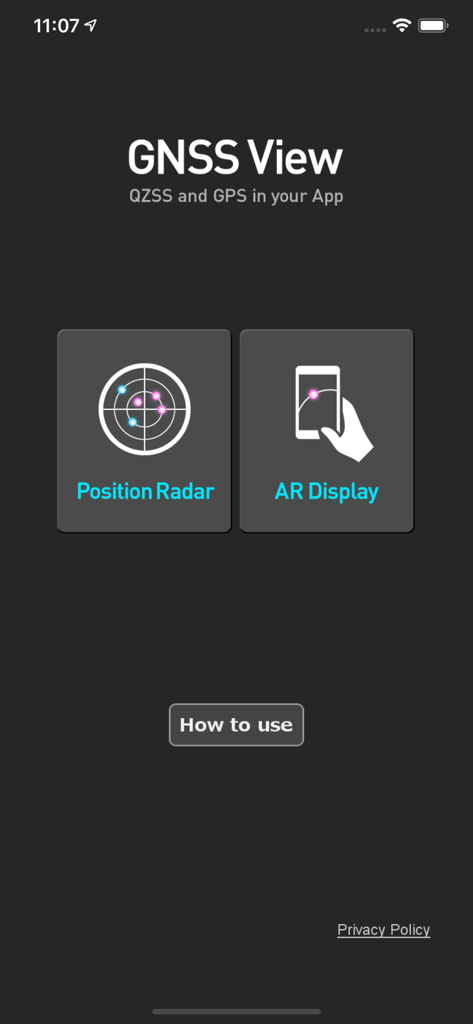
Écran d'accueil de l'application mobile GNSS View avec boutons pour le radar de position et l'affichage AR

Écran d'accueil de l'application mobile GNSS View avec boutons pour le radar de position et l'affichage AR

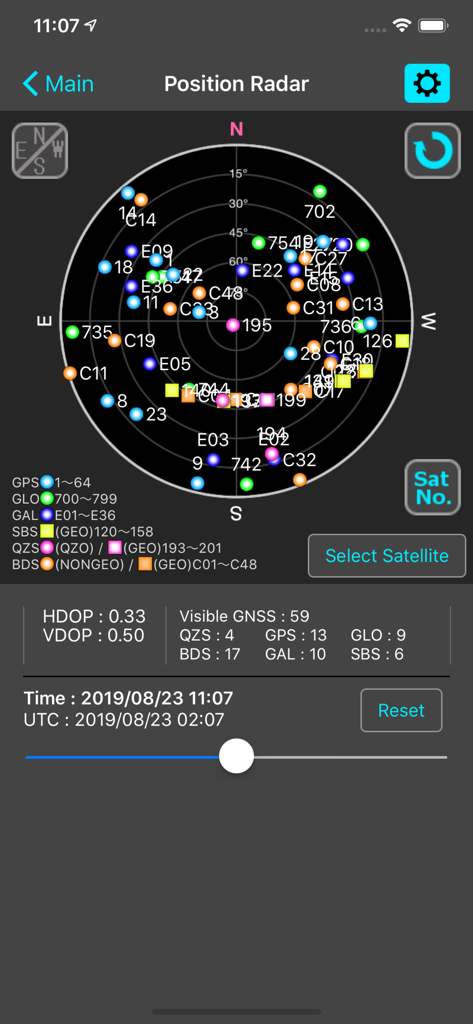
L'application GNSS View affiche un écran radar de position présentant une carte du ciel par satellite avec les métriques HDOP et VDOP.

L'application GNSS View affiche un écran radar de position présentant une carte du ciel par satellite avec les métriques HDOP et VDOP.

Visibilité satellitaire en temps réel et analyses de précision

Les outils qui font la différence, choisis par 259K+ utilisateurs.

🛰️

Suivi global multi-constellation

Surveillez simultanément les systèmes QZSS, GPS, GLONASS, Galileo et BeiDou afin de garantir une fiabilité maximale du signal pour les tâches de haute précision.

👁️

Visualisation du ciel en réalité augmentée

Identifiez instantanément les obstacles dans votre champ de vision en superposant les positions des satellites à votre environnement réel grâce à la vue de la caméra en réalité augmentée.

📊

Mesures de précision professionnelle

Accédez aux données critiques HDOP, VDOP et de masque d'élévation pour vérifier la géométrie du signal et atténuer les erreurs de positionnement avant de démarrer votre opération.

À propos de l'app

Tout ce que vous devez savoir sur GNSS View.

Description

This application enables you to see where the Quasi-Zenith Satellite System in the sky! ●What is QZSS? Quasi-Zenith Satellite System (QZSS) is a Japanese satellite positioning system composed mainly of satellites in quasi-zenith orbits (QZO). Satellite positioning systems use satellite signals to calculate position information. One famous example is the American Global Positioning System (GPS) and the QZSS is sometimes called the Japanese GPS. For details, please refer to the following Website "Quasi-Zenith Satellite System". URL : https://qzss.go.jp/en ●What is GNSS View? GNSS View provides that iOS version application that is based on the website application "GNSS View". This application enables you to know position of positioning satellites such as QZSS and GPS in the specified time and location. The positioning satellites displayed in the GNSS View are not based on the satellite information directly received by the smartphone but are displayed based on the satellite arrangement calculated based on the publicly released orbit information. ●GNSS View 3 functions 【Main】 ・You can move to the Position Radar screen or AR Display screen from the application startup screen. ・You can see the operating manual and privacy policy of this application via the website. 【Position Radar】 ・It is provided radar view of positioning satellites such as QZSS and GPS as a sky plot at the specified time and location. ・Positioning satellites can be specified from QZSS, GPS, GLONASS, BeiDou, Galileo, SBAS. ・You can also select specified signal satellites to see on the radar. ・You can see selected satellites by setting elevation mask angle. ・You can switch east and west of satellite arrangement, turn on / off rotation, and switch on / off display of satellite number. ・It displays HDOP, VDOP, the total number of satellites and the number of each positioning satellites in the satellite arrangement displayed on the radar. 【AR Display】 ・Position of positioning satellites such as QZSS and GPS on the sky from your current location is able to see through your camera at the specified time. ・In order to display satellites, it is necessary to turn on the position information of the smartphone and complete the positioning. Therefore, it may take time to display. ・Positioning satellites can be specified from QZSS, GPS, GLONASS, BeiDou, Galileo, SBAS. ・You can also select specified signal satellites to see on the radar. ・You can see selected satellites by setting elevation mask angle. ●Supported versions ・iOS 18 ・iOS 17 ・iOS 16 ・iOS 15 ・iOS 14 ・iOS 13

Dernière version

6.0.1

Taille

4.3 MB

Date de sortie

31 oct. 2014

Visualisez la précision. Maîtrisez vos données de géolocalisation.

Rejoignez plus de 259 000 professionnels et passionnés de technologie qui utilisent l’outil de confiance de NEC pour le suivi satellite en temps réel, la visualisation en réalité augmentée et l’analyse des signaux critiques.

Télécharger sur App Store

App information, icons, screenshots, and descriptions displayed on this page are sourced from the Apple App Store and are the property of their respective developers. Download estimates and rankings are based on MWM's proprietary models and may not reflect actual figures. This page is provided for informational and analytical purposes only.

Believe this page infringes your intellectual property? File a dispute