GoodReader Pro PDF Editor : L'espace de travail professionnel ultime
Maîtrisez vos documents avec une sécurité de niveau militaire, une gestion de fichiers de classe bureau et des outils PDF supérieurs. Achat unique, zéro abonnement et plus d'une décennie de fiabilité éprouvée pour les utilisateurs exigeants.
Découvrez l'interface utilisée par 159K+ utilisateurs.
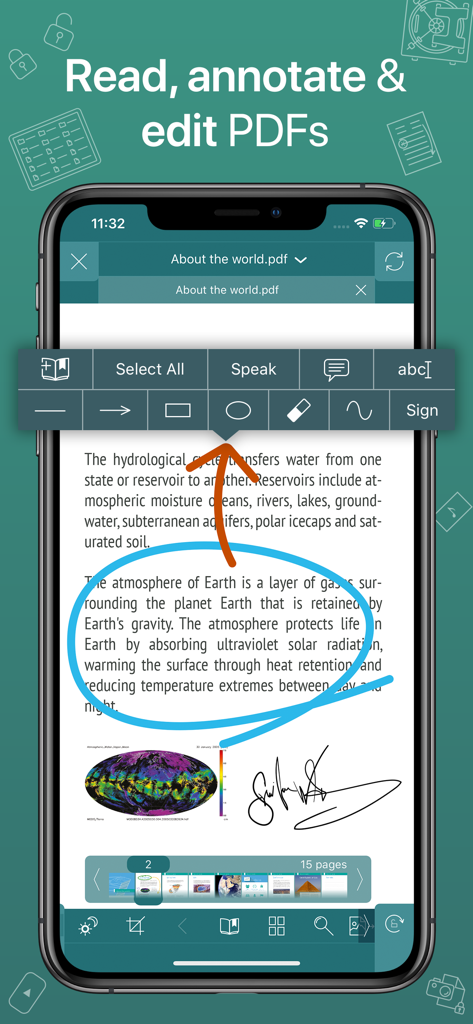
Interface de l'application GoodReader Pro montrant un document PDF avec des annotations en cercle bleu et une signature numérique
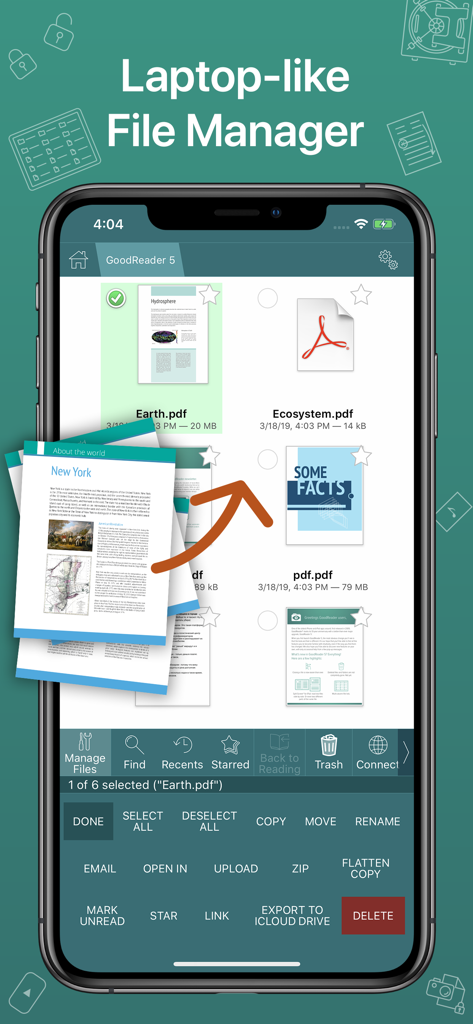
Capture d'écran de l'application GoodReader Pro montrant une interface de gestion de fichiers professionnelle de type ordinateur portable avec des documents PDF
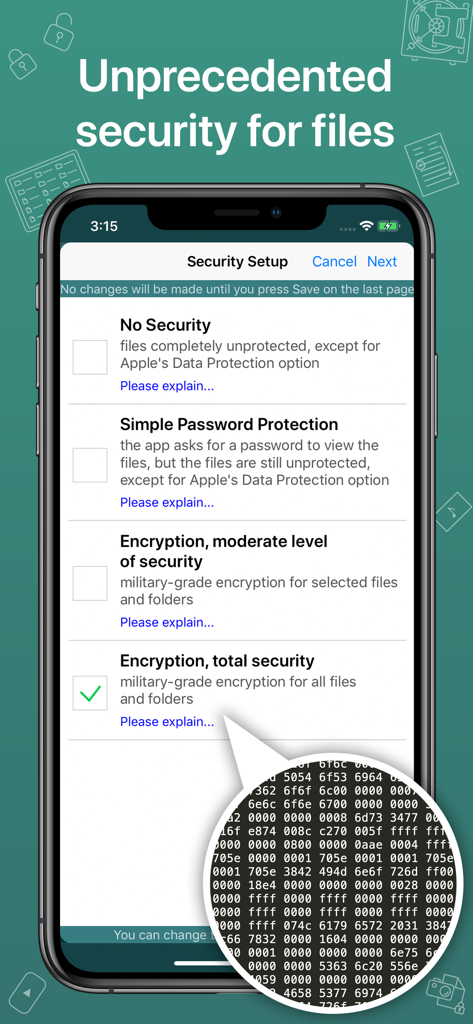
Écran de configuration de la sécurité de GoodReader Pro montrant les options de cryptage de fichiers de niveau militaire.
La puissance d'un bureau pour les professionnels mobiles
Les outils qui font la différence, choisis par 159K+ utilisateurs.
📂
Synchronisation de fichiers de classe bureau
Gérez des bibliothèques massives comme un pro. Connectez-vous directement à des serveurs SMB, SFTP ou cloud pour synchroniser des structures de dossiers entières pour un accès hors ligne.
🖋️
Marquage et Reflow avancés
Éliminez le défilement horizontal avec PDF Reflow et utilisez des outils de précision pour annoter, signer et aplatir des documents pour un partage professionnel.
🛡️
Sécurité de niveau militaire
Protégez les données sensibles avec le cryptage AES-256. Cette couche de sécurité indépendante garantit que vos fichiers restent verrouillés même si votre appareil est compromis.
À propos de l'app
Tout ce que vous devez savoir sur GoodReader Pro PDF Editor.
Description
GoodReader® Pro and our famous classic GoodReader app are essentially the same app, but this one comes with Pro Pack® pre-activated, no subscription or in-app purchase needed.
First released in 2009, GoodReader is truly a veteran of the App Store.
In the modern app business, it's not easy to stay relevant that long. We're proud to say that after 12 years and counting, we've been delivering wonderful updates with extraordinary new features. And we're going to keep doing that!
GoodReader is a perfect combination of document-reading and file-managing capabilities. It's your one-stop shop for all your document needs when you're on the go with your iOS device.
Use the app once, and you'll be hooked. Soon you'll be wondering how you ever managed to work without it.
-= File Reading =-
PDF, TXT, MS Office, iWork, HTML, pictures, music & audio-books, videos. This is what you can view in GoodReader, plus you can also annotate PDF files and edit TXT files.
-= PDF Reading and Annotating =-
PDF files is where GoodReader truly shines. Reading experience is so superior, it's hard to describe. To rephrase one of our customers' review, "try it, and you'll see." While you're at it, give our PDF Reflow feature a try. You'll be surprised how much better PDF reading goes when you don't have to scroll left/right all the time, for every single line of text.
Annotating PDFs is another star feature of our app. Adding notes and drawings, highlighting text, and then sharing your annotated files or annotation summaries will be your main productivity and collaboration asset.
-= File Management =-
While reading files is a big part of GoodReader, it's not all it can do. It can also serve as a central hub for all your files, even those that can't be opened by GoodReader itself. It's like bringing your personal computer experience to your mobile device — easily managing huge collections of files and folders will make you forget you don't have your laptop around.
-= Connecting =-
Dropbox, OneDrive, Google Drive, Box.com, WebDAV, SMB, AFP, FTP, SFTP — these are all accessible from inside GoodReader. Download, upload, and sync individual files or huge folder collections.
-= Security =-
With GoodReader, your data security steps up to the level previously only dreamt of. With GoodReader Pro, you'll get AES-256, a military-grade encryption, for all your data. And it's completely independent from the built-in Apple's Data Protection, so even if a hacker steals and unlocks your device, your data will still be protected by another strong layer of security, our own.
-= Split-Screen =-
This wonderful feature allows you to split an iPad screen in half, to read two files side-by-side. And even two different parts of the same file!
Dernière version
5.19.1221
Taille
49.0 MB
Date de sortie
9 mars 2019
Oubliez les abonnements. Adoptez la norme de l'industrie.
Rejoignez plus de 150 000 professionnels qui font confiance à GoodReader Pro pour sa sécurité de niveau militaire et sa gestion de documents d'élite. Achat unique, productivité à vie.
Recommandations
Apps Similaires
Apps avec des fonctionnalités et une expérience similaires
App information, icons, screenshots, and descriptions displayed on this page are sourced from the Apple App Store and are the property of their respective developers. Download estimates and rankings are based on MWM's proprietary models and may not reflect actual figures. This page is provided for informational and analytical purposes only.
Believe this page infringes your intellectual property? File a dispute