Highlighted Large Keyboard

Highlighted Large Keyboard

Télécharger sur App Store
Logo de Highlighted Large Keyboard

Clavier grand format mis en évidence : une frappe claire, grande et facile

Fini les difficultés avec les petits boutons ! Profitez de touches 37 % plus grandes, d’indications prédictives intelligentes et d’une confidentialité totale, sans accès aux données.

Éditeur

Huixiu Wu

Catégorie

Utilities

Téléchargements

43K+

Note

3.1/5

Nombre d'avis

0

Langues

1

Grandes touches, clarté éclatante

Découvrez l'interface utilisée par 43K+ utilisateurs.
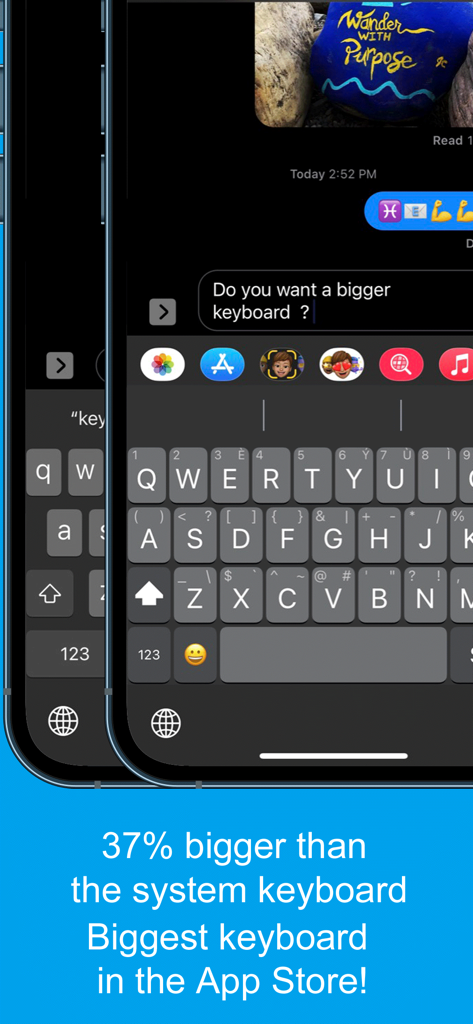
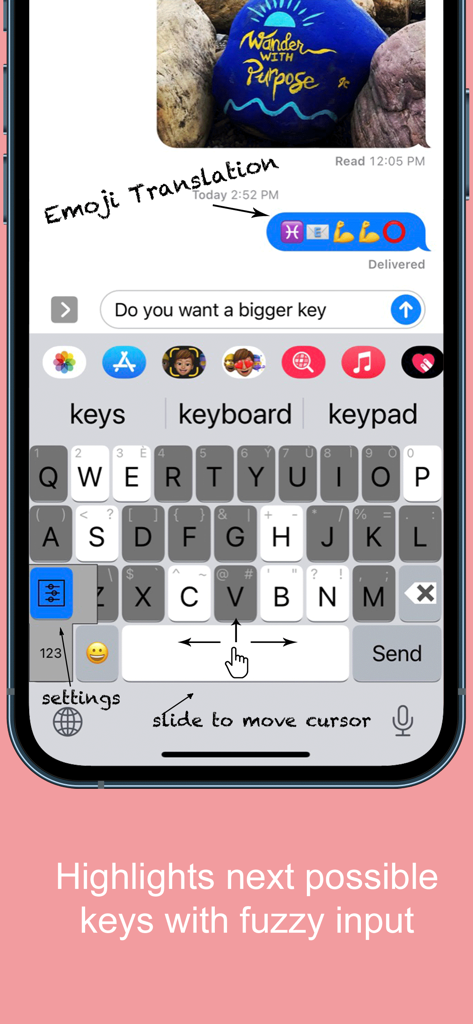
Capture d'écran de l'application Clavier élargi en surbrillance montrant des touches 37 % plus grandes que le clavier système standard pour une meilleure accessibilité

Capture d'écran de l'application Clavier élargi en surbrillance montrant des touches 37 % plus grandes que le clavier système standard pour une meilleure accessibilité

Interface de l'application Clavier grand format mise en évidence, avec de grandes touches et la fonction de glissement pour déplacer le curseur

Interface de l'application Clavier grand format mise en évidence, avec de grandes touches et la fonction de glissement pour déplacer le curseur

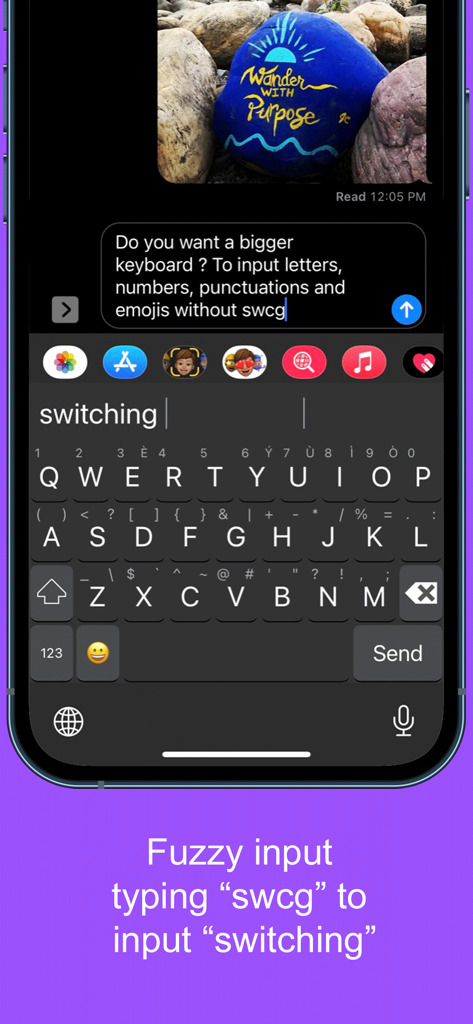
Capture d'écran montrant une saisie imprécise sur l'application Clavier large mis en évidence, où la saisie de « swcg » suggère de changer de clavier.

Capture d'écran montrant une saisie imprécise sur l'application Clavier large mis en évidence, où la saisie de « swcg » suggère de changer de clavier.

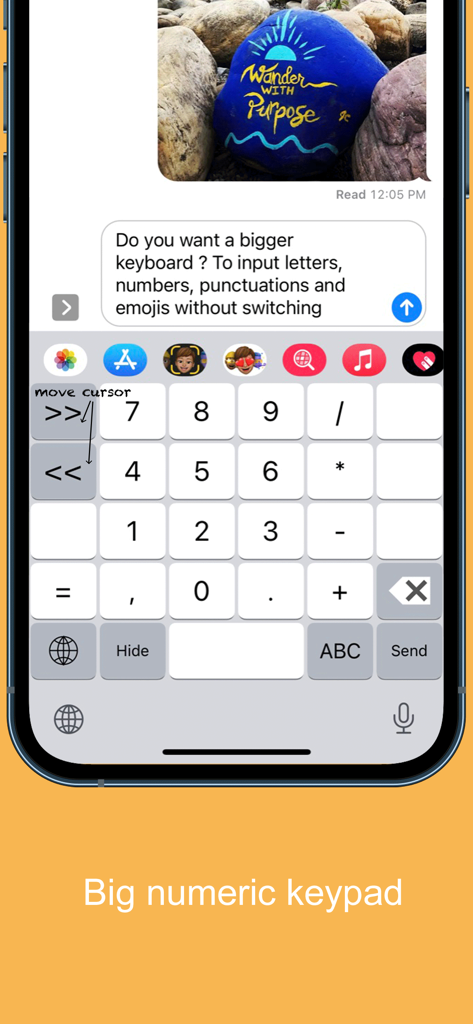
Interface à grand pavé numérique pour l'application mobile Highlighted Large Keyboard

Interface à grand pavé numérique pour l'application mobile Highlighted Large Keyboard

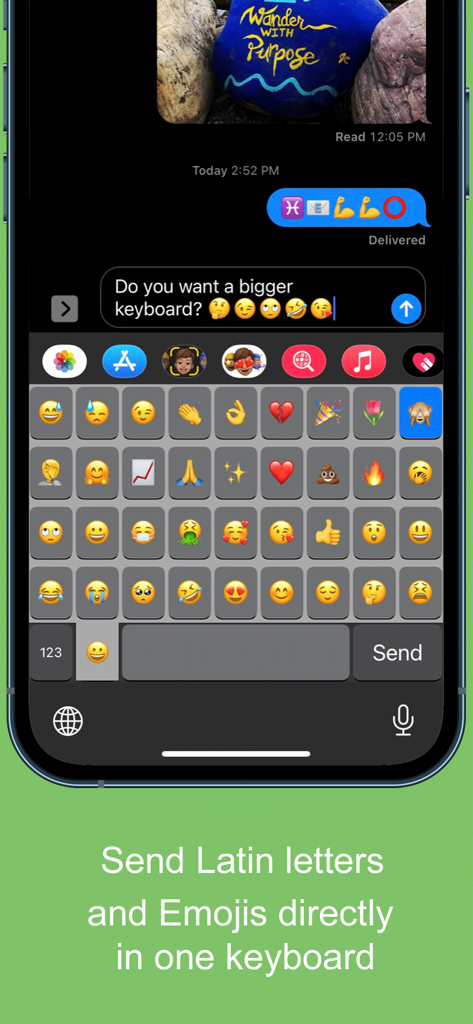
Capture d'écran mobile montrant une grande grille d'émojis sur l'interface de l'application Clavier large mis en évidence.

Capture d'écran mobile montrant une grande grille d'émojis sur l'interface de l'application Clavier large mis en évidence.

Enfin, un clavier conçu pour votre confort

Les outils qui font la différence, choisis par 43K+ utilisateurs.

⌨️

Clés 37 % plus grandes

Fini les difficultés avec les petits boutons ! Nos touches extra-larges sont conçues pour les grands pouces et offrent un confort visuel optimal, réduisant ainsi les fautes de frappe et la frustration.

↔️

Contrôle facile du curseur

Fatigué d'essayer de taper entre les lettres ? Faites simplement glisser votre doigt sur la barre d'espace pour déplacer le curseur exactement où vous le souhaitez.

🔒

100% privé et sécurisé

Votre sécurité est notre priorité. Ce clavier fonctionne sans nécessiter d'accès complet, garantissant ainsi que vos messages et données personnels ne quittent jamais votre appareil.

À propos de l'app

Tout ce que vous devez savoir sur Highlighted Large Keyboard.

Description

Do you want a bigger keyboard? With the smart highlighted next key hints and fuzzy input? And full Emoji supported? Try out this Biggest keyboard in the App Store! ** Biggest Keyboard in the App Store Keys are 37% bigger than the system keyboard. It is good for people who have big thumbs. Also people who want to preserve their vision will benefit from this keyboard. ** Fuzzy input If you use the Apple's system keyboard to input "determination", you won't see it in the suggestion list until typing "determina". With the highlighted keyboard, you can just type "dtmnn" to have it show in the suggestion bar. Another example is that once I wanted to input "anthropology" but I forgot the spelling, all I remembered was it started with "an" something and ended with "logy", I then typed “anlg” in the Highlighted keyboard and I saw “anthropology” in the suggestion list. ** Highlighted next possible keys After you type one key the keyboard will smartly highlights the possible next keys that you want to input. Also it has the suggestions that you can select from the top of the keyboard. ** Latin letters supported You can type the latin letters directly from the keyboard. You can also type "£" & "€" as well. ** Emoji translation Translate the word that you select in the suggestion bar into Emoji characters. It is a fun way to communicate with your friends and family. It is disabled by default and you need to use the "Keyboard Setting" page to enable this feature. ** Slide to move the input cursor Sliding from the Space key to left/right to move the current input cursor to left or right. Sliding up to move the current cursor to the beginning of the sentence and sliding down to move the current cursor to the end of the sentence. It makes your life much easier when editing text on the iPhone/iPad. ** 36 most common emojis in the same keyboard without switching UI Long press on the "happy face" emoji key and it will popup the36 most common emojis. You can then input directly from there. ** Full Emoji keys supported It is very convenience to input Emoji characters with this keyboard when you are using Facebook, Twitter, iMessage, Wechat, Text Message, SMS, etc. Just long press on the key that has sub-menu and more Emoji characters will pop up. The Emoji characters are well categorized and you can input the Emoji and Text together in one keyboard! ** Numeric Keypad This keyboard supports the traditional numeric keypad layout with big number keys. It is useful for entering long sequences of numbers quickly. ** Keyboard Settings Long press on the "globe"/"123" key to pop up the sub-menu. Select the "Tool" key to launch the setting page. You can enable/disable the Highlight Next key feature. You can also enable/disable the "Emoji translation" feature. ** NO Full Access required ** How to use 1. After install you need to enable it in the "Settings" App in your iPhone/iPad. Launch "Settings", click on "General" -> "Keyboard" -> "Keyboards" -> "Add New Keyboard" -> Select the "HighlightedKeyboard". 2. Switch the keyboard to "Highlighted Keyboard" when you are inputting. 3. Long press on one key to input the keys in the pop-up menu including 0-9 and punctuation marks. You may try to long press on keys to find the hidden sub menus. For example, if you want to hide the keyboard, long press on the "globe" key and the sub-menu will pop up. Keep holding and move to select the "Hide" key. The keyboard will hide after you release your finger. Please send any feedback, bug reports or feature request to: feedback.southfun at gmail.com Thanks for viewing!

Dernière version

1.2.1

Taille

1.9 MB

Date de sortie

12 nov. 2014

Arrêtez de plisser les yeux. Commencez à taper avec assurance.

Rejoignez plus de 43 000 utilisateurs qui ont opté pour des touches 37 % plus grandes. Découvrez le plus grand clavier de l’App Store, conçu pour votre confort, votre vision et une confidentialité totale.

Télécharger sur App Store

App information, icons, screenshots, and descriptions displayed on this page are sourced from the Apple App Store and are the property of their respective developers. Download estimates and rankings are based on MWM's proprietary models and may not reflect actual figures. This page is provided for informational and analytical purposes only.

Believe this page infringes your intellectual property? File a dispute