Home Theater SPL
Home Theater SPL
Télécharger sur App Store

Cette page n'est pas une page officielle de l'application ou de son développeur, mais une publication éditoriale indépendante créée à des fins d'information et de commentaire. Sauf indication expresse contraire, ni l'application ni son développeur ne sont affiliés, approuvés, sponsorisés, autorisés ou autrement officiellement liés à MWM, Apple, Google Play, à l'éditeur de l'application ou au développeur de l'application, et rien sur cette page n'implique que l'application a été développée en utilisant les services de MWM. Toutes les marques, logos, captures d'écran et autres contenus restent la propriété de leurs propriétaires respectifs.

Logo de Home Theater SPL
Télécharger sur App Store

Home Theater SPL

Obtenez une scène sonore parfaite et des dialogues cristallins avec le décibelmètre de précision conçu pour les passionnés de home cinéma et les calibreurs amateurs.

Chiffres Clés

Téléchargements

3K+

Note

1.0/5

Nombre d'avis

0

Éditeur

J.S. Technology Ltd.

Catégorie

Utilities

Langues

1

Dernière version

1.26

Taille

9.2 MB

Date de sortie

24 juin 2015
Fonctionnalités

Perfectionnez l'Audio de Votre Home Cinéma

Arrêtez de deviner vos niveaux. Calibrez vos enceintes comme un pro avec une mesure SPL de haute précision conçue pour les systèmes surround 5.1 et 7.1.

Équilibrage Sonore de Précision

Obtenez la 'scène sonore centrée' ultime en faisant correspondre les niveaux de chaque enceinte avec une précision de décibels de niveau professionnel.

Optimisation du Système 7.1

Calibrez facilement des configurations complexes incluant les canaux Centraux, Surround et LFE grâce à une interface dédiée conçue pour les home cinémas.

Les captures d'écran et la description suivantes proviennent directement de la fiche officielle de l'application sur le store et sont la propriété du développeur.

App Store

Captures
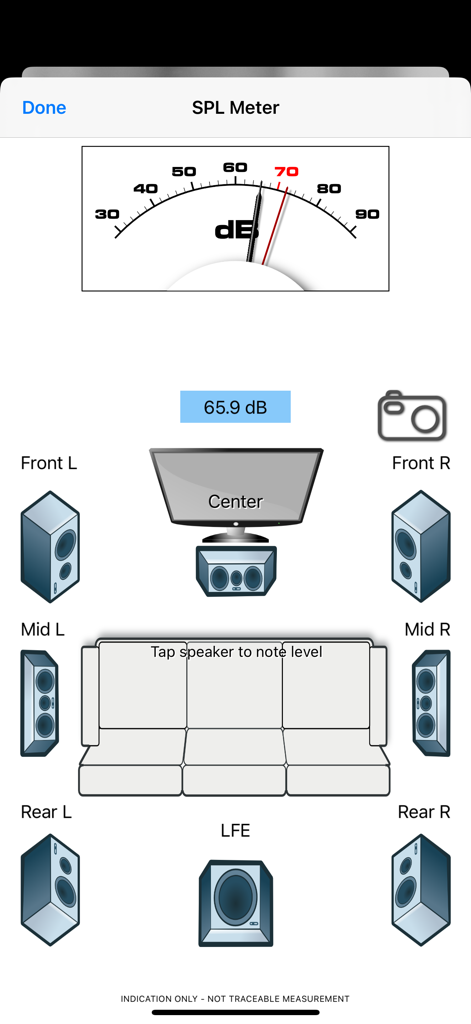
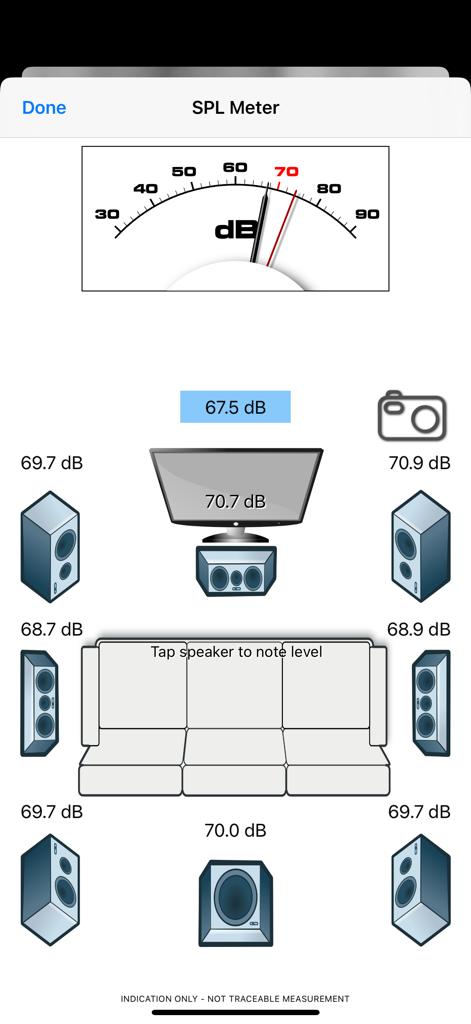
Home Theater SPL - Interface de l'application Home Theater SPL affichant un décibelmètre et une configuration d'enceintes surround 7.1 pour la calibration audio.
Interface de l'application Home Theater SPL affichant un décibelmètre et une configuration d'enceintes surround 7.1 pour la calibration audio.

Home Theater SPL - Écran d'accueil de l'application Home Theater SPL avec un tube à vide vintage et des boutons de navigation
Écran d'accueil de l'application Home Theater SPL avec un tube à vide vintage et des boutons de navigation

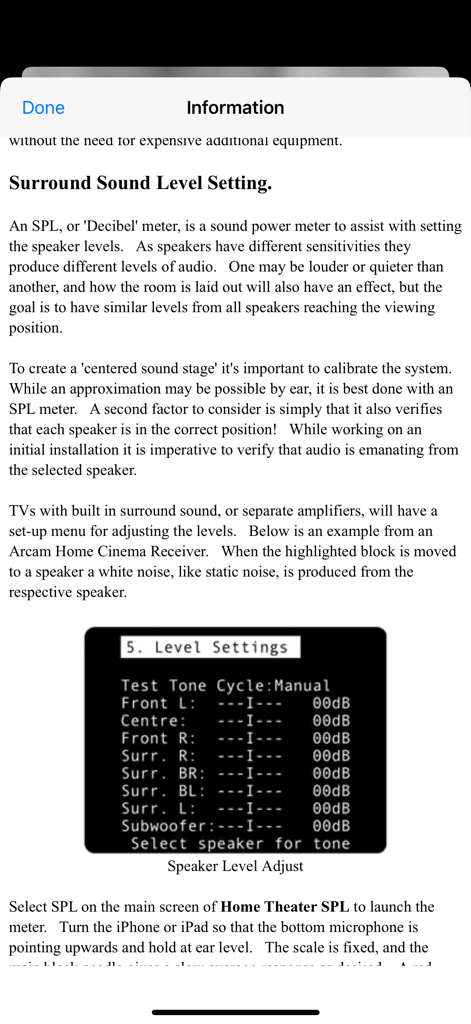
Home Theater SPL - Écran d'information expliquant la calibration des niveaux d'enceintes surround avec un exemple de menu d'amplificateur.
Écran d'information expliquant la calibration des niveaux d'enceintes surround avec un exemple de menu d'amplificateur.

Home Theater SPL - Interface de l'application Home Theater SPL montrant une calibration de système surround 7.1 avec décibelmètre et relevés de niveaux d'enceintes

Interface de l'application Home Theater SPL montrant une calibration de système surround 7.1 avec décibelmètre et relevés de niveaux d'enceintes

Description

Home Theater SPL Information   Professionals use SPL meters to calibrate audio reproduction systems in cinemas, so why shouldn’t Home Theaters or Home Cinemas owners use them too? Now the very same SPL meter that’s in our TestCard ProHD app is available separately.   An SPL or “decibel” meter is an essential tool when setting up surround sound systems.   Home Theater SPL a solution for calibrating the audio level of surround sound systems within the home without the need for additional equipment. Our app TestCard ProHD is the innovative means to calibrating your screen and audio to ensure a consistent and correct representation of display media and surround sound and includes an SPL meter. If you wish to calibrate both audio and visual aspects of your Home Theater then please consider TestCard ProHD.   Surround Sound Level Setting.   An SPL, or “Decibel” meter, is a sound power meter to assist with setting the speaker levels.   As speakers have different sensitivities they produce different levels of audio.   One may be louder or quieter than another, and how the room is laid out will also have an effect, but the goal is to have similar levels from all speakers reaching the viewing position.   To create that “centered sound stage” it’s important to calibrate the system.   While an approximation may be possible by ear, it is best done with an SPL meter.   A second factor to consider is simply that it also verifies that each speaker is in the correct position!   While working on an initial installation it is imperative to verify that audio is emanating from the selected speaker.   Select SPL on the main screen of Home Theater SPL to launch the meter.   Turn the iPhone or iPad so that the bottom microphone is pointing upwards and hold at ear level.   The scale is fixed, and the main black needle gives a slow average response as desired.   A red needle is provided for peak noise level information and is not required during calibration. Start with the front left speaker and allow it to set the benchmark level; the target for all other speakers to be set to.   Typically the audio will be in the 70-80dB range and as a guide 70dB is marked in red on dial.   With Home Theater SPL it is possible to note the current sound level by tapping on respective speaker, making it easier to recall where individual speakers were.   Move to the center speaker and adjust its level to closely match the first.   It is normal for amplifiers to increase or decrease sound levels by 1dB increments and it may not be possible to get an exact match.   Move to the next speaker in the list and repeat.   Variance of 1 or 2dB during calibration is normal, but it will settle around a value.   Some systems will have 5 speakers and some will also have the LFE, or bass effects, speaker to give the “0.1” to make 5.1 audio.   With the SPL meter there are 7 main speakers shown with one LFE to make 7.1.   With a 5.1 system the Mid speakers will not be present and therefore can be skipped. To check it’s always advisable to run round checking the speaker levels again, perhaps even adjusting the initial left speaker if it was not possible to set others within the range allowed by the amplifier.   When complete ensure that you save the settings within the amplifier if they’re not automatically saved.   For reference a screen shot of the SPL meter on Home Theater SPL can be taken to record any stored audio level by pressing the camera button.

Download

Télécharger sur App Store

Cette page n'est pas une page officielle de l'application ou de son développeur, mais une publication éditoriale indépendante créée à des fins d'information et de commentaire. Sauf indication expresse contraire, ni l'application ni son développeur ne sont affiliés, approuvés, sponsorisés, autorisés ou autrement officiellement liés à MWM, Apple, Google Play, à l'éditeur de l'application ou au développeur de l'application, et rien sur cette page n'implique que l'application a été développée en utilisant les services de MWM. Toutes les marques, logos, captures d'écran et autres contenus restent la propriété de leurs propriétaires respectifs.








