
Cette page n'est pas une page officielle de l'application ou de son développeur, mais une publication éditoriale indépendante créée à des fins d'information et de commentaire. Sauf indication expresse contraire, ni l'application ni son développeur ne sont affiliés, approuvés, sponsorisés, autorisés ou autrement officiellement liés à MWM, Apple, Google Play, à l'éditeur de l'application ou au développeur de l'application, et rien sur cette page n'implique que l'application a été développée en utilisant les services de MWM. Toutes les marques, logos, captures d'écran et autres contenus restent la propriété de leurs propriétaires respectifs.


Lightroom: AI Photo Editor
L'image du réel est souvent terne. Lightroom dote l'utilisateur lambda du pouvoir d'un retoucheur pro, façonnant chaque pixel pour un impact visuel maximal, le tout depuis sa poche.
Téléchargements
100M+Note
Nombre d'avis
2.4MÉditeur
Catégorie
Photo & VideoLangues
23Dernière version
11.2.2Taille
316.4 MBDate de sortie
22 juin 2014Analyse des Fonctionnalités Clés
Évaluation des atouts majeurs pour l'édition de photos et vidéos mobiles.
Retouche Rapide et Amélioration Intelligente
L'application propose des actions rapides et des préréglages adaptatifs, s'appuyant sur l'IA pour suggérer les meilleures modifications et améliorer la qualité des photos en quelques secondes, sans nécessiter d'expérience préalable.
Suppression d'Objets et Flou Artistique
Cet outil permet aux utilisateurs de gommer facilement les éléments indésirables d'une photo grâce à la suppression générative, et de créer des arrière-plans flous (effet bokeh) pour un rendu esthétique et professionnel.
Accès aux Préréglages et Inspiration
L'application met à disposition une vaste bibliothèque de filtres et préréglages créés par la communauté, offrant une source d'inspiration pour découvrir de nouveaux styles ou appliquer rapidement des looks tendance.
Contrôle Précis de la Lumière et des Couleurs
Il offre des outils pour ajuster finement l'exposition, les hautes lumières, les ombres, la teinte, la saturation et la gradation des couleurs, permettant une personnalisation créative et un contrôle total sur l'ambiance visuelle.
Édition de Vidéos Intégrée
Il permet d'appliquer les mêmes outils créatifs pour la lumière, la couleur et les préréglages aux vidéos, offrant ainsi une cohérence visuelle entre les photos et les clips pour les plateformes sociales.
Traitement par Lots
Cet outil facilite l'édition de multiples photos simultanément, garantissant une cohérence visuelle rapide et efficace pour des séries d'images (événements, voyages) en appliquant les mêmes modifications.
Questions Fréquentes
Tout ce que vous devez savoir sur Lightroom: AI Photo Editor
Is Adobe Lightroom a free app?
Yes, Adobe Lightroom is a free photo and video editor. It helps users enhance photos and videos with powerful AI editor tools and creative controls.
What AI editing features does Adobe Lightroom offer?
Adobe Lightroom offers AI editor tools such as Generative Remove for object removal, Quick Actions for suggested edits, and Adaptive Presets for enhancing specific photo elements.
Can I remove unwanted objects from photos using Lightroom?
Yes, Adobe Lightroom features Generative Remove, an AI photo eraser tool. It allows users to remove unwanted distractions or objects from photos with a few taps.
Does Adobe Lightroom provide video editing capabilities?
Yes, Adobe Lightroom includes video editing features. Users can apply creative energy to clips using tools for light, color, and presets to match their style.
How does Adobe Lightroom help improve portrait photos?
Adobe Lightroom offers Adaptive Presets for portraits and retouching tools. Users can enhance portraits with one-tap adjustments, including options for blemishes, skin, teeth, and eyes.
Can I apply edits to multiple photos at once in Adobe Lightroom?
Yes, Adobe Lightroom enables batch editing. Users can apply edits once and then fix photos in batches to maintain consistent photo edits across multiple images quickly and easily.
How can I blur the background in my photos using Lightroom?
Adobe Lightroom allows users to blur photo backgrounds for a polished look. It provides a "Background Blur" tool with various shapes and adjustable blur amounts.
Does Adobe Lightroom allow users to adjust sky elements?
Yes, Adobe Lightroom features Adaptive: Sky presets that instantly transform the sky in photos. Users can enhance specific parts of a photo like the sky.
Where can I find the Terms & Conditions for Adobe Lightroom?
The Terms & Conditions for Adobe Lightroom are available at http://www.adobe.com/go/terms_linkfree_en. This link is provided within the app's description.
Does Adobe Lightroom offer color correction tools?
Yes, Adobe Lightroom provides tools to boost color with precision. Users can adjust hue, saturation, color grading, and temperature to achieve the desired look for their photos.
Les captures d'écran et la description suivantes proviennent directement de la fiche officielle de l'application sur le store et sont la propriété du développeur.
App Store
Captures

Édition photo simplifiée
L'application propose des outils d'amélioration rapide et des préréglages adaptatifs pour transformer les photos en un instant, permettant d'atteindre une qualité professionnelle sans effort.

Suppression d'objets IA
Supprimez facilement les éléments indésirables de vos photos grâce à la suppression générative alimentée par l'IA et la détection d'objets intelligente, pour des clichés nets et précis.

Ciels spectaculaires instantanés
Les utilisateurs peuvent métamorphoser le ciel de leurs photos instantanément grâce aux préréglages adaptatifs pour le ciel, offrant une transformation de l'ambiance visuelle sans effort.

Retouche portrait rapide
Cet outil permet une correction des imperfections et une retouche des traits du visage en quelques gestes, assurant des portraits impeccables avec simplicité.

Portraits sublimés instantanément
Améliorez vos portraits avec des préréglages adaptatifs pour portraits et des améliorations en un seul clic, pour des résultats étonnants adaptés à chaque esthétique.
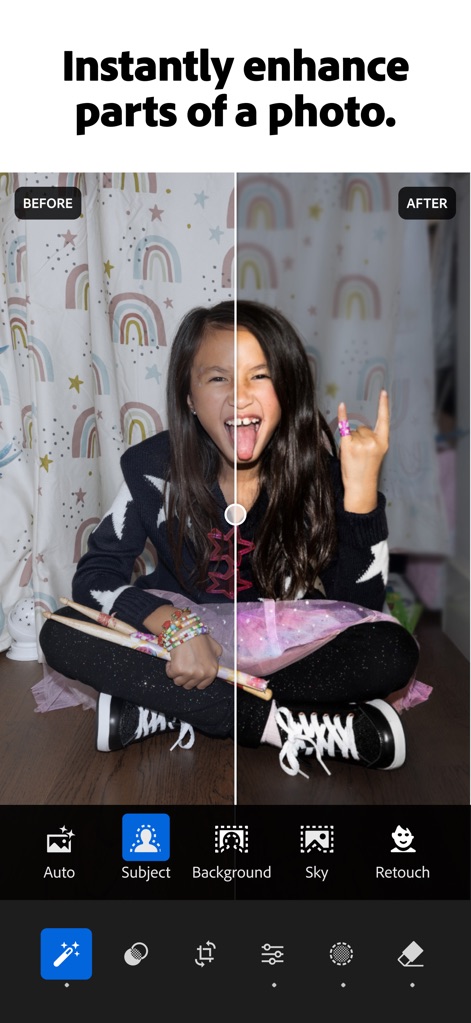
Amélioration sélective IA
L'application offre une sélection d'objets par IA permettant une amélioration ciblée des zones spécifiques d'une photo, comme le sujet ou l'arrière-plan, pour un rendu parfait.

Flou d'arrière-plan rapide
Créez instantanément un flou d'arrière-plan créatif pour des portraits professionnels, avec des effets de bokeh personnalisables tels que 'Ring' ou 'Bubble'.
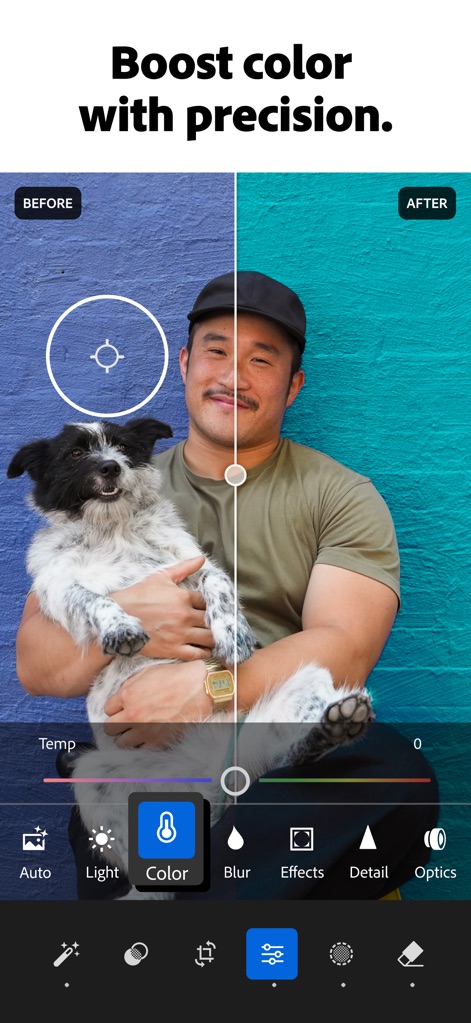
Maîtrise colorimétrique
Les utilisateurs peuvent obtenir un étalonnage des couleurs précis et un ajustement de la teinte/saturation pour donner vie à leurs photos, transformant les couleurs fades en teintes éclatantes.

Montage vidéo créatif
L'application permet une édition vidéo intuitive avec des ajustements créatifs de lumière et de couleur, offrant les mêmes puissantes fonctionnalités que pour les photos, directement sur mobile.
Description
Download
Apps Similaires
Apps avec des fonctionnalités et une expérience similaires

MIX-Photo Editor & Filters
灏 徐

Presets for Lightroom - FLTR
Onelight Apps CY Ltd

Colorby: AI Photo Color Editor
Zhanghan Ke

PRESETS: Filters for Pictures
Gustas Brazaitis

Edith: Presets for Lightroom
MWM

Soft Focus Lite 〜beauty selfie
handyCloset Inc.

BerryFilm - Korean Style Cam
Seungyun Kim

Presets for Lightroom: Filters
Alenrom sp. z o.o.

Video Filters Photo Editor TON
Onelight Apps CY Ltd
Cette page n'est pas une page officielle de l'application ou de son développeur, mais une publication éditoriale indépendante créée à des fins d'information et de commentaire. Sauf indication expresse contraire, ni l'application ni son développeur ne sont affiliés, approuvés, sponsorisés, autorisés ou autrement officiellement liés à MWM, Apple, Google Play, à l'éditeur de l'application ou au développeur de l'application, et rien sur cette page n'implique que l'application a été développée en utilisant les services de MWM. Toutes les marques, logos, captures d'écran et autres contenus restent la propriété de leurs propriétaires respectifs.