
Cette page n'est pas une page officielle de l'application ou de son développeur, mais une publication éditoriale indépendante créée à des fins d'information et de commentaire. Sauf indication expresse contraire, ni l'application ni son développeur ne sont affiliés, approuvés, sponsorisés, autorisés ou autrement officiellement liés à MWM, Apple, Google Play, à l'éditeur de l'application ou au développeur de l'application, et rien sur cette page n'implique que l'application a été développée en utilisant les services de MWM. Toutes les marques, logos, captures d'écran et autres contenus restent la propriété de leurs propriétaires respectifs.

Microsoft OneNote
Le flux incessant d'informations s'ordonne. Cette application ancre vos pensées fugaces et les rend instantanément utiles, où que vous soyez.
Téléchargements
50M+Note
Nombre d'avis
4.5MÉditeur
Catégorie
ProductivityLangues
33Dernière version
16.107.3Taille
350.1 MBDate de sortie
18 janv. 2011Évaluation des Fonctionnalités Clés de Microsoft OneNote
Analyse des capacités fondamentales de Microsoft OneNote pour l'optimisation de la productivité et la gestion de l'information numérique.
Intégration profonde avec l'écosystème Microsoft
L'application s'intègre naturellement avec les services Microsoft tels qu'Office, OneDrive et SharePoint, offrant une expérience unifiée et familière aux utilisateurs déjà engagés dans cet écosystème.
Synchronisation multi-appareils via le cloud
Elle garantit un accès permanent et universel aux notes de l'utilisateur, peu importe le lieu ou l'appareil utilisé, grâce à une synchronisation automatique et fiable via le cloud.
Fonctionnalités de collaboration en temps réel
Cet outil permet à plusieurs utilisateurs de travailler simultanément sur un même bloc-notes, facilitant ainsi le partage d'informations, la coordination et le travail d'équipe en temps réel.
Capture d'idées et prise de notes polyvalente
Il permet aux utilisateurs de saisir rapidement et efficacement des idées, des pensées, des découvertes et des informations diverses, agissant comme un bloc-notes numérique centralisé pour la planification et la création.
Prise de notes manuscrites et dessin
L'application offre la possibilité de prendre des notes manuscrites, d'annoter et de dessiner avec des options de stylos variées, incluant une fonctionnalité de conversion de formes dessinées à la main en formes parfaites, idéale pour les écrans tactiles.
Outils d'organisation et de recherche avancés
Elle propose des outils robustes pour organiser les notes de manière personnalisée et permet de retrouver rapidement des informations spécifiques ou les pages fréquemment utilisées.
Capture et intégration d'images (Office Lens)
Cet outil intègre la technologie Office Lens pour numériser et insérer directement des images de tableaux blancs, de photos ou de documents imprimés dans les notes, optimisant la capture visuelle d'informations.
Intégration de pense-bêtes numériques (Sticky Notes)
Il permet de créer et de synchroniser des pense-bêtes numériques colorés, offrant un moyen rapide et pratique de noter des informations éphémères qui restent accessibles sur tous les appareils.
Questions Fréquentes
Tout ce que vous devez savoir sur Microsoft OneNote
Is Microsoft OneNote available for free?
Yes, Microsoft OneNote is free on iPhone and many other devices. Users can get started by downloading the app and signing in with a Microsoft or work/school account.
How does Microsoft OneNote allow me to access notes across devices?
Microsoft OneNote syncs your notes via OneDrive, allowing access to them anytime, anywhere, and across all your devices. This ensures your notes are always available whether at home or on the go.
Can I secure my notes in Microsoft OneNote with a password?
Yes, Microsoft OneNote allows users to secure their notes with a password. Additionally, it supports using Touch ID for quick and secure access to protected notes.
What organizational features does Microsoft OneNote offer for my notes?
Microsoft OneNote provides powerful organizational tools, allowing users to quickly arrange notes in a personalized way. It also helps find recent notes fast and pin frequently used pages.
Does Microsoft OneNote support drawing and handwriting?
Yes, Microsoft OneNote supports drawing and handwriting, particularly on iPad. It offers various pen colors and settings, and a 'Convert to Shapes' mode for automatically perfecting hand-drawn shapes.
Can I use sticky notes with Microsoft OneNote?
Yes, Microsoft OneNote allows users to quickly save thoughts and ideas using colorful sticky notes. These sticky notes sync across devices, providing access from anywhere, anytime.
How can I collaborate with others using Microsoft OneNote?
Microsoft OneNote facilitates collaboration by allowing users to work together in a shared notepad. Notes are saved to the cloud (OneDrive, SharePoint) and can be accessed and shared on any device.
Does Microsoft OneNote allow capturing images from documents or whiteboards?
Yes, Microsoft OneNote integrates with Office Lens. This feature enables users to save pictures of whiteboards, photos, or printed documents directly into their notes, with automatic cropping.
Are there subscriptions available within the Microsoft OneNote app?
Yes, monthly Microsoft 365 subscriptions are available for purchase within the Microsoft OneNote app. These are charged to your App Store account and renew automatically.
What is the data privacy policy for Microsoft OneNote?
Microsoft OneNote is subject to a separate privacy statement and terms. Data used with the app may be accessible to Microsoft or third-party publishers, and processed in the United States or other countries.
Les captures d'écran et la description suivantes proviennent directement de la fiche officielle de l'application sur le store et sont la propriété du développeur.
App Store
Captures
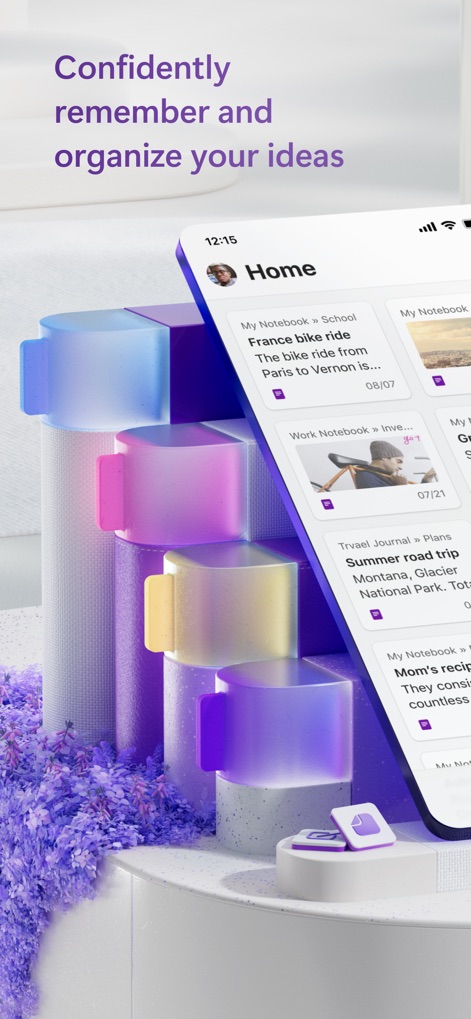
Organisation Intuitive Notes
L'interface d'accueil dynamique affiche une vue d'ensemble des carnets de notes et des entrées récentes, facilitant l'accès rapide aux informations essentielles.

Saisie Idées Rapide
La navigation fluide entre les différentes notes est complétée par un bouton d'ajout rapide, permettant de capturer instantanément de nouvelles pensées ou listes.

Accès Mobile Fluidité
Les utilisateurs peuvent consulter leurs notes en déplacement, présentées sous forme de cartes individuelles avec titres et dates, offrant une vue d'ensemble claire.

Synchronisation Multi-plateforme
L'application assure une continuité parfaite entre les versions mobile et de bureau, avec des capacités d'édition complètes incluant le formatage de texte et l'insertion d'images.

Catégorisation Visuelle Simple
Cet outil structure les informations à l'aide de sections clairement définies et de languettes colorées, simplifiant la gestion et la localisation des contenus.

Notes Enrichies Images
L'application permet d'insérer des images percutantes directement dans les notes, complétées par des descriptions textuelles détaillées pour un contexte enrichi.

Suivi Objectifs Listes
Les utilisateurs créent des listes de contrôle interactives avec des cases à cocher, idéales pour suivre des objectifs personnels ou des tâches quotidiennes de manière efficace.

Planification Créative Intégrée
Cet outil offre la possibilité d'annoter des cartes avec des dessins manuscrits et d'y intégrer des listes de vérification, optimisant la planification de projets complexes.
Description
Download
Apps Similaires
Apps avec des fonctionnalités et une expérience similaires

Notion: Notes, Tasks, AI
Notion Labs, Incorporated

Freenotes®: AI Notes Taking
Hangzhou Free Notes Technology Co., Ltd

Structured - Daily Planner
unorderly GmbH

Google Tasks: Get Things Done
Google LLC

TickTick:To-Do List & Calendar
Appest Limited

Noteful: Notes & PDF Markup
Noteful Technologies Ltd

Todoist: To Do List & Calendar
Doist Inc.

To do list MinimaList & Widget
Inner Grow Limited

monday.com - Work Platform
monday.com Ltd.
Cette page n'est pas une page officielle de l'application ou de son développeur, mais une publication éditoriale indépendante créée à des fins d'information et de commentaire. Sauf indication expresse contraire, ni l'application ni son développeur ne sont affiliés, approuvés, sponsorisés, autorisés ou autrement officiellement liés à MWM, Apple, Google Play, à l'éditeur de l'application ou au développeur de l'application, et rien sur cette page n'implique que l'application a été développée en utilisant les services de MWM. Toutes les marques, logos, captures d'écran et autres contenus restent la propriété de leurs propriétaires respectifs.