NDICam

NDICam

Télécharger sur App Store
Logo de NDICam

NDICam : Caméra NDI de qualité professionnelle pour iOS

Transformez votre iPhone ou iPad en une source vidéo IP haute performance. Diffusez des flux Full NDI ou NDI HX3 à faible latence directement vers vMix, OBS et TriCaster avec des commandes professionnelles conçues pour la production en direct.

Télécharger sur App Store

Éditeur

Mark Gilbert

Catégorie

Photo & Video

Téléchargements

158K+

Note

3.0/5

Nombre d'avis

100

Langues

1

Le contrôle pro en un coup d'œil

Découvrez l'interface utilisée par 158K+ utilisateurs.
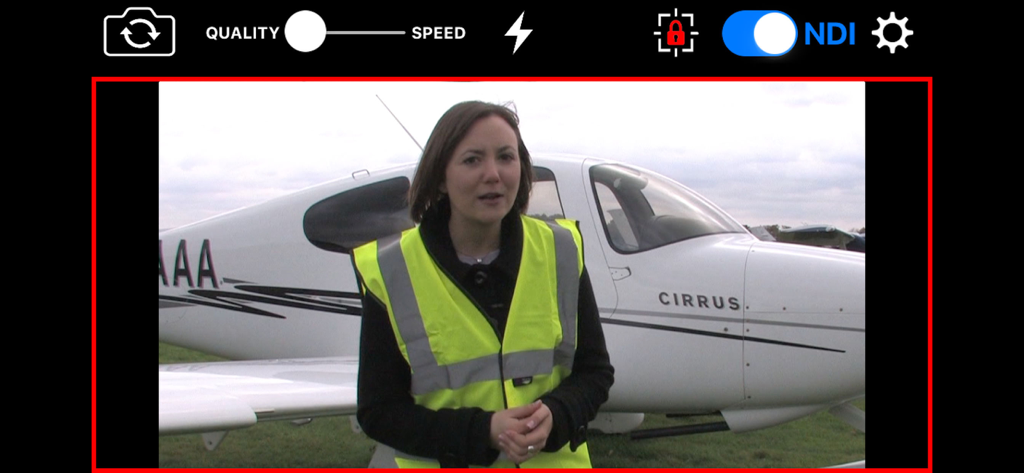
Écran de l'application NDICam montrant l'interface de flux vidéo professionnel avec bascule NDI et voyant tally en direct

Écran de l'application NDICam montrant l'interface de flux vidéo professionnel avec bascule NDI et voyant tally en direct

Logos NDI et NDI HX3 avec le marquage du développeur Sienna

Logos NDI et NDI HX3 avec le marquage du développeur Sienna

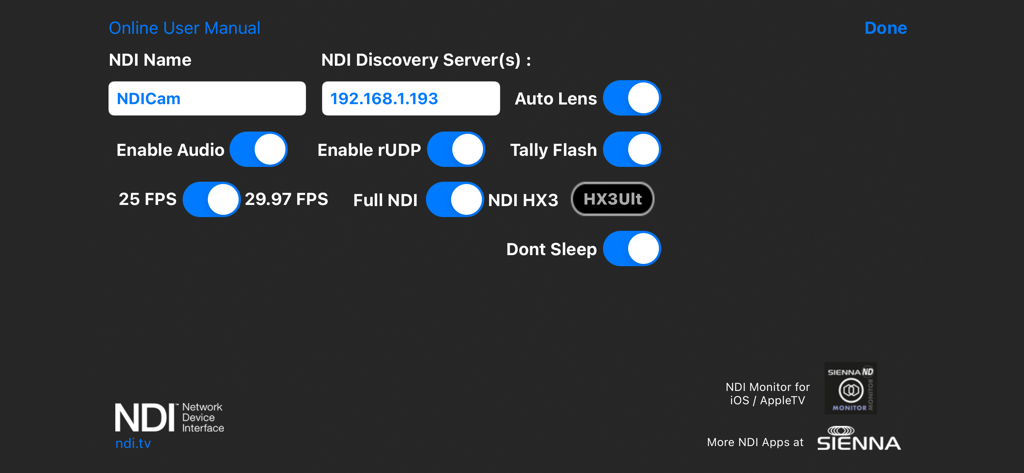
Menu des paramètres de NDICam montrant le serveur de découverte NDI et les options de diffusion vidéo

Menu des paramètres de NDICam montrant le serveur de découverte NDI et les options de diffusion vidéo

La vidéo de qualité diffusion au bout de vos doigts

Les outils qui font la différence, choisis par 158K+ utilisateurs.

NDI HX3 à ultra-faible latence

Basculez entre les modes Full NDI et NDI HX3 pour diffuser une vidéo 1080p cristalline optimisée pour la bande passante de votre réseau et les performances de votre matériel.

🔴

Tally en direct et logique professionnelle

Restez synchronisé grâce aux indicateurs de tally direct/aperçu à l'écran et à un tally flash d'appareil photo optionnel pour signaler aux intervenants qu'ils sont à l'antenne.

⚙️

Contrôle de production complet

Prenez le contrôle total de vos prises de vue avec le verrouillage AF/AE, le nommage manuel de la source, le contrôle de la coupure audio et le basculement fluide entre les caméras avant et arrière pendant les diffusions.

À propos de l'app

Tout ce que vous devez savoir sur NDICam.

Description

* Special Offer Price * NDICam is the original NDI iOS camera built by the world's leading NDI broadcast infrastructure developers - Sienna. Mature and feature rich, uniquely with both Full NDI and NDI HX3 modes. The NDI (Network Device Interface) protocol connects to professional vision mixers and other devices, and delivers a high quality, low latency connection. NDICam is compatible with All TriCasters, VMix, Wirecast and hundreds of other professional IP video systems, software and hardware, which support NDI. - Simple to use - nothing to configure on your iOS device - Switch between front and rear cameras during broadcast - Auto Focus, AF Lock and Tap to Focus - Auto Exposure, AE Lock and Tap to Expose - Illumination light on/off - Audio Mute Control - Manual Naming of NDI Stream source - 4 quality / performance levels to suit your device and network, plus NDI HX Option - Pinch to zoom (where zoom is supported) - Auto-lens mode for multi-lens cameras - On screen live / preview tally plus optional use of camera flash as talent tally (with red gel cover). - Option to prevent iOS device sleep - Select 25FPS or 29.97FPS standard rate. - Choice of Full NDI or NDI HX3 compression modes (HX2 at 2 to 20 mBit, plus HX3 Ultra) - Rotation support for Portrait or Landscape Video Modes. Front and Rear cameras can be selected at the touch of a button and NDICam features a 4 position quality vs frame rate slider to deliver optimum video suited to the quality of your wifi connection and your iPhone's processing performance. Depending on your iOS device, compression mode selected and Wifi network performance NDICam supports up to 1080 full HD resolution. Control of flashlight, touch to focus, focus lock, pinch to zoom and audio enable are also included. You can even use the phone's torch as a Tally Light, by covering it with a red gel. Note: Depending on the performance of your iOS device and your WIFI network, you may not see full frame rates when operating at maximum 1080 resolution with a full HD camera. Using HX3 mode will help if the bottleneck is your WIFI network. Note: NDI is a high bandwidth protocol designed for local area Gigabit networks. In order to see good results you will need a fast, uncontested wifi connection. If you see slow frame rates, try improving the wifi environment, with a better router, less interference, directional antenna or maybe switch to 5GHz if you are on 2.4GHz. . NB HX3 Ultra will use around 50mBits of bandwidth, so it's lower than full NDI, but still quite high. Use one of the lower bandwidth HX3 modes if your network connection is struggling. NDICam is also compatible with wired ethernet connections to iOS devices which can help deliver smooth video compared to a poor quality Wifi network. Good results have been seen with lightning to ethernet adaptors. You can specify an NDI discovery server in the application settings. Note that you will need to restart the app for any changes to take effect. Specifying a discovery server will disable the standard mDNS (Bonjour) advertisement for the NDI Cam source, so your iOS device must be able to reach the discovery server one the network. If you experience problems - delete the Discovery Server entry and restart the app. NB: NDI HX3 Ultra mode requires a recent NDI compatible receiver.

Dernière version

7.31

Taille

3.0 MB

Date de sortie

31 mars 2016

La production NDI® professionnelle commence ici

Transformez votre iPhone ou iPad en une caméra prête pour la diffusion avec prise en charge du Full NDI et du HX3. Intégrez dès aujourd'hui vos appareils mobiles de manière transparente dans les flux de travail vMix, OBS et TriCaster.

Télécharger sur App Store

App information, icons, screenshots, and descriptions displayed on this page are sourced from the Apple App Store and are the property of their respective developers. Download estimates and rankings are based on MWM's proprietary models and may not reflect actual figures. This page is provided for informational and analytical purposes only.

Believe this page infringes your intellectual property? File a dispute