PhotoMapper: GPS EXIF Editor

PhotoMapper: GPS EXIF Editor


Télécharger sur App Store
Logo de PhotoMapper: GPS EXIF Editor

PhotoMapper : Éditeur EXIF GPS – Complétez votre carte photo et protégez votre vie privée

L'utilitaire essentiel pour l'archiviste numérique et le photographe professionnel. Ajoutez sans effort les géobalises manquantes aux photos DSLR, modifiez les métadonnées par lot et supprimez en toute sécurité les données de localisation avant de partager pour préserver votre vie privée.

Télécharger sur App Store

Éditeur

Mykola Fiantsev

Catégorie

Photo & Video

Téléchargements

120K+

Note

4.3/5

Nombre d'avis

400

Langues

8

Votre monde, cartographié

Découvrez l'interface utilisée par 120K+ utilisateurs.
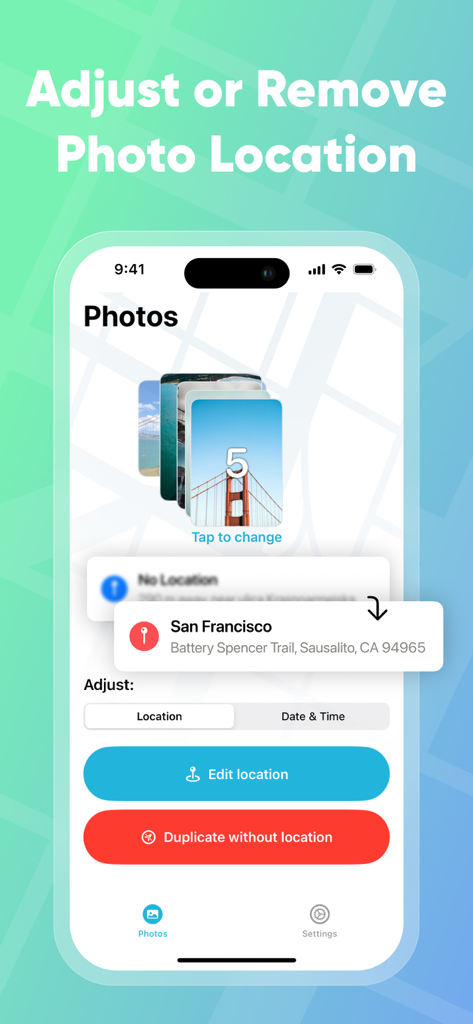
Interface de PhotoMapper GPS EXIF Editor montrant les options d'ajustement et de suppression de la localisation pour une pile de photos.

Interface de PhotoMapper GPS EXIF Editor montrant les options d'ajustement et de suppression de la localisation pour une pile de photos.

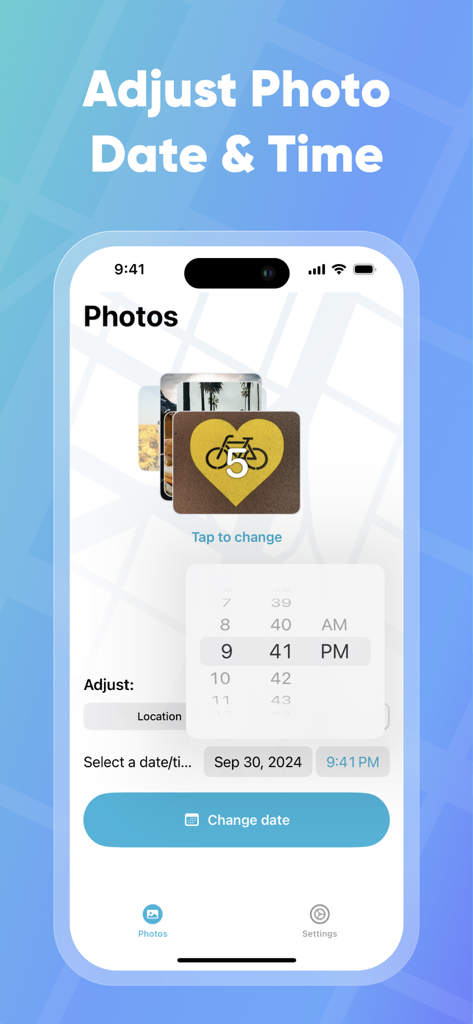
Interface pour ajuster la date et l'heure des photos dans l'application PhotoMapper

Interface pour ajuster la date et l'heure des photos dans l'application PhotoMapper

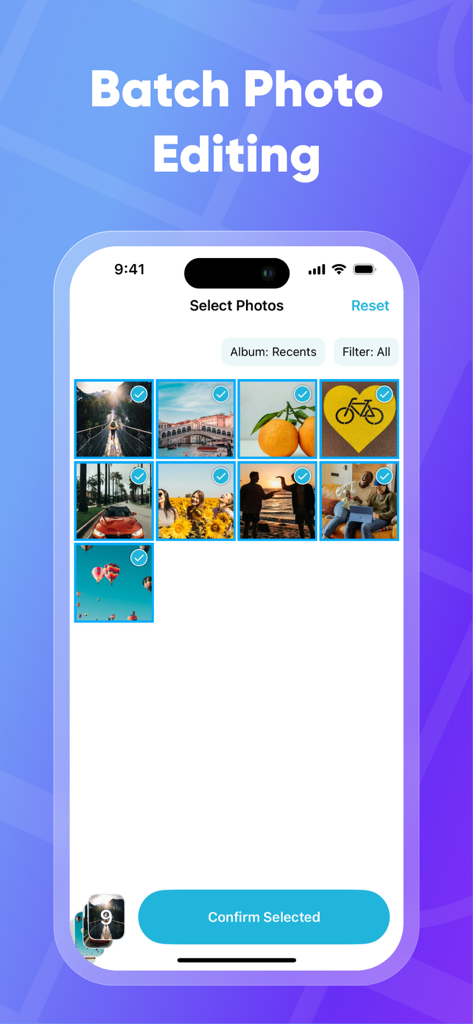
Écran d'iPhone montrant la fonction de sélection de photos par lot dans l'application PhotoMapper pour l'édition des données EXIF

Écran d'iPhone montrant la fonction de sélection de photos par lot dans l'application PhotoMapper pour l'édition des données EXIF

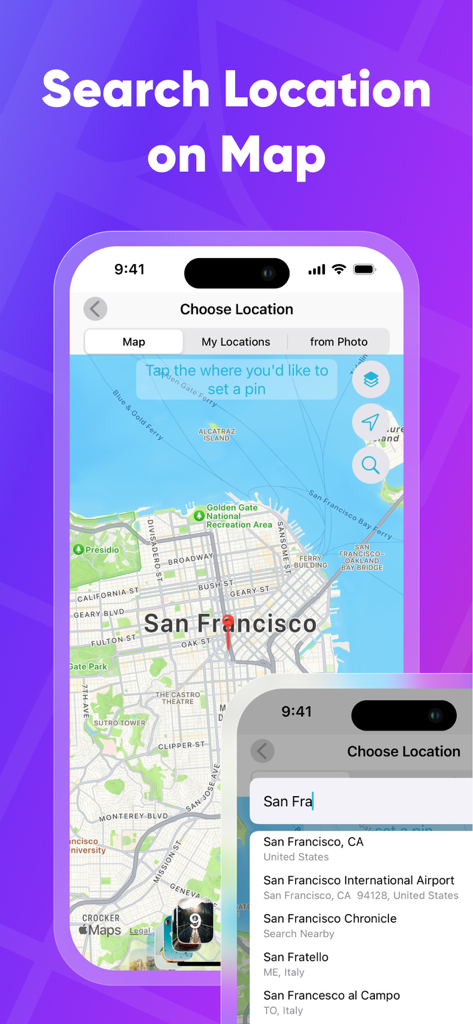
Rechercher et sélectionner un lieu géographique sur une carte pour ajouter des métadonnées GPS aux photos

Rechercher et sélectionner un lieu géographique sur une carte pour ajouter des métadonnées GPS aux photos

Perfectionnez votre archive photo

Les outils qui font la différence, choisis par 120K+ utilisateurs.

📍

Complétez votre carte 'Lieux'

Ne laissez jamais une photo DSLR sans localisation. Ajoutez ou corrigez manuellement les coordonnées GPS pour que chaque photo apparaisse exactement là où elle doit être dans votre bibliothèque iOS.

🛡️

Partagez en toute confidentialité

Protégez vos données personnelles en générant des doublons sans métadonnées. Partagez vos moments préférés sur les réseaux sociaux sans révéler votre domicile ou vos lieux privés.

Efficacité pour les utilisateurs avancés

Économisez des heures de travail manuel grâce à l'édition par lot. Copiez les données de localisation d'une photo et appliquez-les à des centaines d'autres en quelques touchers.

À propos de l'app

Tout ce que vous devez savoir sur PhotoMapper: GPS EXIF Editor.

Description

PhotoMapper: GPS EXIF Editor is an essential app for anyone who wants to keep their iOS Photo library organized by the places where photos were taken. All photographers who store photos in their iOS Photos library and use geo-tags for systematization could be upset with lost geo-tag information due to using DSLRs or getting these photos from friends. Just add this info with our app and keep your geo-tag system in a consistent state. PhotoMapper: GPS EXIF Editor is also useful for people who want to protect their personal privacy. When you share your photos on social networks or send them via email, the geo-location information – where the photo was taken – is shared as well. If you are concerned about your personal privacy and would like to share photos without any mark of location in EXIF metadata, PhotoMapper can remove it. **FEATURES:** • Location info of your photos will always be correct and never missed Easily add or modify location info of photos in your iOS Photo library by simply placing a pin on the map. Never miss this info even if you use a DSLR or for any other reason. • Prepare photos for social sharing with clear location info - Keep the original photo for yourself and create a copy without any mark of the GPS location info (Geotagging) in EXIF metadata for sharing, reinforcing your privacy. • Batch photo editing Edit multiple photos in a few clicks, the fast and easy way. Forget about single selection. • Find all photo with missed location info Easily find all photos without location in one click. • Copy location info from one photo to another Long press in the gallery to open a large preview of the selected photo and use the “Copy Location” action. Now you can copy the location to as many other photos as you wish. **HOW TO ADD OR MODIFY LOCATION INFO:** This action adds a new location, which will be available in the iOS Photo library. 1. Select one or multiple photos 2. Click “Edit location” 3. Set the desired location by placing a pin on the map 4. Confirm the action. **HOW TO REMOVE LOCATION INFO:** This action keeps the original photo and creates a duplicate copy without GPS location info, which you can share. The EXIF metadata will be clean in this case. There is no location info of this photo in any app. 1. Select one or multiple photos on the first screen. 2. Click “Duplicate photo without location.” 3. Confirm the action. Thanks for all feedback! Please leave a 5-star review if you are happy with PhotoMapper :) Terms of Use: https://gist.github.com/bigMOTOR/27f60cb35180a150d38dc11df5462276 Privacy Policy: https://gist.github.com/bigMOTOR/e373f36ef179c17679d5083e5fb39e80

Dernière version

4.2.0

Taille

21.6 MB

Date de sortie

26 mars 2018

Perfectionnez votre bibliothèque de photos dès aujourd'hui

Rejoignez plus de 120 000 utilisateurs qui utilisent PhotoMapper pour organiser leurs souvenirs DSLR et partager des photos en toute sécurité sans révéler leur emplacement.

Télécharger sur App Store

App information, icons, screenshots, and descriptions displayed on this page are sourced from the Apple App Store and are the property of their respective developers. Download estimates and rankings are based on MWM's proprietary models and may not reflect actual figures. This page is provided for informational and analytical purposes only.

Believe this page infringes your intellectual property? File a dispute