Stagehand: PRO DJ LINK Manager
Télécharger sur App Store

Cette page n'est pas une page officielle de l'application ou de son développeur, mais une publication éditoriale indépendante créée à des fins d'information et de commentaire. Sauf indication expresse contraire, ni l'application ni son développeur ne sont affiliés, approuvés, sponsorisés, autorisés ou autrement officiellement liés à MWM, Apple, Google Play, à l'éditeur de l'application ou au développeur de l'application, et rien sur cette page n'implique que l'application a été développée en utilisant les services de MWM. Toutes les marques, logos, captures d'écran et autres contenus restent la propriété de leurs propriétaires respectifs.

Logo de Stagehand: PRO DJ LINK Manager
Télécharger sur App Store

Stagehand: PRO DJ LINK Manager

Rationalisez votre flux de production avec le contrôle matériel à distance, la surveillance de l'état en temps réel et la synchronisation précise de l'éclairage pour les configurations CDJ-3000 et DJM-A9.

Chiffres Clés

Téléchargements

1K+

Note

1.0/5

Nombre d'avis

0

Éditeur

AlphaTheta Corporation

Catégorie

Entertainment

Langues

12

Dernière version

1.0.4

Taille

8.9 MB

Date de sortie

17 avr. 2023
Fonctionnalités

Contrôle Total de la Cabine, Partout dans la Salle

La première solution iPad de l'industrie pour les ingénieurs FOH et les équipes de production afin de gérer, surveiller et synchroniser à distance le matériel Pioneer DJ via PRO DJ LINK.

Efficacité des Balances à Distance

Déclenchez des morceaux, gérez les paramètres utilitaires et testez l'acoustique depuis la piste de danse. Éliminez la règle des deux hommes et réduisez de moitié le temps d'installation.

Surveillance de l'État en Temps Réel

Gardez une distance professionnelle de la cabine tout en surveillant les niveaux master et l'état des appareils. Repérez le 'red-lining' et les problèmes techniques avant qu'ils ne ruinent le set.

Les captures d'écran et la description suivantes proviennent directement de la fiche officielle de l'application sur le store et sont la propriété du développeur.

App Store

Captures
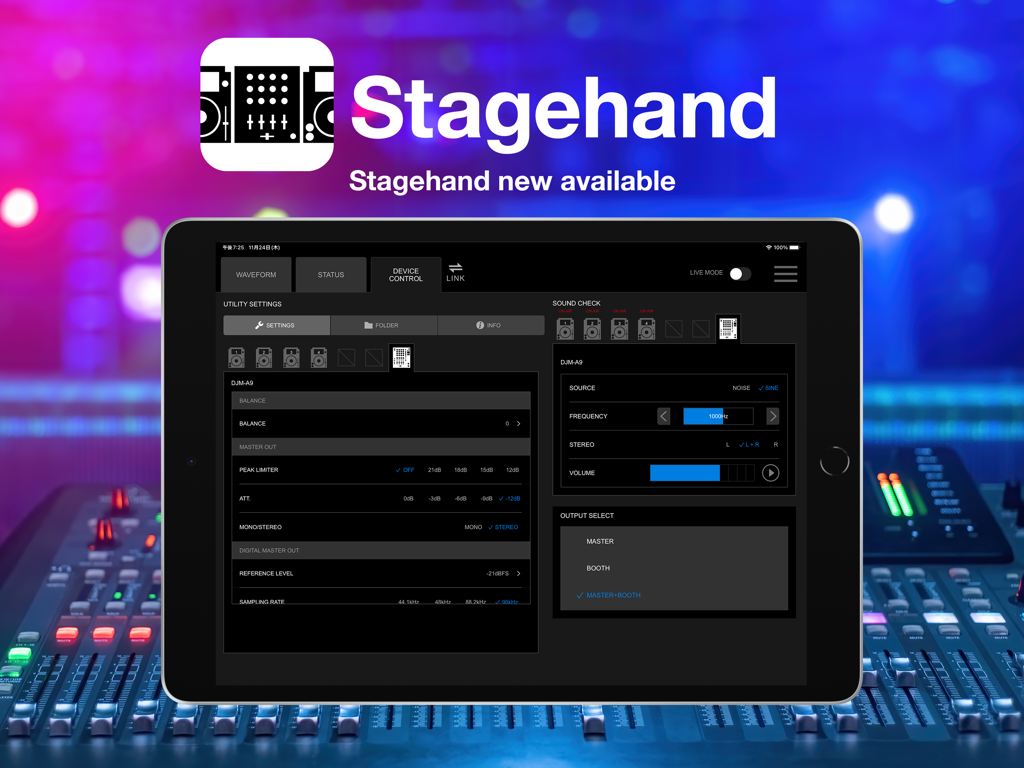
Stagehand: PRO DJ LINK Manager - iPad affichant l'interface Stagehand PRO DJ LINK Manager pour le contrôle à distance des équipements DJ
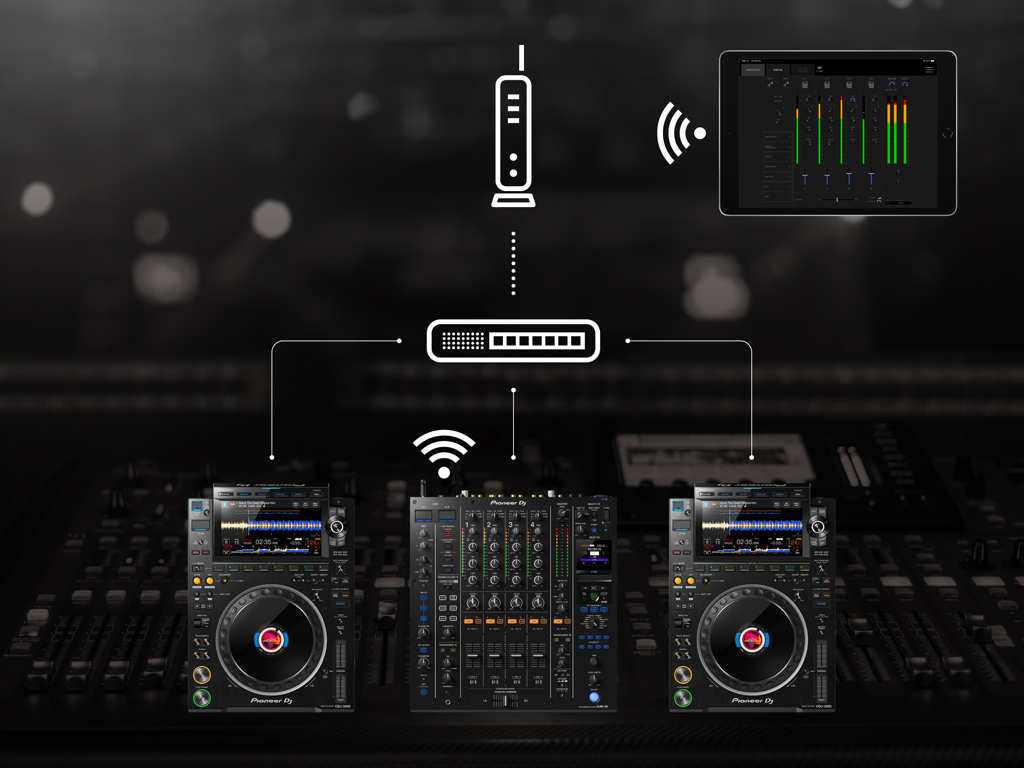
iPad affichant l'interface Stagehand PRO DJ LINK Manager pour le contrôle à distance des équipements DJ

Stagehand: PRO DJ LINK Manager - Un iPad utilisant l'application Stagehand pour surveiller et contrôler sans fil un mixeur Pioneer DJ et des multi-lecteurs sur un réseau
Un iPad utilisant l'application Stagehand pour surveiller et contrôler sans fil un mixeur Pioneer DJ et des multi-lecteurs sur un réseau

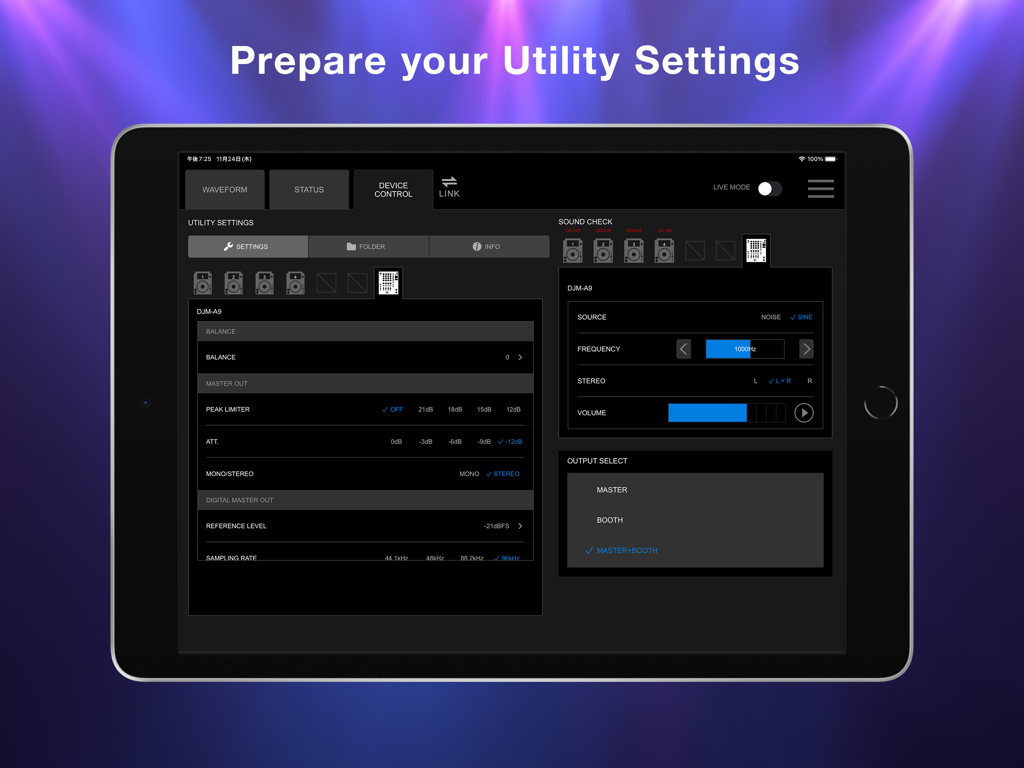
Stagehand: PRO DJ LINK Manager - Écran iPad montrant l'application Stagehand avec les paramètres utilitaires du mixeur DJM-A9 et les commandes de balance
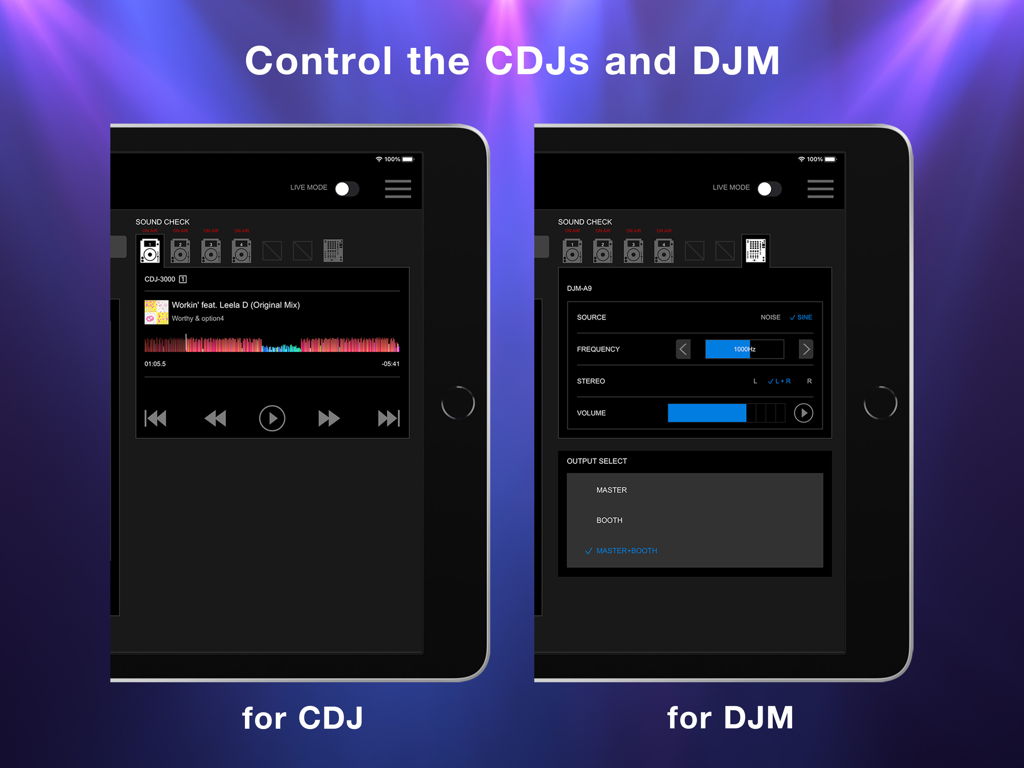
Écran iPad montrant l'application Stagehand avec les paramètres utilitaires du mixeur DJM-A9 et les commandes de balance

Stagehand: PRO DJ LINK Manager - Écran iPad affichant l'interface de l'application Stagehand pour le contrôle à distance des lecteurs CDJ et des mixeurs DJM
Écran iPad affichant l'interface de l'application Stagehand pour le contrôle à distance des lecteurs CDJ et des mixeurs DJM

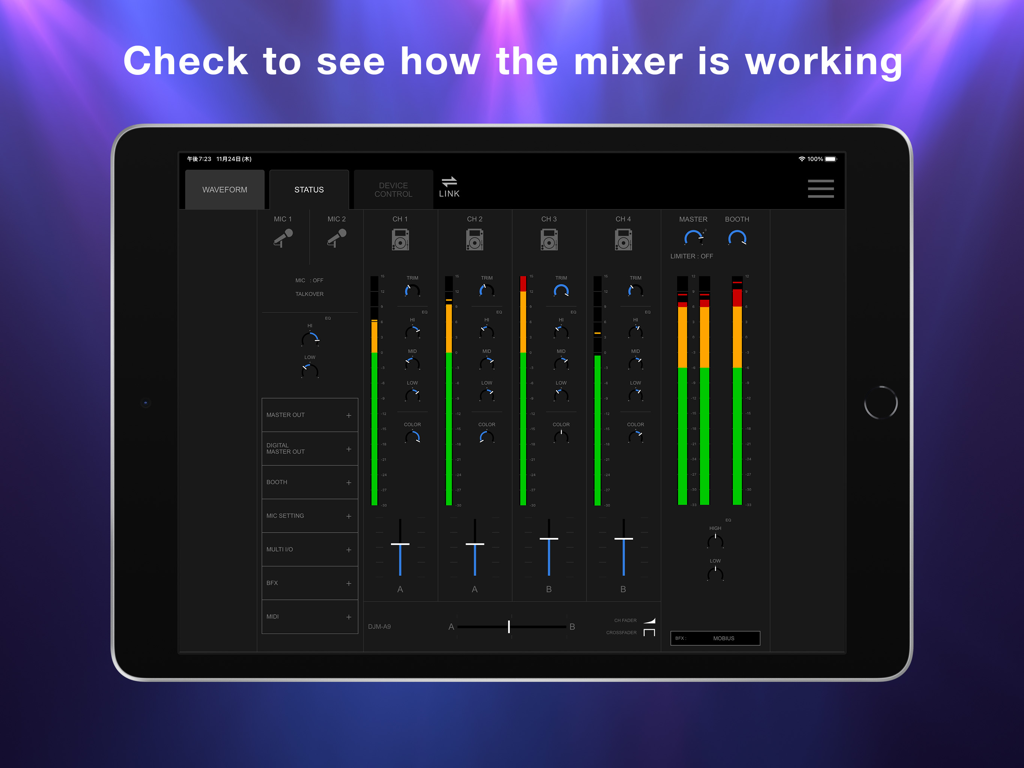
Stagehand: PRO DJ LINK Manager - iPad montrant l'écran d'état de l'application Stagehand avec les niveaux des canaux du mixeur DJ et les positions des faders en temps réel
iPad montrant l'écran d'état de l'application Stagehand avec les niveaux des canaux du mixeur DJ et les positions des faders en temps réel

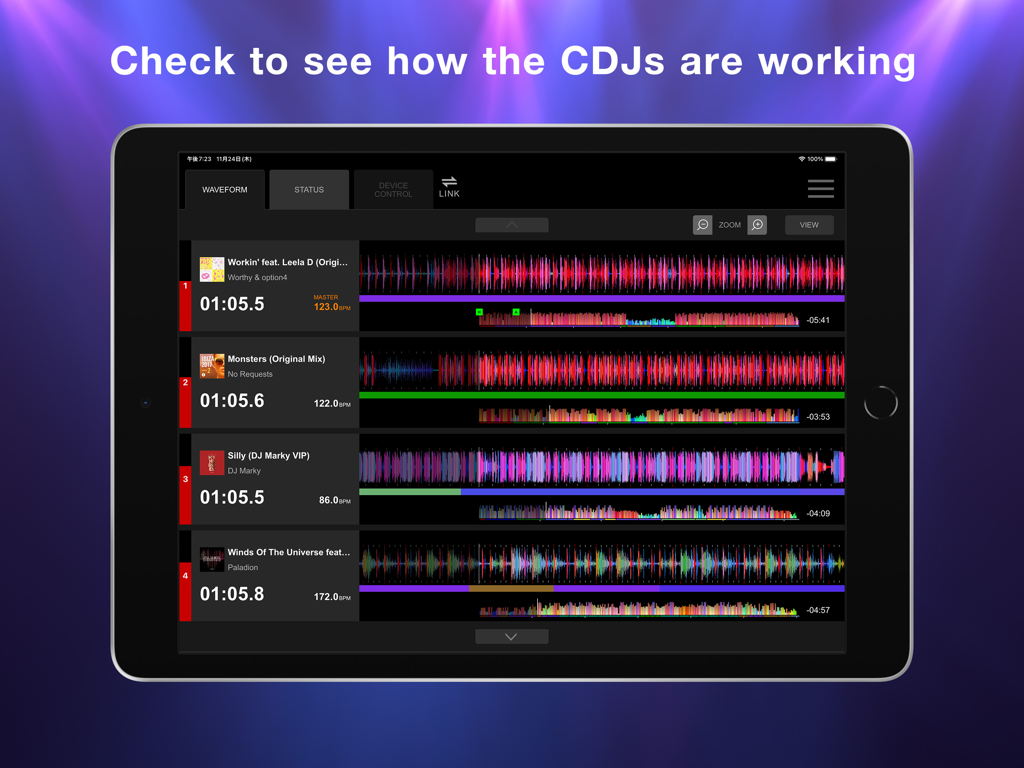
Stagehand: PRO DJ LINK Manager - Écran iPad montrant l'affichage de la forme d'onde de l'application Stagehand pour la surveillance de plusieurs unités CDJ.

Écran iPad montrant l'affichage de la forme d'onde de l'application Stagehand pour la surveillance de plusieurs unités CDJ.

Description

This indispensable new app, the first of its kind, enables you to keep an eye on a host of information and remotely adjust settings on DJM-A9 and CDJ-3000, CDJ-3000X units in a PRO DJ LINK network, all from your iPad. By managing the mixer and multi players via Stagehand, you can run smoother shows and produce more exciting lighting in sync with sound. Before your event begins, you can use Stagehand to remotely check and change the Utility settings of the DJM-A9 and CDJ-3000, CDJ-3000X units for quicker setup. Stagehand is also useful once a gig is underway as you can monitor the DJ’s use of the mixer and players without needing to enter the booth. The app enables you to keep an eye on volume levels and settings, and use beatgrid, BPM, and time information to help create effective lighting displays. There’s a Live mode too, which disables many of the app’s features so you can’t accidentally stop the music during the show. You can try Stagehand free for 60 days. Download the app from App Store to use it with an iPad. To use Stagehand, update the mixer and player's firmware to the latest version via our support page [https://www.pioneerdj.com/support/software/]. A device with the A12 Bionic chip or later is recommended. [Key Features] - Device Control If you’re the designated Admin user of the system, you can easily check and change the Utility settings of the DJM-A9 and CDJ-3000, CDJ-3000X units in the PRO DJ LINK network via the Device Control screen. You can create multiple settings files in advance, giving you the option to apply multiple changes in one go if you need to, and you can share them in numerous ways, including via AirDrop or email to make event preparations run smoother. Speed up sound checks with remote control of the CDJ-3000, CDJ-3000X. There’s no need to go back and forth between the booth and the dancefloor; simply use Sound Check in Stagehand to play, stop, fast-forward, and rewind tracks. You can also control sine waves and noise from the DJM-A9 to make sure the sound system is set up correctly for the room’s acoustics. When the gig starts, turn on Live mode to disable Device Control functions so you can’t accidentally interrupt the music in the middle of a DJ’s set. - Status Keep an eye on a host of information without needing to look over the DJ’s shoulder – or even enter the booth. The Status screen gives you a remote view of almost everything happening on the DJM-A9, including the status of Utility settings, enabling you to quickly spot problems such as excessive volume from the trim and master levels so you can troubleshoot effectively. You can also check the playing information on the CDJ-3000, CDJ-3000X units from here. - Waveform Remotely view various elements of track information from your iPad to help you create exciting lighting sequences in sync with sound. From the Waveform screen, you can view not only the waveforms of tracks playing on CDJ-3000, CDJ-3000X units in real time but also the beatgrid, BPM, and time information. DJs have a choice of public and private settings in their own rekordbox account for sharing most of the music information, and settings made in advance will be reflected in Stagehand.

Download

Télécharger sur App Store

Cette page n'est pas une page officielle de l'application ou de son développeur, mais une publication éditoriale indépendante créée à des fins d'information et de commentaire. Sauf indication expresse contraire, ni l'application ni son développeur ne sont affiliés, approuvés, sponsorisés, autorisés ou autrement officiellement liés à MWM, Apple, Google Play, à l'éditeur de l'application ou au développeur de l'application, et rien sur cette page n'implique que l'application a été développée en utilisant les services de MWM. Toutes les marques, logos, captures d'écran et autres contenus restent la propriété de leurs propriétaires respectifs.








