WatchBMI

WatchBMI

Télécharger sur App Store
Logo de WatchBMI

WatchBMI : Calculs IMC professionnels, directement à votre poignet

L'outil ultime pour les professionnels de la santé et les experts en fitness. Calculez l'IMC en quelques secondes en utilisant les catégories CDC sans jamais sortir votre téléphone — pas de suivi des données, pas d'abonnements, juste une utilité pure.

Télécharger sur App Store

Éditeur

James Nachbar

Catégorie

Health & Fitness

Téléchargements

100

Note

1.0/5

Nombre d'avis

0

Langues

1

La précision en un coup d'œil

Découvrez l'interface utilisée par 100 utilisateurs.
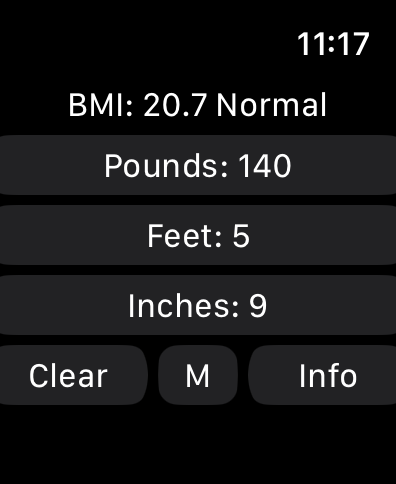
Calculatrice WatchBMI sur Apple Watch affichant le poids en livres et la taille en pieds et pouces avec un résultat IMC normal.

Calculatrice WatchBMI sur Apple Watch affichant le poids en livres et la taille en pieds et pouces avec un résultat IMC normal.

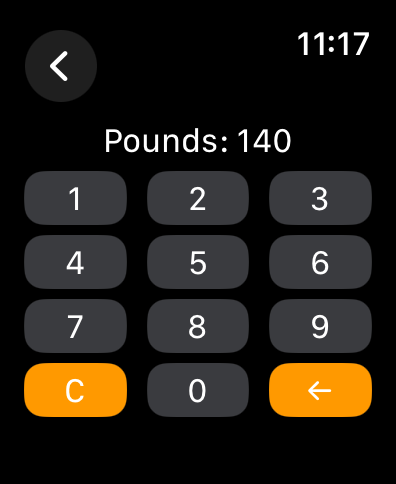
Un clavier numérique sur un écran d'Apple Watch pour entrer le poids en livres.

Un clavier numérique sur un écran d'Apple Watch pour entrer le poids en livres.

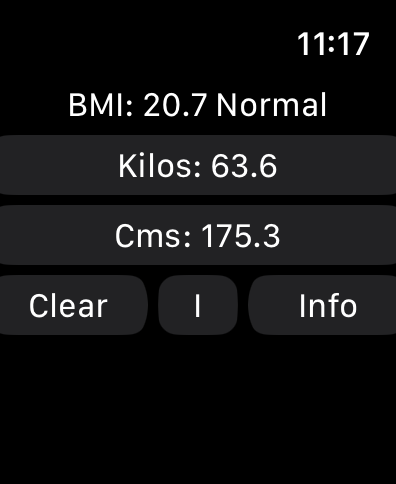
Interface de l'application WatchBMI sur Apple Watch affichant le résultat du calcul IMC métrique.

Interface de l'application WatchBMI sur Apple Watch affichant le résultat du calcul IMC métrique.

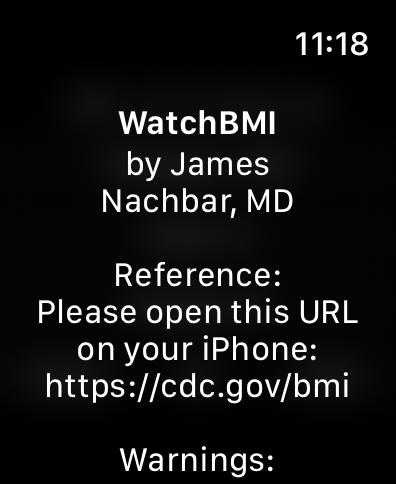
Interface de l'application WatchBMI sur Apple Watch montrant le développeur James Nachbar MD et un lien de référence vers le site Web du CDC.

Interface de l'application WatchBMI sur Apple Watch montrant le développeur James Nachbar MD et un lien de référence vers le site Web du CDC.

Écran d'avertissements médicaux de WatchBMI sur Apple Watch montrant un lien de référence vers le CDC.

Écran d'avertissements médicaux de WatchBMI sur Apple Watch montrant un lien de référence vers le CDC.

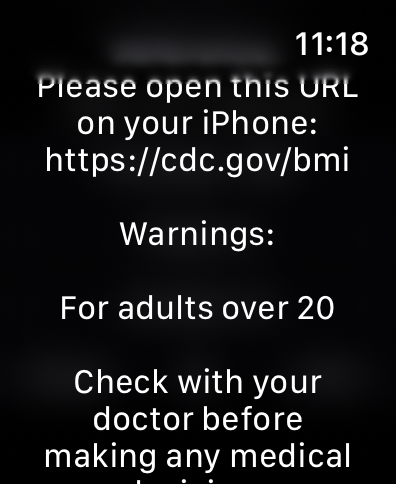
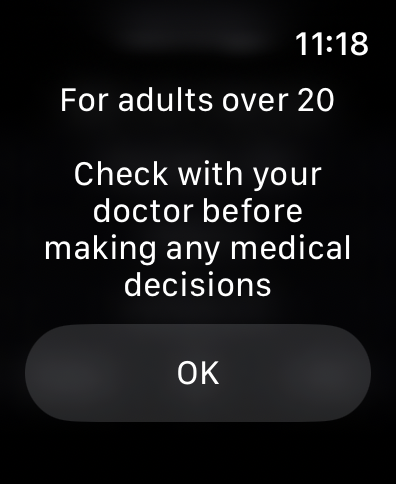
Écran d'avis de non-responsabilité médicale sur l'application WatchBMI pour Apple Watch indiquant qu'il est destiné aux adultes de plus de 20 ans et conseillant aux utilisateurs de consulter un médecin.

Écran d'avis de non-responsabilité médicale sur l'application WatchBMI pour Apple Watch indiquant qu'il est destiné aux adultes de plus de 20 ans et conseillant aux utilisateurs de consulter un médecin.

Conçu pour votre flux de travail professionnel

Les outils qui font la différence, choisis par 100 utilisateurs.

Accès instantané au poignet

Effectuez des calculs rapides en quelques secondes sans perdre le contact visuel avec le patient ou compromettre les protocoles d'hygiène clinique.

📏

Prise en charge hybride des unités

Entrez sans effort la taille en pieds et en pouces, puis basculez vers le système métrique pour la saisie clinique d'un simple toucher.

🔒

Privé et conforme

Alignée sur les catégories CDC, notre architecture sans stockage garantit une confidentialité totale des données pour vous et vos clients.

À propos de l'app

Tout ce que vous devez savoir sur WatchBMI.

Description

This app is a BMI (Body Mass Index) calculator. It is very simple, in that it asks for input of height and weight, and displays the calculated value for BMI. It does not measure anything; it only displays the calculated BMI based on entered values. I created this for my own practice, because I often need to calculate BMI, and do not want to have to take out and unlock my phone every time. While it will certainly work for an individual to determine her own BMI, it is targeted at users (such as myself) who need to calculate BMI based on the measurements of multiple individuals. It does report the CDC category of the BMI, but does not otherwise interpret any of the data. It does not store or collect any of the entered information. You should know that BMI is only a reflection of height and weight; it does not assess body composition, or differentiate between fat and muscle. Instructions: Simply click on one of the buttons on the main screen to show a keyboard for entering the value. WatchBMI can accept values in either the Metric or the Imperial system. Click the "M" button to change to metric, click the "I" button to change to imperial If Imperial: Click on "Pounds" to enter the weight in pounds. Use the "Back" button to go back to the main screen. Click on "Feet" to enter the feet part of height. Click on "Inches" to enter the inches part of height. If Metric: Click on "Kilos:" to enter the weight in kilograms. Click on "Cms: to enter the height in centimeters. The app does not allow inches greater than 11, feet greater than 7, or weight greater than 999, with similar maximums in metric. Once all three values have been entered, the main screen (again, click the "Back" button) to show the calculated BMI and the CDC category for that BMI. When changing from Imperial to Metric or Metric to Imperial, the height and weight will change as well, so you can enter weight in kilograms and height in feet and inches. Reference Information: Information from the U.S. Centers for Disease Control and Prevention (CDC) provides information about BMI and its appropriate use at https://cdc.gov/bmi BMI is a measure of weight relative to height. According to CDC at https://www.cdc.gov/bmi/about/index.html : BMI is a quick, low-cost, and reliable screening measure for underweight, overweight, or obesity; BMI is a valuable population health measure used worldwide; for individuals, BMI should be considered with other factors, such as blood pressure, cholesterol levels, and physical examination. The CDC Adult BMI Categories are from https://www.cdc.gov/bmi/adult-calculator/bmi-categories.html. BMI and this app does not diagnose or treat any condition. The CDC BMI Categories calculated by this app are designed for adults 20 and older, and do not apply to children. Check with your doctor before using this app or making any medical decisions based on BMI.

Dernière version

2.0

Taille

0.4 MB

Date de sortie

15 sept. 2024

Prêt pour votre prochain patient ?

Rejoignez les professionnels de la santé et du fitness qui rationalisent leur flux de travail. Téléchargez WatchBMI dès aujourd'hui pour des calculs instantanés, privés et conformes aux CDC, directement à votre poignet.

Télécharger sur App Store

App information, icons, screenshots, and descriptions displayed on this page are sourced from the Apple App Store and are the property of their respective developers. Download estimates and rankings are based on MWM's proprietary models and may not reflect actual figures. This page is provided for informational and analytical purposes only.

Believe this page infringes your intellectual property? File a dispute