
Questa pagina non è una pagina ufficiale dell'app o del suo sviluppatore, ma una pubblicazione editoriale indipendente creata a scopo informativo e di commento. Salvo espressa indicazione contraria, né l'app né il suo sviluppatore sono affiliati, approvati, sponsorizzati, autorizzati o altrimenti ufficialmente collegati a MWM, Apple, Google Play, all'editore dell'app o allo sviluppatore dell'app, e nulla in questa pagina implica che l'app sia stata sviluppata utilizzando i servizi di MWM. Tutti i marchi, loghi, screenshot e altri contenuti rimangono di proprietà dei rispettivi proprietari.


Auto Clicker - AutoTap App
La fatica del tapping è un residuo preistorico. Quest'app trasforma il vostro dito in un burattino obsoleto, obbediente a un'automazione superiore.
Download
250k+Valutazione
Valutazioni totali
634Editore
Categoria
UtilitiesLingue
8Ultima versione
1.0.6Dimensione
212.4 MBData di lancio
22 lug 2025Una panoramica analitica delle capacità principali offerte da questo strumento di automazione del tocco per utenti iOS.
Analisi delle Funzionalità Chiave dell'App 'Auto Clicker - AutoTap App'
Registrazione e Riproduzione Precisa dei Toccate
L'app consente la registrazione dettagliata delle posizioni di tocco e degli intervalli temporali, riproducendoli con precisione meccanica per automatizzare interazioni ripetitive.
Operatività in Background
Questo strumento supporta l'esecuzione dell'automazione in background, permettendo agli utenti di utilizzare altre applicazioni o bloccare lo schermo mentre le sequenze di tocco continuano in modo indipendente.
Sequenze di Tocco Personalizzate
L'app fornisce la capacità di registrare pattern di tocco multi-step complessi, inclusi diverse posizioni, ritardi e conteggi di ripetizione, ideali per giochi o app con flussi di navigazione articolati.
Integrazione Accessibilità iOS (Senza Jailbreak)
Consente agli utenti di sfruttare funzionalità di automazione avanzate su iOS senza la necessità di effettuare il jailbreak del dispositivo, garantendo sicurezza e conformità con l'ecosistema Apple.
Controlli di Precisione Temporale
Permette di impostare ritardi esatti tra i tocchi, da 100 millisecondi a 60 secondi, fondamentale per sincronizzarsi con tempi di ricarica di giochi o tempi di caricamento delle app.
Impostazioni di Ciclo e Durata
Offre la flessibilità di eseguire i pattern per periodi specifici, un numero predefinito di tocchi o in loop continuo, con timeout di sicurezza per prevenire cicli infiniti accidentali.
Domande Frequenti
Tutto quello che devi sapere su Auto Clicker - AutoTap App
What is the Auto Clicker - AutoTap App?
The Auto Clicker - AutoTap App automates repetitive mobile tasks and minimizes manual input. It boosts gaming performance, streamlines workflows, and eliminates tedious tapping for enhanced productivity.
How does the Auto Clicker - AutoTap App work?
The Auto Clicker - AutoTap App works by automating screen taps. Users can customize settings like the number of pointers, clicks per second, and interval time to perform repetitive actions automatically.
Is the Auto Clicker - AutoTap App suitable for gaming?
Yes, the Auto Clicker - AutoTap App is suitable for gaming. It boosts gaming performance by automating repetitive tasks and minimizing manual input, allowing users to focus on other aspects of gameplay.
What is the cost of the Auto Clicker - AutoTap App subscription?
The Auto Clicker - AutoTap App offers a Weekly Plan subscription for full access at $4.99 per week. This subscription unlocks all unlimited automation features.
How can I enable auto-tap functionality in the Auto Clicker - AutoTap App?
The Auto Clicker - AutoTap App provides step-by-step instructions on how to enable auto-tap functionality. This guidance is accessible directly within the app's interface for user convenience.
Does the Auto Clicker - AutoTap App have custom click settings?
Yes, the Auto Clicker - AutoTap App offers custom click settings. Users can adjust parameters such as the number of pointers, the speed of clicks per second, and the interval time between actions.
Is the Auto Clicker - AutoTap App trusted by users?
Yes, the Auto Clicker - AutoTap App is trusted by a significant user base. The app is explicitly stated as being 'TRUSTED BY 100K+ USERS'.
How do I manage my subscription for the Auto Clicker - AutoTap App?
Users can manage their Auto Clicker - AutoTap App subscription and turn off auto-renewal through their iTunes Account settings. This ensures control over payment and renewal preferences.
Gli screenshot e la descrizione seguenti provengono direttamente dall'elenco ufficiale dello store dell'app e sono di proprietà dello sviluppatore.
App Store
Screenshot

L'app mostra l'automazione dei tocchi attraverso un'icona del dito virtuale mirata, registrando simultaneamente le interazioni con i contatori "+1" sullo schermo.
Tocco Automatico Mirato

L'ampia compatibilità con app popolari come Roblox e Facebook è evidente, mentre l'affidabilità dello strumento è sottolineata dal badge "TRUSTED BY 100K+ Users".
Funzionalità e Credibilità
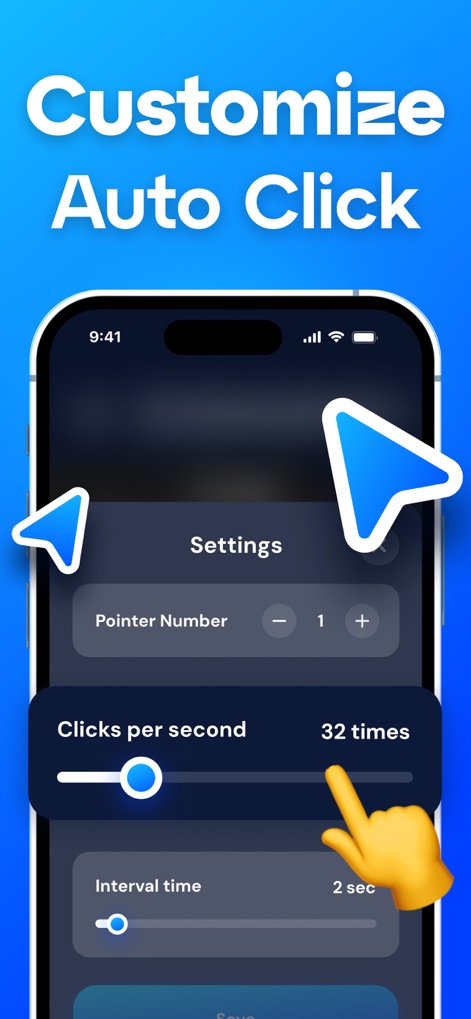
Gli utenti possono impostare la precisione di interazione tramite lo slider "Clicks per second" e definire intervalli specifici con il controllo "Interval time" per un'automazione su misura.
Personalizza Ogni Tocco
Descrizione
Download
App Simili
App con funzionalità ed esperienza simili

自动ּ连点器 - 自动点击器
壮壮 彭

连点器-高效自动点击按键辅助工具
和圆 魏

连点器 - 自动点击持续滚动刷新&旋转指针工具
源 韦

自动点击器·连点器
磊 赵

Auto Clicker-Auto Tapper tool
佳豪 张

Auto Clicker: Click Automatic
RH LANDSCAPING LLC

连点器-自动连点神器&点赞抢购助手
倩格 刘

Auto Clicker - Tap Assistant
乐飞 张

Auto Tapper Assistant App
KUPERTINO BIL. YAZ. HALIL IBRAHIM KARAHAN SAFFET ARSLAN MUSTAFA AYTEN MUHAMMET YALCIN OZDEMIR K. S.
Questa pagina non è una pagina ufficiale dell'app o del suo sviluppatore, ma una pubblicazione editoriale indipendente creata a scopo informativo e di commento. Salvo espressa indicazione contraria, né l'app né il suo sviluppatore sono affiliati, approvati, sponsorizzati, autorizzati o altrimenti ufficialmente collegati a MWM, Apple, Google Play, all'editore dell'app o allo sviluppatore dell'app, e nulla in questa pagina implica che l'app sia stata sviluppata utilizzando i servizi di MWM. Tutti i marchi, loghi, screenshot e altri contenuti rimangono di proprietà dei rispettivi proprietari.