Best Typing Lessons and Test

Best Typing Lessons and Test

Scarica su App Store
Logo di Best Typing Lessons and Test

Migliori Lezioni e Test di Digitazione: Padroneggia la Dattilografia con un Metodo Guidato da Insegnanti

Smetti di cercare i tasti. Il nostro esclusivo approccio 'mignolo per primo' e le lezioni codificate a colori aiutano studenti e adulti a sviluppare una perfetta memoria muscolare per una digitazione più veloce e accurata su qualsiasi dispositivo.

Scarica su App Store

Editore

Tamber Schorey

Categoria

Education

Download

324K+

Valutazione

4.6/5

Valutazioni totali

1K+

Lingue

1

Uno Sguardo alla Maestria

Scopri l'interfaccia usata da 324K+ utenti.

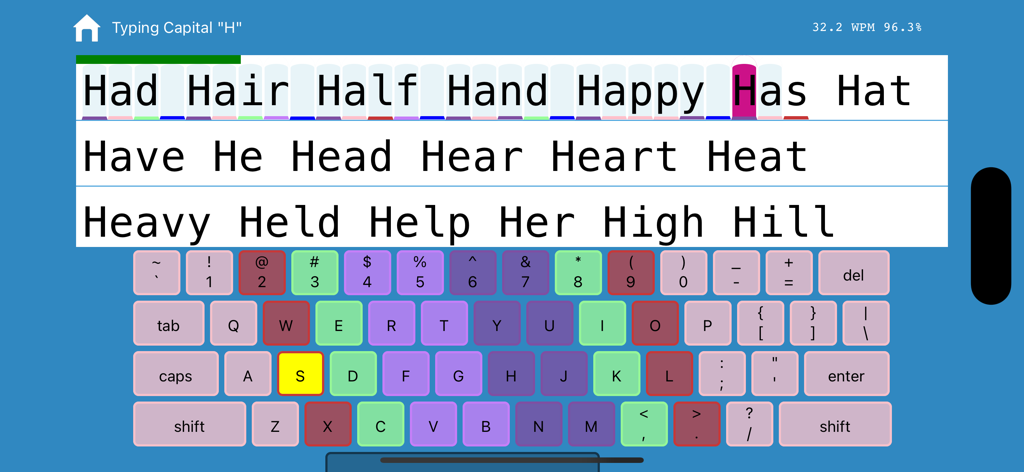
Interfaccia dell'app di digitazione che mostra una tastiera codificata a colori e la pratica di parole con statistiche in tempo reale
Interfaccia dell'app di digitazione che mostra una tastiera codificata a colori e la pratica di parole con statistiche in tempo reale

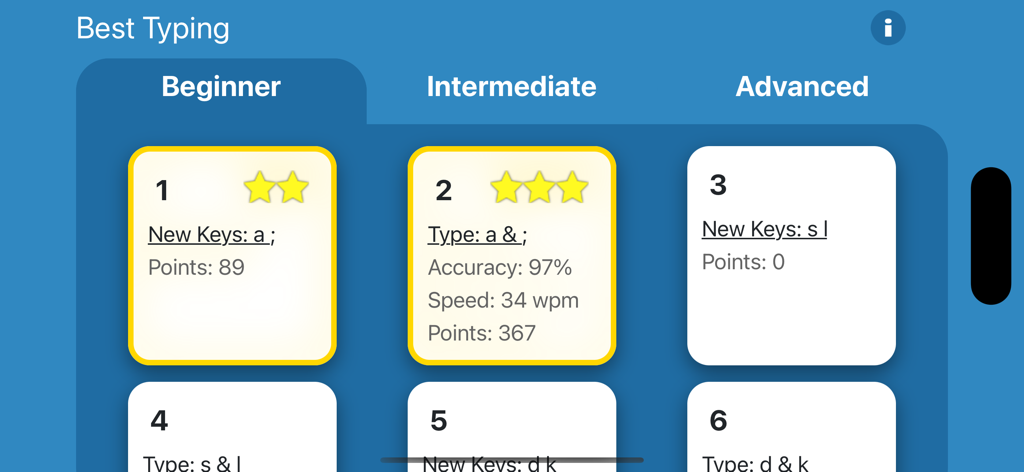
Schermata di selezione delle lezioni di digitazione per principianti che mostra stelle di progresso e statistiche sulla velocità di digitazione
Schermata di selezione delle lezioni di digitazione per principianti che mostra stelle di progresso e statistiche sulla velocità di digitazione

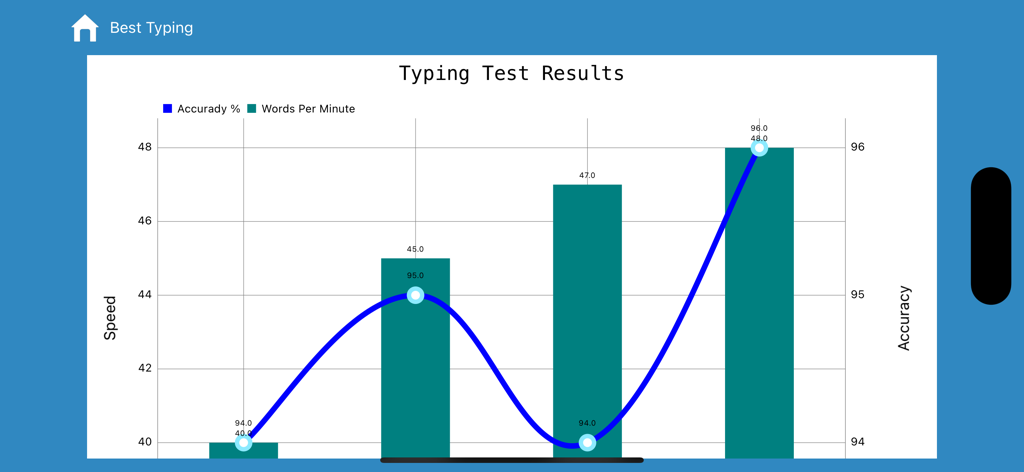
Un grafico che mostra i risultati dei test di digitazione con il progresso di parole al minuto e percentuale di accuratezza
Un grafico che mostra i risultati dei test di digitazione con il progresso di parole al minuto e percentuale di accuratezza

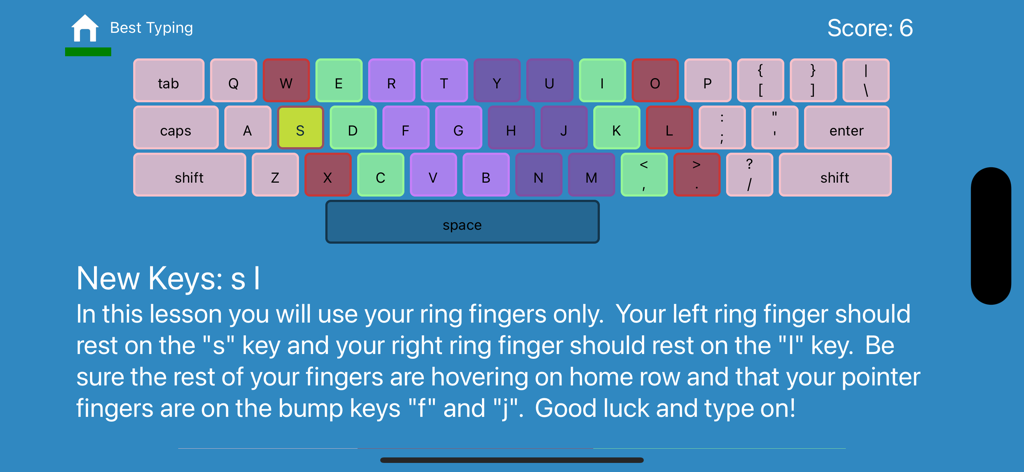
Interfaccia di una lezione di digitazione che mostra una tastiera codificata a colori e istruzioni per l'uso delle dita anulari per digitare s e l
Interfaccia di una lezione di digitazione che mostra una tastiera codificata a colori e istruzioni per l'uso delle dita anulari per digitare s e l

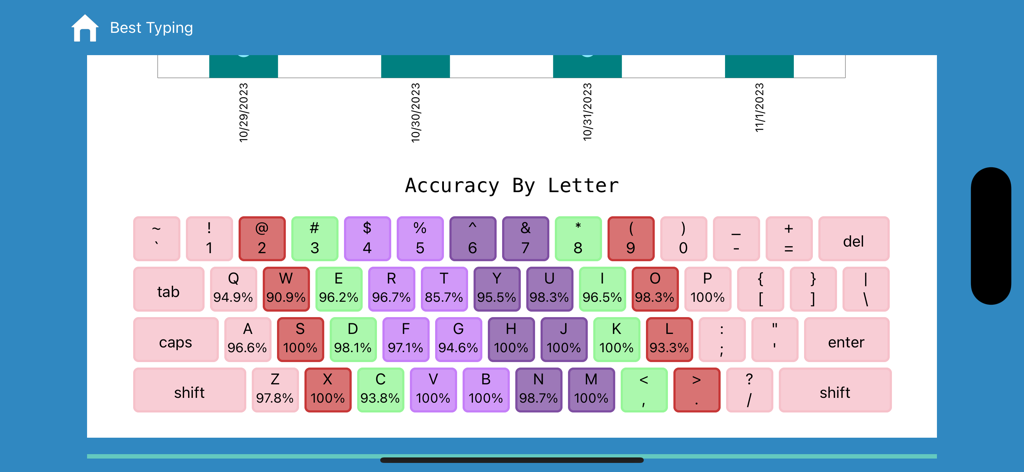
Una tastiera codificata a colori che mostra le percentuali di accuratezza di digitazione per ogni lettera nell'app Best Typing

Una tastiera codificata a colori che mostra le percentuali di accuratezza di digitazione per ogni lettera nell'app Best Typing

Padroneggia la Velocità di Digitazione Professionale

Gli strumenti che rendono questa app unica, scelti da 324K+ utenti.

🖐️

Il Metodo 'Mignolo per Primo'

Correggi permanentemente le abitudini di 'cerca e clicca' con la nostra metodologia unica che sviluppa per prima la memoria muscolare nelle dita più deboli per una padronanza totale della tastiera.

📊

Monitoraggio delle Prestazioni di Precisione

Identifica esattamente dove devi migliorare con report di accuratezza lettera per lettera e statistiche dettagliate dei tuoi ultimi 10 test di digitazione cronometrati.

📱

Il Tuo Laboratorio di Digitazione Portatile

Impara ovunque sul tuo iPhone o iPad. Ottimizzato sia per tastiere touch che Bluetooth per trasformare il tuo dispositivo mobile in una postazione di lavoro ad alte prestazioni.

Info sull'app

Tutto quello che devi sapere su Best Typing Lessons and Test.

Descrizione

Best Typing Lessons and Test will teach you how to touch type quickly without looking at the keyboard. The program is designed to work for all students and skill levels, whether you are beginning as a kid or an adult. A benefit of this app is that it can work on your phone or a tablet and you don’t need to have a computer online (having a Bluetooth keyboard is ideal, but the program can work without one too). After teaching middle school Computer Applications and typing for the past several years I realized that many of the free online typing programs had several flaws. The biggest problem I found was that many of my students would never learn to use the correct fingers to type with when only using the most popular sites. The main problem that I discovered was that the online typing tutors almost always teach the pointer fingers first, and for students who are already used to hunting and pecking they don’t transition to the less used fingers redly. To the best of my knowledge this app and accompanying website www.freetypinglessons.club has the only method that begins teaching the pinkies first and then proceeds to the fingers that students are already used to using. I have found that this method breaks bad habits early and sets students up to successfully type while using the correct fingers. I have also made the learning process easier by color coding the keys creating an alliterating pneumonic device to assist with learning (Pink - pinkies, Red - ring fingers, Mint-Green - middle fingers, and Purple - pointers). The introductory lessons are designed for learners to develop correct muscle memory when typing the keys. The process systematically begins with home row weak fingers, and then adds top row and bottom row in a way that will teach correct finger position automatically and help break bad typing habits naturally. As the lessons progress to beginner and intermediate typing lessons students will type text that works on proper reaches. Some programs deviate from this method at this point and prefer to type words first, however this program focuses on teaching muscle memory and proper keying technique, so many letter combinations are systematically introduced so as to help students master the entire keyboard. Aside from the lessons, students may take a timed typing test. Test options include beginner (lowercase only), intermediate (capitals and lowercase), and advanced (includes numbers and symbols). The typing test duration can be setup for between one and five minutes long, and your results are displayed instantly. Other benefits of this typing program are that it tracks how long is spent on each individual lesson, and it tracks the total amount of time typed overall. Data from each key is recorded, and you can identify your percentage accuracy for each letter of the alphabet. Students earn points for each letter correctly typed, and stars are earned for finishing lessons with a high degree of accuracy. In addition to these features you can view your typing test statistics which will show up to the last 10 tests that you have taken. It’s my pleasure to be a middle school typing teacher and to provide this app developed from my years of experience. I know you will find learning to type beneficial in your life and if this app helps I hope you give it a positive rating. Please don't hesitate to contact me if you have questions, suggestions, or need support via email: squadtiming@gmail.com

Ultima versione

2.1.0

Dimensione

24.7 MB

Data di lancio

6 giu 2019

Pronto a Padroneggiare la Tastiera Come un Professionista?

Unisciti a oltre 324.000 studenti e professionisti che utilizzano il nostro comprovato metodo sviluppato da insegnanti per correggere le cattive abitudini e aumentare la tua velocità di digitazione oggi stesso.

Scarica su App Store

App information, icons, screenshots, and descriptions displayed on this page are sourced from the Apple App Store and are the property of their respective developers. Download estimates and rankings are based on MWM's proprietary models and may not reflect actual figures. This page is provided for informational and analytical purposes only.

Believe this page infringes your intellectual property? File a dispute