Bluetooth BLE Device Finder

Bluetooth BLE Device Finder

Scarica su App Store
Logo di Bluetooth BLE Device Finder

Localizzatore Dispositivi Bluetooth BLE: Trova i tuoi AirPods e Apple Watch smarriti in pochi secondi

Smetti di farti prendere dal panico e risparmia centinaia di euro in sostituzioni. Il nostro radar di segnale di precisione e il localizzatore in background ti guidano direttamente verso i tuoi gadget smarriti prima che la batteria si scarichi.

Scarica su App Store

Editore

Raymond NG

Categoria

Productivity

Download

2M+

Valutazione

4.4/5

Valutazioni totali

40K+

Lingue

1

La Tua Ricerca Resa Visiva

Scopri l'interfaccia usata da 2M+ utenti.
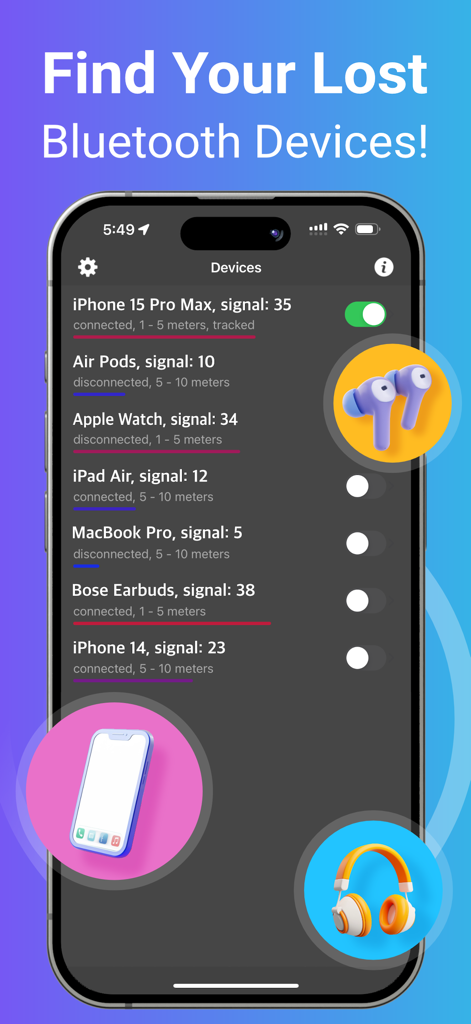
Interfaccia dell'app Bluetooth BLE Device Finder che mostra un elenco di dispositivi vicini e la loro intensità di segnale.

Interfaccia dell'app Bluetooth BLE Device Finder che mostra un elenco di dispositivi vicini e la loro intensità di segnale.

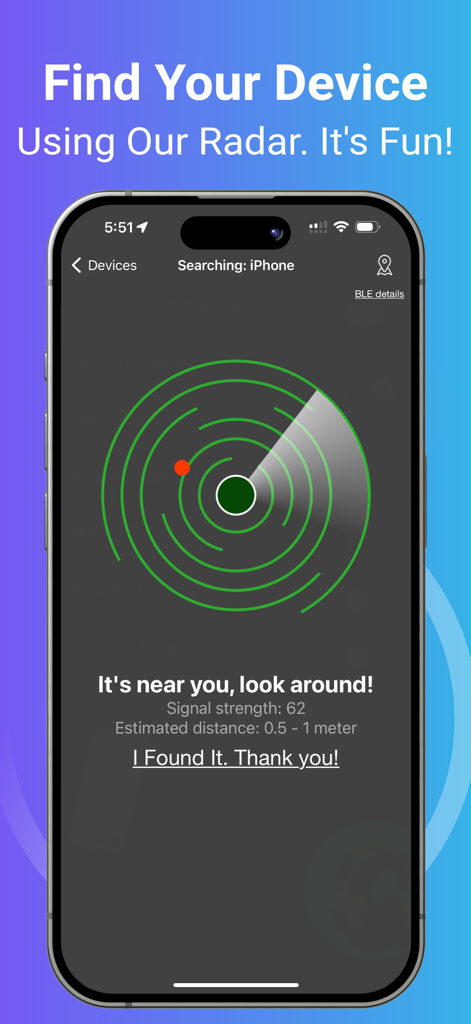
Uno smartphone che mostra un'interfaccia radar con un punto rosso che indica la vicinanza di un dispositivo Bluetooth smarrito

Uno smartphone che mostra un'interfaccia radar con un punto rosso che indica la vicinanza di un dispositivo Bluetooth smarrito

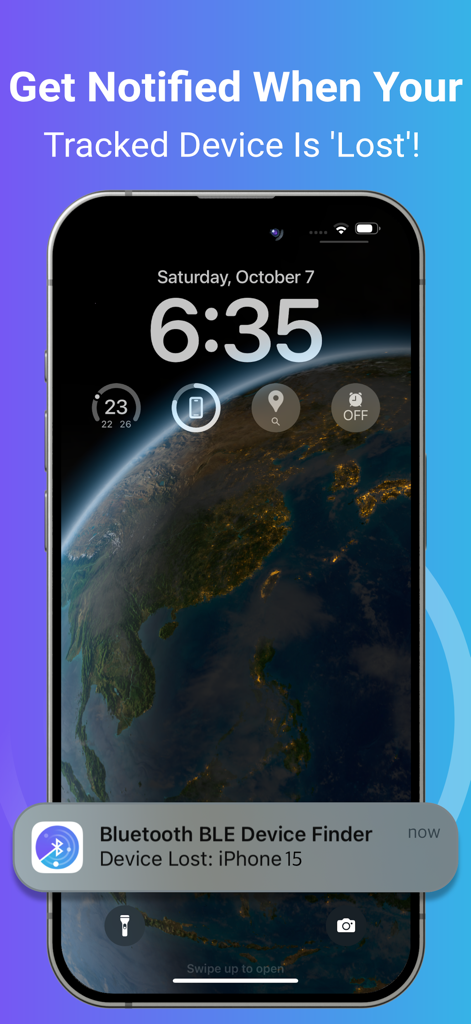
Schermata di blocco dell'iPhone che mostra una notifica per un dispositivo Bluetooth smarrito.

Schermata di blocco dell'iPhone che mostra una notifica per un dispositivo Bluetooth smarrito.

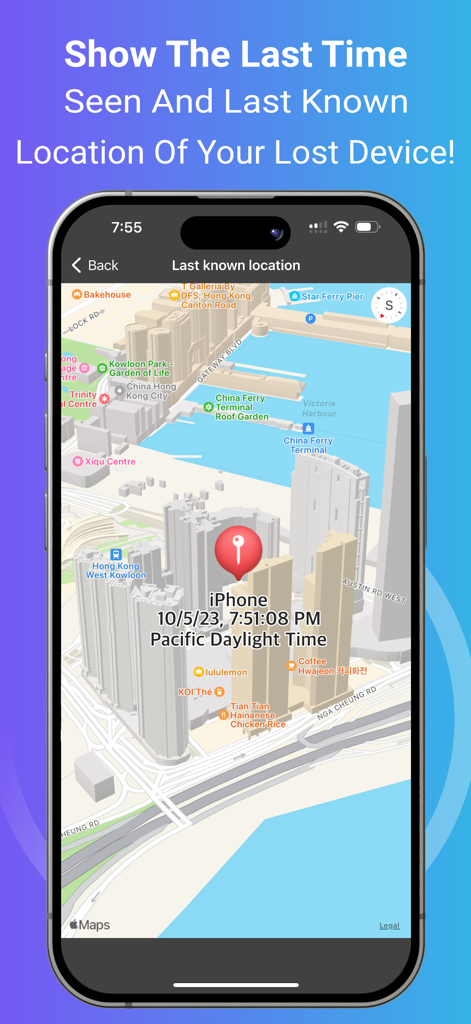
Vista mappa che mostra l'ultima posizione conosciuta e l'ora di un dispositivo Bluetooth smarrito

Vista mappa che mostra l'ultima posizione conosciuta e l'ora di un dispositivo Bluetooth smarrito

Non Perdere Mai Più la Tua Attrezzatura

Gli strumenti che rendono questa app unica, scelti da 2M+ utenti.

Analisi recensioni

Approfondimenti dalle recensioni degli utenti.

Punteggio sentimento

26%
Negativo

Riepilogo

The app garners highly polarized feedback. Many users laud its exceptional ability to successfully locate lost Bluetooth devices, such as earbuds, Fitbits, and phones, often praising its signal tracking for leading them directly to their missing items where other apps had failed. Conversely, a significant portion of reviews criticize the app for its aggressive paywall and mandatory subscription model, which many find too expensive and renders the free version largely useless. Common complaints also highlight misleading "radar" advertising and a general lack of precision or difficulty in identifying specific devices in tech-dense environments, suggesting that the premium version often doesn't deliver sufficient added value.

Temi comuni

Lost Item Recovery(13)
Signal Strength Guidance(6)
Overall App Effectiveness(5)
Free Version Utility(3)
Competitive Performance(2)
Premium Version Consideration(1)

Info sull'app

Tutto quello che devi sapere su Bluetooth BLE Device Finder.

Descrizione

*** Now you can find your lost Bluetooth device quickly, before its battery runs out! *** This app can help you Find Your Lost AirPods, iPhone, iPad, AirTag, Apple Watch, and many other Bluetooth devices in seconds. Use it when you or your family misplace the device – and save the money you'd otherwise need to spend on a new one! HOW TO USE IT: 1. Run the app. Find and select your lost device in the list. 2. Move around slowly and keep watching the data (i.e., the signal strength and estimated distance) on the radar screen. When you get close to your lost device, the spot will turn red on the radar screen. 3. When the signal strength is over 90 and the estimated distance is 0 - 0.5m, look around. Your device won't be far away! Note: When you try to find your device, please walk slowly and watch the radar carefully. Find your device ASAP, or its battery will run out. Note: Your Bluetooth device must be powered on and within a detectable range. TRACKING FUNCTION: You may enable tracking for devices in the background by turning on the switch next to the device on the list. You will receive a notification when your tracked device is disconnected/lost. The application will ping the tracked devices from time to time and remember the last location and time the device was seen. KEY FEATURES: • Find your lost Bluetooth device (with BLE signal advertising). The app is easy to use! • Track your device constantly in the background with this app. A notification will tell you when your tracked device is 'Lost' (i.e., Disconnected). Also, the last detected time and location will be recorded for you. It's very useful when you’re travelling and want to keep your devices safe. ^ • Find your device using our radar. It's fun! No need to read a manual. ^ • Show hints, signal strength and the estimated distance between you and your lost device to help you find it quickly. ^ • Show the last seen (detected) time and last known location of your lost device on a map. ^ • Show your device's BLE (Bluetooth Low Energy) details such as UUID, RSSI, Services, etc. ^ • The following devices can be found/tracked by this app: - AirPods 1/2/3/4, AirPods Pro 1/2, AirPods Max - AirTag - iPhone 5/6/7/8/X/11/12/13/14/15/16, iPad 3/4/5/6/7/8/9/10/A16, iPad mini 2/3/4/5/6/A17Pro, iPad Air 1/2/3/4/5/M2/M3, iPad Pro 1/2/3/4/5/6/M4, iPod Touch 6/7 - Apple Watch Series 1/2/3/4/5/6/7/8/9/10/SE1/SE2/Ultra1/Ultra2 - Apple Pencil 1/2/Pro - MacBook, MacBook Air, MacBook Pro, iMac, iMac Pro, Mac Pro, Mac Mini, Mac Studio - Microsoft Gear, Band 1 & 2 - Samsung Earbuds, Galaxy Watch - JBL Tune, Vibe, Tour Pro, Charge, Flip 3 - Bellabeat Leaf - Garmin Watches - Many other Bluetooth headphones, earphones, and speakers (e.g. Bose, Sony, Google, Jabra, Logitech, Anker, Sennheiser, Technics, etc.) NOTE: The app can locate any BLE (Bluetooth Low Energy) device that is broadcasting a Bluetooth signal. ^ Requires In-App Purchase. Please contact support if you need help. Thank you! Privacy Policy: http://www.99mobileapp.com/pp.html Terms: http://www.99mobileapp.com/terms/index.html

Ultima versione

2.2.7

Dimensione

2.7 MB

Data di lancio

29 mag 2019

Trova il tuo dispositivo smarrito prima che la batteria si scarichi

Unisciti a 2 milioni di utenti che risparmiano centinaia di euro in costi di sostituzione localizzando i loro AirPods, Apple Watch e gadget in pochi secondi. Scarica la tua assicurazione digitale oggi stesso.

Scarica su App Store
FAQ

Domande Frequenti

Tutto quello che devi sapere su Bluetooth BLE Device Finder

Come aiuta Bluetooth BLE Device Finder a localizzare i dispositivi smarriti?

Bluetooth BLE Device Finder ti aiuta a localizzare i dispositivi smarriti visualizzando la potenza del segnale e la distanza stimata su uno schermo radar. Indica la vicinanza, diventando rosso quando molto vicino e mostrando 0-0,5 m quando è a portata.

Quali dispositivi Apple può localizzare Bluetooth BLE Device Finder?

Bluetooth BLE Device Finder localizza AirPods, AirTag, Apple Watch, iPhone, iPad, iPod Touch, Apple Pencil e dispositivi Mac. Supporta vari modelli di ciascuno, inclusi gli ultimi iPhone 16 e Apple Watch Series 10.

Può Bluetooth BLE Device Finder tracciare i dispositivi in background?

Sì, Bluetooth BLE Device Finder offre il tracciamento in background per i dispositivi. Gli utenti attivano questa funzione tramite un interruttore nell'elenco dei dispositivi, ricevendo notifiche se un dispositivo tracciato si disconnette o viene perso.

Bluetooth BLE Device Finder mostra l'ultima posizione nota di un dispositivo smarrito?

Sì, Bluetooth BLE Device Finder mostra l'ultima volta in cui è stato visto e l'ultima posizione nota del tuo dispositivo smarrito su una mappa. Questa funzione aiuta gli utenti a tracciare l'ultima posizione rilevata del loro dispositivo.

Cos'è il Bluetooth Low Energy (BLE) in relazione a questa app?

Bluetooth BLE Device Finder utilizza i segnali Bluetooth Low Energy (BLE) per localizzare i dispositivi. L'app può localizzare qualsiasi dispositivo BLE che trasmette un segnale e ne visualizza i dettagli BLE come UUID e RSSI.

Sono gratuite tutte le funzionalità di Bluetooth BLE Device Finder?

No, alcune funzionalità chiave di Bluetooth BLE Device Finder richiedono un Acquisto in-App. Queste includono il tracciamento in background, il radar, i suggerimenti, la potenza del segnale, la distanza stimata e la visualizzazione dell'ultima posizione nota.

Può Bluetooth BLE Device Finder localizzare dispositivi spenti?

No, Bluetooth BLE Device Finder richiede che il dispositivo sia acceso e a portata Bluetooth rilevabile per poterlo localizzare. L'app si basa sulla trasmissione attiva del segnale BLE.

Quali tipi di dispositivi Bluetooth non Apple può trovare Bluetooth BLE Device Finder?

Bluetooth BLE Device Finder può trovare dispositivi non Apple come Microsoft Gear/Band, Samsung Earbuds/Galaxy Watch, altoparlanti/cuffie JBL, Bellabeat Leaf, orologi Garmin, Bose, Sony, Google, Jabra, Logitech, Anker e dispositivi Sennheiser.

Come aiuta il radar in Bluetooth BLE Device Finder a trovare un dispositivo?

Il radar in Bluetooth BLE Device Finder rappresenta visivamente la potenza del segnale e la distanza stimata dal dispositivo smarrito. Aiuta a guidare l'utente, diventando rosso quando il dispositivo è molto vicino (0-0,5 m), indicando che è nelle vicinanze.

App information, icons, screenshots, and descriptions displayed on this page are sourced from the Apple App Store and are the property of their respective developers. Download estimates and rankings are based on MWM's proprietary models and may not reflect actual figures. This page is provided for informational and analytical purposes only.

Believe this page infringes your intellectual property? File a dispute