
Questa pagina non è una pagina ufficiale dell'app o del suo sviluppatore, ma una pubblicazione editoriale indipendente creata a scopo informativo e di commento. Salvo espressa indicazione contraria, né l'app né il suo sviluppatore sono affiliati, approvati, sponsorizzati, autorizzati o altrimenti ufficialmente collegati a MWM, Apple, Google Play, all'editore dell'app o allo sviluppatore dell'app, e nulla in questa pagina implica che l'app sia stata sviluppata utilizzando i servizi di MWM. Tutti i marchi, loghi, screenshot e altri contenuti rimangono di proprietà dei rispettivi proprietari.


Document Scanner · Scan to PDF
La carta ti tiene in ostaggio? Questa app ti libera, trasformando la burocrazia in puro dato digitale, gestibile con un tocco e non più un incubo cartaceo.
Download
1M+Valutazione
Valutazioni totali
16.1KEditore
Categoria
BusinessLingue
12Ultima versione
2.5Dimensione
35.8 MBData di lancio
29 lug 2020Valutazione delle caratteristiche principali che definiscono l'efficienza e la versatilità dell'app 'Document Scanner · Scan to PDF'.
Analisi Dettagliata delle Funzionalità Chiave
Digitizzazione Rapida e Nitida
L'app fornisce la capacità di digitalizzare rapidamente documenti con risultati nitidi e precisi, trasformando iPhone/iPad in uno scanner portatile e affidabile.
Sicurezza Documenti Avanzata
Consente agli utenti di proteggere documenti riservati tramite password, Face ID o Touch ID, garantendo la privacy e la sicurezza dei dati sensibili.
Riconoscimento Testuale (OCR) Intelligente
Questo strumento permette di estrarre testo dai documenti scansionati grazie all'OCR (Optical Character Recognition), facilitando la modifica e la ricerca rapida delle informazioni.
Sincronizzazione Cloud Integrata
L'app supporta la sincronizzazione con servizi cloud popolari come Dropbox, Google Drive e OneDrive, permettendo di salvare e accedere ai file da qualsiasi luogo e dispositivo.
Conversione in PDF Professionali
L'app converte i documenti scansionati in file PDF di qualità professionale, mantenendo il formato originale e garantendo presentazioni e archiviazione accurate.
Condivisione Facile e Versatile
Consente la condivisione rapida ed efficiente dei file tramite email, app di messaggistica o stampa wireless, semplificando la collaborazione e la distribuzione dei documenti.
Domande Frequenti
Tutto quello che devi sapere su Document Scanner · Scan to PDF
What is the "Document Scanner · Scan to PDF" app?
The Document Scanner · Scan to PDF app transforms your iPhone or iPad into a powerful, portable PDF scanner. It allows you to scan, organize, and share documents easily for work, school, or travel.
Does the Document Scanner · Scan to PDF app provide clear scans?
Yes, the Document Scanner · Scan to PDF app provides fast and clear scans. It digitizes documents in seconds with crisp, accurate results, ensuring high-quality output for all your needs.
Can I extract text from scanned documents using "Document Scanner · Scan to PDF"?
Yes, the Document Scanner · Scan to PDF app features Smart OCR (Optical Character Recognition). This allows you to extract text from your scans for quick editing and searching purposes directly within the app.
What file formats does the "Document Scanner · Scan to PDF" app support for saving?
The Document Scanner · Scan to PDF app converts documents into polished PDFs that retain their original format. You can also save your scanned documents as JPGs, offering flexibility for various uses.
What editing features are available in the Document Scanner · Scan to PDF app?
The Document Scanner · Scan to PDF app offers effortless editing, including options to crop, rotate, or highlight your scanned files. You can also quickly edit images with various filters and tools.
Can I sync my documents with cloud services using "Document Scanner · Scan to PDF"?
Yes, the Document Scanner · Scan to PDF app supports Cloud Sync. You can save and access your files using popular cloud services such as Dropbox, Google Drive, or OneDrive for convenient access.
How can I protect my scanned documents in the "Document Scanner · Scan to PDF" app?
The Document Scanner · Scan to PDF app allows you to secure confidential documents. You can protect your files with passwords, Face ID, or Touch ID for enhanced privacy and data security.
What are the sharing options for documents in the "Document Scanner · Scan to PDF" app?
The Document Scanner · Scan to PDF app provides easy sharing. You can send your files via email, messaging apps, Wi-Fi Transfer, or print them wirelessly directly from the app's interface.
How do I manage my premium subscription for "Document Scanner · Scan to PDF"?
You can manage your premium subscription for Document Scanner · Scan to PDF and turn off auto-renewal in your iTunes account settings after purchase. Auto-renewal must be off 24 hours before the period ends.
Do subscriptions for "Document Scanner · Scan to PDF" automatically renew?
Yes, subscriptions for Document Scanner · Scan to PDF automatically renew. Payment is charged to your iTunes account upon purchase, and renewal charges occur within 24 hours prior to the end of the current period.
Can I sign documents within the "Document Scanner · Scan to PDF" app?
Yes, the Document Scanner · Scan to PDF app allows you to sign documents directly within the application. This feature streamlines the process of finalizing paperwork digitally and efficiently.
Where can I find the Privacy Policy for the "Document Scanner · Scan to PDF" app?
The Privacy Policy for the Document Scanner · Scan to PDF app is accessible at: https://lazy-solutions.com/privacy-policy-scanner/. Users agree to these terms by using the application.
Gli screenshot e la descrizione seguenti provengono direttamente dall'elenco ufficiale dello store dell'app e sono di proprietà dello sviluppatore.
App Store
Screenshot

L'app consente una scansione efficiente, come evidenziato dalla barra di acquisizione in movimento e dalle opzioni di formato 'AUTO' e 'A4' per una digitalizzazione precisa.
Scansione Rapida Documenti

La galleria mostra documenti digitalizzati organizzati in cartelle come 'Receipts' e 'Private', offrendo una gestione chiara e la possibilità di salvare in formati 'PDF o JPG'.
Organizzazione Intuitiva File
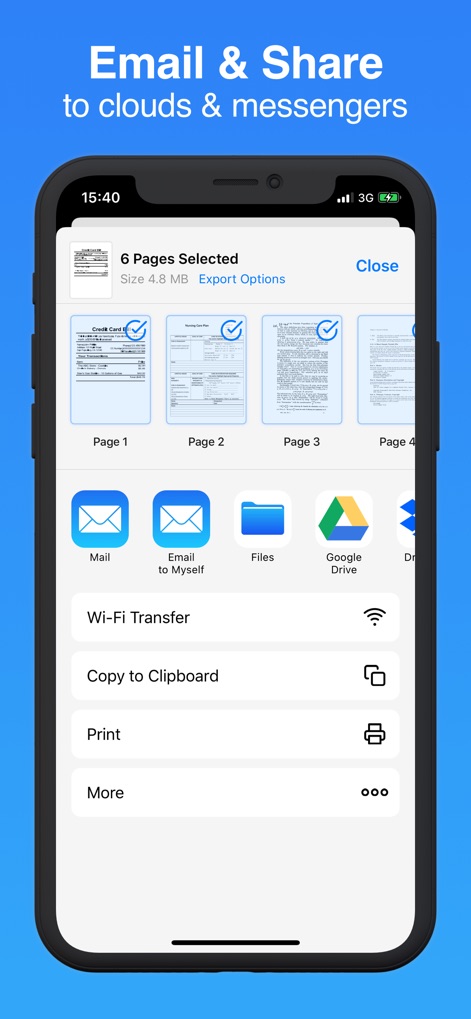
Questa schermata dimostra le ampie opzioni di condivisione, inclusi servizi cloud come 'Google Drive' e la funzionalità 'Print' per una distribuzione versatile dei documenti.
Condivisione Senza Limiti
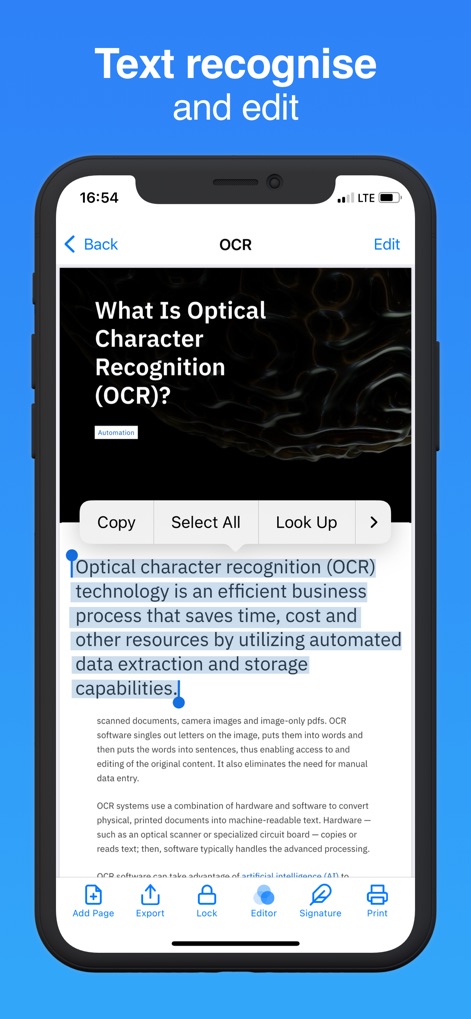
L'app integra una potente funzione OCR, come si evince dal testo evidenziato e dalle opzioni 'Copy' e 'Select All', permettendo di estrarre e manipolare facilmente il contenuto dei documenti.
Riconoscimento Testo Avanzato

Lo strumento facilita la firma digitale, mostrando un campo per la firma posizionabile e l'opzione 'Signature' nel menu inferiore per autenticare i documenti direttamente dall'app.
Firma Elettronica Semplice
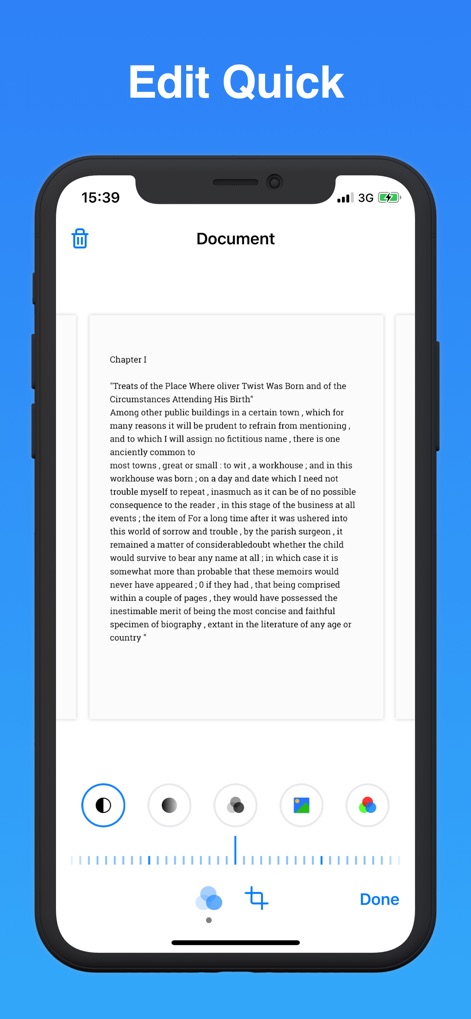
Gli utenti possono raffinare i documenti con strumenti di editing come il 'crop' e le opzioni per la regolazione dei 'colori', garantendo una qualità visiva ottimale prima del salvataggio.
Modifica Immediata Documenti

Questo strumento digitalizza una varietà di documenti, inclusi i dettagliati timbri di un 'passport', e offre funzionalità come 'Add Page' e 'Lock' per gestire e proteggere le informazioni.
Digitalizzazione Completa Dati

L'applicazione garantisce la massima sicurezza con un keypad per l'inserimento della password e l'integrazione del 'Face ID', proteggendo i documenti confidenziali.
Sicurezza Dati Avanzata
Descrizione
Download
App Simili
App con funzionalità ed esperienza simili

PDF PRO Scan Image & Documents
Balzo srl

The PDF Scanner, PDF editor HQ
NEXT K.U.M. LTD

CamScanner - PDF Scanner App
INTSIG Information Co., Ltd

Adobe Scan: PDF & OCR Scanner
Adobe Inc.

WPS Office: PDF, Docs, Sheets
KINGSOFT OFFICE SOFTWARE CORPORATION LIMITED

iLovePDF - PDF Editor & Scan
ILOVEPDF S.L.

Scanner App: Genius Scan
The Grizzly Labs

Microsoft Lens: PDF Scanner
Microsoft Corporation

Clear Scan: Doc Scanner App
INDY MOBILE APP COMPANY LIMITED
Questa pagina non è una pagina ufficiale dell'app o del suo sviluppatore, ma una pubblicazione editoriale indipendente creata a scopo informativo e di commento. Salvo espressa indicazione contraria, né l'app né il suo sviluppatore sono affiliati, approvati, sponsorizzati, autorizzati o altrimenti ufficialmente collegati a MWM, Apple, Google Play, all'editore dell'app o allo sviluppatore dell'app, e nulla in questa pagina implica che l'app sia stata sviluppata utilizzando i servizi di MWM. Tutti i marchi, loghi, screenshot e altri contenuti rimangono di proprietà dei rispettivi proprietari.