GNSS View

GNSS View

Scarica su App Store
Logo di GNSS View

GNSS View: Padroneggia la tua visibilità satellitare e la precisione del posizionamento

Visualizza le costellazioni QZSS, GPS e globali in tempo reale. Sfrutta display AR e grafici celesti di livello professionale per monitorare HDOP/VDOP e garantire un'accuratezza ottimale del segnale per voli di droni, rilievi ed esplorazioni.

Editore

NEC Corporation

Categoria

Navigation

Download

259K+

Valutazione

4.2/5

Valutazioni totali

100

Lingue

1

Precisione visualizzata

Scopri l'interfaccia usata da 259K+ utenti.
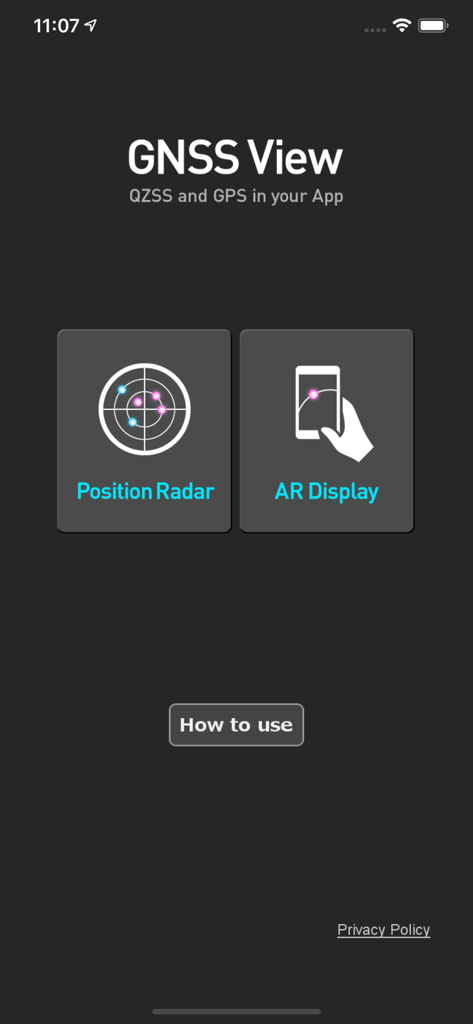
Schermata principale dell'app mobile GNSS View con pulsanti per Radar di Posizione e Display AR

Schermata principale dell'app mobile GNSS View con pulsanti per Radar di Posizione e Display AR

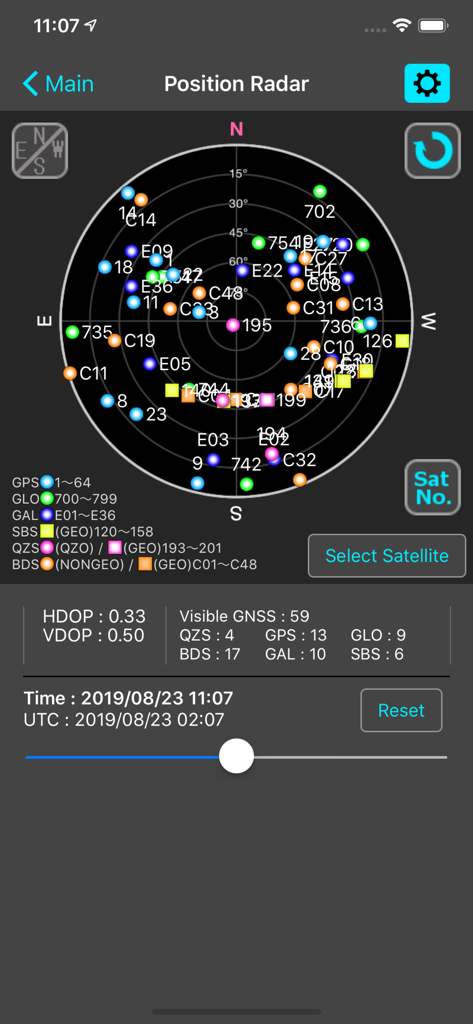
Schermata Radar di Posizione dell'app GNSS View che mostra un grafico celeste dei satelliti con metriche HDOP e VDOP

Schermata Radar di Posizione dell'app GNSS View che mostra un grafico celeste dei satelliti con metriche HDOP e VDOP

Visibilità satellitare in tempo reale e analisi di precisione

Gli strumenti che rendono questa app unica, scelti da 259K+ utenti.

🛰️

Tracciamento globale multi-costellazione

Monitora QZSS, GPS, GLONASS, Galileo e BeiDou contemporaneamente per garantire la massima affidabilità del segnale per attività di alta precisione.

👁️

Visualizzazione AR del cielo

Identifica istantaneamente le ostruzioni della linea di vista sovrapponendo le posizioni dei satelliti al tuo ambiente reale utilizzando la vista della fotocamera AR.

📊

Metriche di precisione professionali

Accedi a dati critici HDOP, VDOP e maschera di elevazione per verificare la geometria del segnale e mitigare gli errori di posizionamento prima di iniziare l'operazione.

Info sull'app

Tutto quello che devi sapere su GNSS View.

Descrizione

This application enables you to see where the Quasi-Zenith Satellite System in the sky! ●What is QZSS? Quasi-Zenith Satellite System (QZSS) is a Japanese satellite positioning system composed mainly of satellites in quasi-zenith orbits (QZO). Satellite positioning systems use satellite signals to calculate position information. One famous example is the American Global Positioning System (GPS) and the QZSS is sometimes called the Japanese GPS. For details, please refer to the following Website "Quasi-Zenith Satellite System". URL : https://qzss.go.jp/en ●What is GNSS View? GNSS View provides that iOS version application that is based on the website application "GNSS View". This application enables you to know position of positioning satellites such as QZSS and GPS in the specified time and location. The positioning satellites displayed in the GNSS View are not based on the satellite information directly received by the smartphone but are displayed based on the satellite arrangement calculated based on the publicly released orbit information. ●GNSS View 3 functions 【Main】 ・You can move to the Position Radar screen or AR Display screen from the application startup screen. ・You can see the operating manual and privacy policy of this application via the website. 【Position Radar】 ・It is provided radar view of positioning satellites such as QZSS and GPS as a sky plot at the specified time and location. ・Positioning satellites can be specified from QZSS, GPS, GLONASS, BeiDou, Galileo, SBAS. ・You can also select specified signal satellites to see on the radar. ・You can see selected satellites by setting elevation mask angle. ・You can switch east and west of satellite arrangement, turn on / off rotation, and switch on / off display of satellite number. ・It displays HDOP, VDOP, the total number of satellites and the number of each positioning satellites in the satellite arrangement displayed on the radar. 【AR Display】 ・Position of positioning satellites such as QZSS and GPS on the sky from your current location is able to see through your camera at the specified time. ・In order to display satellites, it is necessary to turn on the position information of the smartphone and complete the positioning. Therefore, it may take time to display. ・Positioning satellites can be specified from QZSS, GPS, GLONASS, BeiDou, Galileo, SBAS. ・You can also select specified signal satellites to see on the radar. ・You can see selected satellites by setting elevation mask angle. ●Supported versions ・iOS 18 ・iOS 17 ・iOS 16 ・iOS 15 ・iOS 14 ・iOS 13

Ultima versione

6.0.1

Dimensione

4.3 MB

Data di lancio

31 ott 2014

Visualizza la precisione. Padroneggia i tuoi dati di localizzazione.

Unisciti a oltre 259.000 professionisti e appassionati di tecnologia che utilizzano lo strumento affidabile di NEC per il tracciamento satellitare in tempo reale, la visualizzazione AR e l'analisi dei segnali mission-critical.

Scarica su App Store

App information, icons, screenshots, and descriptions displayed on this page are sourced from the Apple App Store and are the property of their respective developers. Download estimates and rankings are based on MWM's proprietary models and may not reflect actual figures. This page is provided for informational and analytical purposes only.

Believe this page infringes your intellectual property? File a dispute