GPS Tracker - Mobile Tracking
Scarica su App Store

Questa pagina non è una pagina ufficiale dell'app o del suo sviluppatore, ma una pubblicazione editoriale indipendente creata a scopo informativo e di commento. Salvo espressa indicazione contraria, né l'app né il suo sviluppatore sono affiliati, approvati, sponsorizzati, autorizzati o altrimenti ufficialmente collegati a MWM, Apple, Google Play, all'editore dell'app o allo sviluppatore dell'app, e nulla in questa pagina implica che l'app sia stata sviluppata utilizzando i servizi di MWM. Tutti i marchi, loghi, screenshot e altri contenuti rimangono di proprietà dei rispettivi proprietari.


Logo di GPS Tracker - Mobile Tracking
Scarica su App Store

GPS Tracker - Mobile Tracking

Trasforma il tuo dispositivo mobile in un hub di localizzazione ad alta precisione. Monitora la tua micro-flotta, automatizza i report aziendali e assicura la totale tranquillità con dati di posizione in tempo reale e geofencing avanzato.

Numeri Chiave

Download

195K+

Valutazione

3.4/5

Valutazioni totali

0

Editore

Edvin Zacharevic

Categoria

Navigation

Lingue

1

Ultima versione

2.11

Dimensione

64.4 MB

Data di lancio

26 set 2015
Funzioni

Gestione Professionale della Flotta in Tasca

Trasforma qualsiasi dispositivo iOS in un potente strumento di localizzazione GPS. Monitora le prestazioni, automatizza la reportistica e ottimizza le tue operazioni aziendali senza il costo di hardware specializzato.

Visibilità della Flotta in Tempo Reale

Segui il tuo team con aggiornamenti in tempo reale ogni 10 secondi. Monitora velocità, posizione e stato per assicurarti che ogni minuto della giornata lavorativa sia contabilizzato e ottimizzato.

Reportistica Automatica e Conformità

Genera rapporti XLS o PDF dettagliati su chilometraggio, consumo di carburante e comportamento alla guida. Semplifica le tue dichiarazioni fiscali e gestisci le spese generali con dati di livello aziendale.

Gli screenshot e la descrizione seguenti provengono direttamente dall'elenco ufficiale dello store dell'app e sono di proprietà dello sviluppatore.

App Store

Screenshot
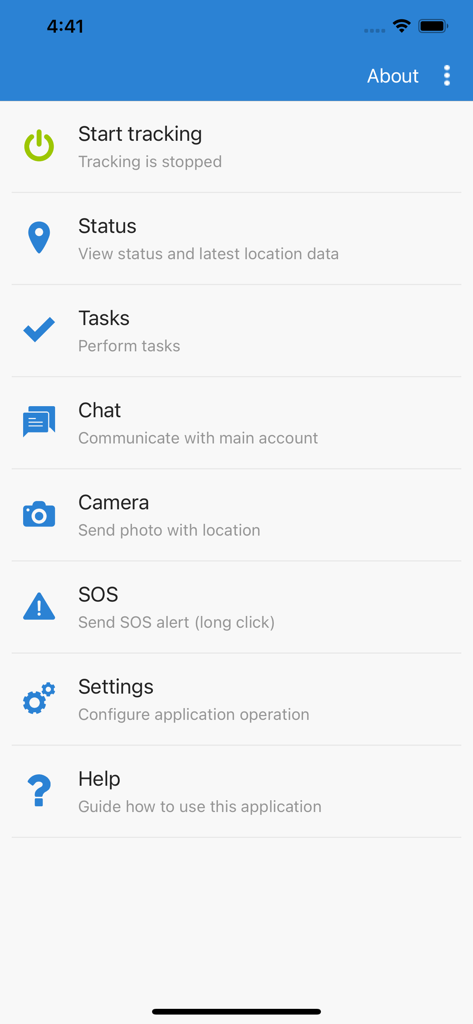
GPS Tracker - Mobile Tracking - Menu principale dell'app mobile GPS Tracker che mostra le funzioni di tracciamento, attività e chat
Menu principale dell'app mobile GPS Tracker che mostra le funzioni di tracciamento, attività e chat

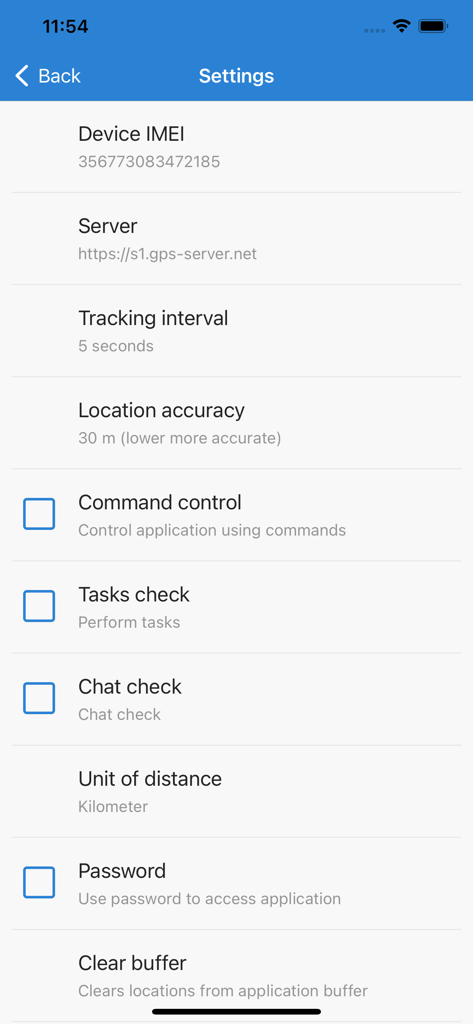
GPS Tracker - Mobile Tracking - Menu impostazioni dell'app GPS Tracker che mostra la configurazione del dispositivo, l'intervallo di tracciamento e le opzioni di precisione della posizione

Menu impostazioni dell'app GPS Tracker che mostra la configurazione del dispositivo, l'intervallo di tracciamento e le opzioni di precisione della posizione

Descrizione

With GPS Tracker application you can transform your iOS mobile device to GPS tracker (GPS tracking device) and use all GPS-server.net features. In order to use this application, you must have personal account or hosted software. NOTE: Continued use of GPS Tracker running in the background can dramatically decrease battery life. If you want better battery life, set tracking interval to at least 60-120 seconds. GPS Tracker features: - Track your device online in real time; - Record and review tracks, generate reports; - Configure various kinds of events and notifications; - Assign or schedule various tasks and delivery times; - Communicate with the person at the other end using built-in chat function; - Make photos and upload to user account with current location; - Possibility to change tracking interval; - Phone battery level is sent together with every location; - If Internet is lost, application will save locations and upload them later; - Possibility to control application via web browser using commands; - Password protection; - Application runs in background. GPS-server.net features: - Real time tracking mode represents live data of tracked objects. Information is updated every ten seconds without need to refresh page or relogin to account. Monitored data contains vehicle status, latitude, longitude, altitude, address, speed, connection time, ignition status, fuel consumption, sensor data, nearest geozone and much more. - Widgets display recent object information which is updated every ten seconds without need to refresh web page. Send commands to control device, view recent events and mileage graph. - Events is one of the most important feature which our software offers. Events are used to trigger actions by important or disruptive activities. Customer will get instant SMS/E-mail/Push notifications triggered by different event types. - History shows all stored data which server has collected from connected devices for chosen period of time. Software stores information received from GPS tracking devices, such as speed, time, location, stops, reports, events, etc. History is displayed in different ways: visually on the map, in a graph or HTML/XLS format. - POI (Points of Interest) allow you to put markers at the locations that might be interesting or useful. You can also name the place, add short description, attach an image or even video to it. - Routes feature is a helpful tool to mark an important section of the road by drawing virtual path on the map. Additionally, get notifications if vehicle is within or out of route. This feature is useful to analyze vehicle dependency to the road. - With geofences you are able to make a virtual perimeter on geographic areas that have specific interest for you. The main reason to have geofences is to control whether the unit stays within it or not, so that when the geofencing unit enters or exits the area a notification is generated. - Get detailed reports about trips, mileage, driving behavior, fuel usage and thefts, activity in particular zone or route. Reports are used for data analysis of particular vehicle or entire group. Reports can be exported or sent instantly to E-mail addresses in HTML/PDF/XLS format. - Tasks make it easy to create and manage entries related to upcoming work which should be accomplished. Set start and end address, priority, task status. - The Maintenance schedule reminds you when you should have your vehicle serviced, such as an oil change or technical inspection. It can also serve as a reminder to take out insurance. - Use the Expenses function to track the amount spent on an object maintenance. Evaluate the economic benefit of vehicle usage with the Expenditure report on a daily, weekly, or monthly basis.

Download

Scarica su App Store

Questa pagina non è una pagina ufficiale dell'app o del suo sviluppatore, ma una pubblicazione editoriale indipendente creata a scopo informativo e di commento. Salvo espressa indicazione contraria, né l'app né il suo sviluppatore sono affiliati, approvati, sponsorizzati, autorizzati o altrimenti ufficialmente collegati a MWM, Apple, Google Play, all'editore dell'app o allo sviluppatore dell'app, e nulla in questa pagina implica che l'app sia stata sviluppata utilizzando i servizi di MWM. Tutti i marchi, loghi, screenshot e altri contenuti rimangono di proprietà dei rispettivi proprietari.








