iCalendar
iCalendar
Scarica su App Store

Questa pagina non è una pagina ufficiale dell'app o del suo sviluppatore, ma una pubblicazione editoriale indipendente creata a scopo informativo e di commento. Salvo espressa indicazione contraria, né l'app né il suo sviluppatore sono affiliati, approvati, sponsorizzati, autorizzati o altrimenti ufficialmente collegati a MWM, Apple, Google Play, all'editore dell'app o allo sviluppatore dell'app, e nulla in questa pagina implica che l'app sia stata sviluppata utilizzando i servizi di MWM. Tutti i marchi, loghi, screenshot e altri contenuti rimangono di proprietà dei rispettivi proprietari.

Logo di iCalendar
Scarica su App Store

iCalendar

Prendi il controllo totale del tuo tempo con lo strumento di produttività definitivo. Sincronizza senza interruzioni Google, Outlook e iCloud gestendo le attività in un'unica potente interfaccia progettata per professionisti ad alta efficienza.

Numeri Chiave

Download

405K+

Valutazione

4.5/5

Valutazioni totali

10K+

Editore

Symfonies, Inc.

Categoria

Productivity

Lingue

5

Ultima versione

5.5.4

Dimensione

36.8 MB

Data di lancio

6 gen 2012
Funzioni

Il Centro di Comando Definitivo per la Tua Giornata

Vai oltre la pianificazione di base con uno strumento ad alte prestazioni creato per professionisti che richiedono velocità, personalizzazione e integrazione fluida tra tutti gli account.

Un'App, Tutti gli Account

Sincronizza senza interruzioni iCloud, Google, Exchange e Outlook per gestire tutta la tua vita professionale e personale da un'unica dashboard unificata.

Gestione Attività Integrata

Smetti di passare da un'app all'altra. Gestisci i tuoi promemoria iOS direttamente all'interno del tuo calendario per visualizzare le tue cose da fare accanto ai tuoi appuntamenti.

Gli screenshot e la descrizione seguenti provengono direttamente dall'elenco ufficiale dello store dell'app e sono di proprietà dello sviluppatore.

App Store

Screenshot
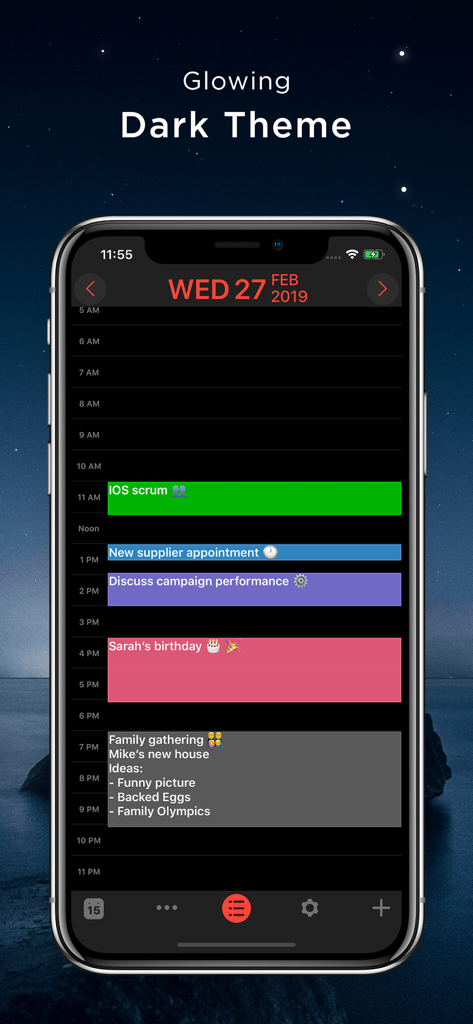
iCalendar - Screenshot dell'app iCalendar su iPhone che mostra un tema scuro luminoso con un programma giornaliero codificato a colori ed eventi

Screenshot dell'app iCalendar su iPhone che mostra un tema scuro luminoso con un programma giornaliero codificato a colori ed eventi

Descrizione

** A MUST-HAVE CALENDAR APP FOR EVERY IPHONE, IPAD, AND IPOD **   iCalendar is the ultimate calendar for your iPhone, iPad and iPod Touch focusing on your productivity. It’s seamless, highly usable interface allows you to enter events quickly and helps you keep track of your busy schedule. It integrates with your iCloud, Google, Exchange, Outlook, or Yahoo! account to provide you with the most convenient calendaring experience.    EASILY TRACK YOUR SCHEDULE - View your daily, weekly, monthly, and yearly schedule. - Custom color-code your events. Use predefined colors, or make up your own colors. - iCalendar implements quickest way on the market to navigate between dates  - Fast and powerful search: Search events by title, location, and notes.    NEW IN VERSION 4.0 - Task Manager: Manage your tasks within your calendar in a fun and easy manner and sync with iOS Reminders. Available as in-app purchase for USD 0.99.   FULL OF PRODUCTIVITY TOOLS - Drag and drop an event to update its timing.  - Copy and paste events. - Create custom repeating events (e.g. repeat on the third Friday every month, and many more).  - Add custom alerts/reminders for events and snooze alerts - Access your event details quickly by tapping on the event.  - Customize the visible time period (e.g. from 9:00 AM – 5:00 PM) to help you focus on most important events.    EVEN MORE - Time Zone Support: View and create your events in your preferred time zone and never get confused when you travel.  - Complete print functionality. Print daily, weekly, monthly, and yearly views.  - Export any view (day, week, month, year) as a PDF file.  - Use built-in maps to set the location of your events.  - Dial into a conference call with one touch right from iCalendar. Add phone numbers from your contacts to events with the ability to use pause and wait, which is ideal for conference calls.  - Set location of an event as the address or phone number of one of your contacts.  - Access all your events directly from the Month view - no need to go to each individual day to review full list of events.  - Use the app icon badge to indicate either the number of upcoming events or the day of the month.  - Google Calendar sync: sync all of your calendars, create and edit Google Calendar events, and use Google Calendar custom reminders (SMS, email and/or alert). - Add, edit and delete calendars right from iCalendar.  - Support of portrait and landscape to match your orientation preference.  - iCalendar is a universal app. Download once and use across all your devices.  - For more details: http://www.symfonies.com/icalendar/   iCalendar offers access to interesting calendars from Calendar Store as an optional in-app purchase.  You may subscribe to your holidays calendar (national/religious) or subscribe to interesting calendars (e.g. local/global sports events, stocks, weather, and many others).   With an optional in-app purchase yearly subscription, you get full and ongoing access to the Calendar Store including (live) updates in your calendar. A subscription always starts with a one-month free trial, so you can try before you buy. One year subscriptions for the Calendar Store costs $1.99. Payment will be charged to your iTunes Account at confirmation of purchase and after the 1 month free trial. Subscriptions automatically renew unless auto-renew is turned off at least 24-hours before the end of the current period. Your account will be charged for renewal within 24-hours prior to the end of the current 1 year period. You can turn off auto-renew at any time from your iTunes account settings. Cancellation of the current active subscription period is not allowed.   Our terms of service and privacy policy are found at http://www.symfonies.com/terms-of-service/ and http://www.symfonies.com/privacy-policy/ respectively.   If you have a question, need help or would like to request a feature, please do not hesitate to contact us. We respond to EVERY email we receive: support@symfonies.com

Download

Scarica su App Store

Questa pagina non è una pagina ufficiale dell'app o del suo sviluppatore, ma una pubblicazione editoriale indipendente creata a scopo informativo e di commento. Salvo espressa indicazione contraria, né l'app né il suo sviluppatore sono affiliati, approvati, sponsorizzati, autorizzati o altrimenti ufficialmente collegati a MWM, Apple, Google Play, all'editore dell'app o allo sviluppatore dell'app, e nulla in questa pagina implica che l'app sia stata sviluppata utilizzando i servizi di MWM. Tutti i marchi, loghi, screenshot e altri contenuti rimangono di proprietà dei rispettivi proprietari.