
Questa pagina non è una pagina ufficiale dell'app o del suo sviluppatore, ma una pubblicazione editoriale indipendente creata a scopo informativo e di commento. Salvo espressa indicazione contraria, né l'app né il suo sviluppatore sono affiliati, approvati, sponsorizzati, autorizzati o altrimenti ufficialmente collegati a MWM, Apple, Google Play, all'editore dell'app o allo sviluppatore dell'app, e nulla in questa pagina implica che l'app sia stata sviluppata utilizzando i servizi di MWM. Tutti i marchi, loghi, screenshot e altri contenuti rimangono di proprietà dei rispettivi proprietari.


Download
750k+Valutazione
Valutazioni totali
10.7KEditore
Categoria
LifestyleLingue
17Ultima versione
6.0.0Dimensione
242.3 MBData di lancio
9 mar 2022Panoramica delle capacità di sorveglianza per la sicurezza domestica e aziendale.
Analisi Funzionale: ieGeek Cam
Notifiche Push Istantanee
L'app avvisa immediatamente gli utenti tramite messaggi push in caso di rilevamento di movimento o eventi significativi, garantendo una reazione tempestiva a potenziali minacce.
Monitoraggio Video in Tempo Reale
Consente agli utenti di visualizzare il feed video in diretta dalle telecamere di sicurezza, permettendo un controllo costante e immediato della proprietà da qualsiasi luogo.
Rilevamento del Movimento con Registrazione
Questo strumento registra automaticamente filmati quando viene rilevato un movimento, fornendo prove visive di eventuali attività sospette e riducendo la necessità di monitoraggio manuale continuo.
Riproduzione Video Registrati
L'app offre la possibilità di accedere e rivedere le registrazioni video precedenti, consentendo agli utenti di esaminare eventi passati o verificare attività in un secondo momento.
Zone di Rilevamento Personalizzabili
Consente agli utenti di definire aree specifiche all'interno del campo visivo della telecamera per il rilevamento del movimento, minimizzando i falsi allarmi e focalizzando l'attenzione sulle zone più critiche.
Condivisione Immagini e Video
Gli utenti possono condividere facilmente clip video o immagini catturate con familiari, amici o forze dell'ordine, facilitando la collaborazione in caso di incidente.
Domande Frequenti
Tutto quello che devi sapere su ieGeek Cam
What is ieGeek Cam?
ieGeek Cam is a security camera system surveillance app. It provides live video, motion detection recording, and instant push messages to inform users of their home's security status.
Does ieGeek Cam offer live video surveillance?
Yes, ieGeek Cam offers real-time live video surveillance. Users can view their camera feeds live through the app interface.
How does ieGeek Cam handle motion detection alerts?
ieGeek Cam sends instant push messages via its alarm system when motion is detected. This functionality enables users to take protective measures promptly.
Can I customize motion detection zones in ieGeek Cam?
Yes, ieGeek Cam allows users to customize smart detection zones. This feature helps define specific areas within the camera's view for motion monitoring.
What are the main features of the ieGeek Cam app?
The main functions of ieGeek Cam include real video playing, video image sharing, playback image checking, time and message reminding, and customizable smart detection zones.
Can I share camera access with others using ieGeek Cam?
Yes, ieGeek Cam allows users to share device access. Sharing can be performed by scanning a QR code or by entering an account within the app.
How can I review past events in ieGeek Cam?
ieGeek Cam provides a playback image checking feature to review past events. Users can access a history of motion detection events with corresponding timestamps.
Does ieGeek Cam offer different alarm working modes?
Yes, ieGeek Cam offers Power Saving Mode, Performance Mode, and Custom Mode for alarm working. Each mode features distinct settings for video length, power consumption, and humanoid detection.
How long are video clips in ieGeek Cam's Power Saving Mode?
In ieGeek Cam's Power Saving Mode, the length of video clips does not exceed 10 seconds. People Detection is enabled by default in this mode for efficient monitoring.
Does ieGeek Cam support humanoid detection?
Yes, ieGeek Cam supports humanoid detection. It is enabled by default in Power Saving Mode and can be customized further in the Custom Mode settings.
Where can I find the privacy policy for ieGeek Cam?
The privacy policy for ieGeek Cam is available via the link provided in the app description: "https://meari-us.s3.us-west-1.amazonaws.com/html/audit/81/storage_server.html".
Can I adjust the motion detection sensitivity in ieGeek Cam?
Yes, ieGeek Cam allows users to adjust motion detection sensitivity. The sensitivity can be precisely set on a numerical scale ranging from 1 to 10.
Does ieGeek Cam offer cloud storage?
Yes, ieGeek Cam offers cloud storage capabilities. This feature is indicated by the presence of a dedicated "Cloud" tab within the app's live view interface.
Gli screenshot e la descrizione seguenti provengono direttamente dall'elenco ufficiale dello store dell'app e sono di proprietà dello sviluppatore.
App Store
Screenshot

L'app offre agli utenti una visione chiara del feed video in tempo reale della propria proprietà, supportata da opzioni di controllo immediate come l'interfono e l'attivazione della sirena, per una gestione proattiva della sicurezza.
Monitoraggio in Tempo Reale
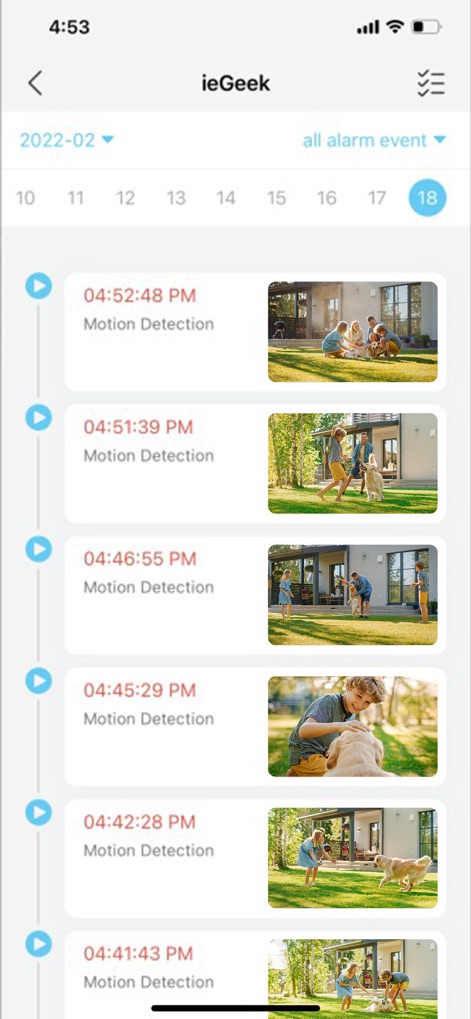
Gli utenti possono facilmente ripercorrere la cronologia degli allarmi con dettagli precisi sull'orario, visualizzando miniature illustrative di ciascun evento di "Motion Detection" per un rapido controllo.
Cronologia Allarmi Intelligente

Questo strumento facilita la condivisione del dispositivo con altri utenti, offrendo la flessibilità di aggiungere contatti tramite la scansione di un "QR Code" o inserendo direttamente i dettagli dell'"account" per un accesso collaborativo.
Condivisione Dispositivo Semplice

L'app presenta una sezione dedicata alla gestione dell'account, dove gli utenti possono accedere a funzionalità come "Family management" per l'organizzazione familiare e la lista di dispositivi o contenuti "Shared" con altri utenti.
Gestione Account Completa

Gli utenti hanno il pieno controllo sul rilevamento del movimento, potendo regolare con precisione la "Detection sensitivity" tramite un intuitivo slider e definire specifiche "Alarm Area" per monitorare zone critiche.
Rilevamento Movimento Avanzato

L'app offre diverse modalità di funzionamento per gli allarmi, inclusa una "Power Saving Mode" predefinita per ottimizzare la durata della batteria e una "Custom Mode" configurabile per adattare il rilevamento alle esigenze specifiche.
Modalità Allarme Flessibili

La schermata principale offre una navigazione chiara con un menu a discesa per selezionare rapidamente la "Test's home" o altre posizioni, mentre la barra di navigazione inferiore fornisce accesso immediato a sezioni chiave come "Home" e "Messages".
Interfaccia Utente Intuitiva
Descrizione
Download
App Simili
App con funzionalità ed esperienza simili

DMSS
Hangzhou Dong Bin Information Technology Co., Ltd.

Joolink
Shenzhen Jooan Technology Company

VicoHome: Smart Home Camera
PHOTON SAIL TECHNOLOGIES PTE. LTD.

Ubox
洪波 王

SimpliSafe Home Security App
SimpliSafe, Inc.

Active Mobile V4
JFL Equipamentos Eletronicos Industria e Comercio Ltda.

Dzees Home
Shenzhen Weixi Technology Co., Ltd

Ring - Always Home
Bot Home Automation, INC

Hik-Connect - for End user
Hangzhou Hikvision Digital Technology Co., Ltd.
Questa pagina non è una pagina ufficiale dell'app o del suo sviluppatore, ma una pubblicazione editoriale indipendente creata a scopo informativo e di commento. Salvo espressa indicazione contraria, né l'app né il suo sviluppatore sono affiliati, approvati, sponsorizzati, autorizzati o altrimenti ufficialmente collegati a MWM, Apple, Google Play, all'editore dell'app o allo sviluppatore dell'app, e nulla in questa pagina implica che l'app sia stata sviluppata utilizzando i servizi di MWM. Tutti i marchi, loghi, screenshot e altri contenuti rimangono di proprietà dei rispettivi proprietari.