Questa pagina non è una pagina ufficiale dell'app o del suo sviluppatore, ma una pubblicazione editoriale indipendente creata a scopo informativo e di commento. Salvo espressa indicazione contraria, né l'app né il suo sviluppatore sono affiliati, approvati, sponsorizzati, autorizzati o altrimenti ufficialmente collegati a MWM, Apple, Google Play, all'editore dell'app o allo sviluppatore dell'app, e nulla in questa pagina implica che l'app sia stata sviluppata utilizzando i servizi di MWM. Tutti i marchi, loghi, screenshot e altri contenuti rimangono di proprietà dei rispettivi proprietari.
iMPC Pro 2 for iPhone
Porta il leggendario flusso di lavoro Akai Professional nel tuo studio mobile. Campiona, taglia e mixa beat standard del settore con un mixer a 64 tracce, integrazione AU e l'iconica interfaccia a 16 pad, ovunque ti colga l'ispirazione.
Numeri Chiave
Download
214K+
Valutazione
4.5/5
Valutazioni totali
2K+
Editore
Akai Professional
Categoria
Music
Lingue
1
Ultima versione
2.2.2
Dimensione
202.7 MB
Data di lancio
10 dic 2018
Funzioni
Lo standard d'oro della produzione mobile
Fusa il leggendario flusso di lavoro MPC con strumenti avanzati di creazione di canzoni, iMPC Pro 2 trasforma il tuo iPhone in uno studio di registrazione di livello professionale.
Campionamento e taglio iconici
Sperimenta la precisione del Chop-Shop. Campiona direttamente da Spotify e utilizza l'intuitiva modifica multi-touch per manipolare i suoni come un professionista.
Potenza dello studio a 64 tracce
Costruisci arrangiamenti complessi con un mixer massiccio, tracce vocali e supporto Audio Unit. La tua tasca è ora una centrale di produzione.
Gli screenshot e la descrizione seguenti provengono direttamente dall'elenco ufficiale dello store dell'app e sono di proprietà dello sviluppatore.
App Store
Screenshot
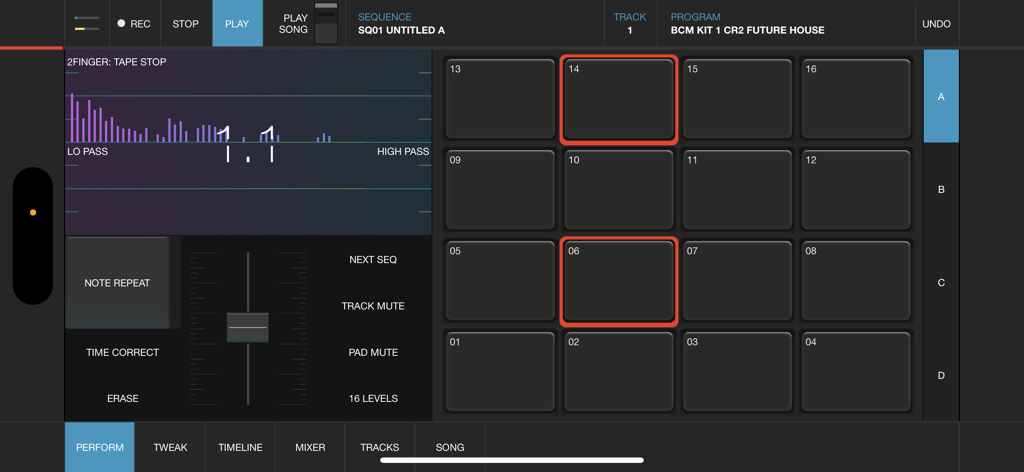
Interfaccia professionale di beat making per iMPC Pro 2 su iPhone con la griglia iconica a 16 pad e controlli di performance audio
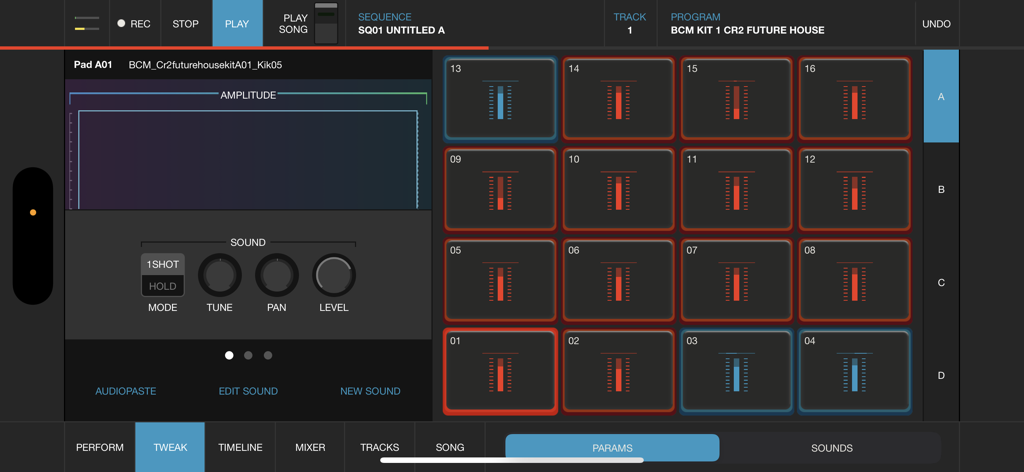
Interfaccia di iMPC Pro 2 per iPhone con 16 drum pad e un editor di forme d'onda per il beat making mobile
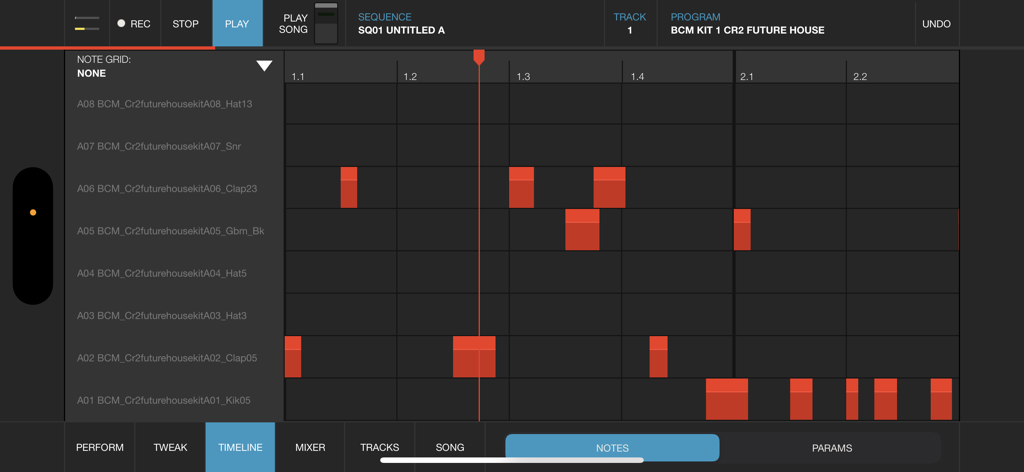
Vista timeline di iMPC Pro 2 per iPhone con griglia di note per il sequencing della produzione musicale
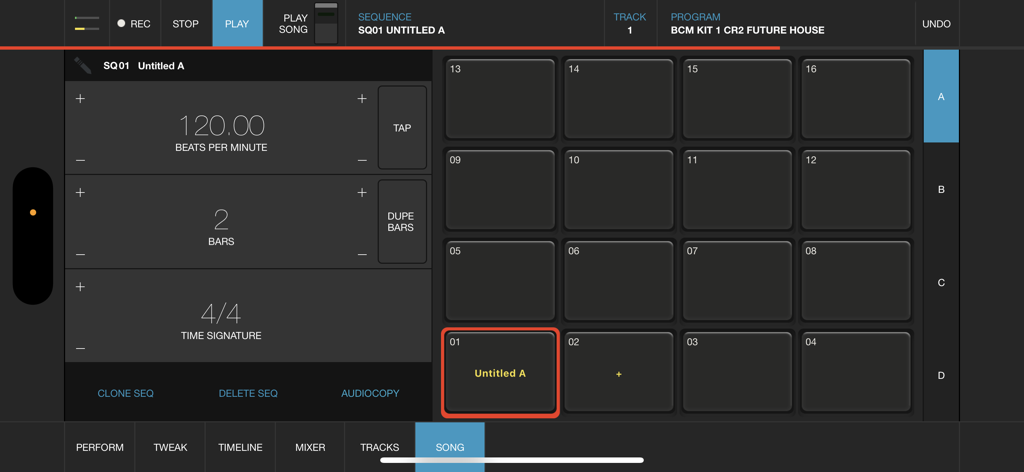
Interfaccia della modalità canzone di iMPC Pro 2 per iPhone che mostra la griglia a 16 pad e le impostazioni di sequenza
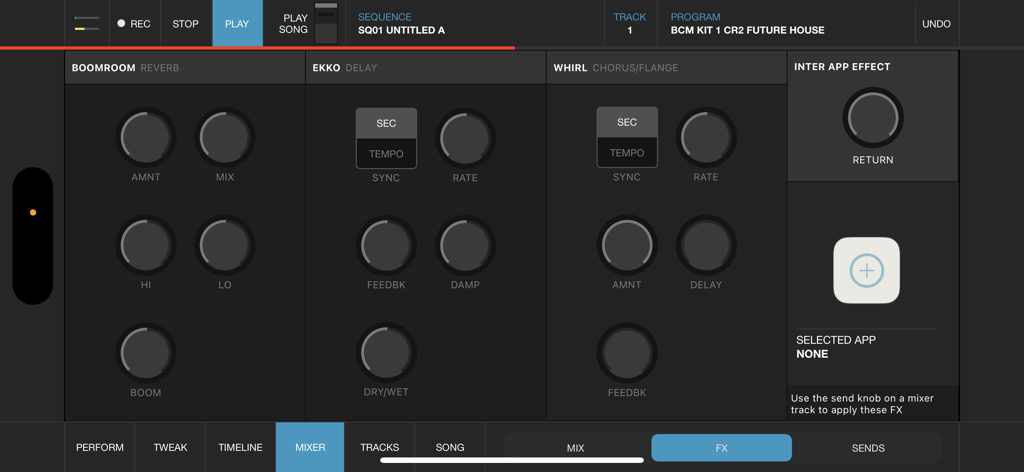
L'interfaccia del mixer effetti di iMPC Pro 2 per iPhone con controlli di riverbero, delay e chorus
Descrizione
iMPC Pro 2 for iPhone fuses innovative song creation with the iconic MPC workflow. It’s a powerhouse in your pocket. Whether you’re using the powerful sampler, dropping in some vocals, or integrating an Audio Unit, you’re sure to find everything you need.
AUDIO TRACKS:
Within the audio tracks, you can time warp, pitch shift, and rearrange your audio clips in real time. The sophistication of real time manipulation is captured in a simple workflow and sleek interface. You can choose from multiple input sources to record, including external mic channels, hardware audio interfaces, and IAA.
AUDIO UNIT TRACKS:
You can now load any Audio Units instrument into an Audio Unit Track! Control your AU instrument with a classic piano keyboard interface and an iMPC interface with note variation, Flux Link, Note Repeat, 16 Levels, and more. The app also features an improvement to the workflow for song creation. Song sequencing is faster, more powerful, and more flexible, so you have complete creative control.
100% NEW SOUND KIT AND MORE:
Designed exclusively for iMPC Pro 2 for iPhone, these kits cover some of the most iconic and cutting-edge beat genres available, from a range of beloved producers, all chosen from the Akai Professional vault. Each kit includes samples featuring sounds from punchy 808’s to melodic hits and stabs, designed for the best user experience possible.
The app also comes with 4 additional Sound Packs for FREE (valued at $20). Grab these packs in the AudioCopy Content Store: Bryson’s Soul, Dark Swang, and Metro Bang. iMPC University students have the opportunity to earn an additional Sound Pack, The Diploma! You can use them in hundreds of AudioCopy compatible apps (including iMPC for iPhone).
iMPC UNIVERSITY:
Unlock producer secrets and learn how to become a full fledged song creator with this tutorial series. iMPCU unlocks one course per day and gives you the tools you need to take your music to the next level. Fun for both new and experienced users, iMPC Pro 2 for iPhone offers an expansive dive into the world of beatmaking and song editing through these courses. We’re excited for you to try it!
FEATURES:
Audio Tracks:
- Record from built in mic, external mics, audio interfaces, instruments, etc.
- Record from Inter App Audio Apps
- Warp Tracks and Clips to match tempo
- Access several quick editing features on Audio Clips (Pitch shift, Time Stretch, Amplify, Crop, Split, Duplicate)
- Drag to arrange Audio Clips, snap them to an adjustable grid setting
- Advanced waveform editing
AudioUnit integration:
- Audio Unit tweak mode with full keyboard support (including 2 dozen scale modes from Chromatic to Blues to Aeolian)
---
- 100% New Sound Set, with 4 additional free Sound Packs
- Sample sounds from Spotify
- 64 Track Mixer with EQ and 4 FX sends (Reverb, Delay, Chorus/Flange, and one Inter App Audio Effect)
- Chop-shop provides intuitive multi-touch editing, trimming, auditioning, splicing, splicing and processing samples
- Tracks View shows an overview of all the tracks in your song
- 16 Levels mode with attack, velocity, length, and tuning settings for quickly creating variations of sounds
- Live Sequence queuing for real-time performance and playback
- Time correct: 1/8 note - 1/32T with variable swing
- MPC Note Repeat featuring 1/8 note - 1/32T timing with latch
- IAA and Ableton Link support
- Share beats and songs seamlessly to YouTube
- 4 Mute Groups and custom-designed envelope filters for all pads
- AudioCopy and AudioPaste support
- Improved integration and support for iMPC Pro Packs and other Sound Packs from the AudioCopy Content Store
- Expert MIDI support including expanded options, multiple maps, and more
- Extensive undo/redo capabilities
- New Song Arrangement workflow and integrated Song Mode makes song creation easier than ever
- Drag entire Folders and Sound Packs directly to pads to load many sounds at once
Questa pagina non è una pagina ufficiale dell'app o del suo sviluppatore, ma una pubblicazione editoriale indipendente creata a scopo informativo e di commento. Salvo espressa indicazione contraria, né l'app né il suo sviluppatore sono affiliati, approvati, sponsorizzati, autorizzati o altrimenti ufficialmente collegati a MWM, Apple, Google Play, all'editore dell'app o allo sviluppatore dell'app, e nulla in questa pagina implica che l'app sia stata sviluppata utilizzando i servizi di MWM. Tutti i marchi, loghi, screenshot e altri contenuti rimangono di proprietà dei rispettivi proprietari.








