iProject Viewer

iProject Viewer

Scarica su App Store
Logo di iProject Viewer

iProject Viewer: Gestione Professionale di Microsoft Project in Movimento

Apri, modifica e salva file MPP con diagrammi di Gantt ad alta fedeltà. La soluzione mobile completa per i Project Manager per mantenere il controllo dall'ufficio al campo.

Scarica su App Store

Editore

Viewer Central Inc

Categoria

Business

Download

129K+

Valutazione

3.4/5

Valutazioni totali

100

Lingue

1

Precisione del Progetto, Visualizzata

Scopri l'interfaccia usata da 129K+ utenti.

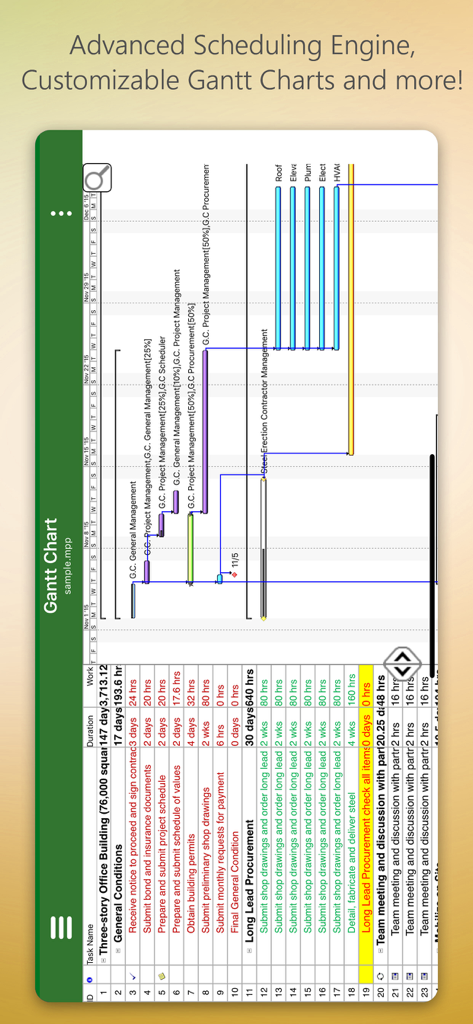
Interfaccia mobile di iProject Viewer che mostra un diagramma di Gantt dettagliato per un progetto di costruzione
Interfaccia mobile di iProject Viewer che mostra un diagramma di Gantt dettagliato per un progetto di costruzione

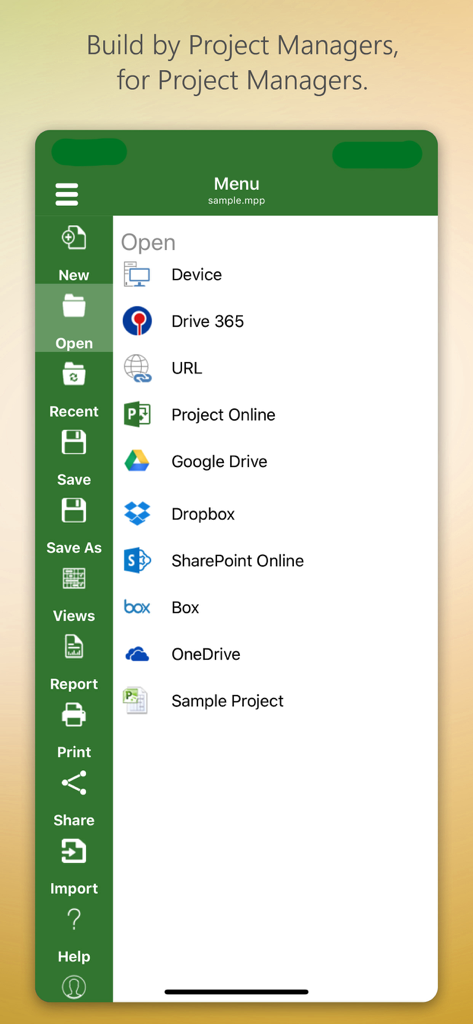
Menu dell'app iProject Viewer che mostra le opzioni per aprire file di progetto da archivi cloud come Google Drive e SharePoint
Menu dell'app iProject Viewer che mostra le opzioni per aprire file di progetto da archivi cloud come Google Drive e SharePoint

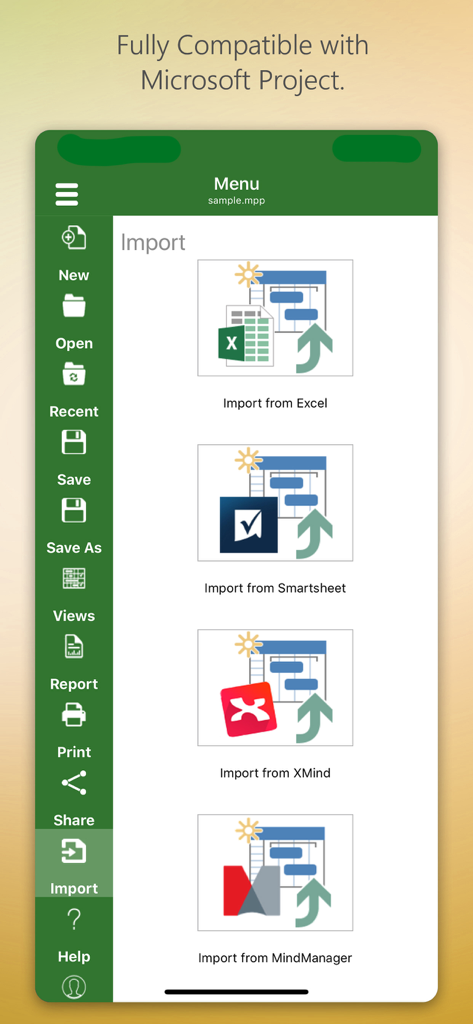
Interfaccia dell'app iProject Viewer che mostra opzioni di importazione da Excel, Smartsheet, XMind e MindManager.
Interfaccia dell'app iProject Viewer che mostra opzioni di importazione da Excel, Smartsheet, XMind e MindManager.

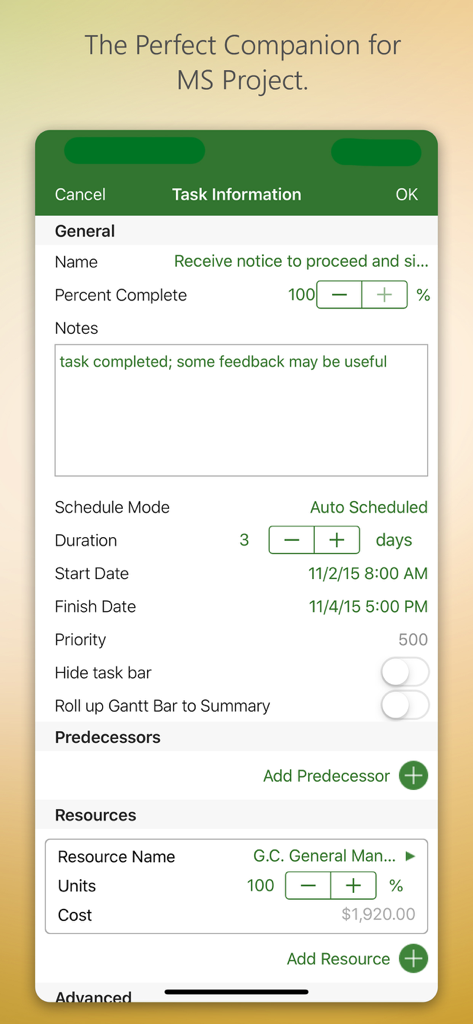
Interfaccia dell'app iProject Viewer che mostra informazioni sulle attività e gestione delle risorse
Interfaccia dell'app iProject Viewer che mostra informazioni sulle attività e gestione delle risorse

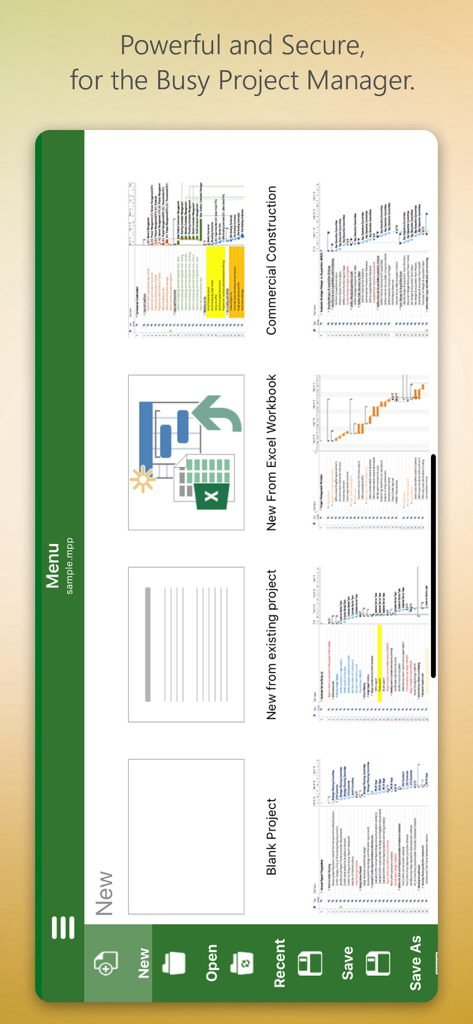
Schermata del menu dell'app iProject Viewer con opzioni per creare nuovi progetti da zero o da modelli

Schermata del menu dell'app iProject Viewer con opzioni per creare nuovi progetti da zero o da modelli

Padroneggia la Tua Pianificazione di Progetto, Ovunque

Gli strumenti che rendono questa app unica, scelti da 129K+ utenti.

📊

Diagrammi di Gantt ad Alta Fedeltà

Sperimenta visualizzazioni cristalline. Visualizza attività, dipendenze e risorse esattamente come appaiono in Microsoft Project, assicurandoti di non perdere mai un dettaglio del percorso critico.

☁️

Integrazione Cloud Aziendale

Accedi in modo sicuro ai tuoi file .mpp da SharePoint, OneDrive o Box. Sincronizza senza problemi con la tua infrastruttura aziendale esistente senza trasferimenti di file manuali.

🏗️

Modifica Pronta per il Campo

Apporta aggiornamenti critici alla pianificazione in loco. Crea o modifica diagrammi di Gantt direttamente sul tuo iPad e salva le modifiche nel formato MPP nativo per una vera postazione di lavoro mobile.

Amata dagli utenti di tutto il mondo

Scelto da 129K+ persone che amano questa app.

"

"Finalmente un modo per accedere ai miei file MS Project in movimento senza complicazioni. La possibilità di visualizzare e modificare i diagrammi di Gantt direttamente dal mio iPad mentre sono sul posto ha snellito l'intero flusso di lavoro della nostra costruzione. Si integra perfettamente con il nostro OneDrive, rendendolo uno strumento essenziale per qualsiasi project manager sul campo."

Mark Thompson, Construction Superintendent
"

"Come professionista PMP che è costantemente in riunioni, avere la possibilità di consultare un file MPP sul mio telefono è un punto di svolta. Il rendering è nitido e l'interfaccia è incredibilmente intuitiva per chiunque sia abituato alla versione desktop. È la soluzione mobile più affidabile per gestire complesse pianificazioni di progetto che abbia mai utilizzato."

Elena Rodriguez, Senior IT Project Manager

Analisi recensioni

Approfondimenti dalle recensioni degli utenti.

Punteggio sentimento

31%
Negativo

Riepilogo

This app receives a mixed to largely negative reception, primarily valued by users for its ability to open and view Microsoft Project (.MPP) files directly on iOS devices, which many find useful. However, a significant portion of feedback highlights severe issues including frequent crashes, unreliable saving, and difficulties with various cloud integrations like OneDrive and Dropbox. Users are also highly critical of the expensive subscription model, the app's often clunky user interface, and its limited editing capabilities, often functioning more as a viewer than a full-fledged project management tool. While a few users appreciate responsive developer support, many feel it's not worth the high annual cost given its stability and feature shortcomings.

Temi comuni

Crashes and Bugs(13)
MPP File Viewing(10)
Cloud Integration(9)
User Interface(7)
Subscription Model(6)
Editing Limitations(4)
Customer Support(1)

Info sull'app

Tutto quello che devi sapere su iProject Viewer.

Descrizione

New!! Create Gantt charts and edit/save existing MS Project Plans in MPP file format! Housatonic’s Project Viewer 365 for iOS allows you to open MS Project Plans from cloud locations like Google Drive. Dropbox, OneDrive, SharePoint Online, Box, Basecamp, URL Links and email attachments.

 Housatonic Project Viewer 365 for iOS is compatible with Microsoft Project (MPP file format) 2016, 2013, 2010, 2007, 2003 and earlier versions. The interface is intuitive making Project Viewer simple for the end users.

 Now Microsoft Project Plans look better than ever on your iOS. Free view-only MS Project views like Gantt chart, Task Sheet and Resource Sheet are available along with basic project plan sorting, filters, zooming and time scale viewing capabilities.

 Additional features can be enabled by subscribing to in-app-purchase packages: In-App Option 1: Advanced View Only Enable advanced sorting capabilities, apply additional filter options, customize time scale 
Access additional project views like Calendar View, Resource and Task Usage, View Network Diagram
 View Multiple Project Reports and Print Project Info to PDF or Paper
 This in-app purchase option is offered on a yearly (1 year) basis for a price of $19.99 USD per year. In-App Option 2: Standard Editor Create new Gantt charts and modify existing project schedules in the same intuitive way as MS Project. Save and Share your plans (MPP files) from any storage or cloud location on any iOS device. Works with, or as an alternative to Microsoft Project. This in-app purchase option is offered on a yearly (1 year) basis for a price of $129.99 USD per year. Payment will be charged to iTunes Account at confirmation of purchase Subscription automatically renews unless auto-renew is turned off at least 24-hours before the end of the current period Account will be charged for renewal within 24-hours prior to the end of the current period, and identify the cost of the renewal Subscriptions may be managed by the user and auto-renewal may be turned off by going to the user's Account Settings after purchase No cancellation of the current subscription is allowed during active subscription period Any unused portion of a free trial period, if offered, will be forfeited when the user purchases a subscription to that publication, where applicable Terms and Conditions: http://housatonic.com/terms.html Privacy Policy: http://housatonic.com/privacy.html

Ultima versione

25.14

Dimensione

94.4 MB

Data di lancio

16 set 2011

Porta i Tuoi Piani MS Project sul Campo

Smetti di aspettare di tornare alla tua scrivania. Apri, modifica e condividi i tuoi diagrammi di Gantt direttamente dal tuo iPhone o iPad con il visualizzatore ed editor MPP leader del settore.

Scarica su App Store