IPTV fast: Il Lettore Potente per i Moderni Cord-Cutters
Prendi il pieno controllo del tuo intrattenimento. Importa le tue playlist M3U o TXT e goditi un'esperienza di streaming velocissima e priva di bloatware, progettata per lo spettatore esperto di tecnologia.
Editore
丽娜 夏
Categoria
Entertainment
Download
112K+
Valutazione
2.8/5
Valutazioni totali
100
Lingue
2
Uno Sguardo al Controllo Totale
Scopri l'interfaccia usata da 112K+ utenti.
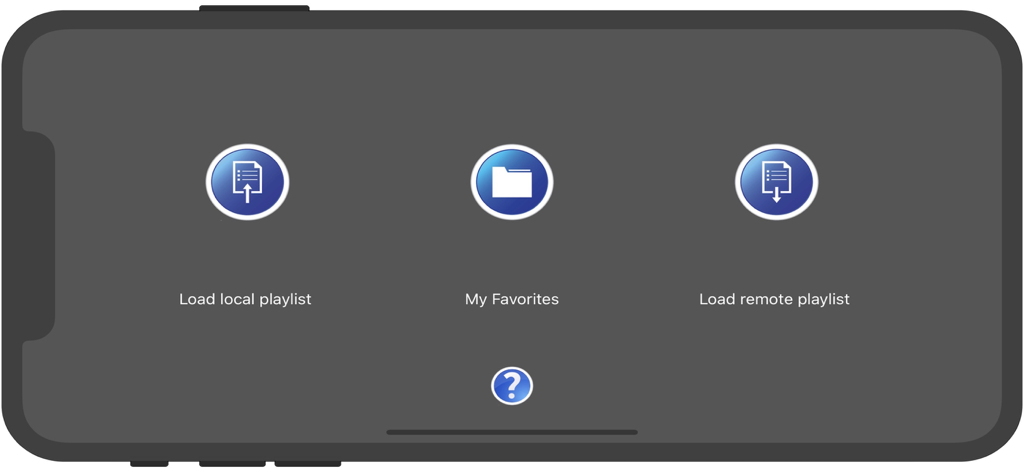
Schermata principale dell'app IPTV fast con pulsanti per caricare playlist locali, preferiti e playlist remote
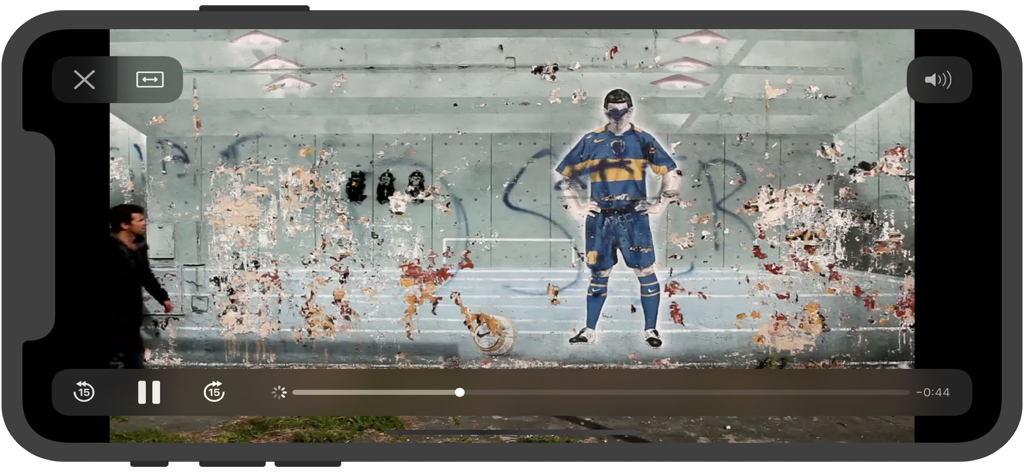
Schermata del lettore video dell'applicazione mobile IPTV fast che mostra i controlli di riproduzione e un video di paesaggio panoramico
Schermata del lettore video dell'app mobile IPTV fast in orientamento orizzontale con controlli di riproduzione
Riproduzione video dell'app IPTV fast su uno schermo di smartphone
Prendi il Controllo della Tua Esperienza di Streaming
Gli strumenti che rendono questa app unica, scelti da 112K+ utenti.
🛠️
Personalizzazione Completa delle Playlist
Costruisci la tua guida TV importando playlist M3U o TXT. Organizza i tuoi canali preferiti di sport internazionali, notizie e intrattenimento esattamente come li desideri.
⚡
Leggero e Velocissimo
Con soli 6 MB, IPTV fast offre un'interfaccia pulita e un cambio canale istantaneo senza rallentare il tuo iPhone o iPad con processi in background non necessari.
🔒
Sincronizzazione Locale Privata
Mantieni sicuri e privati i tuoi link di streaming. Sincronizza le tue playlist curate direttamente dal tuo Mac o PC utilizzando iTunes o la condivisione file di Finder per una totale indipendenza dal cloud.
Info sull'app
Tutto quello che devi sapere su IPTV fast.
Descrizione
IPTV fast is a complete user defined IPTV solutions for live and non-live TV/stream.
Support M3U playlist formats, TXT playlist formats.
If you ever want to play M3U streams, if you need player supporting these live or non-live streams, the IPTV fast is a solution for these requirements.
- Built-in powerful player, No need to look for third party player to support these formats.
- Support Local M3U and TXT playlists, user can add playlists to their device
via iTunes's file sharing function (connecting their device to iTunes, then add playlists to its file sharing document).
- Support Remote playlists, user can add their http remote playlists.
Features
- Support m3u8 TV/Radio live or non-live stream, you can custom your own TV/Radio channel.
- Support TXT and M3U playlist.
- Support media formats such as m3u8, mp4, mp3. . . . . .
- Download Remote playlists to Local.
- Support My Favorites.
How it works?
1. Make your own playlist
1A. Make your own TXT playlist
Name your playlist as xxx.txt, then edit and save your file in format as below:
TV or Radio Channel,Media Source Link
One line one TV or Radio channel (do not forget The comma)
For example:
(line 1) TV 1,http://streamer.oodlz.it/hls/livestream.m3u8
(line 2) TV 2,http://stream.1music.hu/stream/1music.m3u8
(line 3) Radio 1,http://icestreaming.rai.it/1.mp3
etc. . . . . .
(Save your xxx.txt file as UTF-8)
1B. Make your own M3U playlist (format 1)
Name your playlist as xxx.txt, then edit and save your file in format as below:
#EXTM3U
#EXTINF:-1 tvg-logo=”sample.png” group-title=”No group”,Channel 1
Channel 1,https://edge.music-choice-play-chaina/play/chunklist.m3u8
#EXTINF:-1 tvg-logo=”sample.png” group-title=”No group”,Channel 2
Channel 2,https://nhkworld.webcdn.stream.ne.jp/live_wa_s.m3u8
#EXTINF:-1 tvg-logo=”sample.png” group-title=”No group”,Channel 3
Channel 3,http://77.89.199.174:81/hls/live2.m3u8
etc. . . . . .
Save your xxx.txt file as UTF-8 format, then change its extension from xxx.txt to xxx.m3u.
1C. Make your own M3U playlist (format 2)
Name your playlist as xxx.txt, then edit and save your file in format as below:
#EXTM3U
#EXTINF:-1 tvg-logo=”sample.png” group-title=”No group”,Channel 1
https://edge.music-choice-play-chaina/play/chunklist.m3u8
#EXTINF:-1 tvg-logo=”sample.png” group-title=”No group”,Channel 2
https://nhkworld.webcdn.stream.ne.jp/live_wa_s.m3u8
#EXTINF:-1 tvg-logo=”sample.png” group-title=”No group”,Channel 3
http://77.89.199.174:81/hls/live2.m3u8
etc. . . . . .
Save your xxx.txt file as UTF-8 format, then change its extension from xxx.txt to xxx.m3u.
2. Add your xxx.txt or xxx.m3u file to your device
2A. Add local playlists to your device
First, connecting your device t your computer,
(1) If your macOS is earlier than Catalina, Open iTunes, click file sharing find the IPTV fast, add your playlist to its file share document.
(2) If your macOS is Catalina or Big Sur or later, use Finder, you can drag your playlist to IPTV fast's file share document.
2B. Download remote playlist
First, upload your playlist the a website, get its download url, If all this done, open IPTV fast, enter your playlist download url, press download.
3. Relax and watch your favorite shows on your device
DISCLAIMER
- IPTV fast does not supply or include any media or content.
- IPTV fast has no affiliation with any third-party provider what so ever.
- Users must provide their own contents.
- I do not endorse the streaming of copyright protected material without permission of the copyright holder.
Ultima versione
22.0
Dimensione
5.9 MB
Data di lancio
23 nov 2018
Pronto a Costruire la Tua Programmazione TV Perfetta?
Unisciti a oltre 112.000 cord-cutters che si affidano a IPTV fast per un'esperienza di streaming leggera e ad alte prestazioni. Scarica ora e prendi il pieno controllo delle tue playlist M3U senza la fatica degli abbonamenti.
App information, icons, screenshots, and descriptions displayed on this page are sourced from the Apple App Store and are the property of their respective developers. Download estimates and rankings are based on MWM's proprietary models and may not reflect actual figures. This page is provided for informational and analytical purposes only.
Believe this page infringes your intellectual property? File a dispute