
Questa pagina non è una pagina ufficiale dell'app o del suo sviluppatore, ma una pubblicazione editoriale indipendente creata a scopo informativo e di commento. Salvo espressa indicazione contraria, né l'app né il suo sviluppatore sono affiliati, approvati, sponsorizzati, autorizzati o altrimenti ufficialmente collegati a MWM, Apple, Google Play, all'editore dell'app o allo sviluppatore dell'app, e nulla in questa pagina implica che l'app sia stata sviluppata utilizzando i servizi di MWM. Tutti i marchi, loghi, screenshot e altri contenuti rimangono di proprietà dei rispettivi proprietari.


Lightroom: AI Photo Editor
Dimentica l'imperfezione casuale. L'applicazione consegna all'utente il dominio sulla realtà catturata, permettendo all'intelligenza artificiale di scolpire ogni frammento visivo fino a riflettere una visione intenzionale, non un errore.
Download
100M+Valutazione
Valutazioni totali
2.4MEditore
Categoria
Photo & VideoLingue
23Ultima versione
11.2.2Dimensione
316.4 MBData di lancio
22 giu 2014Analisi Funzionale: Lightroom: AI Photo Editor
Un'esplorazione delle capacità chiave che potenziano la creatività fotografica e video su dispositivi mobili.
Strumenti di Rimozione e Sfocatura Intelligente
Questo strumento presenta la capacità di eliminare oggetti indesiderati dalle foto tramite l'IA (Generative Remove) e di sfocare lo sfondo per creare un effetto bokeh professionale, mettendo in risalto il soggetto. È ideale per pulire le immagini e ottenere un look raffinato.
Ritocchi Rapidi e Preset AI-Powered
L'app fornisce funzionalità di modifica rapida con intelligenza artificiale, suggerendo automaticamente i migliori ritocchi e consentendo l'applicazione di preset predefiniti o personalizzati per migliorare istantaneamente le immagini. Questo rende l'editing accessibile e veloce, anche senza esperienza.
Libreria di Preset della Community e Personalizzazione
Presenta una vasta libreria di filtri e preset condivisi da altri creatori in tutto il mondo, offrendo ispirazione e la possibilità di salvare o creare i propri stili unici. Consente agli utenti di trovare look che corrispondono alla loro estetica o di definire la propria firma visiva.
Modifica in Batch per Consistenza
Consente agli utenti di applicare le stesse modifiche a più foto contemporaneamente, garantendo coerenza stilistica e ottimizzando il flusso di lavoro. Questo è particolarmente utile per chi cattura serie di immagini o gestisce un feed sui social media.
Controlli di Editing Avanzati
Consente agli utenti di prendere il controllo totale dell'immagine con strumenti precisi per regolare esposizione, luci, ombre, grading colore, tonalità e saturazione, offrendo ampia libertà creativa per perfezionare ogni dettaglio visivo.
Modifica Video Integrata
L'app estende le sue capacità di editing alle clip video, permettendo di applicare regolazioni di luce, colore e preset anche ai filmati. Ciò garantisce una coerenza stilistica tra contenuti foto e video, essenziale per i creatori di contenuti.
Domande Frequenti
Tutto quello che devi sapere su Lightroom: AI Photo Editor
Is Adobe Lightroom a free app?
Yes, Adobe Lightroom is a free photo and video editor. It helps users enhance photos and videos with powerful AI editor tools and creative controls.
What AI editing features does Adobe Lightroom offer?
Adobe Lightroom offers AI editor tools such as Generative Remove for object removal, Quick Actions for suggested edits, and Adaptive Presets for enhancing specific photo elements.
Can I remove unwanted objects from photos using Lightroom?
Yes, Adobe Lightroom features Generative Remove, an AI photo eraser tool. It allows users to remove unwanted distractions or objects from photos with a few taps.
Does Adobe Lightroom provide video editing capabilities?
Yes, Adobe Lightroom includes video editing features. Users can apply creative energy to clips using tools for light, color, and presets to match their style.
How does Adobe Lightroom help improve portrait photos?
Adobe Lightroom offers Adaptive Presets for portraits and retouching tools. Users can enhance portraits with one-tap adjustments, including options for blemishes, skin, teeth, and eyes.
Can I apply edits to multiple photos at once in Adobe Lightroom?
Yes, Adobe Lightroom enables batch editing. Users can apply edits once and then fix photos in batches to maintain consistent photo edits across multiple images quickly and easily.
How can I blur the background in my photos using Lightroom?
Adobe Lightroom allows users to blur photo backgrounds for a polished look. It provides a "Background Blur" tool with various shapes and adjustable blur amounts.
Does Adobe Lightroom allow users to adjust sky elements?
Yes, Adobe Lightroom features Adaptive: Sky presets that instantly transform the sky in photos. Users can enhance specific parts of a photo like the sky.
Where can I find the Terms & Conditions for Adobe Lightroom?
The Terms & Conditions for Adobe Lightroom are available at http://www.adobe.com/go/terms_linkfree_en. This link is provided within the app's description.
Does Adobe Lightroom offer color correction tools?
Yes, Adobe Lightroom provides tools to boost color with precision. Users can adjust hue, saturation, color grading, and temperature to achieve the desired look for their photos.
Gli screenshot e la descrizione seguenti provengono direttamente dall'elenco ufficiale dello store dell'app e sono di proprietà dello sviluppatore.
App Store
Screenshot

Qualità Professionale Facile
L'app offre filtri preimpostati per migliorare istantaneamente le immagini, come si evince dalle diverse opzioni visualizzate, ed è riconosciuta con il prestigioso badge 'Editor's Choice' per la sua eccellenza.

Eliminazione Intelligente AI
Questo strumento permette di rimuovere oggetti indesiderati dalle foto, come illustrato dal confronto 'Before/After', utilizzando la potente funzione di intelligenza artificiale Generative AI.

Cieli Spettacolari Subito
Gli utenti possono trasformare istantaneamente il cielo nelle proprie foto, come evidenziato dalla netta differenza 'Before/After', grazie ai preset adattivi specifici per il cielo.

Ritocco Dettagli Viso
L'app consente un ritocco dettagliato delle immagini, visibile nel miglioramento delle imperfezioni della pelle e nella luminosità del viso, attraverso strumenti specifici come 'Blemishes' e 'Skin'.

Ritratti Perfetti Facile
Gli utenti possono migliorare i ritratti con un solo tocco, scegliendo tra diverse preimpostazioni adattive, come 'Polished Portrait' e 'Glamour Portrait', per ottenere un look impeccabile.
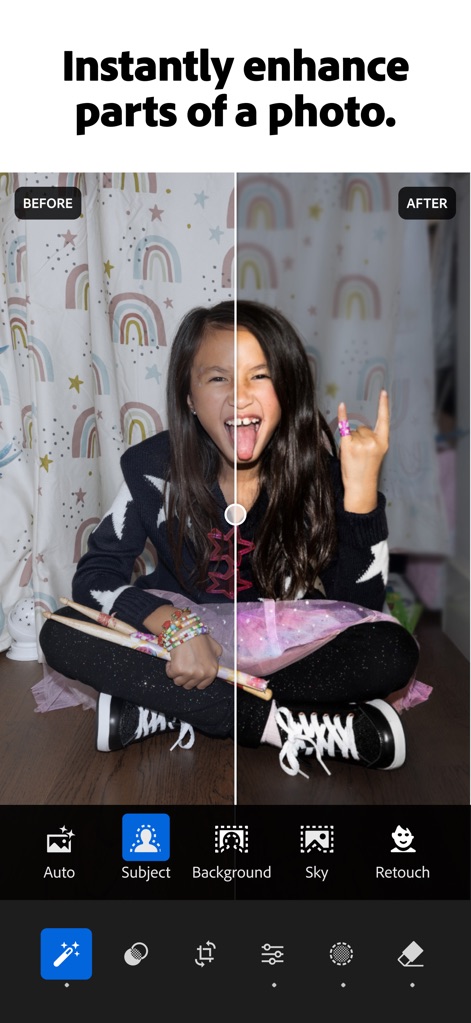
Migliora Zone Specifiche
L'app permette di migliorare istantaneamente parti specifiche di una foto, come il 'Subject' o il 'Background', mostrando una trasformazione da un'immagine scura a una luminosa e colorata.

Sfondo Sfocato Pro
Gli utenti possono sfocare rapidamente lo sfondo delle loro foto, creando un effetto bokeh professionale, e scegliere tra diverse forme di sfocatura come 'Circle' o 'Ring' per un risultato personalizzato.
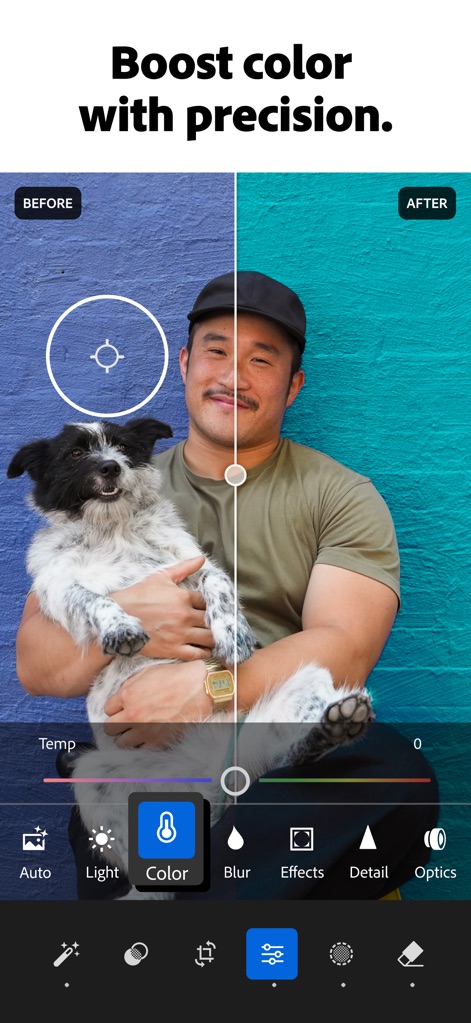
Colori Vibranti Precisi
Questo strumento consente di aumentare la vivacità dei colori con precisione, trasformando tonalità come un muro da blu spento a un teal brillante, grazie a controlli come il 'Temp' e altre opzioni colore.

Editing Video Creativo
Lightroom estende le sue potenti funzionalità all'editing video, permettendo agli utenti di regolare 'Light' e 'Color' direttamente sui loro filmati per armonizzarli con il proprio stile creativo.
Descrizione
Download
App Simili
App con funzionalità ed esperienza simili

MIX-Photo Editor & Filters
灏 徐

Presets for Lightroom - FLTR
Onelight Apps CY Ltd

Colorby: AI Photo Color Editor
Zhanghan Ke

PRESETS: Filters for Pictures
Gustas Brazaitis

Edith: Presets for Lightroom
MWM

Soft Focus Lite 〜beauty selfie
handyCloset Inc.

BerryFilm - Korean Style Cam
Seungyun Kim

Presets for Lightroom: Filters
Alenrom sp. z o.o.

Video Filters Photo Editor TON
Onelight Apps CY Ltd
Questa pagina non è una pagina ufficiale dell'app o del suo sviluppatore, ma una pubblicazione editoriale indipendente creata a scopo informativo e di commento. Salvo espressa indicazione contraria, né l'app né il suo sviluppatore sono affiliati, approvati, sponsorizzati, autorizzati o altrimenti ufficialmente collegati a MWM, Apple, Google Play, all'editore dell'app o allo sviluppatore dell'app, e nulla in questa pagina implica che l'app sia stata sviluppata utilizzando i servizi di MWM. Tutti i marchi, loghi, screenshot e altri contenuti rimangono di proprietà dei rispettivi proprietari.