
Questa pagina non è una pagina ufficiale dell'app o del suo sviluppatore, ma una pubblicazione editoriale indipendente creata a scopo informativo e di commento. Salvo espressa indicazione contraria, né l'app né il suo sviluppatore sono affiliati, approvati, sponsorizzati, autorizzati o altrimenti ufficialmente collegati a MWM, Apple, Google Play, all'editore dell'app o allo sviluppatore dell'app, e nulla in questa pagina implica che l'app sia stata sviluppata utilizzando i servizi di MWM. Tutti i marchi, loghi, screenshot e altri contenuti rimangono di proprietà dei rispettivi proprietari.

Link to Windows
La barriera tra iOS e Windows è caduta. Il tuo PC ora detiene le redini operative del tuo smartphone, orchestrando chiamate, messaggi e notifiche senza interruzioni.
Download
25M+Valutazione
Valutazioni totali
37.5KEditore
Categoria
ProductivityLingue
33Ultima versione
1.26031.21Dimensione
98.9 MBData di lancio
28 feb 2023Analisi delle Funzionalità Chiave di 'Link to Windows'
Una valutazione delle capacità principali offerte dall'applicazione per ottimizzare l'integrazione e la produttività degli utenti iPhone con PC Windows.
Gestione Chiamate Diretta
L'app consente agli utenti di effettuare e ricevere chiamate direttamente dal PC Windows, eliminando la necessità di prendere in mano il telefono e migliorando il flusso di lavoro.
Messaggistica Integrata
L'app fornisce la possibilità di leggere e rispondere ai messaggi di testo direttamente dal PC, migliorando l'efficienza nella comunicazione quotidiana senza dover cambiare dispositivo.
Sincronizzazione Notifiche
Questo strumento presenta la capacità di gestire e visualizzare le notifiche del telefono direttamente sul desktop, riducendo le distrazioni e mantenendo il focus sulle attività sul PC.
Condivisione File Semplificata
Questo strumento facilita il trasferimento di file tra il telefono e il PC, colmando il divario tra i due dispositivi per una maggiore produttività e semplicità d'uso.
Domande Frequenti
Tutto quello che devi sapere su Link to Windows
Can I make calls from my PC using "Link to Windows"?
Yes, the "Link to Windows" app enables you to make and receive calls directly from your Windows PC when your iPhone is connected via the Phone Link feature.
Does "Link to Windows" show iPhone notifications on my PC?
Yes, "Link to Windows" allows you to manage and view your iPhone's notifications directly on your connected Windows PC through the Phone Link feature.
Can I send text messages from my PC with "Link to Windows"?
Yes, the "Link to Windows" app enables users to read and reply to text messages from their iPhone directly through their connected Windows PC.
Does "Link to Windows" display my iPhone contacts on the PC?
Yes, the "Link to Windows" app provides the ability to view your iPhone contacts directly on your connected Windows PC.
How do I share files between my iPhone and PC using "Link to Windows"?
"Link to Windows" facilitates file sharing between your iPhone and PC. The app displays received files and offers a file share option to another paired device.
What iOS version is required for "Link to Windows"?
"Link to Windows" requires an iPhone running iOS 16 or higher to support the Phone Link feature connection with a Windows PC.
What are the PC requirements for the Phone Link feature with "Link to Windows"?
The Phone Link feature requires a PC with Bluetooth Low Energy (BLE) support running Windows 10 (May 2019 Update or later) or Windows 11.
Is "Link to Windows" available for iPad or Mac?
No, "Link to Windows" is not available for iPad (iPadOS) or MacOS. It exclusively supports iPhone and Windows PC integration.
How do I connect my iPhone to my PC using the "Link to Windows" app?
To connect, open the Phone Link app on your PC and follow the instructions. You can scan a QR code from your PC or proceed without one to link your device.
How does the "Link to Windows" app maintain connection with my PC?
The "Link to Windows" app automatically connects your iPhone to a paired PC when it is within range. Ensure your PC is nearby and Bluetooth is activated.
Where can I find the Microsoft Terms of Use for the "Link to Windows" app?
The Microsoft Terms of Use for the "Link to Windows" app are located at the provided link: https://go.microsoft.com/fwlink/?LinkID=246338.
Does the "Link to Windows" app have a privacy statement?
Yes, the "Link to Windows" app adheres to a Privacy Statement, which users can access via the link: https://go.microsoft.com/fwlink/?LinkID=248686.
What is "Link to Windows"?
"Link to Windows" is an app that connects your iPhone to the Phone Link feature on your Windows PC. It provides instant access to phone content directly from your computer.
Gli screenshot e la descrizione seguenti provengono direttamente dall'elenco ufficiale dello store dell'app e sono di proprietà dello sviluppatore.
App Store
Screenshot

Gestione Chiamate Intuitiva
Gli utenti possono rispondere e gestire le chiamate direttamente dal PC, evidenziato dalla notifica di chiamata in entrata su Windows e dai controlli simultanei sul proprio iPhone, per una comunicazione senza interruzioni.
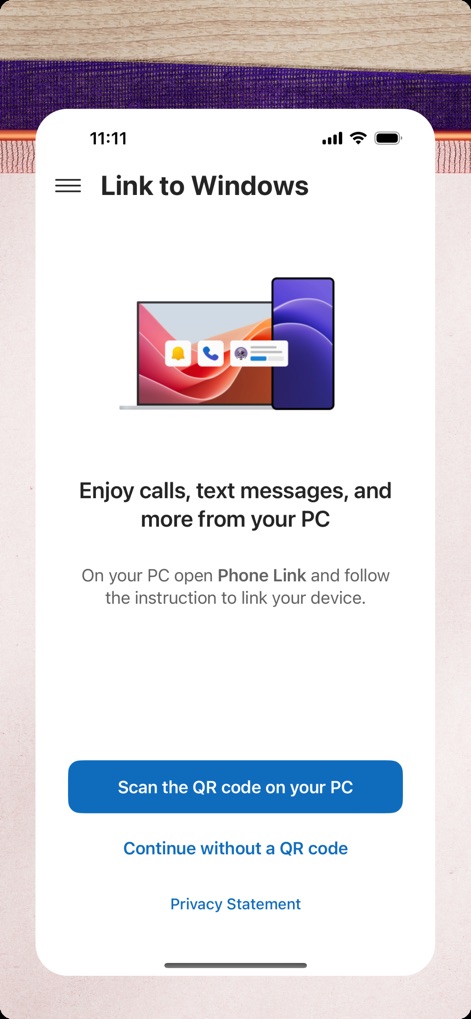
Integrazione Semplificata
Questo strumento offre una configurazione rapida, mostrata dall'illustrazione che simboleggia la connessione tra dispositivi, e facilita il collegamento iniziale tramite la scansione di un codice QR.
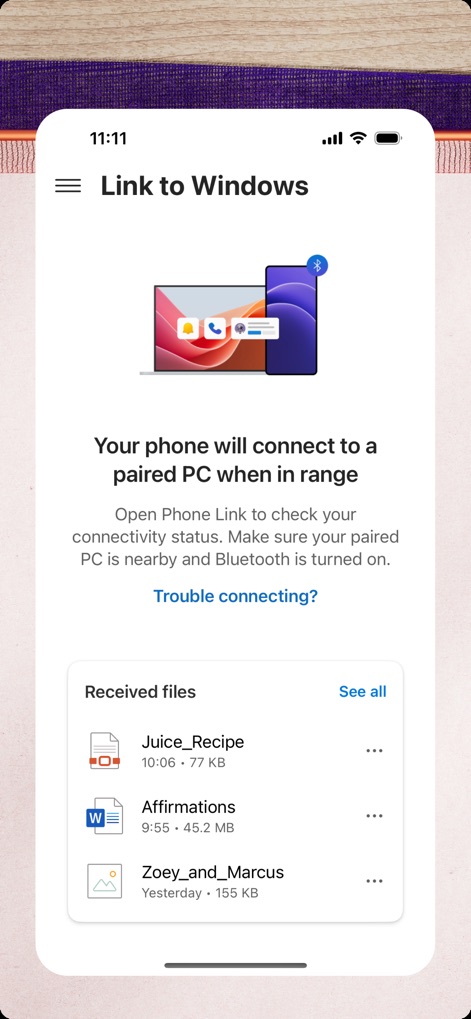
Sincronizzazione Automatica File
Una volta accoppiati, il telefono si connette automaticamente via Bluetooth, permettendo agli utenti di visualizzare e accedere ai file recentemente ricevuti direttamente dall'interfaccia dell'app.
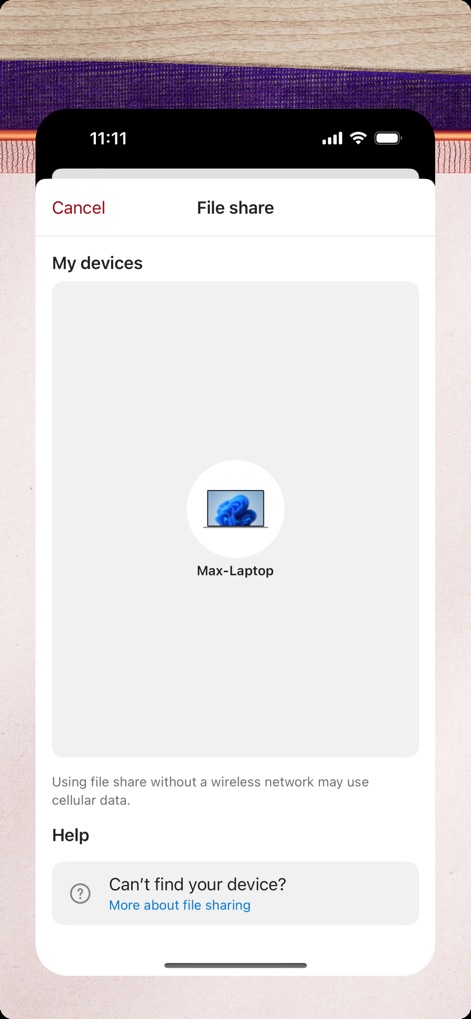
Condivisione File Rapida
L'app semplifica la condivisione di file, permettendo agli utenti di selezionare il PC accoppiato e gestendo il trasferimento direttamente da questa schermata dedicata alla condivisione.
Descrizione
Download
App Simili
App con funzionalità ed esperienza simili





Questa pagina non è una pagina ufficiale dell'app o del suo sviluppatore, ma una pubblicazione editoriale indipendente creata a scopo informativo e di commento. Salvo espressa indicazione contraria, né l'app né il suo sviluppatore sono affiliati, approvati, sponsorizzati, autorizzati o altrimenti ufficialmente collegati a MWM, Apple, Google Play, all'editore dell'app o allo sviluppatore dell'app, e nulla in questa pagina implica che l'app sia stata sviluppata utilizzando i servizi di MWM. Tutti i marchi, loghi, screenshot e altri contenuti rimangono di proprietà dei rispettivi proprietari.