
Questa pagina non è una pagina ufficiale dell'app o del suo sviluppatore, ma una pubblicazione editoriale indipendente creata a scopo informativo e di commento. Salvo espressa indicazione contraria, né l'app né il suo sviluppatore sono affiliati, approvati, sponsorizzati, autorizzati o altrimenti ufficialmente collegati a MWM, Apple, Google Play, all'editore dell'app o allo sviluppatore dell'app, e nulla in questa pagina implica che l'app sia stata sviluppata utilizzando i servizi di MWM. Tutti i marchi, loghi, screenshot e altri contenuti rimangono di proprietà dei rispettivi proprietari.


Microsoft Authenticator
L'era delle password è finita: la tua sicurezza, una certezza indiscutibile.
Download
100M+Valutazione
Valutazioni totali
1.8MEditore
Categoria
ProductivityLingue
42Ultima versione
6.8.43Dimensione
155.0 MBData di lancio
30 mag 2015Analisi delle Funzionalità Chiave
Una valutazione approfondita delle capacità primarie di Microsoft Authenticator per utenti esigenti in materia di sicurezza.
Autenticazione Multi-Fattore (MFA)
L'app fornisce un ulteriore livello di sicurezza, richiedendo una verifica aggiuntiva (tramite notifica o codice OTP a tempo) dopo l'inserimento della password, garantendo che solo l'utente autorizzato possa accedere.
Autenticazione Basata su Certificato (Organizzazioni)
Consente agli utenti di registrare il proprio dispositivo all'organizzazione, supportando l'autenticazione basata su certificato per accedere in modo fluido e sicuro alle risorse aziendali o scolastiche senza login ripetuti.
Accesso Senza Password
Questo strumento consente agli utenti di accedere ai propri account Microsoft utilizzando il telefono, sostituendo la password con un'approvazione tramite notifica, protetta da impronta digitale, Face ID o PIN.
Supporto Multi-Account Universale
L'app consente agli utenti di aggiungere e gestire facilmente l'autenticazione a due fattori per numerosi account, inclusi servizi non-Microsoft come Facebook, Amazon, Google e GitHub, centralizzando la sicurezza.
Domande Frequenti
Tutto quello che devi sapere su Microsoft Authenticator
What is Microsoft Authenticator used for?
Microsoft Authenticator provides easy, secure sign-ins for online accounts using multi-factor authentication, passwordless options, or password autofill. It also offers account management for Microsoft personal, work, or school accounts.
Does Microsoft Authenticator support multi-factor authentication?
Yes, Microsoft Authenticator provides multi-factor authentication (MFA). It offers a second layer of security by requiring approval of a notification or entry of a one-time password (OTP) generated by the app after entering your password.
How does multi-factor authentication work with Microsoft Authenticator?
Multi-factor authentication in Microsoft Authenticator works by sending a notification for approval or generating a time-based one-time password (OTP). Users either approve the notification or enter the OTP, which has a 30-second timer.
Can I use Microsoft Authenticator for non-Microsoft accounts?
Yes, Microsoft Authenticator supports adding multiple accounts, including non-Microsoft accounts. Examples include Facebook, Amazon, Dropbox, Google, LinkedIn, and GitHub.
Does Microsoft Authenticator offer passwordless sign-in?
Yes, Microsoft Authenticator enables passwordless sign-in for Microsoft accounts. Users enter their username, then approve a notification on their phone using fingerprint, Face ID, or PIN for verification.
How does passwordless sign-in work with Microsoft Authenticator?
Passwordless sign-in with Microsoft Authenticator requires entering a username for a Microsoft account. The app sends a notification to the phone, which the user approves using fingerprint, Face ID, or PIN for a second layer of security.
Can Microsoft Authenticator autofill passwords?
Yes, Microsoft Authenticator can autofill passwords. Users sign in to the Passwords tab with their personal Microsoft account to sync passwords, including those from Microsoft Edge, and can set it as the default autofill provider.
Is password autofill in Microsoft Authenticator secure?
Yes, password autofill in Microsoft Authenticator is secure. Passwords are protected with multi-factor authentication, requiring fingerprint, Face ID, or PIN verification to access and autofill them on mobile devices.
Can I import passwords into Microsoft Authenticator?
Yes, Microsoft Authenticator allows users to import passwords. It supports importing passwords from Google Chrome and other password managers.
How does Microsoft Authenticator support work or school accounts?
Microsoft Authenticator supports work or school accounts by allowing device registration for organizational resources. It provides cert-based authentication, ensuring seamless and secure access to Microsoft apps and services without needing separate logins.
Does the Microsoft Authenticator app drain battery or require a network connection for OTPs?
No, the Microsoft Authenticator app does not drain battery or require a network connection for its one-time password (OTP) feature. The OTP codes are time-based and function offline.
Gli screenshot e la descrizione seguenti provengono direttamente dall'elenco ufficiale dello store dell'app e sono di proprietà dello sviluppatore.
App Store
Screenshot
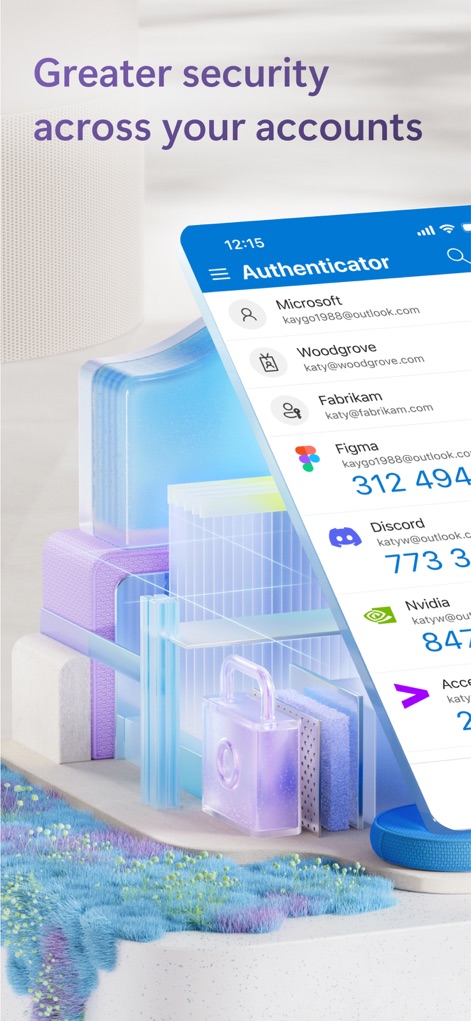
Gestione Multi-Account
Gli utenti possono visualizzare in modo centralizzato tutti i loro account, dai servizi Microsoft a quelli di terze parti come Figma e Discord, con codici OTP visibili per un accesso rapido.

Funzionalità Multidevice
L'app offre la possibilità di aggiungere rapidamente nuovi account con il pulsante '+', mentre le icone di telefono e desktop indicano la compatibilità multi-dispositivo per l'autenticazione.

Notifiche Push Immediate
Gli utenti ricevono notifiche push chiare e immediate sulla schermata di blocco, come la richiesta 'Approve sign-in?', consentendo un'approvazione rapida dell'accesso con l'interfaccia semplificata del proprio dispositivo.

Accesso Senza Password
Questa schermata illustra il metodo di accesso senza password, dove l'utente deve selezionare il numero corretto (ad esempio '54') da una lista presentata per verificare l'identità dell'account 'katyw@outlook.com'.

Account Aziendali Integrati
L'app permette la selezione intuitiva di account specifici, come quelli di 'Woodgrove' o 'Contoso', facilitando l'accesso unificato a servizi Microsoft rappresentati dalle icone di Outlook e OneDrive.

Verificabilità Aziendale
Questo strumento offre una 'Identità Verificata' digitale che include dettagli come il nome dell'impiegato (Joey Tee) e l'email aziendale, fornendo una prova affidabile dello stato professionale con il logo 'Woodgrove'.

Autenticazione con Passkey
L'app facilita un accesso altamente sicuro con passkey, invitando gli utenti a 'Continuare' per autenticarsi su domini specifici come 'login.contoso.com', eliminando la necessità di password tradizionali.
Descrizione
Download
App Simili
App con funzionalità ed esperienza simili

Google Authenticator
Google LLC

Duo Mobile
Duo Security LLC

Authenticator App - 2FA &. MFA
APPLY DIJITAL HIZMETLER TICARET LIMITED SIRKETI

authenticator . app
Mustafa Uz

SafeNet MobilePASS+
Thales DIS (Singapore) Pte Ltd

Čítačka
Tatra banka, a.s.

Authenticator App - SafeAuth
Brilliant App Limited

Authenticator App - 2FA Auth
UNIVERSE DIJITAL HIZMETLER LIMITED SIRKETI

Authenticator App : Scan & 2FA
XSOFT GLOBAL LIMITED
Questa pagina non è una pagina ufficiale dell'app o del suo sviluppatore, ma una pubblicazione editoriale indipendente creata a scopo informativo e di commento. Salvo espressa indicazione contraria, né l'app né il suo sviluppatore sono affiliati, approvati, sponsorizzati, autorizzati o altrimenti ufficialmente collegati a MWM, Apple, Google Play, all'editore dell'app o allo sviluppatore dell'app, e nulla in questa pagina implica che l'app sia stata sviluppata utilizzando i servizi di MWM. Tutti i marchi, loghi, screenshot e altri contenuti rimangono di proprietà dei rispettivi proprietari.