
Questa pagina non è una pagina ufficiale dell'app o del suo sviluppatore, ma una pubblicazione editoriale indipendente creata a scopo informativo e di commento. Salvo espressa indicazione contraria, né l'app né il suo sviluppatore sono affiliati, approvati, sponsorizzati, autorizzati o altrimenti ufficialmente collegati a MWM, Apple, Google Play, all'editore dell'app o allo sviluppatore dell'app, e nulla in questa pagina implica che l'app sia stata sviluppata utilizzando i servizi di MWM. Tutti i marchi, loghi, screenshot e altri contenuti rimangono di proprietà dei rispettivi proprietari.


Microsoft Edge: AI Browser
L'era del browser come mero veicolo è finita. L'applicazione si propone come un copilota digitale che decostruisce il caos informativo e genera contenuto, elevando l'utente da spettatore a orchestratore della sua esperienza online.
Download
100M+Valutazione
Valutazioni totali
1.5MEditore
Categoria
UtilitiesLingue
38Ultima versione
146.3856.85Dimensione
394.2 MBData di lancio
30 nov 2017Analisi Funzionale: Microsoft Edge: AI Browser
Valutazione delle capacità principali per utenti tech-savvy e professionisti, focalizzandosi su AI, produttività e sicurezza.
Assistente AI Copilot Integrato (GPT-5)
L'app fornisce un assistente AI avanzato, potenziato da GPT-5, che supporta gli utenti con riassunti, risposte a domande complesse e adattabilità intelligente alla profondità richiesta da ogni attività.
Riassunto Intelligente di Contenuti
Questo strumento consente di riassumere rapidamente pagine web, documenti PDF e video con l'AI, fornendo insight chiari e citati in pochi secondi per massimizzare la produttività.
Composizione Testuale Assistita da AI
L'app integra un assistente di scrittura AI che trasforma idee in bozze ben strutturate, accelerando il processo di creazione di contenuti e migliorando la qualità dei testi.
Sicurezza e Privacy Avanzate
Consente agli utenti di navigare in sicurezza grazie a funzionalità come la prevenzione del tracciamento, Microsoft Defender SmartScreen, AdBlock, navigazione InPrivate e monitoraggio delle password.
Generazione di Immagini con AI
Gli utenti possono generare immagini creative semplicemente descrivendo ciò che desiderano, sfruttando l'AI per trasformare le loro idee in visualizzazioni.
Interazione Vocale con Copilot
Questo strumento permette agli utenti di interagire con Copilot tramite comandi vocali per brainstorming, risposte a domande complesse e redazione di testi, migliorando l'accessibilità e la produttività hands-free.
Ricerca Visuale AI
L'app fornisce la capacità di caricare immagini per effettuare ricerche, ottenere insight o trovare ispirazione, estendendo le possibilità di scoperta delle informazioni.
Traduzione e Correzione Multilingue AI
Consente di tradurre e correggere testi in più lingue con l'assistenza dell'AI, rendendo la comunicazione e la creazione di contenuti pronti per un pubblico globale.
Supporto Estensioni Avanzate
Questo strumento offre un'esperienza di navigazione personalizzabile grazie al supporto di estensioni per la gestione dei cookie, il controllo della velocità di media e la personalizzazione dei temi dei siti web.
Lettura Ad Alta Voce Intelligente
L'app consente agli utenti di ascoltare i contenuti web attraverso la funzione 'Read Aloud' con voci naturali e accenti diversi, migliorando la comprensione e facilitando il multitasking.
Domande Frequenti
Tutto quello che devi sapere su Microsoft Edge: AI Browser
What is Microsoft Edge: AI Browser?
Microsoft Edge is an AI browser featuring Copilot, your personal AI assistant. It offers smarter, more productive browsing powered by OpenAI and Microsoft AI models, including GPT-5.
Does Microsoft Edge include an AI assistant?
Yes, Microsoft Edge includes Copilot, an AI assistant built in. Copilot is powered by the latest AI models from OpenAI and Microsoft, enhancing browsing capabilities.
Can Microsoft Edge summarize articles and videos?
Yes, Microsoft Edge's built-in Copilot can summarize lengthy articles, web pages, PDFs, and videos. It provides clear, cited insights rapidly.
Does Microsoft Edge support browser extensions?
Yes, Microsoft Edge supports extensions to personalize the browsing experience. Examples include cookie management, video/audio speed control, and website theme customization.
What privacy features does Microsoft Edge offer?
Microsoft Edge prioritizes privacy with features like tracking prevention, Microsoft Defender SmartScreen, AdBlock, InPrivate browsing, and password monitoring.
Can Microsoft Edge generate images using AI?
Yes, Microsoft Edge's Copilot can generate images. Users describe what they want, and the AI creates it, transforming words into a masterpiece.
Is GPT-5 integrated into Microsoft Edge?
Yes, Microsoft Edge integrates GPT-5, the smartest and most intuitive AI model. It adapts by responding fast or thinking deeply based on the query's complexity.
How does InPrivate browsing work in Microsoft Edge?
InPrivate browsing in Microsoft Edge deletes your browsing information when all InPrivate tabs close. It does not save search history to Microsoft Bing or your Microsoft account.
Can Copilot in Microsoft Edge help with content creation?
Yes, Copilot in Microsoft Edge functions as a built-in AI writer. It transforms ideas into polished drafts and translates or proofreads across multiple languages.
Does Microsoft Edge protect against phishing?
Yes, Microsoft Edge includes built-in protection against phishing and malware attacks. This protection is provided by Microsoft Defender SmartScreen.
Can I use voice commands with Copilot in Microsoft Edge?
Yes, users can talk to Copilot with their voice in Microsoft Edge. This allows for hands-free brainstorming, complex questions, or writing stories and scripts.
Gli screenshot e la descrizione seguenti provengono direttamente dall'elenco ufficiale dello store dell'app e sono di proprietà dello sviluppatore.
App Store
Screenshot
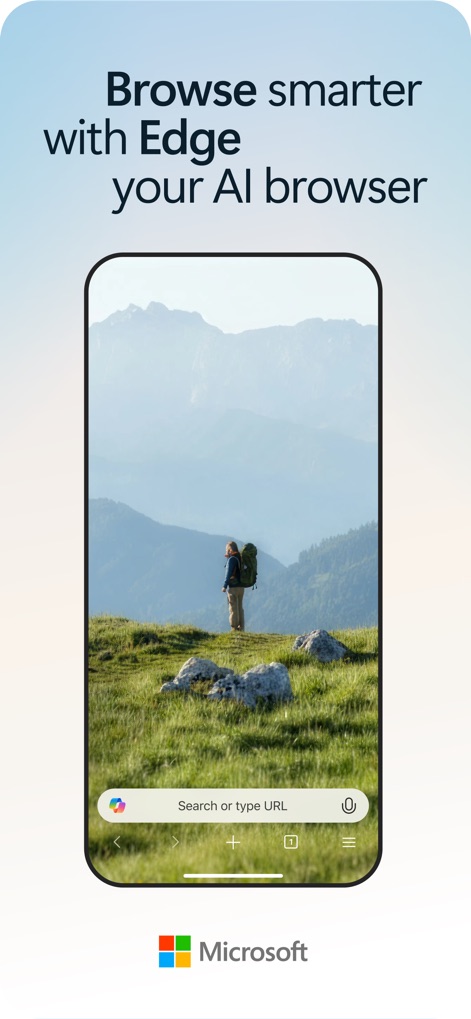
Navigazione Intelligente
Questo screenshot evidenzia il design pulito del browser, con la barra di ricerca centrale (X) e l'icona di Copilot (Y) che suggerisce l'integrazione AI per una ricerca avanzata.
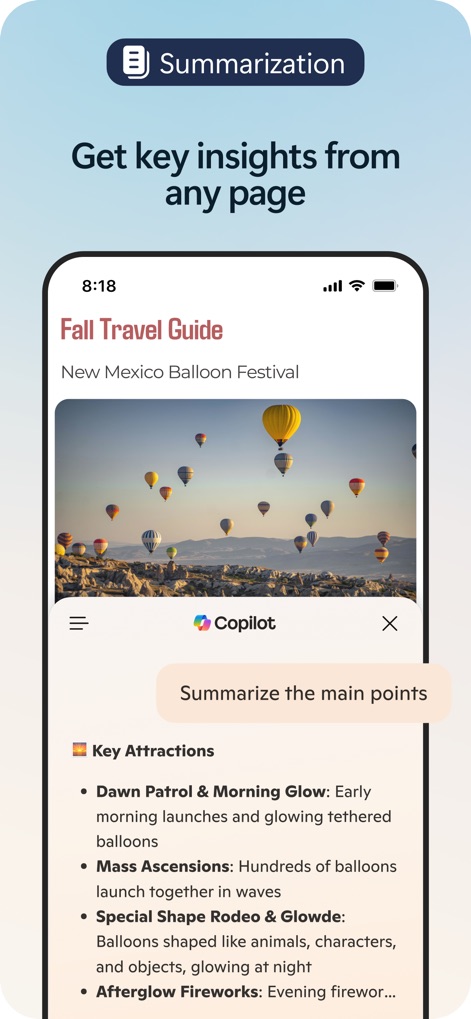
Sintesi Intuitiva
Gli utenti possono apprezzare la funzione di sintesi con il prompt "Summarize the main points" (X) e la successiva presentazione di punti chiave sotto forma di elenco (Y) per articoli complessi.
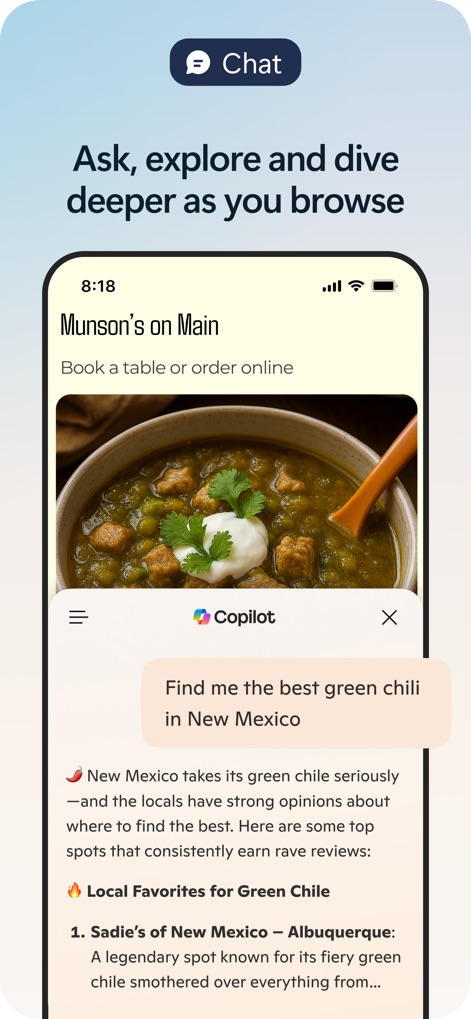
Chat Intelligente
Lo screenshot mostra l'interazione diretta con Copilot tramite la domanda "Find me the best green chili in New Mexico" (X) e la risposta pertinente che suggerisce i "Local Favorites for Green Chile" (Y).
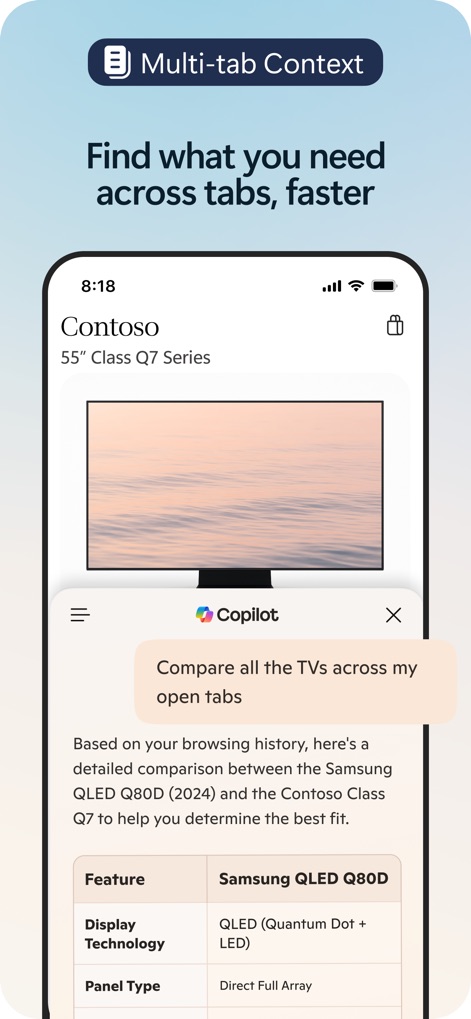
Contesto Multi-Tab
L'app facilita la ricerca su più schede, illustrato dal comando di Copilot "Compare all the TVs across my open tabs" (X) e dalla tabella comparativa tra prodotti (Y) per decisioni rapide.
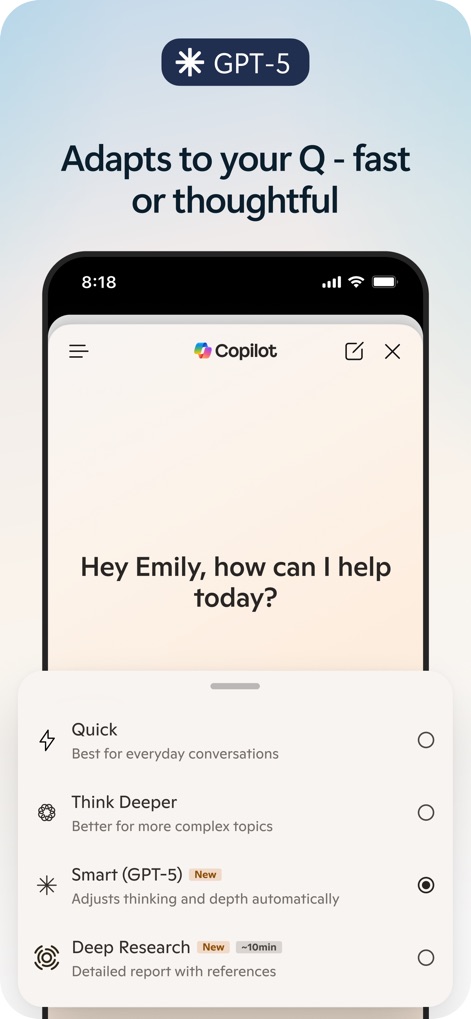
Potenza GPT-5
La schermata rivela l'adattabilità di Copilot con le opzioni "Quick" e "Think Deeper" (X) per risposte personalizzate, evidenziando la sua integrazione con il modello "GPT-5" (Y).
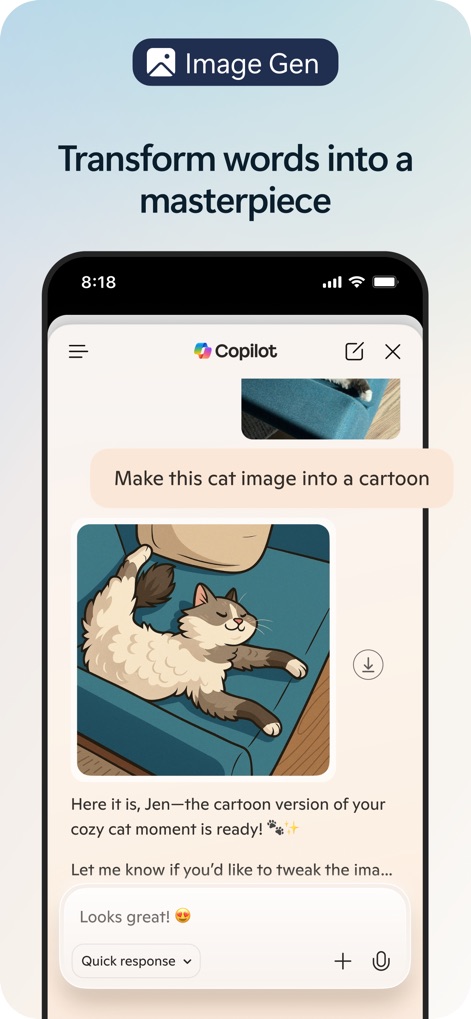
Generazione Immagini
Questo strumento permette la trasformazione creativa, come dimostrato dalla richiesta a Copilot "Make this cat image into a cartoon" (X) e dall'immagine risultante del gatto in stile cartone animato (Y).
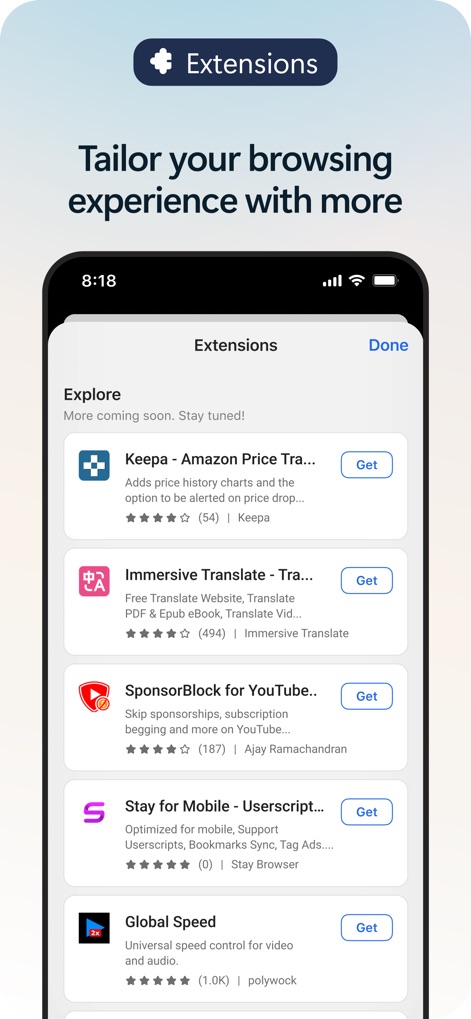
Estensioni Potenziate
Gli utenti possono personalizzare l'esperienza di navigazione con un'ampia gamma di estensioni elencate con dettagli (X) e installabili tramite il pratico pulsante "Get" (Y).
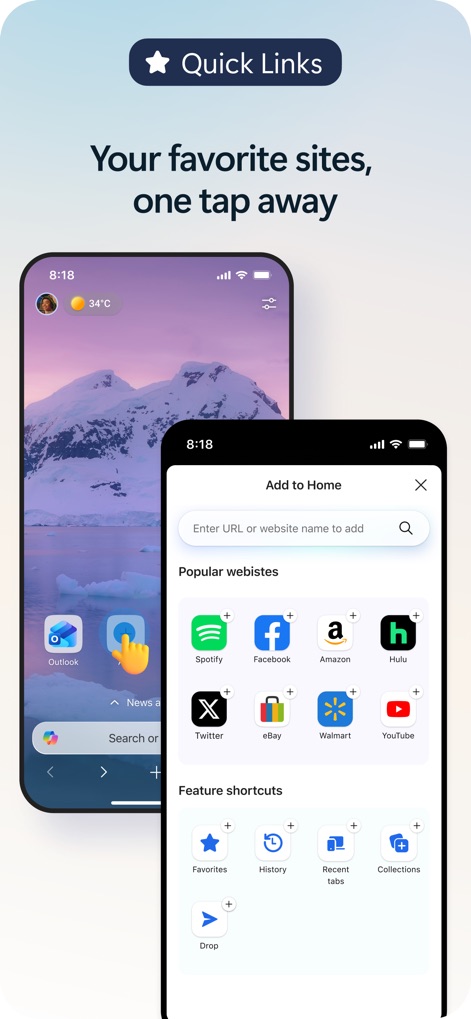
Accesso Rapido
L'app offre collegamenti rapidi ai "Popular websites" (X) direttamente dalla homepage e la possibilità di aggiungerli con facilità tramite l'opzione "Add to Home" (Y).
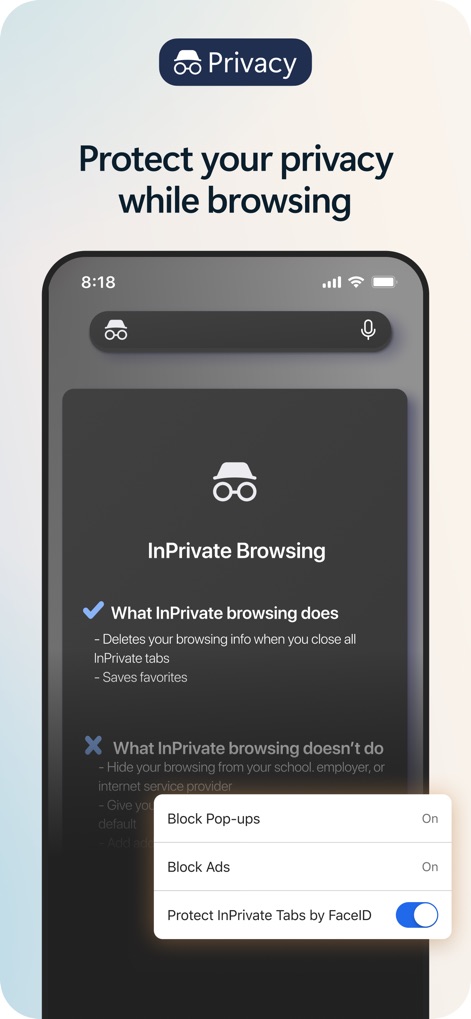
Privacy Garantita
La funzionalità InPrivate Browsing è illustrata dalle sue "What InPrivate browsing does" (X) e dalla possibilità di proteggere le schede InPrivate con FaceID (Y) per la massima sicurezza.
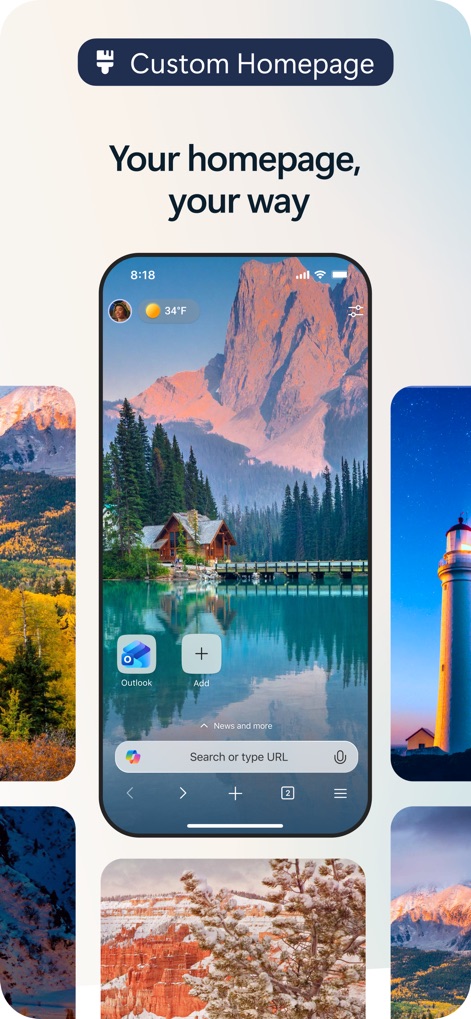
Homepage Personalizzata
Il browser offre un'esperienza su misura, permettendo agli utenti di scegliere tra diverse opzioni di sfondo (X) e di aggiungere widget e collegamenti personalizzati tramite l'icona "Add" (Y).
Descrizione
Download
App Simili
App con funzionalità ed esperienza simili

ChatGPT
OpenAI OpCo, LLC

Grok
X.AI Corporation

Microsoft Copilot
Microsoft Corporation

Perplexity - AI Search & Chat
Perplexity AI Inc.

Alice: AI assistant
DIRECT CURSUS COMPUTER SYSTEMS TRADING LLC

Kimi - Now with K2.5
Beijing Moonshot Technology Co., Ltd

AI Chat Assistant – ChatNow
Tappz GmbH

Chat & Ask AI by Codeway
DEEP FLOW SOFTWARE SERVICES - FZCO

Luzia: Your AI Assistant
Factoria Elcano SL
Questa pagina non è una pagina ufficiale dell'app o del suo sviluppatore, ma una pubblicazione editoriale indipendente creata a scopo informativo e di commento. Salvo espressa indicazione contraria, né l'app né il suo sviluppatore sono affiliati, approvati, sponsorizzati, autorizzati o altrimenti ufficialmente collegati a MWM, Apple, Google Play, all'editore dell'app o allo sviluppatore dell'app, e nulla in questa pagina implica che l'app sia stata sviluppata utilizzando i servizi di MWM. Tutti i marchi, loghi, screenshot e altri contenuti rimangono di proprietà dei rispettivi proprietari.