
Questa pagina non è una pagina ufficiale dell'app o del suo sviluppatore, ma una pubblicazione editoriale indipendente creata a scopo informativo e di commento. Salvo espressa indicazione contraria, né l'app né il suo sviluppatore sono affiliati, approvati, sponsorizzati, autorizzati o altrimenti ufficialmente collegati a MWM, Apple, Google Play, all'editore dell'app o allo sviluppatore dell'app, e nulla in questa pagina implica che l'app sia stata sviluppata utilizzando i servizi di MWM. Tutti i marchi, loghi, screenshot e altri contenuti rimangono di proprietà dei rispettivi proprietari.


Microsoft Outlook
Nell'era dell'eccesso digitale, l'app concede il lusso raro di decidere cosa merita davvero la tua attenzione, non il contrario.
Download
250M+Valutazione
Valutazioni totali
30.8MEditore
Categoria
ProductivityLingue
47Ultima versione
5.2612.0Dimensione
414.7 MBData di lancio
29 gen 2015Analisi delle Funzionalità Chiave di Microsoft Outlook
Valutazione approfondita per professionisti e utenti orientati alla produttività.
Riepilogo Email con Copilot
Consente di riassumere istantaneamente thread di email lunghi, ottimizzando il tempo e la comprensione delle comunicazioni complesse.
Generazione Bozza Email con Copilot
Questo strumento permette di avviare bozze o schemi di email semplicemente digitando poche parole, accelerando la creazione di contenuti e supportando la produttività.
Coaching di Scrittura con Copilot
L'app fornisce suggerimenti e consigli prima dell'invio di email per migliorare tono, sentiment e chiarezza, garantendo comunicazioni più efficaci.
Gestione Integrata Email, Calendario e Contatti
Consente agli utenti di centralizzare la gestione di email, calendari e contatti da diverse piattaforme in un unico ambiente coeso.
Posta in Arrivo Intelligente
L'app fornisce una posta in arrivo intelligente che aiuta a distinguere i messaggi prioritari da quelli secondari, migliorando la focalizzazione e l'efficienza.
Integrazione Office e Gestione Allegati Cloud
Questo strumento consente di visualizzare e allegare file da email, OneDrive, Dropbox e altri servizi, oltre a modificare allegati Word, Excel o PowerPoint direttamente nelle app corrispondenti.
Gestione Calendario e Programmazione Riunioni
Consente agli utenti di condividere la propria disponibilità e trovare facilmente orari per riunioni, semplificando la pianificazione e la collaborazione.
Ricerca Unificata
L'app permette di trovare rapidamente qualsiasi elemento, inclusi file, contatti e viaggi imminenti, attraverso una funzione di ricerca unificata.
Supporto Multi-Account
Questo strumento supporta l'integrazione di account di posta elettronica multipli, inclusi Exchange, Office 365, Outlook.com, Gmail, Yahoo e iCloud, in un'unica interfaccia.
Azioni Rapide (Swipe)
L'app presenta azioni rapide tramite swipe per schedulare, eliminare o archiviare messaggi, ottimizzando la gestione dell'email.
Domande Frequenti
Tutto quello che devi sapere su Microsoft Outlook
What is Microsoft Outlook for iOS?
Microsoft Outlook for iOS is an app that centralizes email accounts and calendars in one convenient spot. It helps users stay productive, organized, and connected.
Does Microsoft Outlook for iOS have a smart inbox?
Yes, Microsoft Outlook for iOS features a smart inbox. It helps users sort between messages requiring immediate action and other emails.
Can users manage emails with swipe gestures in Microsoft Outlook for iOS?
Yes, Microsoft Outlook for iOS allows users to quickly schedule, delete, and archive messages using intuitive swipe gestures directly from the inbox.
How do I share meeting availability in Microsoft Outlook for iOS?
Microsoft Outlook for iOS allows users to share their meeting availability with just a tap, simplifying the process of finding suitable times to meet with others.
What can I search for in Microsoft Outlook for iOS?
In Microsoft Outlook for iOS, users can find everything they are looking for, including files, contacts, and forthcoming trips, using the built-in search function.
Can Microsoft Outlook for iOS access files from cloud storage?
Yes, Microsoft Outlook for iOS allows viewing and attaching files directly from email, OneDrive, Dropbox, and more, without downloading them to the phone.
Can I edit Word, Excel, or PowerPoint attachments in Microsoft Outlook for iOS?
Yes, Microsoft Outlook for iOS allows users to open and edit Word, Excel, or PowerPoint attachments directly in their corresponding apps, then attach them back to an email.
How does Microsoft Outlook for iOS summarize email threads?
Microsoft Outlook for iOS can instantly recap extra-long email threads using the "Summarise with Copilot" feature, condensing the content for quick understanding.
Can Microsoft Outlook for iOS generate email drafts?
Yes, Microsoft Outlook for iOS's Copilot feature jump-starts writing. Users type a few words, and Copilot generates an outline or draft.
Does Microsoft Outlook for iOS offer writing assistance for emails?
Yes, Microsoft Outlook for iOS provides "Coaching with Copilot." This feature offers tips and suggestions to improve email tone, sentiment, and clarity before sending.
What are the requirements to use Copilot features in Microsoft Outlook for iOS?
To use Copilot features in Microsoft Outlook for iOS, users require a Microsoft 365 Personal/Family subscription or a business account enabled with Copilot.
Which email accounts does Microsoft Outlook for iOS support?
Microsoft Outlook for iOS supports accounts from Microsoft Exchange, Office 365, Outlook.com (Hotmail, MSN), Gmail, Yahoo Email, and iCloud.
How do I purchase a Microsoft 365 subscription within Microsoft Outlook for iOS?
To purchase a Microsoft 365 subscription in Microsoft Outlook for iOS, open the app, go to Settings, and tap "Upgrade" next to your Outlook.com or Hotmail.com account.
How much does a Microsoft 365 subscription cost through Microsoft Outlook for iOS?
Microsoft 365 subscriptions purchased via Microsoft Outlook for iOS start at $6.99 per month in the US. Pricing varies by region.
What benefits come with a Microsoft 365 subscription purchased via Microsoft Outlook for iOS?
A Microsoft 365 subscription offers 1TB storage per user, full Word, Excel, and PowerPoint access on iOS, plus installation rights for these and other apps on PCs/Macs.
How do Microsoft Outlook for iOS subscriptions renew?
Microsoft 365 subscriptions purchased through Microsoft Outlook for iOS automatically renew via your iTunes account within 24 hours before the current period ends, unless auto-renewal is disabled.
Can I cancel a Microsoft Outlook for iOS subscription mid-period?
No, a Microsoft 365 subscription purchased through Microsoft Outlook for iOS cannot be canceled during its active subscription period.
Where can I find the privacy policy for Microsoft Outlook for iOS?
The privacy policy for Microsoft Outlook for iOS is accessible via the link: https://go.microsoft.com/fwlink/?LinkId=521839.
Does Microsoft Outlook for iOS include intelligent writing tools like spell check?
Yes, Microsoft Outlook for iOS includes intelligent writing tools such as spell check, which corrects errors like misspelled words during email composition.
Gli screenshot e la descrizione seguenti provengono direttamente dall'elenco ufficiale dello store dell'app e sono di proprietà dello sviluppatore.
App Store
Screenshot
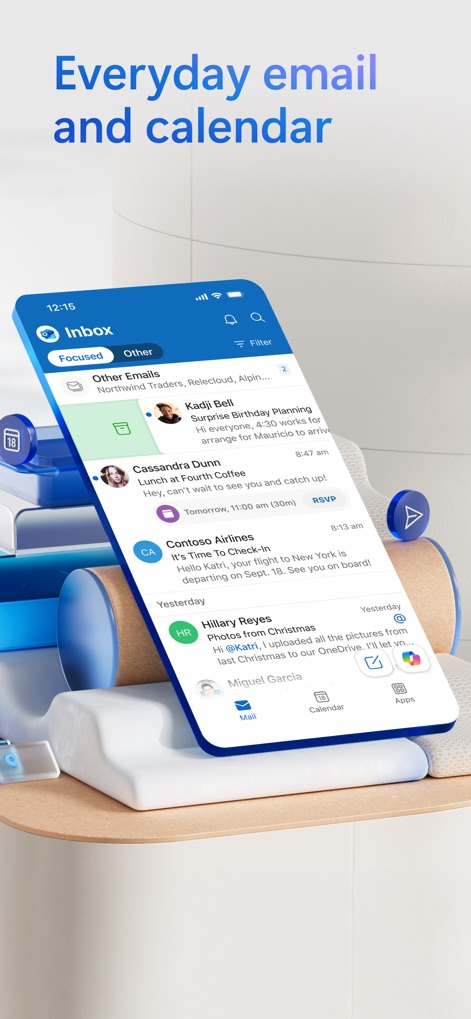
Inbox Intelligente
Gli utenti possono organizzare le proprie comunicazioni tramite la vista 'Focused' dell'inbox e gestire facilmente gli impegni quotidiani con il rapido accesso al 'Calendario' integrato.
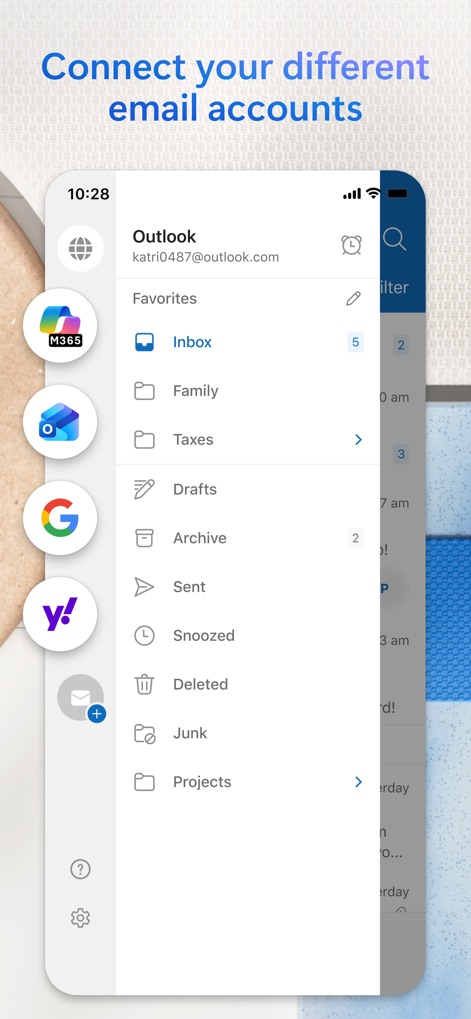
Account Unificati
L'app permette di centralizzare diverse caselle di posta come 'Outlook', 'Google' e 'Yahoo', e offre una 'struttura di cartelle' personalizzabile per una gestione ottimale della corrispondenza.
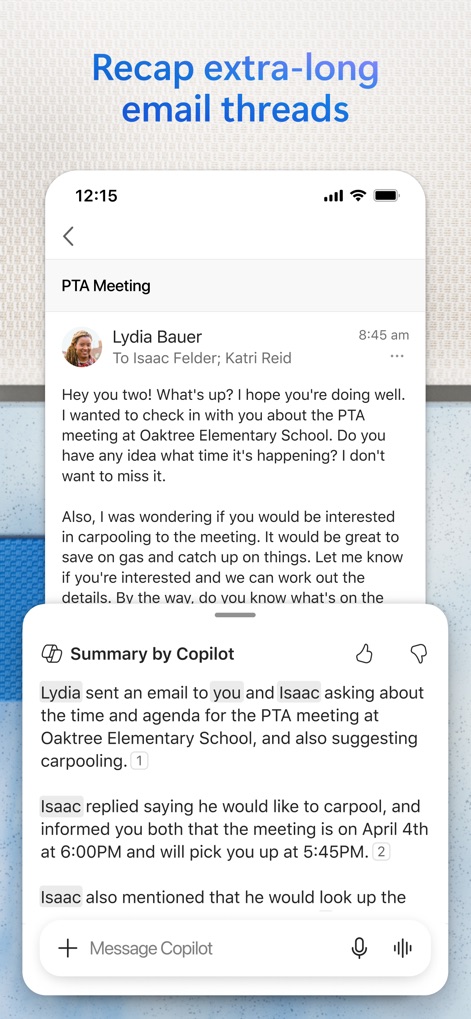
Riassunti Istantanei
Questo strumento sfrutta la potenza di 'Copilot' per riassumere conversazioni email estese, mostrando i punti salienti in 'punti numerati' chiari e concisi.
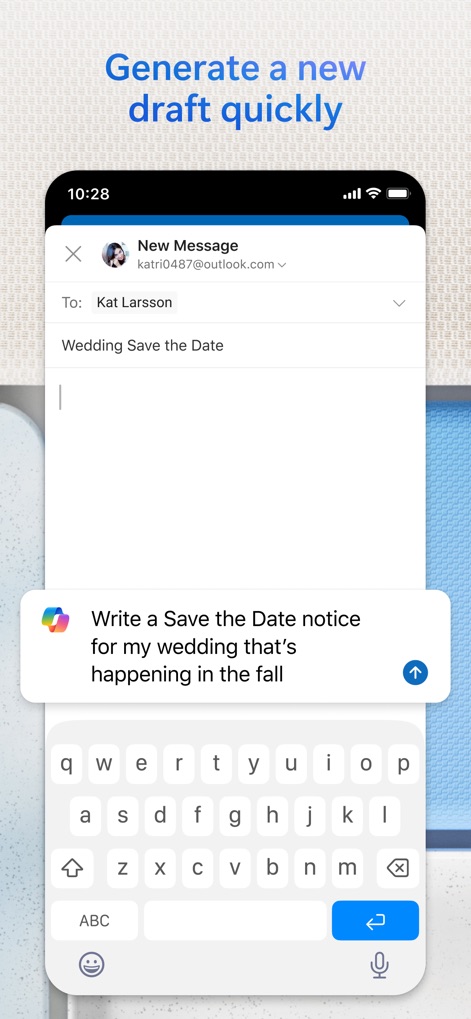
Bozze Rapide AI
La composizione di nuove email è agevolata dall''interfaccia intuitiva', mentre il suggerimento proattivo di 'Copilot' assiste nella generazione rapida di bozze pertinenti.
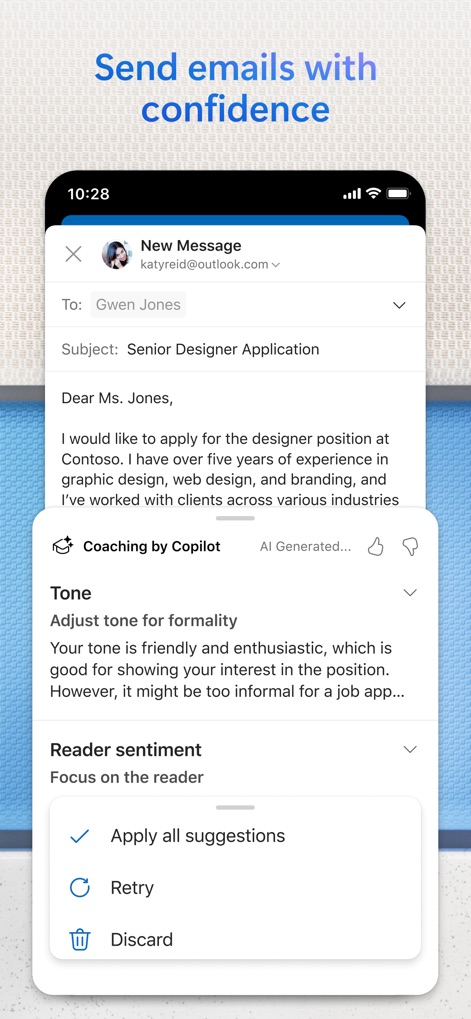
Migliora la Comunicazione
Gli utenti possono affinare la propria comunicazione grazie alla funzione di 'Coaching by Copilot', che offre 'suggerimenti mirati' per migliorare il tono e il sentimento delle email prima dell'invio.
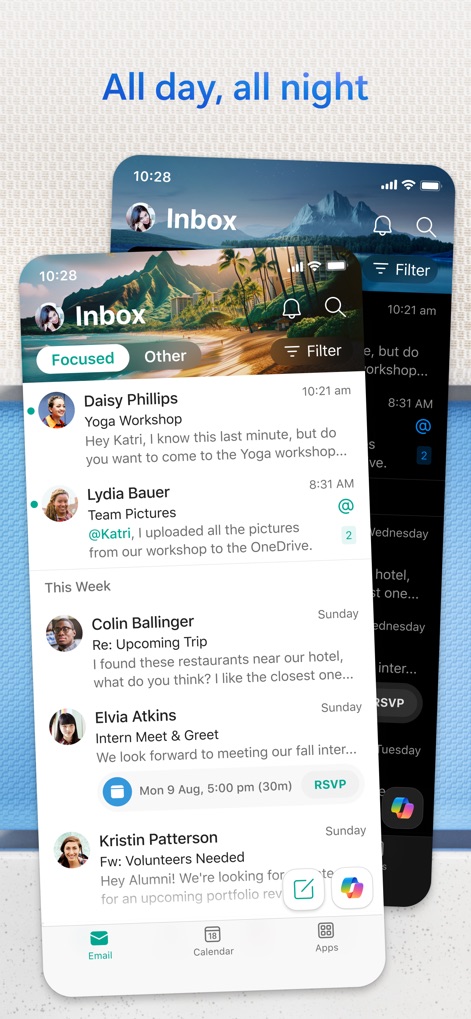
Gestione Costante
L'app offre una gestione continua della posta con la 'vista Focused' per le priorità, affiancata da una perfetta integrazione del 'Calendario', assicurando organizzazione in ogni momento.
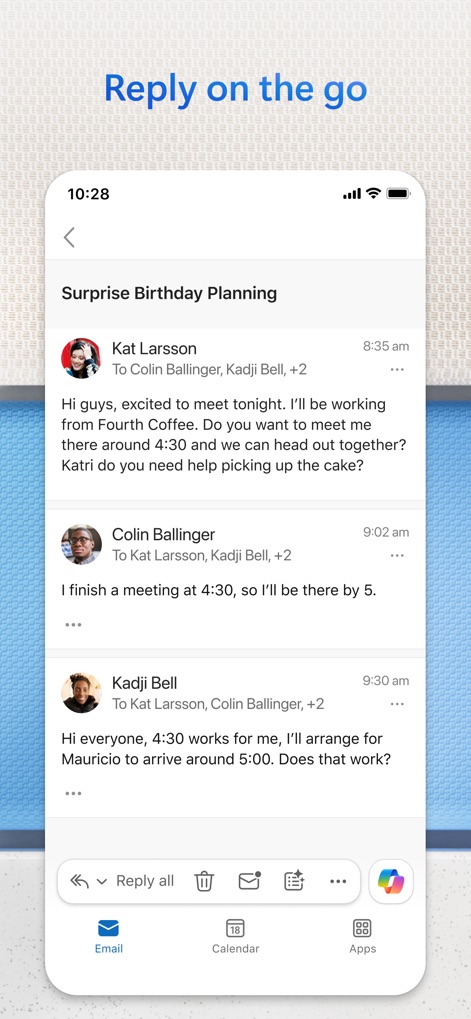
Rispondi al Volo
Gli utenti possono rispondere efficacemente alle comunicazioni anche in mobilità, sfruttando le 'opzioni di risposta rapida' e l'ottima 'organizzazione del thread di conversazione' per mantenere chiarezza.
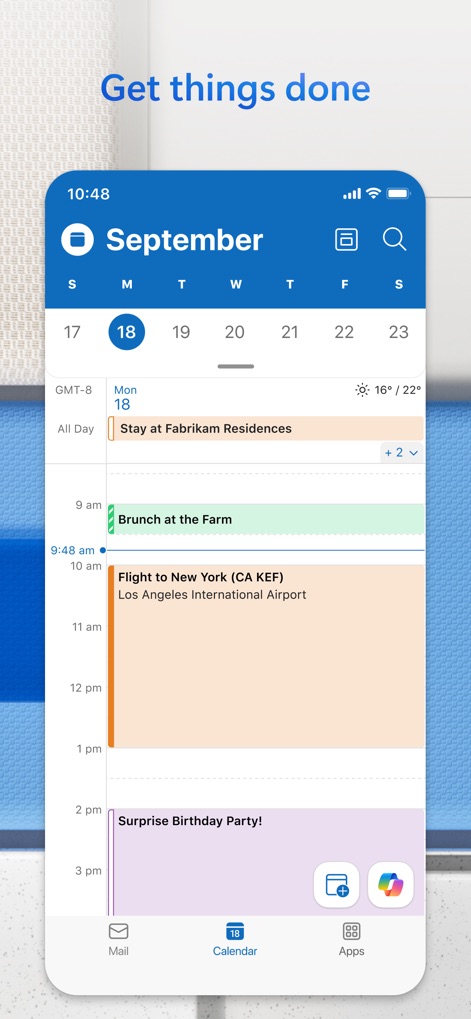
Pianificazione Efficace
La vista calendario dettagliata permette di tenere sotto controllo gli 'eventi giornalieri' e le scadenze importanti, con un 'accesso rapido alla navigazione mensile' per una pianificazione flessibile.
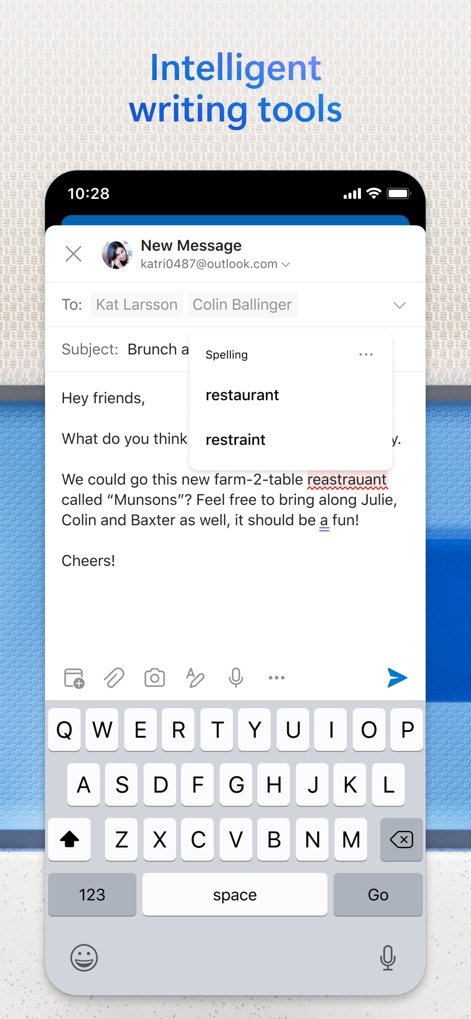
Scrittura Assistita
L'app include potenti 'strumenti di correzione ortografica' che migliorano la qualità delle email, offrendo 'suggerimenti contestuali' per una comunicazione più professionale e priva di errori.
Descrizione
Download
App Simili
App con funzionalità ed esperienza simili

Mail: Email, Cloud, Calendar
V Kontakte OOO

Yandex Mail: Email & Cloud
DIRECT CURSUS COMPUTER SYSTEMS TRADING LLC

Gmail - Email by Google
Google LLC

Yahoo Mail
Yahoo Inc.

Proton Mail - Encrypted Email
Proton AG

Email - Edison Mail
Edison Software Inc.

Zoho Mail - Email and Calendar
Zoho Corporation

GMX - Mail & Cloud
1&1 Mail & Media GmbH

AOL Mail, News, Weather
AOL Media LLC
Questa pagina non è una pagina ufficiale dell'app o del suo sviluppatore, ma una pubblicazione editoriale indipendente creata a scopo informativo e di commento. Salvo espressa indicazione contraria, né l'app né il suo sviluppatore sono affiliati, approvati, sponsorizzati, autorizzati o altrimenti ufficialmente collegati a MWM, Apple, Google Play, all'editore dell'app o allo sviluppatore dell'app, e nulla in questa pagina implica che l'app sia stata sviluppata utilizzando i servizi di MWM. Tutti i marchi, loghi, screenshot e altri contenuti rimangono di proprietà dei rispettivi proprietari.