
Questa pagina non è una pagina ufficiale dell'app o del suo sviluppatore, ma una pubblicazione editoriale indipendente creata a scopo informativo e di commento. Salvo espressa indicazione contraria, né l'app né il suo sviluppatore sono affiliati, approvati, sponsorizzati, autorizzati o altrimenti ufficialmente collegati a MWM, Apple, Google Play, all'editore dell'app o allo sviluppatore dell'app, e nulla in questa pagina implica che l'app sia stata sviluppata utilizzando i servizi di MWM. Tutti i marchi, loghi, screenshot e altri contenuti rimangono di proprietà dei rispettivi proprietari.


Music Editor Cut MP3 Converter
Questa app non ti offre un editor; ti consegna il bisturi di un chirurgo del suono, per sezionare e ricomporre l'audio come fosse argilla digitale.
Download
2.5M+Valutazione
Valutazioni totali
37.6KEditore
Categoria
MusicLingue
23Ultima versione
1.4.33Dimensione
328.9 MBData di lancio
31 gen 2023Una valutazione delle capacità principali dell'applicazione per la manipolazione audio digitale.
Analisi Funzionale: Music Editor Cut MP3 Converter
Taglio e Trimming Audio Precisi
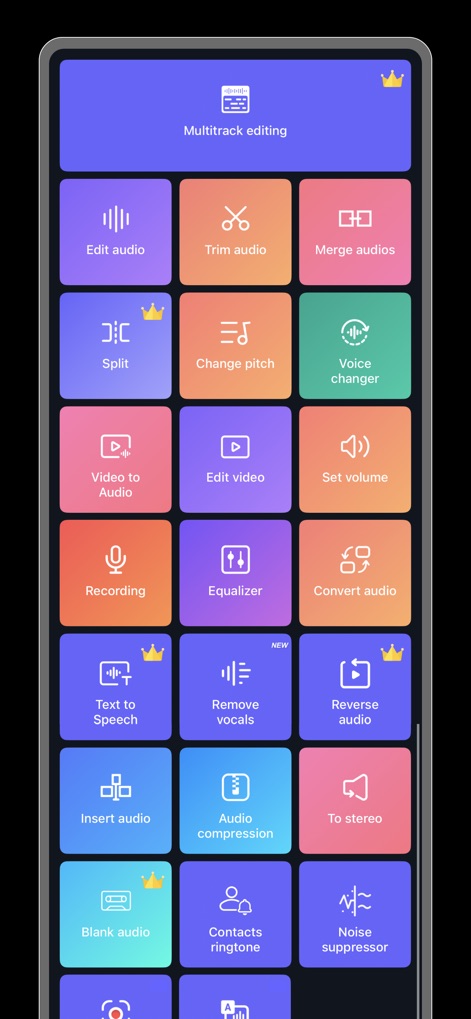
L'app consente un taglio e trimming dell'audio con precisione millisecondrica, permettendo di salvare facilmente segmenti specifici o rimuovere parti indesiderate, ideale per la creazione di suonerie personalizzate.
Conversione Video in Audio
Questo strumento permette di trasformare file video in formati audio, ideale per estrarre musica o dialoghi da video e ascoltarli offline o utilizzarli in altri progetti e contenuti social.
Mixaggio e Unione Audio
L'app offre funzionalità di mixaggio per combinare più tracce audio e di unione per fondere più clip, consentendo la creazione di brani complessi, podcast o sequenze audio creative.
Cambio Voce e Effetti Audio
Consente agli utenti di modificare la propria voce con vari effetti (maschile, anziano, robot) e personalizzare tono, intonazione e velocità per creazioni audio divertenti e uniche, perfette per i social media.
Variazione di Tono, Ritmo e Velocità
Questo strumento fornisce controlli per alterare il tono, il ritmo e la velocità dell'audio, offrendo flessibilità per adattare i brani o creare effetti sonori particolari, apprezzati da musicisti amatoriali.
Conversione di Formato Audio
L'app supporta la conversione tra diversi formati audio popolari come MP3, AAC, WAV, FLAC e altri, garantendo compatibilità e flessibilità d'uso su diverse piattaforme e dispositivi.
Regolazione Volume e Effetti Fade
Consente di aumentare o diminuire il volume dell'audio e di applicare effetti di dissolvenza in entrata e in uscita (fade in/out) per transizioni fluide e un suono più professionale.
Elaborazione Audio in Batch
Lo strumento supporta l'elaborazione in batch per conversioni video-audio o modifiche audio multiple, ottimizzando il flusso di lavoro per grandi quantità di file e utenti più esperti.
Domande Frequenti
Tutto quello che devi sapere su Music Editor Cut MP3 Converter
What is the Music Editor Cut MP3 Converter app?
Music Editor Cut MP3 Converter, also known as Super Sound, is a powerful audio editor. It supports functions like audio editing, cutting, splicing, mixing, format conversion, and voice changing to create music and ringtones.
Can Music Editor Cut MP3 Converter convert video to audio?
Yes, Music Editor Cut MP3 Converter converts video files to audio. This feature allows users to extract audio from videos and listen to them as desired.
Does the Music Editor Cut MP3 Converter app include a voice changer?
Yes, Music Editor Cut MP3 Converter offers a voice changer. Users can alter their voice to male, elderly, or robot, and customize tone, pitch, and speed for creative effects.
What audio editing features are available in Music Editor Cut MP3 Converter?
Music Editor Cut MP3 Converter provides audio mixing, fade in/out effects, volume adjustment, tone and tempo changes, and audio speed modification for comprehensive editing.
How do I cut audio with precision in Music Editor Cut MP3 Converter?
Music Editor Cut MP3 Converter enables precise audio cutting in milliseconds. Users can perform multiple cuts, save specific segments, or choose to keep or delete selected audio parts.
Can I combine multiple audio files using Music Editor Cut MP3 Converter?
Yes, Music Editor Cut MP3 Converter supports splicing, which combines two or more audio files into a single track. This creates combined songs or audio compositions.
Which audio formats does Music Editor Cut MP3 Converter support for conversion?
Music Editor Cut MP3 Converter supports various audio formats for conversion, including MP3, AAC, WAV, FLAC, M4A, and AMR, ensuring broad compatibility.
Is Music Editor Cut MP3 Converter a subscription-based service?
Yes, Music Editor Cut MP3 Converter operates on an auto-renewable subscription model. It offers both monthly and yearly subscription durations for users.
How can I cancel my Music Editor Cut MP3 Converter subscription?
You can cancel your Music Editor Cut MP3 Converter auto-renewal subscription through your iPhone account settings. Cancellation must occur at least 24 hours before the current period ends.
Does Music Editor Cut MP3 Converter app offer an equalizer?
Yes, Music Editor Cut MP3 Converter includes an equalizer feature. This allows users to apply various sound effects to customize their audio output.
Does the Music Editor Cut MP3 Converter app provide multitrack editing?
Yes, Music Editor Cut MP3 Converter supports multitrack editing. This feature, indicated by a crown icon, allows users to layer and mix multiple audio streams simultaneously.
Can I create ringtones with the Music Editor Cut MP3 Converter app?
Yes, Music Editor Cut MP3 Converter enables users to create ringtones. You can set your edited audio files as personalized ringtones directly within the app.
What new features are available in the Music Editor Cut MP3 Converter app?
Recent additions to the Music Editor Cut MP3 Converter app include 'Remove vocals' and 'Noise suppressor,' marked as new features in the main interface.
Gli screenshot e la descrizione seguenti provengono direttamente dall'elenco ufficiale dello store dell'app e sono di proprietà dello sviluppatore.
App Store
Screenshot


Descrizione
Download
App Simili
App con funzionalità ed esperienza simili
Ringtones Maker - the ring app
苏娟 陈

LittyTone:Ringtone & AI Voice
Shenzhen Chuangyuan Huaqi technology Co., LTD

Garage Ringtones for iPhone
Appflow Software - FZCO

ClipTone: Ringtone & AI Cover
BUD TECHNOLOGIES, PTE. LTD.

Mp3 Cutter - M4a, Music Cutter
TOWER OF HANOI SOFTWARE COMPANY LIMITED

Ringtone Maker & MP3 Converter
Oleksandr Pylaiev

Ringtone Maker +
迪刚 宋
Any Ringtones
Ion Danilov
Ringtone Maker Garage
TwinBit Ltd
Questa pagina non è una pagina ufficiale dell'app o del suo sviluppatore, ma una pubblicazione editoriale indipendente creata a scopo informativo e di commento. Salvo espressa indicazione contraria, né l'app né il suo sviluppatore sono affiliati, approvati, sponsorizzati, autorizzati o altrimenti ufficialmente collegati a MWM, Apple, Google Play, all'editore dell'app o allo sviluppatore dell'app, e nulla in questa pagina implica che l'app sia stata sviluppata utilizzando i servizi di MWM. Tutti i marchi, loghi, screenshot e altri contenuti rimangono di proprietà dei rispettivi proprietari.