
Questa pagina non è una pagina ufficiale dell'app o del suo sviluppatore, ma una pubblicazione editoriale indipendente creata a scopo informativo e di commento. Salvo espressa indicazione contraria, né l'app né il suo sviluppatore sono affiliati, approvati, sponsorizzati, autorizzati o altrimenti ufficialmente collegati a MWM, Apple, Google Play, all'editore dell'app o allo sviluppatore dell'app, e nulla in questa pagina implica che l'app sia stata sviluppata utilizzando i servizi di MWM. Tutti i marchi, loghi, screenshot e altri contenuti rimangono di proprietà dei rispettivi proprietari.


MySign
Il pasticcio burocratico è morto: MySign ti consegna lo scettro della validazione digitale, ovunque tu sia.
Download
750k+Valutazione
Valutazioni totali
463Editore
Categoria
BusinessLingue
2Ultima versione
1.2.30Dimensione
308.8 MBData di lancio
13 gen 2023Una valutazione dettagliata delle capacità principali offerte da MySign per le firme digitali sicure e conformi.
Analisi Funzionale di MySign
Firma Digitale Remota Multi-dispositivo
Questo strumento consente agli utenti di apporre firme digitali a documenti e transazioni in modo sicuro, utilizzando i propri telefoni cellulari e tablet, ovunque e in qualsiasi momento, migliorando significativamente l'efficienza e la flessibilità operativa.
Conformità Legale Vietnamita
L'applicazione assicura una piena aderenza ai requisiti legali vigenti per le firme digitali in Vietnam, garantendo validità e riconoscimento giuridico per tutte le transazioni effettuate sul territorio.
Autenticazione e Autorizzazione Sicura
L'app fornisce un sistema robusto per l'autenticazione e l'autorizzazione degli utenti, fondamentale per la sicurezza e l'integrità delle firme digitali all'interno della soluzione Viettel-CA.
Conformità agli Standard eIDAS
Consente agli utenti di generare firme digitali remote in conformità con gli standard europei eIDAS, facilitando il riconoscimento internazionale e l'interoperabilità delle firme.
Domande Frequenti
Tutto quello che devi sapere su MySign
What is MySign?
MySign is an authentication and authorization application for Viettel-CA's remote digital signature solution. It allows customers to securely approve document and transaction signatures using mobile devices.
How does MySign ensure digital signature security?
MySign ensures digital signature security by complying with European eIDAS standards for remote signing. It also meets all legal requirements for digital signatures in Vietnam.
Can I sign documents on my mobile phone using MySign?
Yes, MySign allows you to digitally sign documents directly on your mobile phone, tablet, and other applications. This provides flexibility for signing anytime, anywhere.
Does MySign support biometric login?
Yes, MySign supports biometric login methods such as fingerprint authentication. Users can utilize this feature for quick and secure access to their account.
How do I register for MySign service?
You can register for MySign service by selecting 'Register service' within the app. The process involves choosing a package, entering information, a video call, payment, and contract signing.
What are the password requirements for MySign?
MySign passwords require a minimum of 8 characters, including uppercase, lowercase, special characters, and numbers. The new password cannot be the same as the old one.
Where can I find customer support for MySign?
You can contact MySign customer support by calling the hotline 1800 8000. This number is accessible within the app's side menu.
Can I view my active and revoked digital certificates in MySign?
Yes, MySign provides a list of both active and revoked digital certificates. Users can view the status of their certificates within the application.
Is MySign compliant with international digital signature standards?
Yes, MySign digitally signs remotely according to European eIDAS standards. It also fully meets legal requirements for digital signatures in Vietnam.
How do I manage my devices connected to MySign?
MySign includes a 'Manage device' feature, allowing users to oversee and control the devices linked to their digital signature service.
Can I renew my digital certificate through the MySign app?
Yes, the MySign app provides a function to 'Renew digital certificate,' allowing users to extend the validity of their certificates directly within the application.
What information is required for MySign account registration?
Account registration requires personal information, including a valid ID (CMND/CCCD). Users must photograph the front, back, and a portrait of themselves for verification.
Does MySign allow me to track my service orders?
Yes, MySign includes a 'Look up order' feature. This allows users to check the status or details of their service orders within the application.
Can MySign users change their service package?
Yes, MySign offers a 'Change package' option. This feature allows users to modify their current service plan directly through the application.
How can I save authentication sessions in MySign?
MySign provides a 'Save authentication session' option. This feature allows users to maintain their authentication status for convenience.
Is MySign integrated with other systems?
Yes, MySign features an 'Integrated system' section. This indicates the app can connect or work with other platforms for enhanced functionality.
How do I approve a signature request in MySign?
To approve a signature request, navigate to the 'List of signature authentication'. Details like document name and remaining time are displayed before you confirm authentication.
Can I create a new signature request using MySign?
Yes, MySign includes a 'Create signature request' function. This allows users to initiate new digital signature processes directly from the application.
Gli screenshot e la descrizione seguenti provengono direttamente dall'elenco ufficiale dello store dell'app e sono di proprietà dello sviluppatore.
App Store
Screenshot
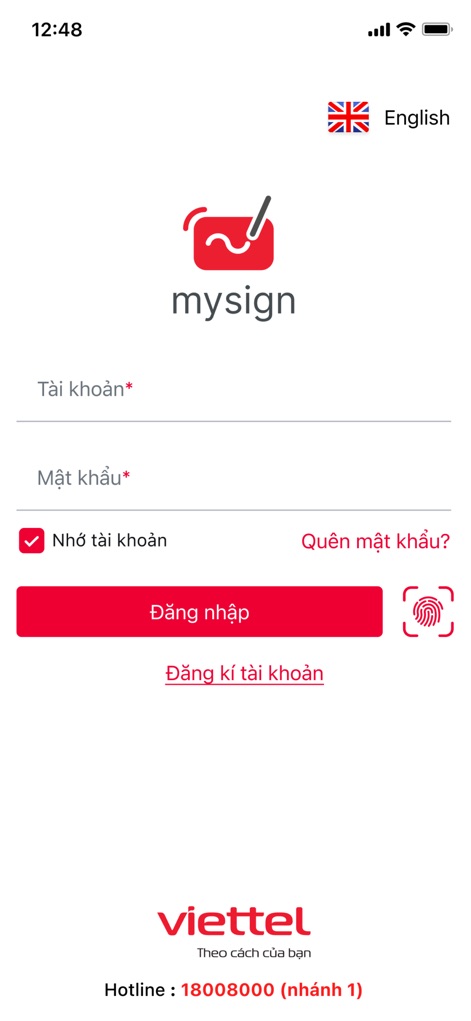
L'app MySign consente agli utenti di accedere in modo intuitivo tramite i campi "Tài khoản*" e "Mật khẩu*", con l'opzione di utilizzare l'autenticazione biometrica per maggiore sicurezza.
Accesso Semplice Sicuro

Questa schermata offre un percorso chiaro per gli utenti, evidenziando le opzioni "Đăng ký dịch vụ" e "Kích hoạt dịch vụ" per iniziare a gestire le proprie firme digitali.
Attiva i Servizi
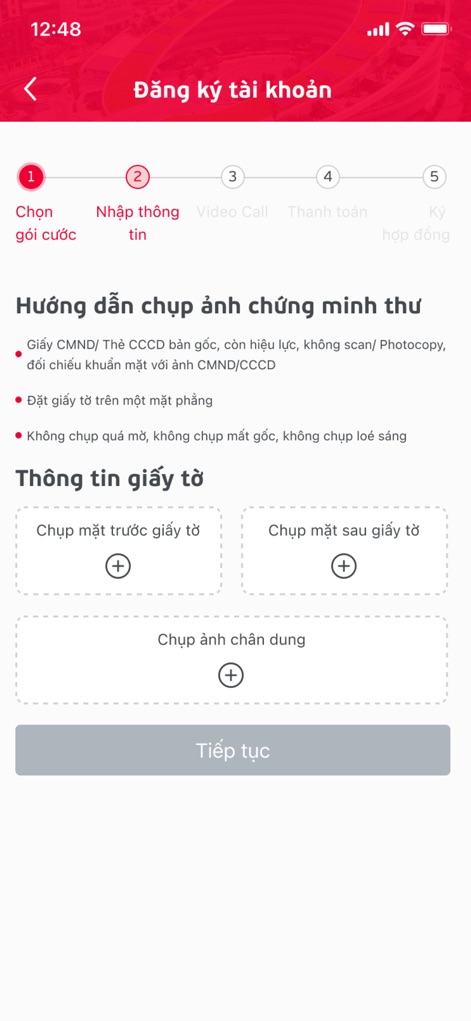
Il processo di registrazione è semplificato attraverso una guida passo-passo visibile in alto e con pulsanti dedicati per caricare facilmente il "fronte" e il "retro" del documento d'identità.
Onboarding Guidato
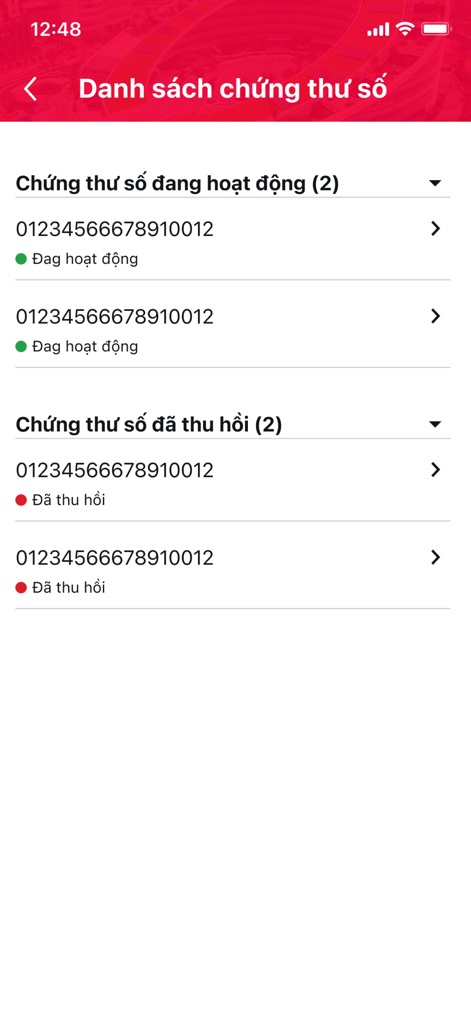
Gli utenti possono visualizzare e organizzare facilmente i propri certificati digitali, distinguendo tra quelli "attivi" e quelli "revocati" per una chiara panoramica.
Gestione Certificati
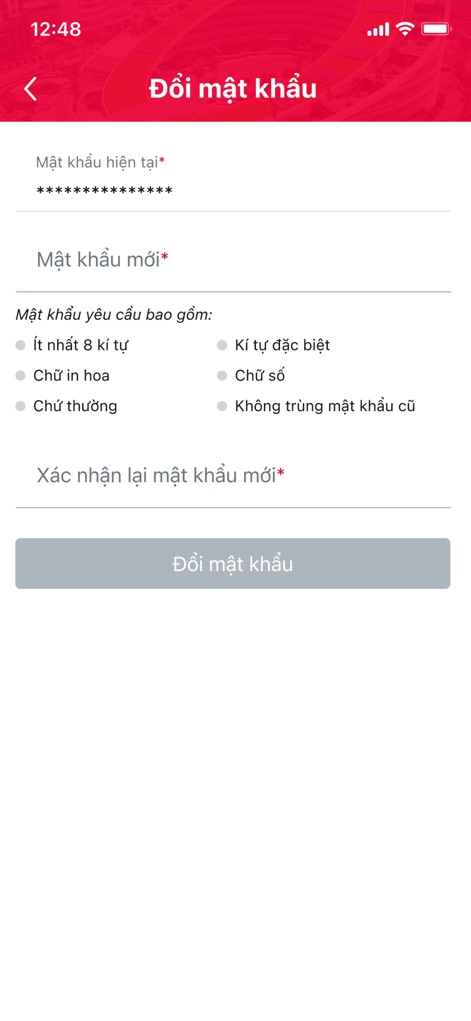
La sicurezza è prioritaria, come dimostrano i campi per la "password attuale" e "nuova password", supportati da requisiti espliciti per la robustezza della nuova credenziale.
Modifica Password Sicura
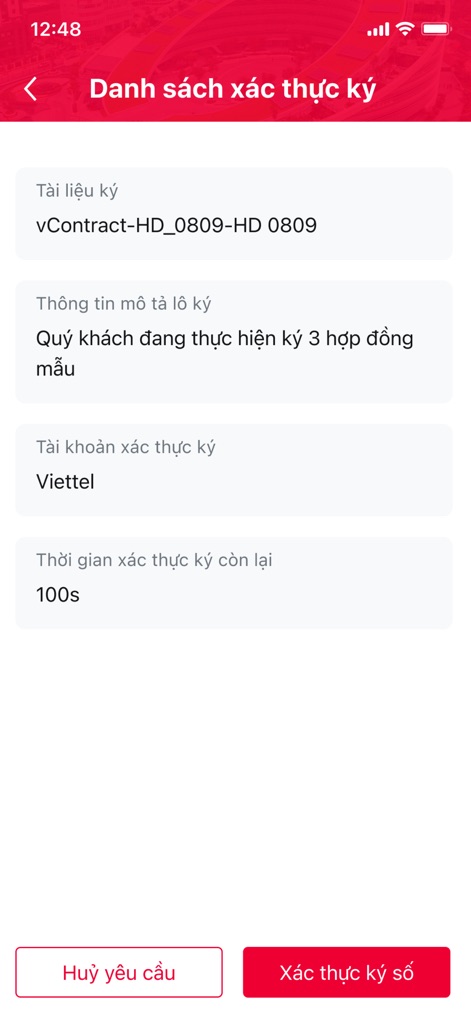
Lo schermo mostra chiaramente il "documento da firmare" e un "timer" per l'autenticazione, garantendo che gli utenti possano rapidamente rivedere e confermare le loro firme digitali.
Autenticazione Istantanea

Gli utenti possono facilmente visualizzare e gestire le proprie informazioni personali, inclusi il "tipo di account" e il proprio "nome completo", con un'area per l'immagine del profilo.
Dati Personali Essenziali

Il menu laterale offre un accesso rapido a sezioni chiave come "Informazioni account" e la possibilità di "contattare il servizio clienti", mostrando la versione dell'app.
Navigazione Intuitiva

La dashboard presenta una panoramica chiara delle funzioni principali attraverso icone dedicate, come "lista dei certificati digitali" e "creazione di richieste di firma", per un'efficienza ottimale.
Funzionalità Centralizzate
Descrizione
Download
App Simili
App con funzionalità ed esperienza simili

Mi_Pass
Banco de Chile

Raiffeisen SmartToken
Raiffeisen Bank S.A.

Synology Secure SignIn
Synology Inc.

DATEV SmartLogin
DATEV eG

VR SecureGo plus
Atruvia AG

Namirial OTP
Namirial Spa

UBS Access – secure login
UBS AG

Mobilní klíč eGovernmentu
MINISTERSTVO VNITRA

Commerzbank photoTAN
Commerzbank AG
Questa pagina non è una pagina ufficiale dell'app o del suo sviluppatore, ma una pubblicazione editoriale indipendente creata a scopo informativo e di commento. Salvo espressa indicazione contraria, né l'app né il suo sviluppatore sono affiliati, approvati, sponsorizzati, autorizzati o altrimenti ufficialmente collegati a MWM, Apple, Google Play, all'editore dell'app o allo sviluppatore dell'app, e nulla in questa pagina implica che l'app sia stata sviluppata utilizzando i servizi di MWM. Tutti i marchi, loghi, screenshot e altri contenuti rimangono di proprietà dei rispettivi proprietari.